Repository navigation
Test Management
Studio includes a complete manual test management tool. It's designed around one idea: a test result is evidence. Evidence has to be precise (what exactly was tested?), honest (who recorded it, and was it corrected?) and durable (nobody quietly edits it later).


PlantUML source (rendered live by the PlantUML for GitHub extension)
@startuml
skinparam backgroundColor transparent
skinparam defaultFontName Verdana
skinparam shadowing false
skinparam class {
  BackgroundColor #ffffff
  BorderColor #335999
  ArrowColor #335999
}
hide methods
hide circle
class Development
class "Test Plan" as TP {
  code TP-
  state: Draft/Active/Closed
  environment, stage
}
class "Test Suite" as TS {
  code TS-
}
class "Test Case" as TC {
  code TC-
  state: Draft/Ready/Obsolete
  last result
}
class "Test Step" as ST {
  action
  expected result
  optional?
}
class "Test Run" as RUN {
  code RUN-
  tester
  state
}
class "Execution" as EX {
  frozen copy of the case
  result
}
class "Step Result" as SR {
  frozen copy of the step
  result, evidence
}
class "Result Correction" as CO {
  old → new
  reason · immutable
}
class "QA Issue" as QI {
  code QI-
  priority, state
}
Development "1" *-- "*" TP
TP "1" *-- "*" TS
TS "1" *-- "*" TS : child suites
TS "1" *-- "*" TC
TC "1" *-- "*" ST
TP "1" *-- "*" RUN
RUN "1" *-- "*" EX
EX "1" *-- "*" SR
EX "1" o-- "*" CO
EX "*" -- "*" QI : linked
EX ..> TC : snapshot of
@enduml| Piece | Code | In plain words |
|---|---|---|
| Test plan | TP- |
What we're going to test, for a Development, in one environment (Staging, UAT…) and stage (System, Regression…). Draft → Active → Closed. |
| Test suite | TS- |
A folder of test cases. Suites can contain suites. |
| Test case | TC- |
One scenario: objective, preconditions, test data, acceptance criteria, postconditions, priority. Draft → Ready → Obsolete. |
| Test step | — | One action and its expected result. Steps can be marked optional. |
| Test run | RUN- |
One execution campaign of a plan, by one tester. |
| Execution | — | One test case inside a run, with its result. |
| Step result | — | One step inside an execution, with its result and evidence. |
| QA issue | QI- |
A defect found by testing. See QA issues. |
When a run is created, Studio copies every Ready test case of the plan into the run: title, objective, preconditions, test data, acceptance criteria and every step. That copy is frozen.
Why? Because test cases evolve. If someone rewrites step 3 next week, the results recorded today must still show the step as it was when it was tested. Draft and obsolete cases are not copied, so only cases someone declared ready get executed.
flowchart LR
    subgraph Plan["Test plan (living design)"]
        C1[TC-0007 Ready]
        C2[TC-0008 Ready]
        C3[TC-0009 Draft]
    end
    subgraph Run["RUN-0005 (frozen copy)"]
        E1[Execution of TC-0007<br/>+ its steps]
        E2[Execution of TC-0008]
    end
    C1 -- copied --> E1
    C2 -- copied --> E2
    C3 -. not copied .-x Run

PlantUML source (rendered live by the PlantUML for GitHub extension)
@startuml
skinparam backgroundColor transparent
skinparam defaultFontName Verdana
skinparam shadowing false
skinparam state {
  BackgroundColor #ffffff
  BorderColor #335999
  ArrowColor #335999
}
[*] --> Draft : created\n(snapshot of Ready cases)
Draft --> InProgress : Start Run
InProgress --> Completed : last result recorded\n(automatic) or Complete
InProgress --> Draft : Reset to Draft\n(nothing recorded yet)
Completed --> InProgress : Reopen\n(QA Manager, with reason)
Draft --> Cancelled : Cancel
InProgress --> Cancelled : Cancel
Completed : historical evidence
Cancelled : terminal
state "In Progress" as InProgress
@enduml- A run is started by its tester or a QA lead. It needs at least one execution.
- It completes automatically the moment the last pending result is recorded. No need to remember to click Complete.
- A completed run is historical evidence: it can't be edited. A QA Manager can reopen it, giving a reason that's kept in a reopen audit.
- A run with recorded results can't be deleted. Cancel it instead.

flowchart LR
L["👩💼 QA Lead"] -->|designs| P[Plans, suites,<br/>cases, steps]
L -->|creates & assigns| R[Runs]
T["🧑🔬 Tester"] -->|starts & executes| R
T -->|records| X[Results & evidence]
T -->|reports| Q[QA issues]
M["🧑⚖️ QA Manager"] -->|reopens| R
M -->|configures| C[Environments, stages,<br/>priorities, tags]
| Role | Can |
|---|---|
| QA User | Read the plans of their Developments and the runs assigned to them. |
| QA Tester | Create their own runs from active plans, start and execute assigned runs, record results and evidence, add scenarios, skip cases, report QA issues. Sees only their own runs. |
| QA Lead | Everything above, plus design plans, create runs for testers, reassign, cancel, complete, reset to draft, promote scenarios, see the dashboard and reports. |
| QA Manager | Everything above, plus configuration, reopening completed runs and deleting records. |
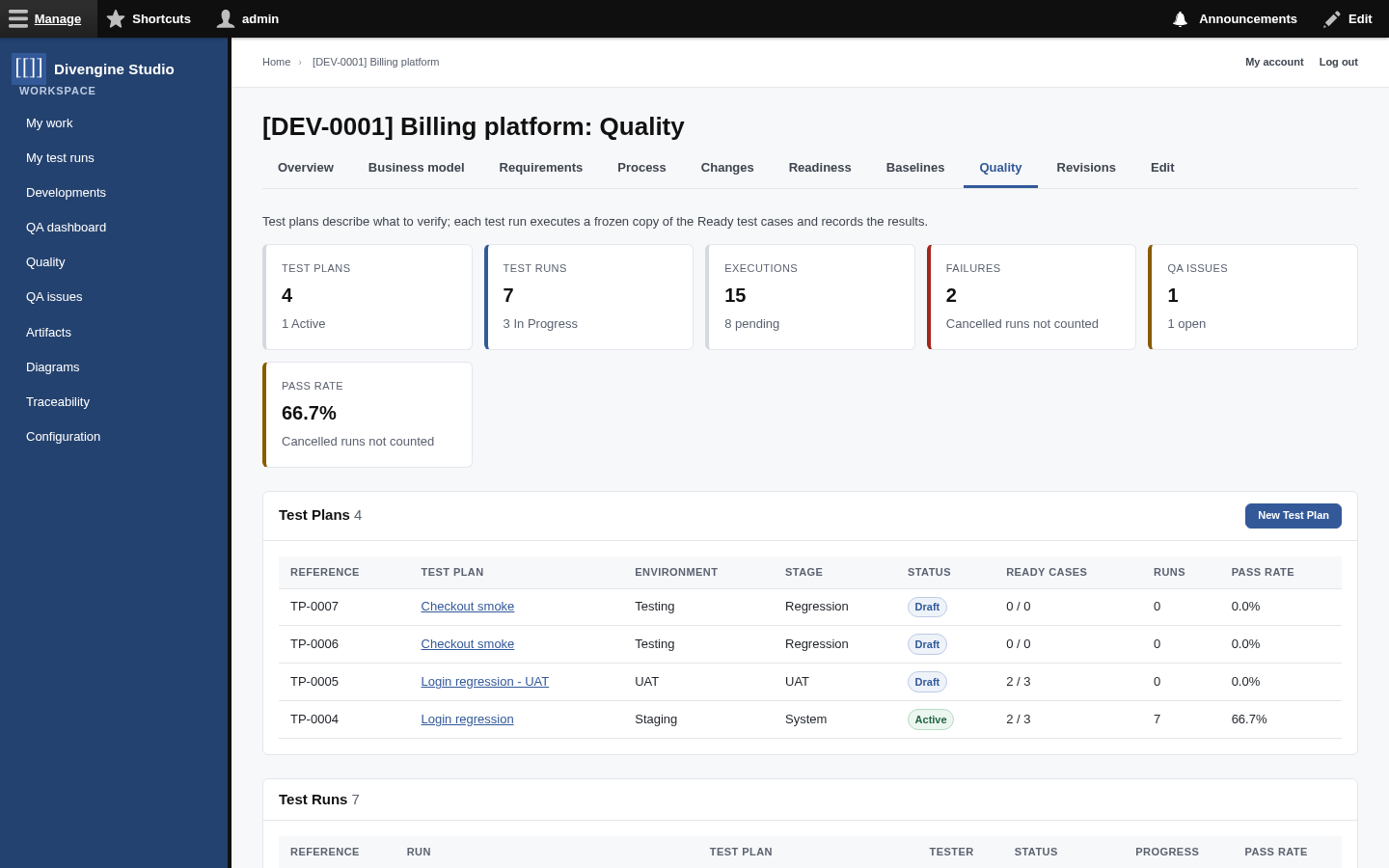
- Open a Development and its Quality tab, then New Test Plan. Pick the environment and stage.
- In the plan, Add suite, then Add case in the suite, then Add step in each case.
- When a case is ready to be executed, click Mark Ready on it.
- Activate the plan.
- Create runs: New Test Run for one tester, or Create Runs for Testers to give each tester their own run in one go.
- Watch results arrive on the plan, the run and the dashboard.
Need the same plan on another environment? Clone it: suites, cases and steps are copied into a new draft plan; runs and results are not.
Every plan and run has a Print button that opens a clean document (the Test Plan Specification and the Test Run Execution Report). Use your browser's Print → Save as PDF to send it to someone who doesn't use Studio.
Next: Running tests, the tester's guide.

Getting started
Knowledge
- Knowledge base
- Artifacts
- Traceability
- Diagrams
- Discussions & attachments
- Code Source
- Code docs
- Database schemas
Work
Process
Quality
- Test management
- Running tests (for testers)
- QA issues
- Dashboard & reports
- Verifying requirements with tests
Administration
Under the hood