Repository navigation
Unified Process
Studio organises work using the Unified Process (UP), the classic iterative method behind RUP and OpenUP. Don't worry if you've never used it: the core idea fits in one sentence.
You build the system in short iterations, grouped into four phases, and each phase ends with a milestone where you check that you've really achieved what that phase was for.
Everything starts with a Development (DEV-0001): the effort of building or changing a
system. It's what other tools would call a project. A Development has a responsible person,
members, dates, a Development case and a state:
stateDiagram-v2
    direction LR
    [*] --> Planned
    Planned --> Active: Activate
    Active --> OnHold: Put on hold
    OnHold --> Active: Activate
    Active --> Closed: Close
    OnHold --> Closed: Close
    Planned --> Cancelled: Cancel
    Active --> Cancelled: Cancel
    OnHold --> Cancelled: Cancel
    Closed --> Planned: Reset
    Cancelled --> Planned: Reset
    state "On Hold" as OnHold
Who can see a Development? Its owner, its responsible person and its members. Everything that belongs to it (artifacts, activities, test plans, traces…) follows the same rule. People outside it simply don't see it. Process administrators see everything.
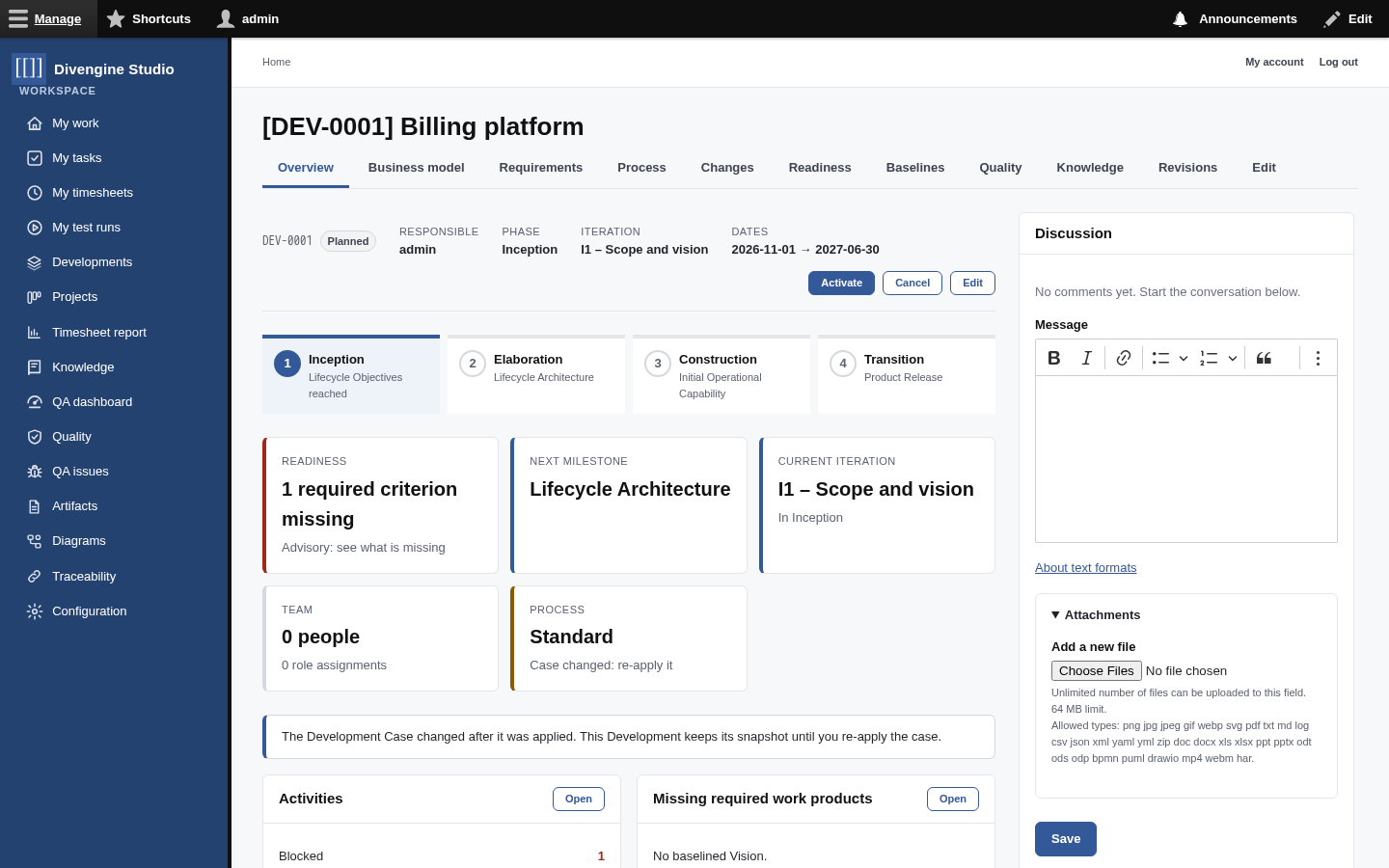
The overview shows where you are at a glance: the phase stepper, readiness, the next milestone, the current iteration, the team and the process in use, plus whatever needs attention (blocked activities, missing work products, unreviewed business use cases…).
timeline
    title The lifecycle of a Development
    Inception : Agree on the scope and the vision
              : Milestone · Lifecycle Objectives
    Elaboration : Get the architecture right, tame the big risks
                : Milestone · Lifecycle Architecture
    Construction : Build the rest, iteration by iteration
                 : Milestone · Initial Operational Capability
    Transition : Deliver it to users and stabilise
               : Milestone · Product Release
Studio creates the four phases and their milestones for you. Each phase goes Planned → Active → Done. When you think a phase's goals are met, you mark its milestone as reached. Studio shows you the readiness first, but the decision is yours: unmet criteria are recorded on the milestone as a note, not used to block you. Reaching a milestone also takes a baseline automatically.
Inside each phase you plan iterations (I1 – Scope and vision, I2 – Core claims…), each with dates and a goal. They go Planned → Active → Done (or Cancelled). The current one is shown on the overview and on everyone's My work page.
| Tab | What's in it |
|---|---|
| Overview | The dashboard of the Development. |
| Business model | Business actors, workers, business use cases and business rules: how the business works before any software. |
| Requirements | System actors, system use cases and requirements: what the system must do. |
| Process | Activities and work products, iteration by iteration. |
| Changes | Change requests. |
| Readiness | Criterion by criterion, what's met and what's missing. |
| Baselines | Snapshots of what was agreed. |
| Quality | Test plans, runs and open QA issues (Test management). |
| Revisions | The history of the Development itself. |

UP encourages you to understand the business before designing software. Studio supports that journey with explicit traces between the two worlds:
flowchart LR
    subgraph Business
        BA[Business actor]
        BW[Business worker]
        BUC[Business use case]
        BR[Business rule]
    end
    subgraph System
        SA[System actor]
        UC[System use case]
        REQ[Requirement]
    end
    SA -- represents --> BW
    UC -- realizes --> BUC
    REQ -- derives from --> BR
    UC -- refines --> REQ
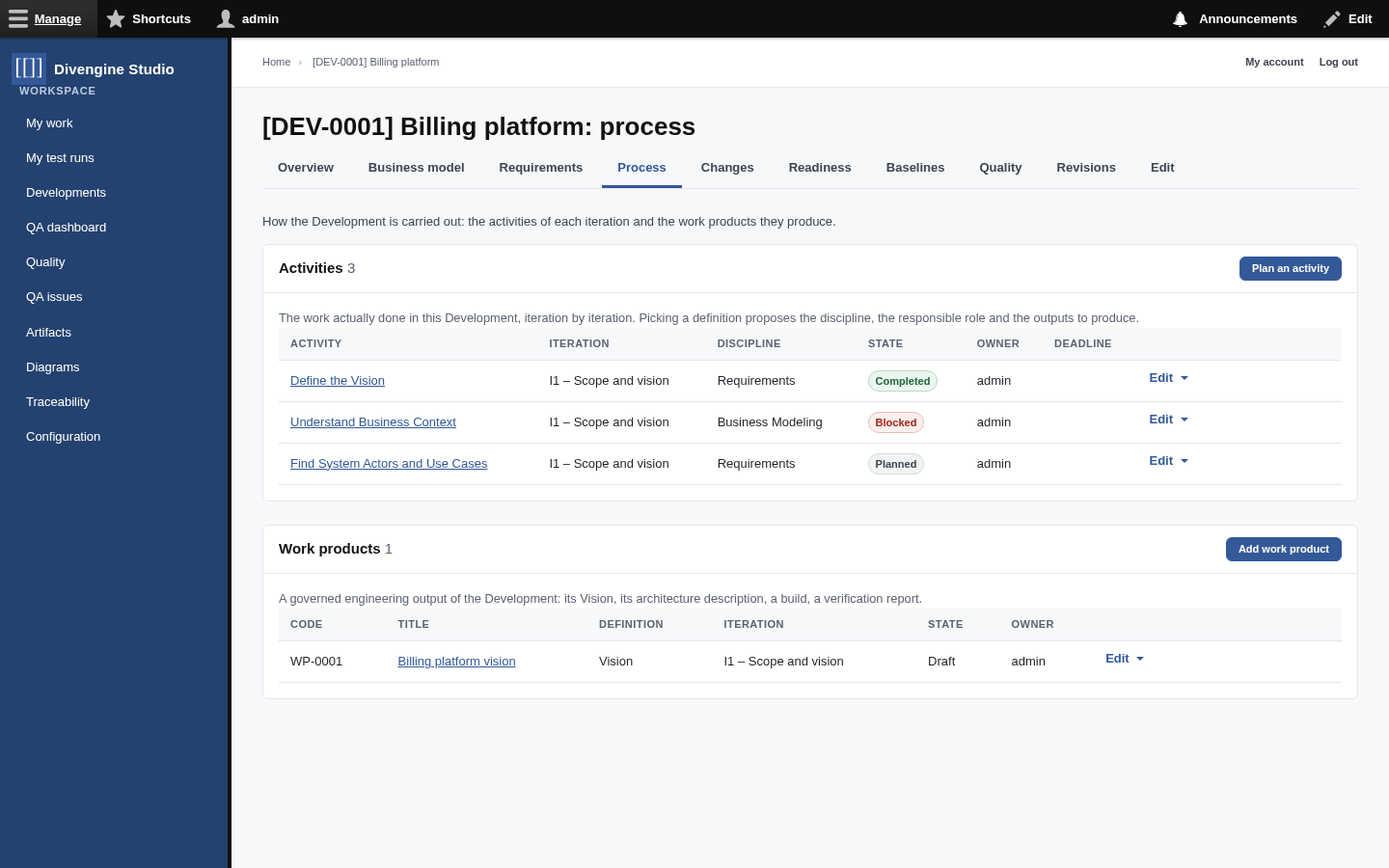
Activities are the actual work of an iteration: Define the Vision, Find System Actors and Use Cases… When you plan one, picking an activity definition proposes its discipline, the responsible role and the work products it should produce. Activities can be assigned to people and have a deadline.
stateDiagram-v2
    direction LR
    [*] --> Planned
    Planned --> Ready
    Planned --> InProgress: Start
    Ready --> InProgress: Start
    InProgress --> Completed: Complete
    Ready --> Completed: Complete
    Planned --> Blocked: Block
    InProgress --> Blocked: Block
    Blocked --> InProgress: Start
    Planned --> Skipped: Skip
    Blocked --> Skipped: Skip
    Completed --> Planned: Re-plan
    Skipped --> Planned: Re-plan
    state "In Progress" as InProgress
A blocked activity carries its reason ("Waiting for the payer contract"), and it shows up in red on the overview until someone unblocks it.
Work products (WP-) are the governed outputs: the Vision, the Architecture Description, a
verification report. They follow Draft → In review → Published, and a published work product
counts as baselined for readiness.
People play process roles in a Development: Business Analyst, Requirements Analyst, Software Architect, Designer, Developer, Tester, Change Control Manager, Project Manager, Process Engineer. Roles tell everyone who's responsible for what, and readiness checks that every required discipline has somebody in it.
🔐 Playing a process role grants no access by itself. Permissions come from the site roles (see Users and roles). This keeps "who does the work" and "who may click what" nicely separate.
UP groups work into disciplines that are active throughout the lifecycle with varying intensity: Business Modeling, Requirements, Analysis & Design, Implementation, Test, Deployment, Configuration & Change Management, Project Management and Environment. Your Development case says which of them are required.
Next: how Studio decides whether you're ready for a milestone → Development cases & readiness.

Getting started
Knowledge
- Knowledge base
- Artifacts
- Traceability
- Diagrams
- Discussions & attachments
- Code Source
- Code docs
- Database schemas
Work
Process
Quality
- Test management
- Running tests (for testers)
- QA issues
- Dashboard & reports
- Verifying requirements with tests
Administration
Under the hood