Repository navigation
Git
The Git plugin shows the state of files in Git repositories. It runs the git program, which must be installed. Switch it on in Settings → Plugins → Git.
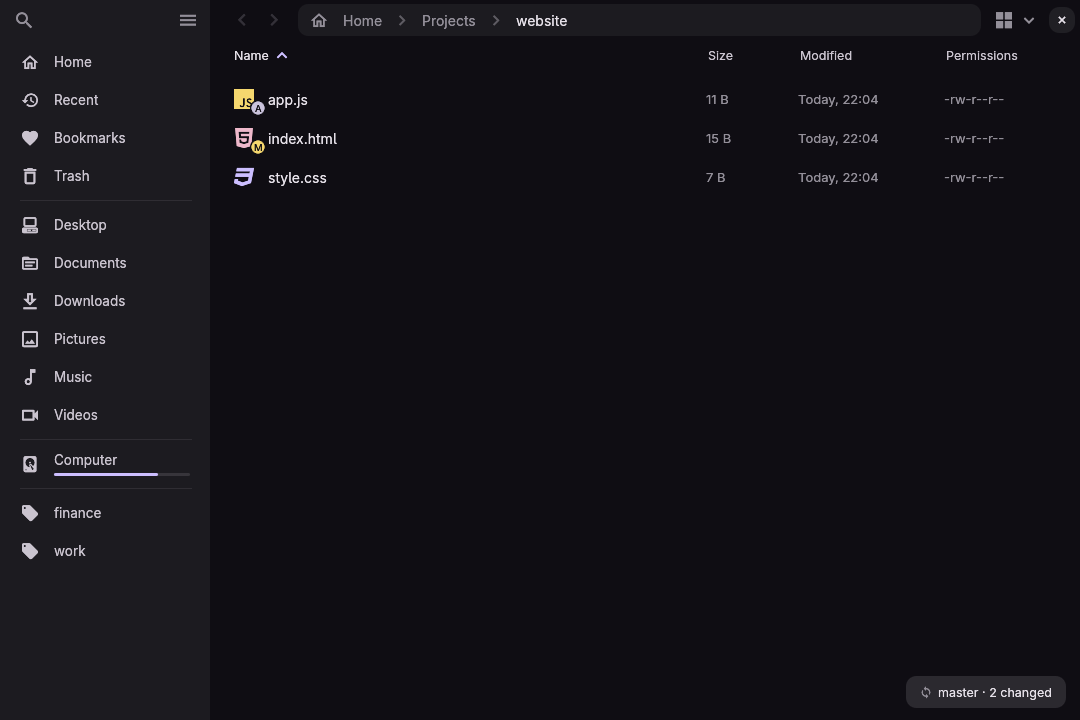
Inside a repository, each changed file gets a letter on its icon:
| Badge | Meaning |
|---|---|
M |
Changed in the work tree, not staged |
S |
Changed and staged |
A |
New and staged |
R |
Renamed, staged |
D |
Deleted in the work tree |
! |
Conflicted (during a merge or rebase) |
? |
Untracked |
A folder that contains changed files is marked as well. Files inside an untracked folder show ?.
The bottom right corner shows the branch and the number of changed files, for example "master · 2 changed". When the branch is ahead of or behind its upstream, the counts follow, for example [ahead 1]. A detached HEAD shows "detached HEAD".
In a repository the context menu of files and folders has a Git group. Each entry appears only when it applies to the selection.
| Entry | Effect |
|---|---|
| Stage |
git add for the selected items |
| Unstage |
git restore --staged for the selected items |
| Show diff | Opens a window with the staged and unstaged changes of the selected items against the last commit |
| Discard changes |
git restore for the selected files: unstaged changes are dropped. Ski asks first. |
Discarded changes cannot be brought back, and they are not part of Undo.
The badges follow changes on disk. Ski reruns git status when the folder changes, at most once every 0.4 seconds. Git commands run in the background, so a large repository does not block the window.