Repository navigation
Servers
Ski opens folders on other computers as folders. It mounts them through GVfs, the service GNOME Files uses.
| Server | Address forms |
|---|---|
| Windows share, NAS (SMB) |
smb://nas/media, smb://WORKGROUP;me@nas/media, \\nas\media
|
| SSH (SFTP) |
sftp://me@example.com/home/me, sftp://me@example.com:2222/, ssh://…, and in the dialog me@example.com:/srv
|
| FTP | ftp://ftp.example.com/pub |
| FTP over TLS | ftps://ftp.example.com/pub |
| WebDAV (Nextcloud, ownCloud and others) |
dav://host/path, davs://cloud.example.com/remote.php/dav/files/me (https:// is read as davs://) |
| Apple file sharing (AFP) | afp://host/volume |
| NFS | nfs://host/export |
The parts of an address: scheme://[domain;][user@]host[:port]/path. The domain is used by SMB only.
There are three ways:
-
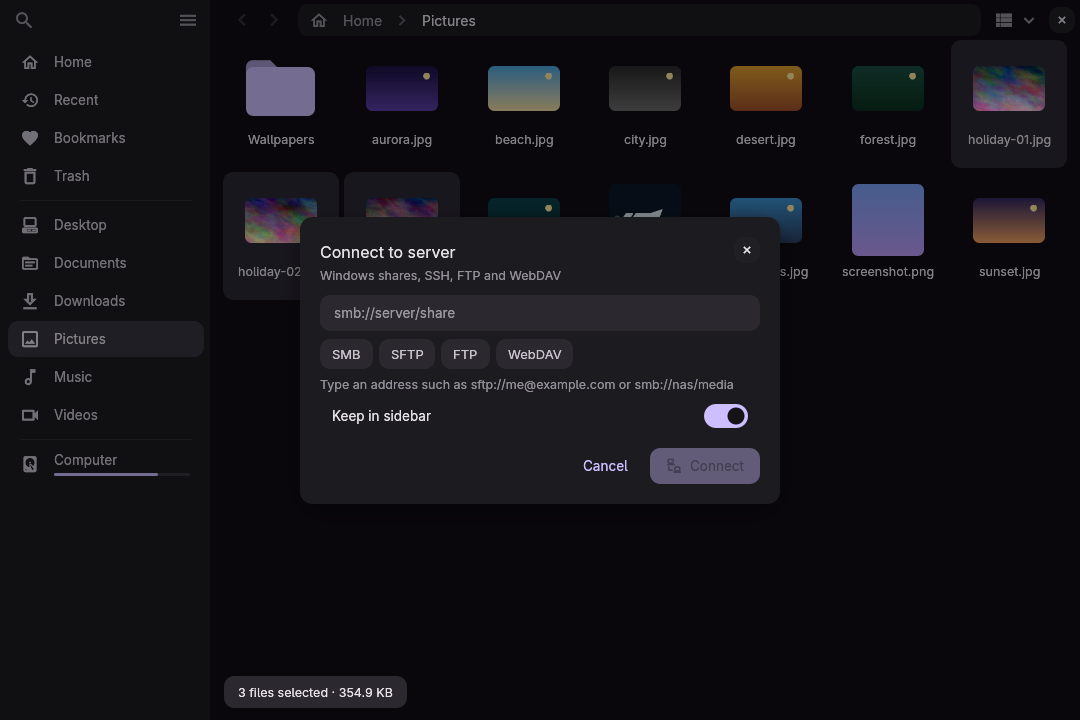
Ctrl+K, the main menu → Connect to server…, or the Connect to server… entry of the sidebar (switch it on in Settings → Sidebar). The dialog has buttons for SMB, SFTP, FTP and WebDAV that start the address, and a list of recent servers. - Type the address into the path field (
Ctrl+L). - Pass the address on the command line:
ski sftp://me@example.com/srv.
When a server asks for a password, Ski shows a login dialog with user name, domain (SMB) and password.
| Option | Effect |
|---|---|
| Remember password | Saves the password in the keyring through the Secret Service: GNOME Keyring, KWallet or KeePassXC. Ski files it the way GNOME Files does, so a password saved by either one is found by the other. |
| Connect anonymously | FTP servers that allow it |
| Connect as guest | SMB shares that allow it |
A wrong password shows "The server did not accept this user name or password" and asks again.
SSH logs in with the keys of ssh-agent and ~/.ssh before it asks for a password.
When Ski connects to an SSH server for the first time, it shows the server's key fingerprint and asks whether to connect. Compare the fingerprint with the one the server's administrator gives, or connect only on a network you trust.
Connected servers appear in the Devices section of the sidebar, each with a disconnect button.
Keep in sidebar (in the connect dialog, or the server's context menu) keeps the server in the sidebar after it disconnects. Clicking it connects again. Kept servers are stored in ~/.config/ski/servers.json; passwords are not stored there.
The context menu of a server:
| Entry | Shown for | Action |
|---|---|---|
| Open, Open in new tab, Open in new window | Connected servers | Opens the server's folder |
| Connect, Open in new tab, Open in new window | Disconnected kept servers | Connects and opens the folder |
| Disconnect | Connected servers | Unmounts the server |
| Edit… | Kept servers | Changes the name shown in the sidebar and the address |
| Remove from sidebar | Kept servers | Removes the entry |
| Keep in sidebar | Servers not kept | Keeps the entry after disconnecting |
| Copy address | Every server | Copies the address as text |
| Forget password | Every server | Removes the saved password from the keyring |
| Properties | Connected servers | Opens Properties of the server's folder |
A folder on a server can be pinned (Ctrl+D). Opening the pin connects to the server.
Copying, moving, renaming, opening files with other applications, Quick Look and dragging to other programs work as with local files. These differ:
| Feature | On a server |
|---|---|
| Trash | Servers have no trash. Move to trash asks whether to delete permanently. |
| Thumbnails and folder item counts | Off, because they read every file over the network. Settings → Files & View → Previews on servers turns them on. |
Open in terminal (F4) |
On an SSH server, runs ssh and opens a shell in the same folder on the server. |
| Mount helper | Covers |
|---|---|
GVfs with its FUSE part (gvfsd-fuse) and backends |
Every server type |
sshfs |
SSH, when GVfs is missing (tried before rclone) |
rclone |
SFTP, SMB, FTP, FTPS and WebDAV, when GVfs is missing |
Packages: gvfs-backends and gvfs-fuse on Debian or Ubuntu; gvfs-fuse and gvfs-smb on Fedora; services.gvfs.enable = true on NixOS (the NixOS module sets it). Log out and in after installing GVfs.
Servers mounted outside Ski (with mount -t cifs, mount -t nfs or sshfs) are recognized and shown in the sidebar as well.