Repository navigation
Renaming
F2, or context menu → Rename, opens a field with the current name. The part before the extension is selected, so typing replaces the name and keeps the extension. Press Enter to rename or Esc to cancel.
A name cannot be empty, contain /, or be . or ... If an item with the new name exists, Ski asks for another name.
With several items selected, F2 or context menu → Rename… opens the batch rename dialog. It has two modes, Use a template and Find and replace. A preview below the fields shows the old and new name of each item before anything changes.
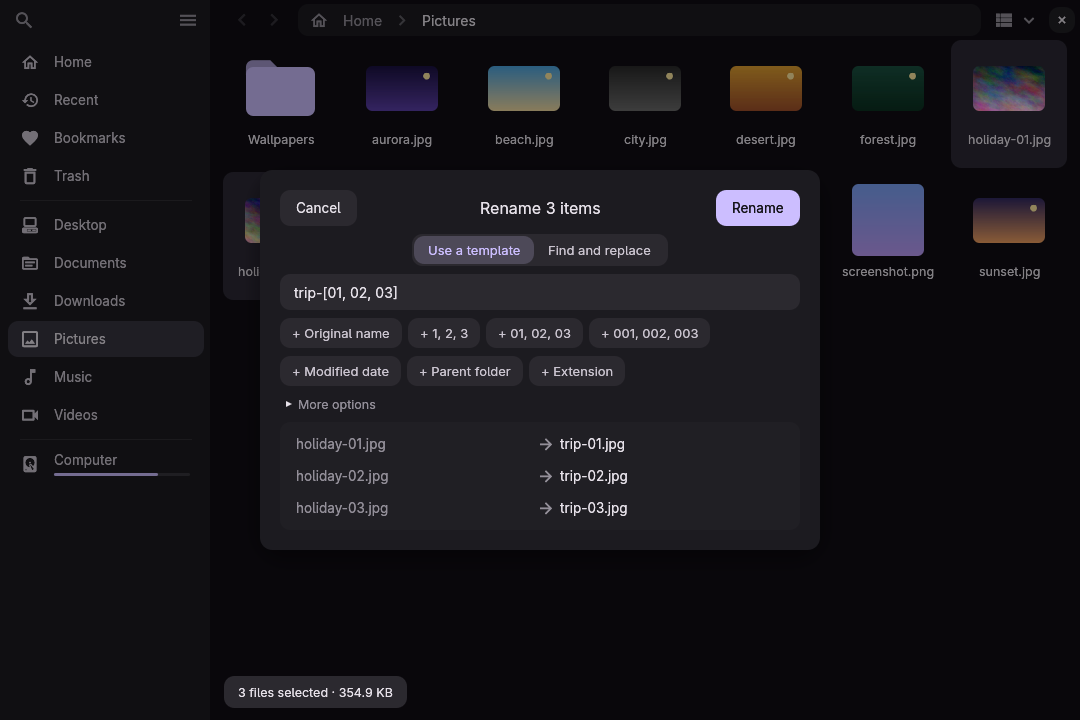
Both modes change the name without its extension. The extension stays, so a file keeps its type. Folders have no extension; their full name is changed.
The template is the new name. Buttons under the field insert tokens:
| Token | Replaced by |
|---|---|
[Original name] |
The current name without extension |
[1, 2, 3] |
A number: 1, 2, 3 |
[01, 02, 03] |
A number with two digits |
[001, 002, 003] |
A number with three digits |
[Modified date] |
The modification date as YYYY-MM-DD
|
[Parent folder] |
The name of the folder that holds the item |
[Extension] |
The extension without the dot |
Example: the template trip-[01, 02, 03] renames holiday-01.jpg, holiday-02.jpg, holiday-03.jpg to trip-01.jpg, trip-02.jpg, trip-03.jpg.
Every occurrence of the text in Find is replaced by the text in Replace with. Match case decides whether letter case must match; it is on by default. Replace with may be empty, which removes the text.
More options, under the mode fields, applies after the template or the replacement:
| Option | Effect |
|---|---|
| Add at start | Text put before the name |
| Add at end | Text put after the name, before the extension |
| Remove first N characters | Cuts that many characters from the start of the original name |
| Remove last N characters | Cuts that many characters from the end of the original name |
| Letter case | Keep, lowercase, UPPERCASE, Title Case, Sentence case |
| Spaces | Keep, replace with _, replace with -, or remove |
| Numbering: Start at | The first number (default 1) |
| Numbering: Step | What each next number adds (default 1) |
| Numbering: order | As listed, by name, or by date |
| Lowercase extension |
.JPG becomes .jpg
|
- Items whose new name equals the old one are left alone.
- Ski refuses the rename when two items would get the same name, when a name would be empty or invalid, or when a name would be longer than the file system allows. The preview marks the problem.
- Names may swap: renaming
atobandbtoain one step works. - A batch rename is one step of Undo.