Useful .bash_profile settings_11436107
Created by James Santangelo, last modified on Apr 29, 2017
The .bash_profile is a shell configuration file that is executed every time you start a login shell. This is the case anytime you are prompted for your username and password prior to the start of the shell (e.g. logging in to a remote server via ssh). This config file is executed just prior to the bash prompt appearing in the shell and allows you to more finely tune your shell environment. This page will first go over how to create your own .bash_profile config file on hpcnode1 and then serve as a repo for useful aliases and functions that folks have used to make their lives just a little easier while computing. Feel free to add aliases, functions or other commands to the lists below. Also, Here is a screenshot of a *.bash_profile *configuration file.
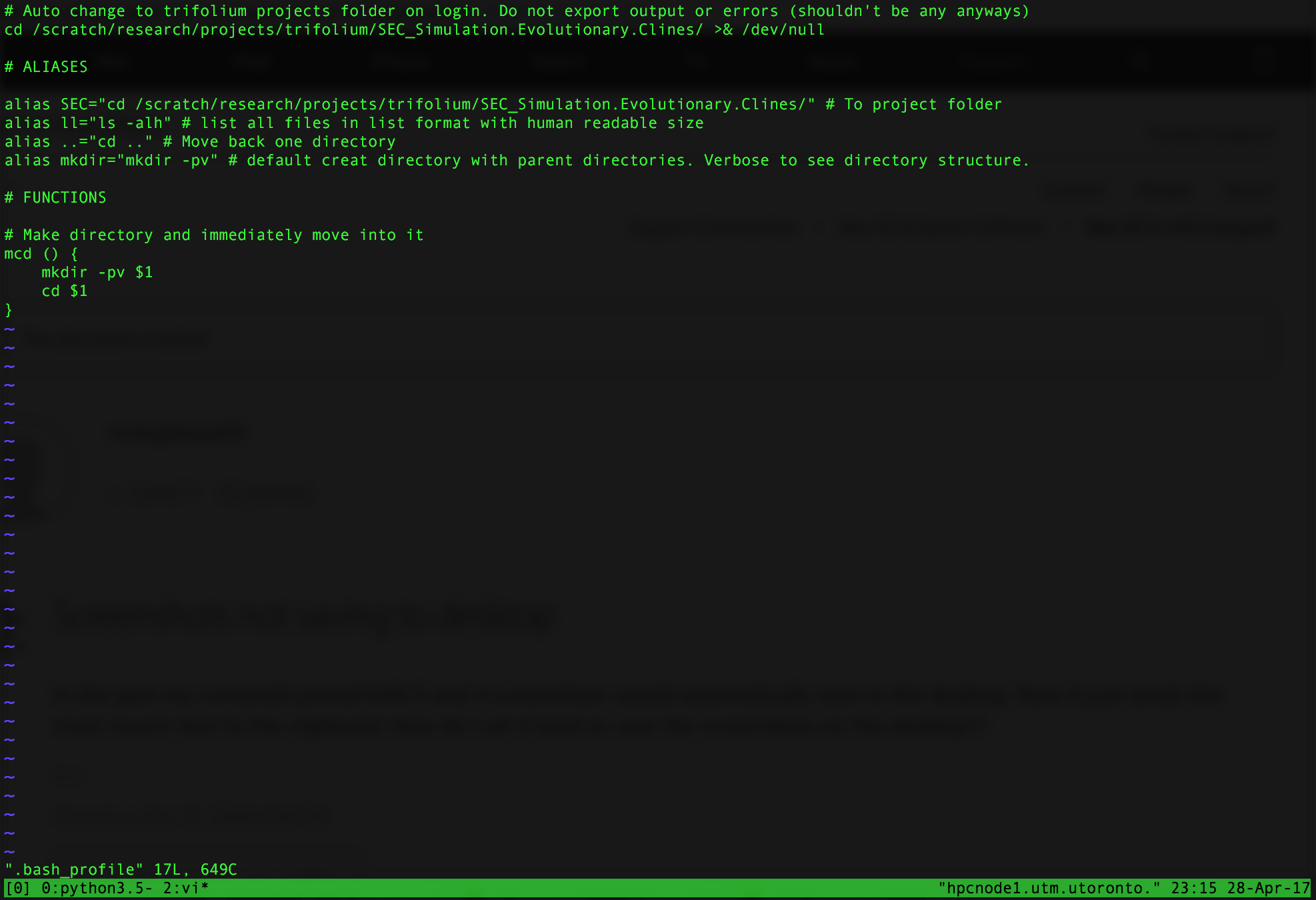
-
Create the .bash_profile config file (assuming it doesn't exit) using the text editor of your choice. Vim is a good choice. At the command line, type
vi .bash_profile. -
Exit the .bash_profile file by typing
:wq -
Type l
s -al. You should now have an empty .bash_profile file in your home directory
The first thing I added to my configuration file was a single line that automatically changes to my project folder upon login. This is useful since this is where most of the action happens for me on the server and this avoids me having the move there every time I login. Add the following line to your .bash_profile file:
cd /path/to/directory/ >& /dev/null
Now, every time you login the above command will be read from
.bash_profile and you will appear in your folder of choice with a bash
prompt. Of course, you have to change /path/to/directory/ with the
path to the folder you wish to move to. The >& /dev/null at the end of
line is likely unnecessary but is good practice in some cases. It
redirect both STDERR (i.e. warnings and errors) and STDOUT (i.e. output)
to /dev/null/ (i.e. the directory on Linux machines where things go to
die). This prevents these messages from appearing in terminal.
Aliases are useful for shortening commands that you often use during your terminal session. You can think of it like creating a variable that holds the command you want to run. Calling the variable runs the command. Here is a list of useful aliases that you can add to your .bash_profile file.
alias DIR="cd /path/to/directory"# Change directly to directory
alias ll="ls -alh"# List all files in list format with human readable size
alias mkdir="mkdir -pv"# Default create directory with parent directories. Verbose to see directory structure.
alias ..="cd .."# Move back one directory. Because sometime typingcd ..is just too long.
As an example, the first alias above allows you to immediately change to
a chosen directory. This is useful if you repeatedly navigate to a
folder and do not want to type the full path every time. On hpcnode1 I
frequently work out of my project directory. The screenshot below shows
that I've created an alias
as SEC="cd /scratch/research/projects/trifolium/SEC_Simulation.Evolutionary.Clines/.
Typing SEC from any directory immediately brings me to my project
folder. Notice that there are no spaces around the = and that the
command is in quotes.
Functions work the same way in bash as many other scripting language. They enable you to perform some repeated task as many times as desired. You can pass arguments to functions and use these to accomplish different things or perform tasks on those arguments. If you are unsure how functions in bash work, there is a brief introduction here. Below is a list of useful functions (Code blocks were entered as markdown and then quoted).
# Make directory and immediately move into it
mcd () {
    mkdir -pv $1
    cd $1
}


# Takes zipped file and extracts it. Accepts
# a range of different formats
function extract {
 if [ -z "$1" ]; then
    # display usage if no parameters given
    echo "Usage: extract <path/file_name>.<zip|rar|bz2|gz|tar|tbz2|tgz|Z|7z|xz|ex|tar.bz2|tar.gz|tar.xz>"
 else
    if [ -f $1 ] ; then
        # NAME=${1%.*}
        # mkdir $NAME && cd $NAME
        case $1 in
          *.tar.bz2)   tar xvjf ../$1    ;;
          *.tar.gz)    tar xvzf ../$1    ;;
          *.tar.xz)    tar xvJf ../$1    ;;
          *.lzma)      unlzma ../$1      ;;
          *.bz2)       bunzip2 ../$1     ;;
          *.rar)       unrar x -ad ../$1 ;;
          *.gz)        gunzip ../$1      ;;
          *.tar)       tar xvf ../$1     ;;
          *.tbz2)      tar xvjf ../$1    ;;
          *.tgz)       tar xvzf ../$1    ;;
          *.zip)       unzip ../$1       ;;
          *.Z)         uncompress ../$1  ;;
          *.7z)        7z x ../$1        ;;
          *.xz)        unxz ../$1        ;;
          *.exe)       cabextract ../$1  ;;
          *)           echo "extract: '$1' - unknown archive method" ;;
        esac
    else
        echo "$1 - file does not exist"
    fi
fi
}
 [Document2.pdf](attachments/11436107/11436103.pdf) (application/pdf)
Document generated by Confluence on May 22, 2024 11:44