Repository navigation
Admin Settings EN
Ελληνικά · English
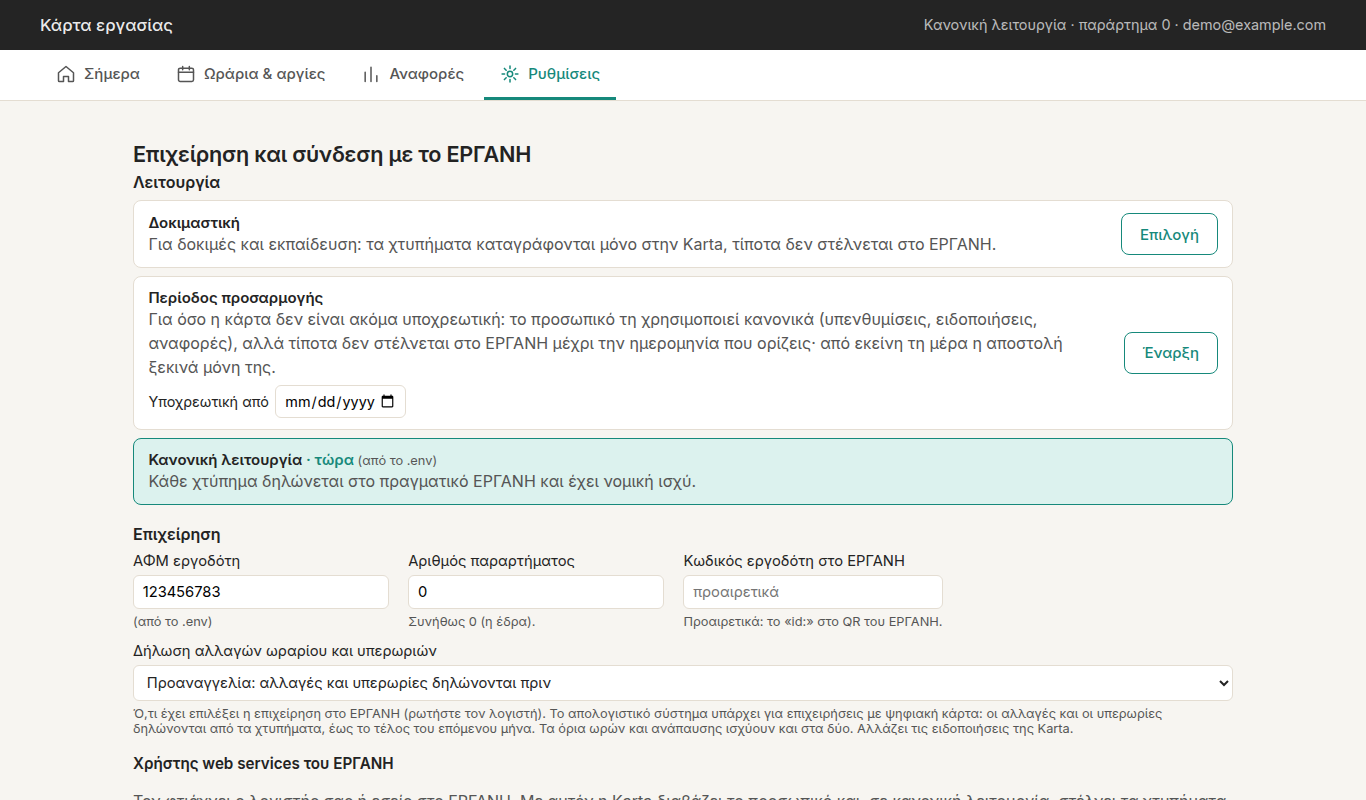
Anything saved here applies immediately (no restart) and overrides .env. A value
that comes from .env is marked «από το .env».
Backups hold the database, not .env. If some settings exist only in .env (e.g. the
Ergani password or the mode, on an installation set up without the assistant), the top of
the section says «Μόνο στο .env, όχι στα αντίγραφα: …» (only in .env, not in the
backups). Press «Να μπουν στα αντίγραφα» (put them in the backups): they are stored in
the database with the same values (passwords encrypted), so a restore on a new machine brings
everything back. «Αποθήκευση» does the same when the password field is left empty.
-
«Λειτουργία» (mode): «Δοκιμαστική» (test and training, nothing is sent), «Περίοδος προσαρμογής» (onboarding period, with the mandatory date: punches are recorded and sent from that day) or «Κανονική λειτουργία» (normal operation). From «Δοκιμαστική» you type the ΑΦΜ (tax number) to confirm, and Karta tests the connection first. The Ergani test environment (
trial) is under «Για προχωρημένους» (advanced). See Going live. -
«Επιχείρηση» (business): employer ΑΦΜ (the check digit is verified), branch number (usually 0) and, optionally, your employer id in Ergani (the «id:» in Ergani's QR, so a QR from another employer is refused).
-
«Δήλωση αλλαγών ωραρίου και υπερωριών» (declaring schedule changes and overtime): what the business has chosen in Ergani.
- Προαναγγελία (advance, the default): schedule changes and overtime are declared before they happen. Karta shows the overtime deadline every day and alerts about "undeclared overtime".
- Απολογιστικό σύστημα (retrospective): for businesses on the digital work card (since 1/7/2024). Schedule changes, the organisation of working time and overtime are declared afterwards, from the punches, by the end of the next month. Karta shows no overtime deadline; the alerts say «δηλώνεται απολογιστικά» (declared retrospectively), and the monthly report's «Απολογιστικές δηλώσεις» sheet has the hours to declare. No phone reminder comes before the end; if someone is still inside 10′ after the end, one alert says they stayed late. The shop screen's reminders with sound stay the same.
The limits on hours, rest and overtime apply in both. This setting changes nothing in Ergani: it only tells Karta what you chose there. If unsure, ask your accountant.
-
«Χρήστης web services του ΕΡΓΑΝΗ» (Ergani web‑services user, in the same block as «Επιχείρηση»; one «Αποθήκευση» saves both**):** username, password and type (
01API user,02branch «ΕΡΓΑΝΗ» user). «Δοκιμή σύνδεσης» (test connection) connects read‑only. The password is stored encrypted (withPIN_KEY) and is never shown again; to keep it unchanged, leave the box empty. -
«Για προχωρημένους: δοκιμαστικό ΕΡΓΑΝΗ» (advanced, at the end): the user for
trialv2eservices.yeka.gr(if you have a separate one) and the switch totrialmode.
If something the current mode needs is missing, a red «Χρειάζεται συμπλήρωση» (needs filling in) line appears, and punches wait until it's filled in.
Reads from Ergani and compares with Karta. It never submits anything. Of everything Ergani returns, Karta keeps only ΑΦΜ, full name and the declared schedule (data minimisation; the rest is discarded and never logged).
| Button | What it does |
|---|---|
| «Έλεγχος ΕΡΓΑΝΗ» | Reads the employer, branches, current staff and each employee's declared schedule (weekly hours, break, flexible arrival and, with the digital organisation, each day's hours). It runs in the background (1–2 minutes, showing how long it has been). Each person is marked «Νέος», «Υπάρχει ✓» or «Διαφορετική γραφή ονόματος»; tick the new ones and import them: this is how employees are added. It also refreshes what «Χρήση στοιχείων ΕΡΓΑΝΗ» fills in, in «Ωράρια». |
| «Υπηρεσίες ΕΡΓΑΝΗ» | Lists the Ergani web services available to your user (useful when checking credentials). |
- Employer: whether the ΑΦΜ matches «Ρυθμίσεις», whether the business is enrolled in the digital work card, and whether the branch Karta uses exists in Ergani.
- Anyone in Karta who isn't in Ergani's current staff (e.g. left the job), with an «Απενεργοποίηση» (deactivate) button next to them.
- The staff, one folded card each: the line shows name, ΑΦΜ, status, weekly hours and, when Ergani's hours differ from Karta's schedule, «⚠ άλλες ώρες στην Karta». Press the line to open the card with everything Ergani says (hours, days, full/part time, break, arrangement, flexible arrival), the hours per day of the digital organisation with the dates they come from, and next to it what Karta has («ίδιες ώρες ✓» or «διαφέρουν από το ΕΡΓΑΝΗ»). For new people, that's where you change the «Όνομα στο tablet» (name on the tablet, e.g. with accents). New people in your branch are already ticked. With many employees: «Αναζήτηση» (search), «Άνοιγμα όλων» (open all), «Κλείσιμο όλων» (fold all).
- The digital organisation up to the previous month. Ergani gives each day's hours only for the previous month and earlier. Whatever the accountant changes during the current month (e.g. a new schedule from 5 October) doesn't show until the 1st of the next month; until then enter it by hand in «Ωράρια», with the right «ισχύουν από» date. From the 1st, the month check shows day by day what differs.
- «Εισαγωγή / ενημέρωση επιλεγμένων» (import / update selected): adds the new people and fixes the names that are spelled differently. It shows each new employee's PIN once.
- In the Ergani test environment (
trial) a warning appears, and import and deactivation aren't offered.
The daily and weekly limits depend on the employment contract and on whether you work 5 or 6 days. Confirm them with your accountant.
| Setting | Default | Meaning |
|---|---|---|
| «Ευελιξία προσέλευσης / αποχώρησης (λεπτά)» | 5 | Phone alert if someone hasn't punched in this many minutes after their start, or is still in this long after their end. It only controls notifications; it's not a tolerance in the reports. |
| «Επείγον μετά από (λεπτά)» | 30 | Still in this long after that → the alert becomes urgent. |
| «Προσέλευση πριν το ωράριο (λεπτά)» | 0 | How early an arrival is accepted. Ergani has no tolerance, so 0 is the safe value. |
| «Προθεσμία δήλωσης υπερωρίας πριν τη λήξη (λεπτά)» | 60 | Overtime or a later end must be declared in Ergani at least this long before the declared end. Shown as «υπερωρία δηλώνεται έως …». |
| «Υπενθύμιση προθεσμίας υπερωρίας (λεπτά πριν)» | 0 (off) | Phone reminder this long before that deadline, naming who's in. |
| «Όριο ημέρας, μετά υπερωρία (ώρες)» | 9 | Daily maximum; beyond it is υπερωρία. |
| «Συμβατική εβδομάδα, μετά υπερεργασία (ώρες)» | 40 | Contractual week; beyond it is υπερεργασία (+20%). |
| «Νόμιμη εβδομάδα, μετά υπερωρία (ώρες)» | 45 | Legal week (45 for a 5‑day week, 48 for 6‑day); beyond it is υπερωρία. |
| «Ελάχιστη ανάπαυση (ώρες)» | 11 | Minimum rest between two working days. |
With the retrospective system the two overtime‑deadline settings aren't shown: there's no deadline before the end.
The shop‑screen reminders switch is on the Today tab. Festive decorations are under «Ωράρια & αργίες» → «Αργίες και κλειστό κατάστημα».
The ntfy server and topic, and optionally a token. The page suggests a random topic: add it in the ntfy app («+»), then press «Αποθήκευση» (save) and «Δοκιμαστική ειδοποίηση» (test notification). «Απενεργοποίηση» (turn off) clears the setting and stops phone notifications. See Alerts and reminders.
- The result of the last nightly backup: on the machine and on USB (from
backup.sh), and in the cloud, with how long the upload took (e.g. «✓ (1′20″)»). - Cloud: connect to Google Drive, Dropbox or Backblaze B2 («Σύνδεση και πρώτο ανέβασμα», connect and first upload, with an encryption password shown once that can't be recovered in any way: write it down, type its last 4 characters back and press «Τον σημείωσα», I've noted it), «Ανέβασμα τώρα» (upload now), «Εμφάνιση κωδικού κρυπτογράφησης» (show the encryption password, while the machine works; who viewed it is logged), «Αποσύνδεση cloud» (disconnect cloud), and «Έχω ήδη αντίγραφα στο cloud» (I already have backups in the cloud) for a new machine.
- «Λήψη αντιγράφου τώρα» (download a backup now): the whole database in one file.
- «Αρχείο χτυπημάτων (Excel)» (punch archive): every punch of a year, with its Ergani protocol number, for your records and for inspections.
- «Επαναφορά» (restore) «Από αρχείο…» (from a file) or «Από το cloud…» (from the cloud, where you pick a backup and press «Έλεγχος αντιγράφου», check backup): first it shows what the backup contains, and then «Επαναφορά τώρα» (restore now) puts it in place of the current database (which is kept as a copy).
See Backups and restore.
What staff see on the shop screen, the phone QR card and the links:
- «Επωνυμία»: the business name customers know.
- «Σύντομο όνομα»: used in page titles and messages.
-
«Χρώματα» (colours):
- «Έτοιμο θέμα» (ready theme): Karta (turquoise), «Θάλασσα» (sea, blue), «Μπορντό» (burgundy), «Ελιά» (olive, green), «Τερακότα» (terracotta), «Γραφίτης» (graphite), «Νύχτα» (night, dark). It fills in the colours, which you can then change one by one; once you change one it reads «Δικά μου χρώματα» (my own colours).
- Main colour (buttons, titles, QR card), Background, Side panel, Text, «Προσέλευση» button (clock in) and «Αποχώρηση» button (clock out). Text on the buttons automatically turns black or white, whichever reads better, and the page warns you if something isn't readable.
- Dark theme, separately for the shop screen and for the admin page.
- A small preview of the screen changes as you choose; the admin page takes the colours when you save, the shop screen the next time it opens or with «Ανανέωση οθόνης» (refresh screen). «Αρχικά χρώματα» (original colours) goes back to Karta's theme.
- Logo: PNG, JPG or WebP up to 1 MB, ideally square with a transparent background. It's stored in the database, so it's included in your backups. With no logo, the name is shown instead. «Αφαίρεση λογότυπου» (remove logo) deletes it.
The official employer details in the accountant's report always come from Ergani, not from here.
The running version, and whether a newer one is out (checked every few hours; «Έλεγχος
τώρα» (check now) asks right away), with a «Τι αλλάζει» (what's new) link. «Ενημέρωση τώρα» (update now) leaves a request for
update.sh on the machine, which within two minutes keeps a backup, downloads the new version
and restarts Karta; the page and the shop screen reload by themselves. If the button is
missing, run cd ~/karta && ./setup.sh update once on the machine (it updates and installs
update.sh).
The registered shop screens: name, when registered and last seen. Create a registration code with «Δημιουργία κωδικού εγγραφής» (see Shop screen), revoke a device, or remove it from the list.
The last 300 punches, with how they were made («· PIN», «· QR», «· QR ΕΡΓΑΝΗ», «· από διαχείριση» = by the admin), their status (see How punches reach Ergani) and protocol number. From here you can:
- see «Τι θα στελνόταν»: the exact payload, in
dry_run; - retry a failed submission;
- decide on an uncertain one («Υπάρχει στο ΕΡΓΑΝΗ» / «Δεν υπάρχει — νέα αποστολή»);
-
«Διαγραφή δοκιμαστικών κινήσεων»: remove every punch made in
dry_runortrialmode, including those made in these modes during the onboarding period. Punches made inproductionmode are never touched, including onboarding‑period ones.