Reject Reasons
A rejected chore with no explanation just leaves a child confused. When you reject a chore or a reward claim, you can now say why, and the child sees the reason on their card: "Sent back: Not finished".
New in v6.0.0
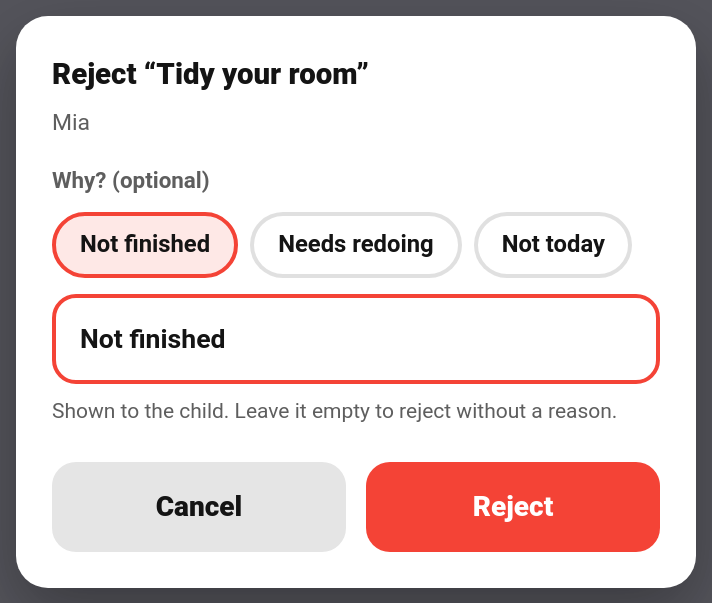
Tapping Reject now opens a small sheet instead of rejecting straight away:
- Quick-pick chips: Not finished, Needs redoing, Not today. Tap one to fill in the reason.
- Free text: type your own reason, up to 200 characters.
- Cancel or Reject to confirm.
The reason is optional. Leave the box empty and the reject works exactly as it always has.
| Where | Covers |
|---|---|
| Approvals card | Chores and reward claims, in every card design |
| TaskMate panel | The approval queue on the Today page, the Activity tab and bounty rows |
| Phone approval notification | Reject now opens a text box on the notification itself. Type a reason, or send it empty for a plain reject. |
The quick-pick chips are in your family's language, so the reason the child sees is too. The quick reject on the parent dashboard card still rejects without a reason.

| Where | Shows |
|---|---|
| Child card | "Sent back: …" on the rejected chore, in every card design. |
| Rewards card | "Not approved: …" on the reward, when the card is set to a child. |
| Activity card | A chore rejected or reward rejected entry with the reason, under the Chores or Rewards filter. |
The note on the child card disappears once the child does the chore again, once it's done, or after 24 hours, whichever comes first.
Turn on the Chore or reward sent back notification type under TaskMate panel → Notifications to tell the child straight away:
↩️ Mia, "Tidy your room" was sent back: Not finished
It's off by default. With no reason given, the message simply ends at "was sent back".
taskmate.reject_chore and taskmate.reject_reward take an optional reason:
action: taskmate.reject_chore
data:
  completion_id: f5548687
reason: The bed still isn't made| Field | Required | Description |
|---|---|---|
reason |
No | Up to 200 characters, kept to one line. Leave it out for a plain reject. |
The taskmate_chore_rejected and taskmate_reward_rejected events now carry reason. A child undoing their own chore (see Child Undo Window) fires taskmate_chore_undone instead, which never has a reason.
Rejecting removes the completion or claim, so the reason is stored in a small log of its own. Entries are kept for 7 days (50 at most) and are removed along with the child if you delete them. A reject without a reason adds nothing to it.
- Be specific. "The bed isn't made" gets a better second attempt than "Not finished".
- Use Not today for chores that were fine but done on the wrong day.
- Done, but not very well? With Quality Ratings switched on, you can approve it with ★ instead of rejecting it.
- Approvals Card — reviewing chores from a dashboard
- Rewards — reward claims and approval
- Quality Ratings — rating approved chores
- Notifications — notification types