Surprise Inspections
"I tidied my room!" — but did they? A surprise inspection lets you spot-check a chore you've already approved. If it still looks good when you check, the child earns a bonus. If it doesn't, you can just note it, or send it back to be redone. No points are ever taken away, so inspections reward keeping things tidy rather than punishing a slip.
New in v6.0.0
- Flag a chore. Any chore approved (or auto-approved) in the last 24 hours shows a 🔍 magnifier in Recent activity on the Today page and in Activity. Tap it.
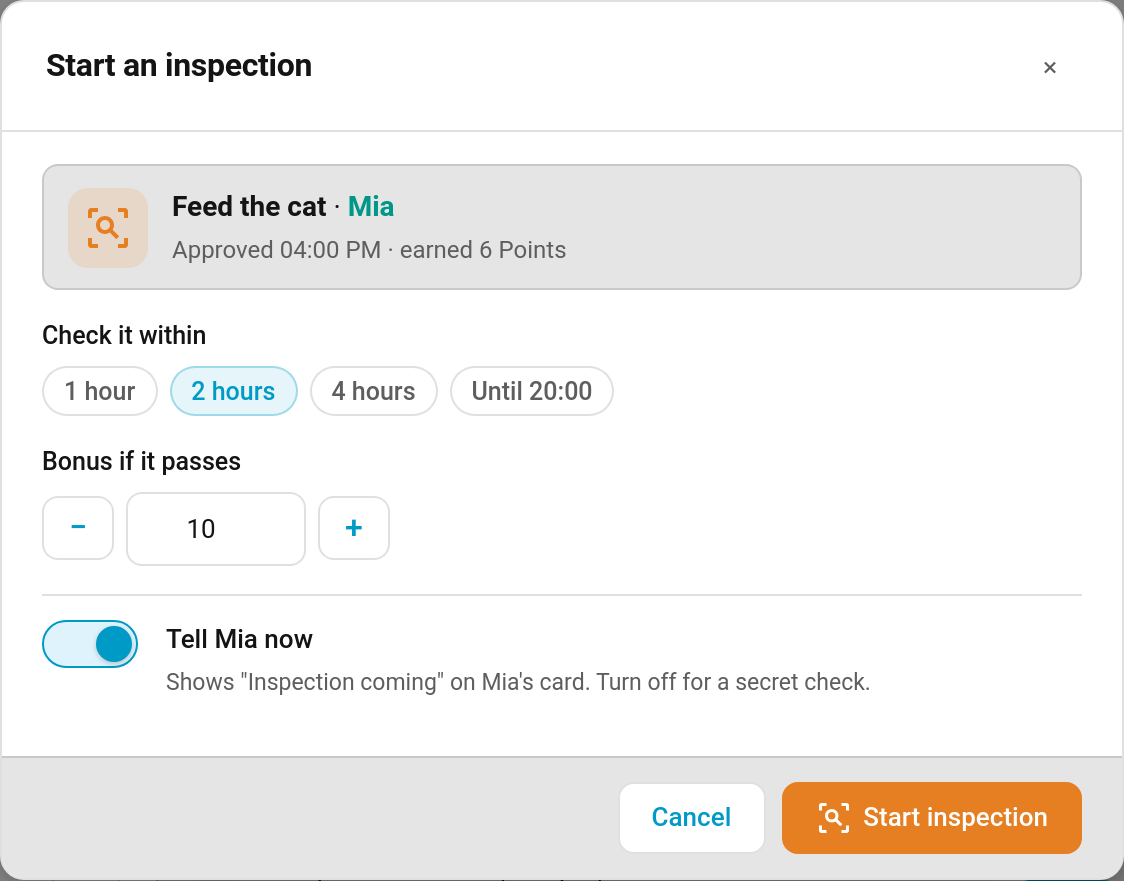
- Set it up. Choose how long you have to check it (1 hour, 2 hours, 4 hours or until bedtime), the bonus (10 points by default, editable), and whether to tell the child now. Turn Tell … now off for a secret check.
- Check it. The open inspection sits at the top of Needs you on the Today page with a countdown, and Pass, Fail and cancel buttons.
- Decide. Pass pays the bonus; fail notes it or sends the chore back.
Each approved chore can be inspected once.
When the child has been told, their card shows an amber Inspection coming! banner with the countdown and the bonus, and the chore gets a dashed border and an Inspection tag.

| Outcome | On the child's card |
|---|---|
| Passed | A one-off celebration with your note, then a green banner and a Passed +10 tag for the rest of the day |
| Failed — just noted | A grey "Not this time. No points lost." |
| Failed — sent back | The chore reappears as not done for today, with your note |
| Secret check | Nothing at all until you decide |
- Pass pays the bonus as an ordinary points transaction ("Inspection passed: Tidy the playroom"). You can change the bonus as you pass it. Like any bonus it can be undone from the activity feed; undoing it takes the pass back and reopens the inspection if its time is still open.
- Fail → Just note it records the result. The child keeps the chore's original points.
- Fail → Send it back to redo puts the chore back on the child's list for today. They complete it again through the normal path (including approval, if the chore needs it), but the redo pays nothing extra. The original points stand.
- Time runs out — if you don't decide in time, the inspection closes quietly with no bonus. You get a reminder 30 minutes before.
- Cancel (✕) drops the inspection without a result.
Rejecting the inspected completion itself also cancels an open inspection on it.
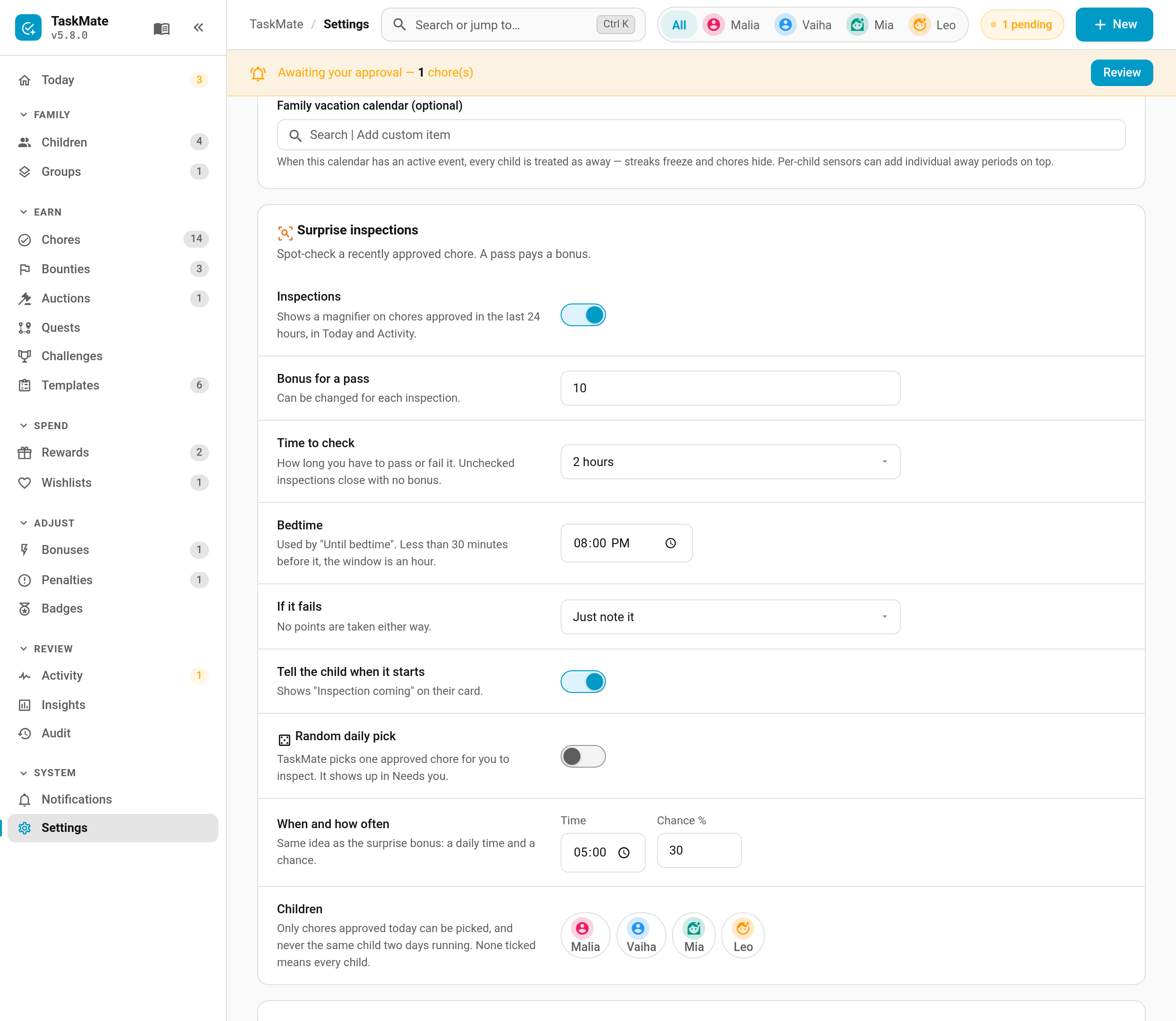
TaskMate panel → Settings → Surprise inspections
| Setting | Default | Description |
|---|---|---|
| Inspections | on | Shows the magnifier on chores approved in the last 24 hours, in Today and Activity |
| Bonus for a pass | 10 |
The starting bonus. Can be changed for each inspection |
| Time to check | 2 hours | The starting window: 1 hour, 2 hours, 4 hours or until bedtime |
| Bedtime | 20:00 |
Used by "Until bedtime". Less than 30 minutes before it, the window is an hour |
| If it fails | Just note it | Just note it, Send it back to redo, or Ask me each time |
| Tell the child when it starts | on | The starting position of the "Tell … now" switch |
| Random daily pick | off | TaskMate picks one approved chore for you to inspect. It shows up in Needs you |
| When and how often |
17:00, 30% |
The daily time the pick is made, and the chance it happens on any given day |
| Children | all | Which children can be picked. None ticked means every child |
The random pick only chooses chores approved that day, and never the same child two days running.
| Type | Sent to | Default |
|---|---|---|
| Inspection started | The child (only when told) | Off |
| Inspection passed | The child | Off |
| Inspection reminder | Parents, 30 minutes before the window closes | On |
| Service | Description |
|---|---|
taskmate.start_inspection |
Start one on a completion_id. Optional bonus, window (1h, 2h, 4h or bed) and tell_child
|
taskmate.pass_inspection |
Pass it (inspection_id), with an optional bonus override and note
|
taskmate.fail_inspection |
Fail it, with an optional redo (send it back) and note
|
taskmate.cancel_inspection |
Cancel it |
All four are parent-only. Events: taskmate_inspection_started, _passed, _failed, _expired, _cancelled and _reopened. The activity feed and Activity card show started, didn't-pass and sent-back entries (a secret inspection only appears once it's decided).
- Bonuses — the other ways to hand out extra points
- Managing Rewards — the approval queue
- Admin Panel — the Today page and Needs you
- Celebrations — the animation a pass plays on the child's card