Wishlist
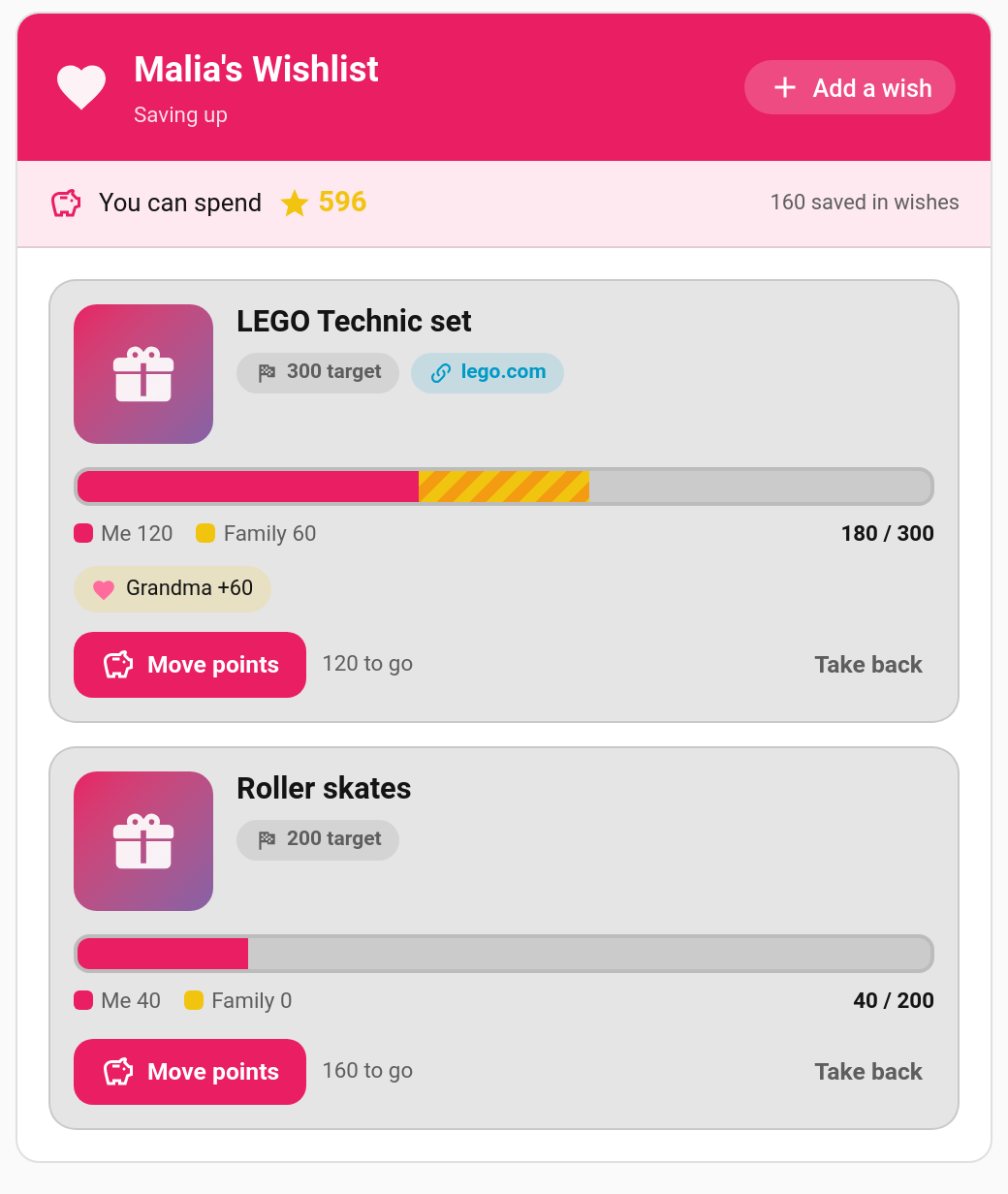
Children keep a list of things they'd love to have and save their points towards them. You approve each wish and set its price, and the rest of the family can chip in: Grandma's 60-point pledge shows up as its own stripe on the progress bar. When a wish is fully funded, the child asks to redeem it and it arrives in your approval queue like any reward claim.
New in v6.0.0
- The child adds a wish on their Wishlist card: a name, a suggested target, and optionally a link and a picture. It waits for a grown-up.
- You approve it on the Wishlists page, changing the target first if you like. Or you decline it, with an optional reason the child will see.
- The child saves towards it by moving points in. The slider stops at what they can spend and at what the wish still needs.
- Family members pledge points through you ("Grandma +60").
- Once it's fully funded, the child taps Ask to redeem, and it becomes a normal reward claim for you to approve.
| Points | Where they come from | Can they come back out? |
|---|---|---|
| Saved ("Me") | The child's own balance | Yes. The child can Take back their own savings at any time |
| Pledged ("Family") | A gift you record on someone's behalf | No. Pledges never come out of a wish and never touch any child's balance |
Saved points leave the child's spendable balance straight away, like a savings jar, but they are still theirs. The card shows both numbers: "You can spend 596 · 160 saved in wishes".
- Declining or deleting a wish gives the child back everything they saved and cancels every pledge.
- Redeeming a wish takes nothing more from the wallet, because the saved points already left it.
- Moving points in and taking them back out doesn't count towards the monthly leaderboard, so it can't be used to farm season points.
- Every movement (save, take back, pledge, pledge removed, refund, redeem) is written to the activity log.
TaskMate panel → Wishlists
| Section | What's there |
|---|---|
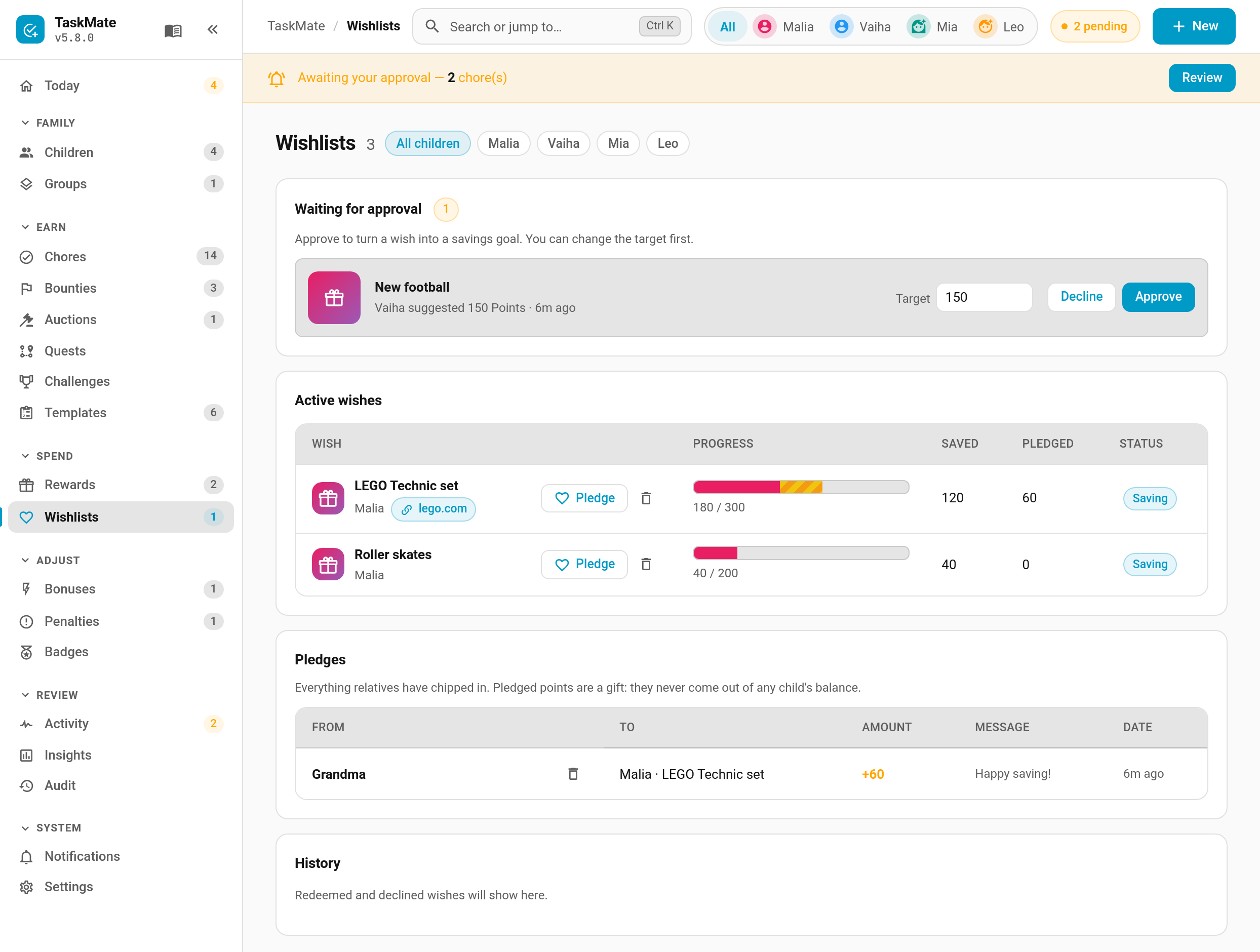
| Waiting for approval | New wishes, with an editable target, Approve and Decline |
| Active wishes | Progress, saved and pledged amounts, and status. Pledge, Fulfil (once redeem is requested) and delete on each row |
| Pledges | Everything relatives have chipped in, with a remove button until the wish is redeemed |
| History | Redeemed and declined wishes |
New wish requests also appear in Needs you on the Today page. Filter by child with the chips at the top of the page.
Tap Pledge on a wish. Enter the giver's name (names used before appear as quick chips), an amount (quick chips, or Finish it for exactly what's still needed) and an optional message. A preview bar shows the result before you save.
- Up to 5 active wishes per child. Targets are fixed once approved; there's no dynamic pricing.
-
Links must start with
http://orhttps://, and open in a new tab. - Pictures are uploaded from the child's device (camera or gallery) and checked for type and size.
type: custom:taskmate-wishlist-card
entity: sensor.taskmate_overview
child_id: b803da068e6a4b21| Option | Type | Default | Description |
|---|---|---|---|
entity |
string | required | The TaskMate overview sensor |
child_id |
string | — | Whose wishlist the card shows. Find IDs in the panel with Show IDs switched on |
title |
string | <name>'s Wishlist |
Card header title |
card_design |
string | global default |
classic, playroom, console, cleanpro, accessible or graphite
|
header_color |
string | #e91e63 |
Header banner colour |
On the card, the child can Add a wish, Move points, Take back, Withdraw a wish that's still waiting, and Ask to redeem a funded one. A declined wish shows your reason until they tap Got it.
Both are off until you switch them on under Notifications:
| Type | Sent to | When |
|---|---|---|
| Wish requested | Parents | A child adds a wish |
| Wish pledged | The child | Someone pledges towards their wish |
| Service | Who | Description |
|---|---|---|
taskmate.add_wish |
Child | Add a wish (child_id, name, target, optional link, photo_url) |
taskmate.withdraw_wish |
Child | Withdraw a wish that's still waiting |
taskmate.move_points_to_wish |
Child | Save points into a wish |
taskmate.take_points_from_wish |
Child | Take saved points back out |
taskmate.request_wish_redeem |
Child | Ask to redeem a funded wish |
taskmate.approve_wish |
Parent | Approve, with an optional new target
|
taskmate.decline_wish |
Parent | Decline, with an optional reason
|
taskmate.pledge_to_wish |
Parent | Record a pledge (name, points, optional message) |
taskmate.remove_wish_pledge |
Parent | Remove a pledge |
taskmate.remove_wish |
Parent | Delete a wish, refunding the child's savings |
Each child gets a sensor.taskmate_<child>_wishlist sensor listing their wishes.
Events: taskmate_wish_added, taskmate_wish_approved, taskmate_wish_declined, taskmate_wish_saved and taskmate_wish_pledged. Redemption uses the usual taskmate_reward_claimed / _approved / _rejected events, with a wish_id field.
- Rewards — fixed-cost rewards from your own catalogue
- Pool Mode (Savings Jars) — saving towards a shared family reward
- Managing Rewards — the approval queue a redeemed wish lands in
- Gifting Points — children giving points to each other