Repository navigation
Control Center AVISO
Control Center: Overview · Display · AVISO · Alerts · Groups · Modes · Profiles · Settings
AVISO edits the active airport's validated GeoJSON. Confirm the airport in the Runtime Menu and the source in Settings first. The tabs are Geometry and Text.
These screenshots were captured directly in EuroScope on 2026-10-06; the selected LFPG styles/colors are locally configured examples, not the supplied Real palette specification.
Choose Dark, Light or Real where available. Unavailable choices are disabled; airport changes select a valid fallback. The 161 bundled GeoJSON files include the alternative LFPO works map. New views default to Light, except LFMN, LFML and LFPO, which default to Real; saved selections remain in effect. LFBO, LFLL, LFML, LFMN, LFPG, LFPO and LFSB provide Real. LFBO and LFLL have screenshot-inspired palettes and a shared LFBO / LFLL profile.
LFBO Real uses a uniform slate-grey ground fill with fine grass/surface boundaries, lighter buildings and stand-label colors distinguishing north/south/runway-facing pushbacks. LFLL Real includes detailed surface markings and a separate Runway distance labels group for nine distance labels. LFSB Real uses dark blue-grey ground, grey-violet runways/buildings, green taxiway labels and muted yellow stands; both runways remain the same neutral color. LFSB paved/runway polygon outlines are disabled to avoid artificial internal seams at the runway intersection and apron; grass boundaries remain visible. These palette changes preserve Dark/Light styling.
Palettes share geometry, text configuration and groups. Changing palette changes colors, not airport geometry. Color edits target the selected palette; text/font/zoom settings and content changes are shared. Older documents are normalized to the shared representation when loaded/imported.
The map palette is independent from the Settings Night/Day UI theme. The main AVISO and its inset use the same selected map palette.
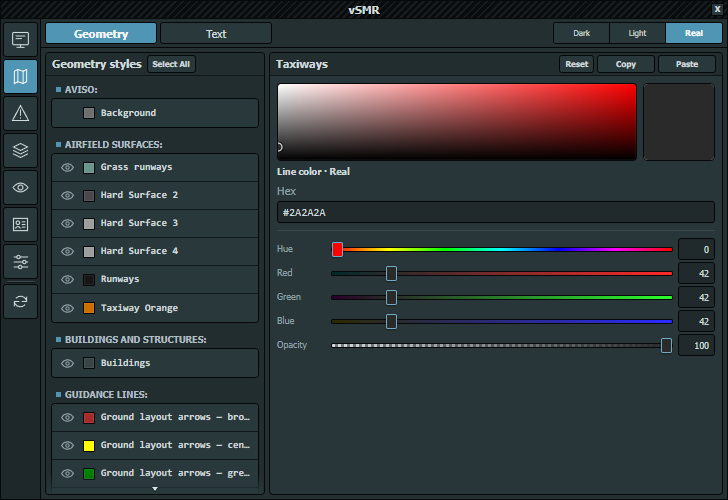
Styles are grouped by layer. Background cannot be hidden; other rows have an eye control for stored style visibility, separate from session-only Runtime Menu group visibility.
Select a row to edit it. Ctrl-click adds/removes selections, Shift-click selects a range, Select All or Ctrl+A selects all styles and Escape keeps the current row. Mixed values mean the selected styles disagree; only deliberately changed properties are propagated.
The editor exposes applicable background, line or fill colors and opacity. Background is opaque. Copy/Paste transfers validated geometry-style settings and supports the existing multi-selection workflow. Review the selected palette and rows before pasting.
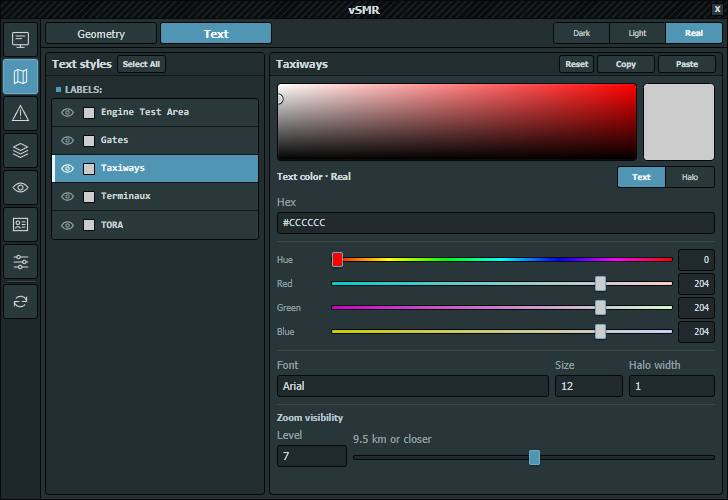
The text list supports the same visibility and selection workflow. Text and Halo choose which color to edit. Font suggests installed faces; Size accepts 6–32, Halo width 0–6 in 0.5 steps, and Level controls zoom visibility (0 for all ranges; 1–14 for progressively closer ranges).
Copy/Paste transfers validated text-style settings. Untouched mixed properties remain independent.
Both Geometry and Text have Select All and Reset buttons. Reset asks for confirmation, restores the selected styles from the same airport's bundled defaults and saves through the normal save queue.
Colors reset only in the currently selected palette. Non-color properties such as font, size, opacity and visibility level are shared, so resetting them affects every palette. Other palettes' colors are preserved.
Reset does not replace geometry coordinates, feature identities or group membership. Custom styles without a matching bundled style are left alone. If there is no baseline for this airport, or none of the selected styles match, the editor reports that and leaves the map unchanged.
Settings → Resolution scales rendered AVISO labels/lines and aircraft icons/tags without changing map coordinates, geographic zoom or editor dimensions.
The current source includes 161 GeoJSON files, including the alternative LFPO_Work.geojson. Only groups actually supplied in a map are available. LFPG includes independent East Arrows and West Arrows groups (89 and 97 arrow lines respectively); these are unrelated to Paris vSID controls.
LFPG arrow visibility follows EuroScope's ARR/DEP runway selections by default and remains manually overridable until those selections change. Rules can monitor any airport and runway set through Runway-Driven Group Visibility.
Keep a backup before editing custom maps. Release installation/migration behavior is governed by the actual package policy and modified-map protection, not merely by which files exist in the source checkout.