Repository navigation
Control Center Groups
Control Center: Overview · Display · AVISO · Alerts · Groups · Modes · Profiles · Settings
The Groups page combines AVISO text, line, and area content into named layers. Definitions and order belong to the active airport GeoJSON; the shown/hidden state selected in the Runtime Menu belongs only to the current radar session.
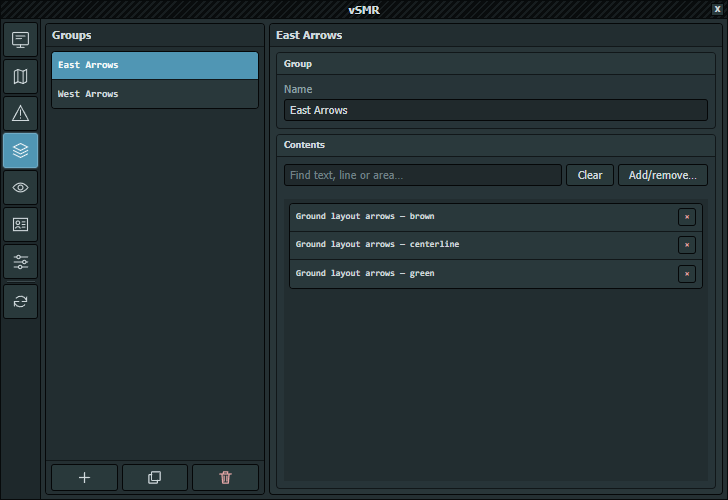
Actual screenshot captured in EuroScope on 2026-10-06. This editor defines group membership; automatic and manual session visibility are separate.
Select a group to edit it or drag rows to reorder the Runtime Menu list. New creates Group N. Duplicate copies the name, membership, and stored visibility/accent metadata. Delete confirms, removes that group ID from its members, and leaves the map features intact. Name is required; vSMR manages the internal ID.
Below the name, Find text, line or area… filters current members. Clear confirms before removing all membership. Add/remove… opens the content selector. A member-row × removes only that member.
| Control | Action |
|---|---|
| Text | Lists individual text features |
| Lines / Areas | Lists geometry styles, which can represent several features |
| Find content… | Filters the current tab |
| Select All | Adds every candidate matching the current tab and search |
| Clear shown | Removes every filtered candidate |
| Candidate row | Toggles membership; a partial mark means only some features in that style are members |
| Close or title × | Closes the selector |
There is no Apply or Cancel transaction. Candidate and bulk-selection actions update membership immediately and enter the normal save queue. Close the selector and confirm the current-member list before testing live visibility.
Group definitions and geometry/text membership are shared across Dark, Light and Real palettes; switching palette changes colors, not group contents. The available groups depend on the selected GeoJSON. LFPG provides independent East Arrows and West Arrows groups. Paris vSID selections are separate operational controls, not map groups.
Bundled LFPG rules show East for 08/09 and West for 26/27, reading actual ARR/DEP selections from EuroScope's active sector. No selected direction or mixed directions hides both. The rules apply to main AVISO and insets, including CoFrance, without selecting runways or changing stored group membership.
You can still show/hide a group in the Runtime Menu while its rule is enabled. That override remains until its source airport's ARR/DEP selection changes, even within the same direction, or the rule itself changes. Unrelated airport changes/profile saves do not cancel it. Reopening/loading the view applies the rule afresh.
Rules are configured in user config.json, not in this membership editor. They can monitor another airport, filter arrival/departure, require any/all requested runways, exclude opposing runways or return a group to permanent manual control. See Runway-Driven Group Visibility for the complete schema and examples.