Repository navigation
Insets
vSMR provides four native inset windows: AVISO, SRW, Weather, and Timer. Insets provide secondary information and controls without leaving the EuroScope radar display.
Note
The SRW name and corrected tag-background Assume/Handoff action are included in the 2.0.2 stable feed and next-airac pack. Older 2.0.1 builds may show SRW 1 and may not open that menu.
Open, hide, reset, and manage their layouts from Runtime Menu → Insets.
AVISO/SRW/Weather screenshots below remain illustrative examples from earlier builds; the Timer image was captured directly on 2026-10-06. Colors and tag layouts depend on the current profile and theme.
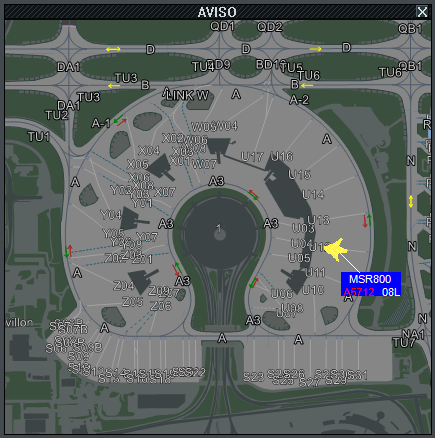
AVISO is a second viewport of the active airport map. It shares the main display's Dark/Light/Real palette, where available and the Runtime Menu's group visibility.
When a preset contains Linked movement, AVISO follows the main geographic center and scale. Otherwise, it keeps an independent view.
The Runtime popup has no Linked movement switch. Load a preset that already contains the required state or select No preset to clear it.
Map geometry, text, colors, and zoom visibility are configured on Control Center - AVISO. Group names and membership are configured on Control Center - Groups.
Map-label visibility adapts to the drawable inset size using the inset-to-host diagonal ratio, capped at 1. Smaller insets hide close-range labels sooner to reduce clutter. Font and halo sizes do not shrink automatically. This applies to AVISO insets on both native vSMR and CoFrance; aircraft tags and main-view labels are unchanged.
Left/right clicks on painted tag fields use the same actions as the main AVISO: runway/SID selectors, flight plan, holding point, scratchpad and the other configured functions. A background right-click drag pans the inset, but a tag-field click takes priority; ending a pan over a tag does not open its editor. Opening the HP editor immediately sets an eligible ground aircraft to Taxi; see Targets and Tags.

SRW is a focused surface-radar view. It uses the same captured target scene, profile colors, tag definitions, RIMCAS state, and AVISO palette as the main display.
When the window is floating, select F in its title bar to choose the altitude filter. Values run from 500 to 9500, plus UNL and the current EuroScope transition altitude.
If traffic is missing, check this filter and the active mode's altitude and speed limits.
Right-click an aircraft tag's background to open EuroScope's Assume/Handoff menu and take or transfer the aircraft. A tag-field action keeps its configured behavior.
Configure target presentation on Control Center - Display and runway alerts on Control Center - Alerts.

The Runtime Menu calls this inset Weather; its window title is Metar.
The 2.0.4 panel also shows the current ATIS letter and frequency when EuroScope supplies them for the displayed airport. It does not show the full ATIS text.
Detail is selected automatically from the window's drawable size and airport count:
- Full: wind rose plus the weather stack and QNH.
- Compact: vertical information including wind/knots and QNH, without the wind rose.
- Minimum strip: only ICAO, wind and QNH, for example
LFPG 03009KT Q1027; gusts and VRB are retained when reported.
These are responsive layouts, not selectable modes: the old Full/Compact/Mini options were removed. Larger layouts include available visibility, cloud, temperature/dew point, wind variation and runway components.
QNH has a high-contrast pressure area. Where shown, the wind rose uses a shaded face, cardinal markers and a tapered gradient from the wind-from bearing toward the center. Calm/variable wind and variation arcs remain supported. Day/Night follows the interface theme.
In Control Center → Settings → Display → METAR airports, choose All open airports or One airport at a time. The station list includes airports of open native AVISO views and CoFrance AVISO insets, deduplicated across views. The title-bar arrows switch pages in all-airports mode or the selected station in single-airport mode. All airports remain reachable even when they cannot fit on one page; the grouping preference is saved in the ASR.
Resizing adjusts detail and capacity. Snapping to a side, top, bottom or corner translates the weather window without enlarging it, subject to available host bounds. Missing/stale values are unavailable, not valid operational data. Wind components use the displayed station's runway context where available; verify the station before using them.

Timer provides four independent countdowns: 1M, 2M, 3M, and 4M.
Actual idle Timer captured in EuroScope on 2026-10-06, at native pixel size. No countdown was started for this screenshot.
The four countdowns are shared by every vSMR/CoFrance view in the same EuroScope plug-in session, not copied per window. Starting/resetting a cell updates all visible timer windows. Closing or switching views does not reset it, and expiration produces one shared alarm rather than one alarm per view. Restarting/unloading the plug-in starts a new timer session.
The entire Timer follows the Settings Night/Day theme, including running, hover and expired states, without resetting countdowns. Timer and PDC notification audio have embedded fallbacks if their external WAV files are missing or cannot be played; Windows volume/mute and the selected output device still apply.
Unlike the other insets, Timer has a fixed compact size. It can be positioned against an edge or corner but does not use the resizable map-style layout.
| Interaction | Result |
|---|---|
| Left-click a cell | Start its countdown |
| Right-click a cell | Reset that countdown |
| Countdown expires | Show 0:00 and play the configured alarm |
Important
Runtime Menu Reset, hiding Timer, and selecting No preset do not cancel a running countdown. A hidden timer continues and may still sound.
Right-click its cell when the countdown must be cleared.
Inset presets save complete window arrangements so a working layout can be restored without repositioning each inset manually.
After arranging the insets, select Save current from Runtime Menu → Insets. vSMR creates and activates a unique preset name. Rename it, then load it once to verify the layout.
Load vSMR together with CoFrance, then reopen the CoFrance ASR so the geo-referenced CoFrance radar display is attached. The vSMR rail opens expanded on a new host: choose an airport and enable windows under Insets. If needed, .smr insets restores/recenters the rail on attached hosts and reports attachment/refresh status; it cannot attach a screen created before vSMR was loaded.
CoFrance retains its main map, targets and tools. vSMR supplies its inset views and runtime rail; it does not paint its main AVISO, main targets/tags, RDF or RIMCAS panels over CoFrance. AVISO inset tags remain interactive. Main/inset linked movement and presets that recenter CoFrance's main map are not supported. Test with a backup ASR before live use, and save the ASR to retain vSMR inset state.
Wheel zoom and resizing use the inset's hit area; leaving a resize/move handle restores the host cursor. If the rail or controls are missing, reopen the ASR, run .smr insets and export .smr diagnostics.
AVISO and SRW share the active profile's icons and normal/detailed tags, including interactive detailed hover fields and optional per-line backgrounds. AVISO uses automatic tag deconfliction and draws target symbols beneath tags.
Resolution presets scale map/aircraft rendering inside these views. They do not resize inset title bars, borders/buttons, Weather or Timer. UI theme colors are independent of the map palette. Ground-aircraft RDF indications are suppressed in SRW; see Native RDF.