Repository navigation
Control Center Modes
Control Center: Overview · Display · AVISO · Alerts · Groups · Modes · Profiles · Settings
A mode is a presentation and filter definition inside the active profile. The dot marks the active mode. The Runtime Menu Mode popup activates the same definitions without opening the editor.
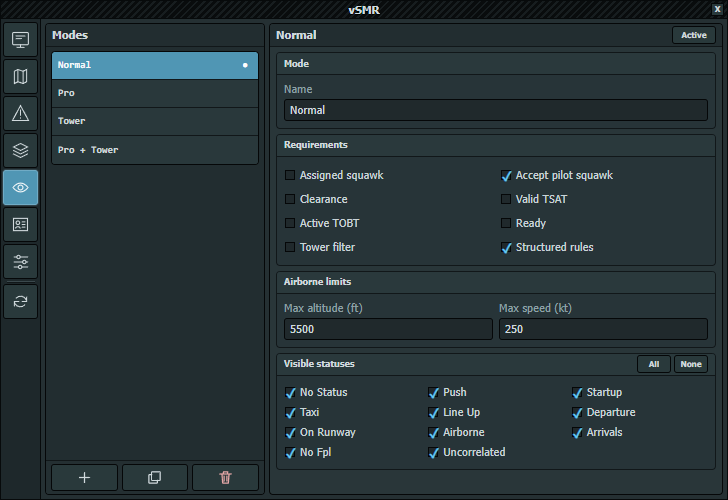
Captured directly in EuroScope on 2026-10-06; the listed modes and values belong to the example profile.
New, Duplicate, Delete, Name, and Set active behave like their profile counterparts. The final mode cannot be deleted. Activation is refused until current edits are saved or reverted. New modes start with all statuses visible, Accept pilot squawk and Structured rules enabled, the other requirements clear, and 5,500 ft / 250 kt limits. An empty name becomes Mode.
Requirements are evaluated together:
| Toggle | Effect |
|---|---|
| Assigned squawk | Requires the assigned-squawk match for tag visibility; the target symbol may remain |
| Accept pilot squawk | Accepts pilot correlation when a valid flight plan exists, including without an assigned/reported squawk match |
| Clearance | Requires vSMR clearance state |
| Valid TSAT / Active TOBT | Requires the current CDM bridge-derived TSAT/TOBT state; missing required data filters the target |
| Ready | Requires ASRT published by CDM; missing ASRT/provider data filters the target |
| Tower filter | Applies the tower-oriented target-role filter |
| Structured rules | Enables conditional colors from Control Center — Display |
Max altitude (ft) accepts 0–60,000 in 100 ft steps; Max speed (kt) accepts 0–1,000 in 10 kt steps. Zero disables that limit. Above 50 kt, limits can omit a target from the main display and radar insets, but never remove it from RIMCAS processing.
Under Visible statuses, All or None changes the complete set. Individual choices are No Status, Push, Startup, Taxi, Line Up, Departure, On Runway, Airborne, Arrivals, No FPL, and Uncorrelated.
Modes and their active-mode choice are stored in the shared profile definition. Selecting a mode in the Runtime Menu or using Set active here changes that profile's active mode. Reloading the shared source preserves each ASR's own active-profile selection; screens using another profile are not switched to this one.
Independent active profiles do not create private copies of their definitions. See Profiles and Integrations.