Repository navigation
Control Center Alerts
Control Center: Overview · Display · AVISO · Alerts · Groups · Modes · Profiles · Settings
Alerts configures the active profile's RIMCAS alert types, Normal/LVP timing, visibility and manual runway closure state. See RIMCAS for operational behavior and limitations.
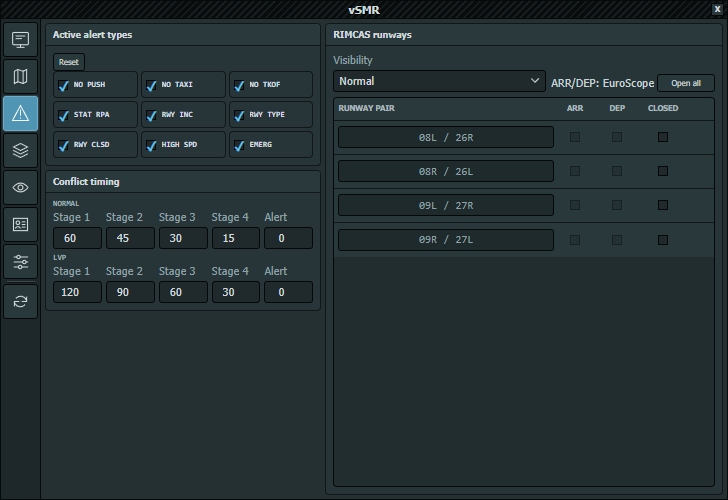
Captured directly in a disconnected EuroScope session on 2026-10-06. Runway ARR/DEP boxes are inactive in this example; verify real runway selection and local timing requirements before controlling.
- Select the intended airport in the Runtime Menu.
- Verify runway selections in EuroScope. Runway pairs and ARR/DEP assignments are derived automatically for that airport.
- Select the required alert types and review Normal and LVP timings.
- Set Visibility deliberately.
- Review the independent Closed state, then test representative movements/conflicts away from live traffic.
Runway names and ARR/DEP indicators are read-only. All ARR, All DEP, Add runway pair and row deletion are no longer available. Edit runway selection in EuroScope instead.
Closed remains manually editable; Open all clears manual closure state. This does not change EuroScope's runway selection. Missing runway rows require checking the active airport/sector context, not adding manual rows.
Map runway geometry comes from the active AVISO. Verify it before changing alert timing.
Stage 1, Stage 2, Stage 3, Stage 4 and Alert are countdown-bin thresholds for the arrival list, not five conflict severities. Conflict presentation has no alert, Stage One and Stage Two states; movement warnings are separate.
Alert colors are under Display → Colors. Check them against every available airport palette and normal/detailed tags. A display-mode filter can hide a target while RIMCAS continues processing it.
Alerts edits the active profile. Merely selecting another row on Profiles does not redirect this editor.
Reset restores bundled alert options and timings for the active profile after confirmation. It preserves EuroScope-derived runway assignments, manual runway closures and the current visibility/Normal-LVP selection. Alert colors are separate Display settings and are not reset here.
For a custom profile without a matching bundled definition, the bundled Default profile supplies the reset values. Changes are saved automatically; this is not a global configuration reset.