Repository navigation
Control Center Display
Control Center: Overview · Display · AVISO · Alerts · Groups · Modes · Profiles · Settings
The Display page changes the active profile's colors, target symbols, trails, tag definitions, and conditional rules. Its tabs are Colors, Icons, Tags, and Rules.
The screenshots below were captured directly from the installed EuroScope interface on 2026-10-06. Their profile values are illustrative.
Runtime connection: changing the active profile loads a different Display configuration; changing mode can enable structured rules and filter visible targets.
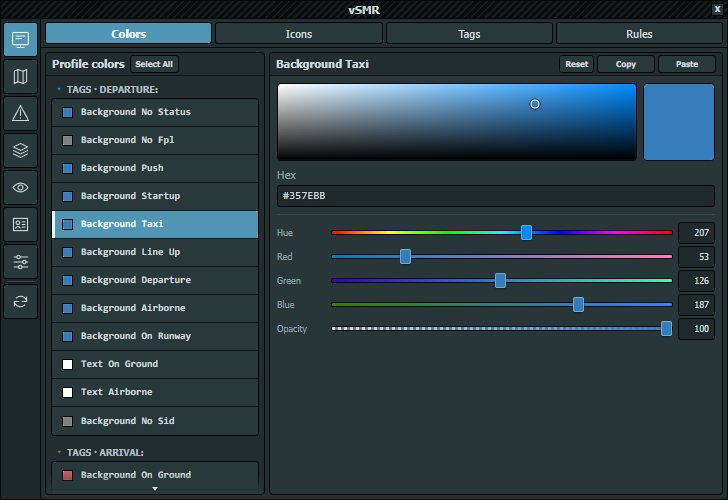
The left list groups colors under Tags, Targets, RIMCAS, and SRW. Select a heading to collapse it and a row to edit it. Target rows depend on Icon style: NOVA exposes one target color, while Icon and Triangle expose departure and arrival colors.
The SRW heading is included in the 2.0.2 stable feed and next-airac pack. Older 2.0.1 builds may show SRW 1.
Ctrl-click selects multiple colors; Shift-click selects a range. Select All (or Ctrl+A with the list focused) selects the list's entries. Reset restores only the selected colors from bundled profile defaults after confirmation.
The editor provides a saturation/brightness field, preview, Hex, Hue (0–360), Red, Green, and Blue (0–255), and Opacity (0–100%). Hex commits only when a complete six-digit RGB value is valid. Arrow keys move the saturation/brightness selection by 1%; Shift+Arrow moves it by 5%.
Copy writes #RRGGBBAA. Paste accepts six-digit RGB or eight-digit RGBA, with or without #; RGB becomes fully opaque. Rules can override Target, Tag, or Text colors when Structured rules is enabled in the active mode.
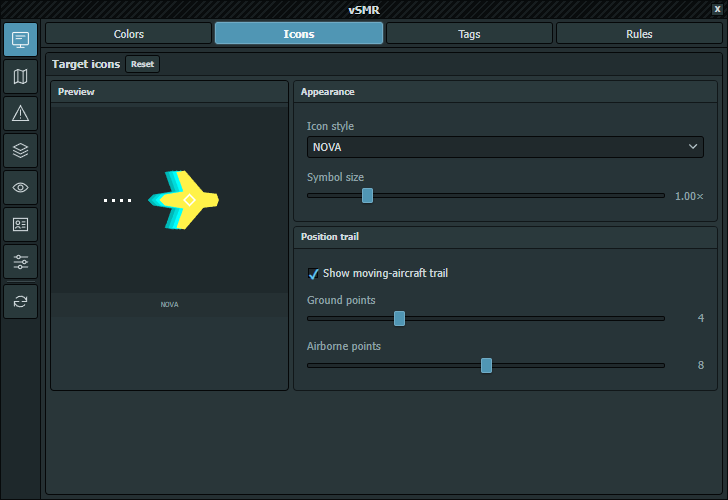
Icon style offers NOVA, Icon, Triangle, and Diamond. Symbol size ranges from 0.25× to 5.00× in 0.05 steps.
Show moving-aircraft trail controls recorded position points. When cleared, Ground points and Airborne points are disabled. Each slider accepts 0–16. Verify the result at the actual EuroScope resolution.
Diamond trails use quarter-interval samples along the recent track for closer circles, without changing the configured point count or fade. Other icon styles retain their spacing.
Trail dots/rings and ring strokes scale with the rendered icon at each zoom, including minimum/maximum icon sizes, resolution scaling and missing-icon fallback. This avoids trails becoming larger than the aircraft when zooming out or disproportionately small when zooming in. The same renderer is used in main AVISO, AVISO/CoFrance insets and SRW.
Reset restores this profile's bundled icon style, symbol size and trail options. It leaves colors, tag definitions and rendering resolution unchanged.

Definitions are grouped under DEPARTURE, ARRIVAL, and UNCORRELATED. Ctrl-click selects several definitions and Shift-click selects a range. Select All, or Ctrl+A while the list is focused, selects all definitions; Escape keeps only the current row. Copy copies the current normal/detailed structure; Paste applies it to every selected definition. The definition editor's Reset restores only the selected normal/detailed definitions and their inheritance settings.
Detailed tag inherits normal uses Normal as the shared definition. Otherwise Normal and Detailed are independent. The editor begins with three lines and adds rows when needed. Tokens may be separated by spaces or commas.
Choose a token, place the caret in an enabled line, and select Insert token. The dropdown contains the most common tokens; every renderer token in the reference below can also be typed directly into a Normal or Detailed line. Use the lowercase spelling shown.
The dropdown includes aircraft/flight-plan tokens plus vsid_sid, vsid_rwy, vsid_cfl, ready_startup, tobt, tsat, ttot, ctot, tsac, asrt and asat. Other supported renderer tokens can still be entered directly. Provider-dependent values require the matching integration.
| Token | Meaning |
|---|---|
callsign |
Aircraft callsign, including communication suffix and EuroScope assume/transfer decoration when applicable |
actype |
Flight-plan aircraft type, shortened to four characters; NoFPL when unavailable |
sctype |
Aircraft type normally; changes to the squawk-error value when the assigned and reported squawks disagree |
sqerror |
A followed by the assigned squawk when a mismatch exists; otherwise empty |
flightlevel |
Flight level, or pressure-altitude presentation below the transition altitude |
gs |
Reported ground speed in knots |
tendency |
Vertical tendency: ^ climbing, ` |
wake |
Flight-plan wake-turbulence category; ? when unavailable |
ssr |
Currently reported transponder code |
systemid |
System identifier used for an uncorrelated target |
| Token | Meaning |
|---|---|
deprwy |
Assigned departure runway; RWY when unavailable |
seprwy |
Departure runway, changing to ground speed above 25 kt |
arvrwy |
Assigned arrival runway; RWY when unavailable |
srvrwy |
Ground speed, changing to the arrival runway below 25 kt |
asid |
Assigned SID; SID when unavailable |
ssid |
Short SID form: for longer names, the first three and final two characters |
origin |
Flight-plan origin aerodrome; ???? when unavailable |
dest |
Flight-plan destination aerodrome; ???? when unavailable |
groundstatus |
Current vSMR/EuroScope ground state, including the session-only LNUP override |
clearance |
Clickable clearance flag: [ ] when not received and [x] when received |
| Token | Meaning |
|---|---|
gate |
Stand/gate derived from the scratchpad, with STAND= removed and the result shortened to four characters; NoGate when unavailable |
sate |
Gate/stand value, changing to ground speed above 25 kt |
uk_stand |
Assigned stand published by Ramp Agent through EuroScope Plugin Bridge; empty when unavailable |
remark |
Remark published by Ramp Agent through EuroScope Plugin Bridge; empty when unavailable |
scratchpad |
EuroScope scratchpad text; ... when empty |
holdingpoint |
vSMR holding-point assignment synchronized through flight-plan remarks; empty when none is assigned |
The retired VACDM HTTP source is replaced by bridge-enabled CDM. Valid times render as four-digit UTC HHMM; missing values remain empty. TOBT has no estimated-departure-time fallback.
| Token | Meaning |
|---|---|
tobt |
Target Off-Block Time |
tsat |
Target Start-up Approval Time |
ttot |
Target Take-Off Time |
ctot |
Calculated Take-Off Time |
tsac |
CDM TSAC time |
asrt |
Actual Start-up Request Time |
asat |
Actual Start-up Approval Time |
ready_startup |
RDY, red until CDM publishes ASRT, then green; left-click invokes CDM's own toggle |
vsid_sid |
SID published by vSID |
vsid_rwy |
Runway published by vSID |
vsid_cfl |
Cleared flight level published by vSID |
The legacy tokens aobt, atot, aort and event_booking are recognized for compatibility but currently produce empty values. They are not available CDM bridge fields.
See Integrations for provider requirements and missing-data behavior.
Tokens on a line may be separated by spaces or commas. These renderer modifiers can be entered manually:
| Syntax | Result |
|---|---|
b:callsign |
Render the token in bold; bold:callsign and *callsign are equivalent legacy forms |
callsign(255,128,0) |
Override that token's text color with an RGB value from 0–255 |
b:callsign(255,128,0) |
Combine bold and an RGB override |
clearance |
Use the default [ ] and [x] clearance values |
clearance(N,C) |
Show N when not cleared and C when cleared |
clearance(N) |
Show N when not cleared and hide the token when cleared |
clearance(,C) |
Hide the token when not cleared and show C when cleared |
clearance() |
Hide both states; cleared is accepted as an alias for clearance
|
The Bold option beside Insert token inserts the selected dropdown token with the b: prefix. An RGB suffix must be typed manually. Empty data can leave a token or an entire line invisible; in a Detailed holding-point layout, vSMR can show the clickable HP placeholder when no holding point is assigned.
Rounded corners, Auto deconfliction, Fit background to each text line, Typeface, Weight, and Label font size apply to the profile, not only the selected definition. Per-line backgrounds follow each line's measured width in the main view, AVISO inset and SRW.
Label font size (px) accepts 6-72 pixels, with common size suggestions and direct numeric entry instead of the old 1-5 preset numbers. Existing profiles keep their appearance until edited.
The separate tag-options Reset restores the profile's font, rounded corners, per-line background fitting and auto-deconfliction without replacing tag definitions.
Settings → Resolution scales rendered icons, trails, tag text/backgrounds and hit areas. It does not resize this editor. The symbol-size multiplier is separate from that resolution scale.
Rules conditionally replace Target, Tag, or Text colors. They run in list order; later matching rules refine only the channels they enable. New appends a starter CDM TSAT rule, Duplicate inserts a copy after the selection, and Delete confirms first. There is no reorder control. Copy and Paste transfer a validated rule definition; review its conditions and scope before using it.
Reset replaces the active profile's whole rule list with its bundled defaults, not just the selected rule. All section resets ask for confirmation and autosave; unmatched custom profiles use the bundled Default profile. See reset scope and recovery.
Every Match row contains Source, Token, Condition, an optional values field, and ×. + condition adds a row; all rows must match. CDM supplies published time/state and operational data; the dedicated vSID source supplies its SID, runway and cleared-flight-level data. Runway and SID/custom sources support any, set, missing, in, and not in; list values are comma-separated.
Under Applies to, narrow the tag kind, detail level, and statuses. Then enable only the required Target, Tag, or Text channel and set its six-digit color. Rules affect presentation only while Structured rules is enabled on Control Center — Modes.