Repository navigation
Control Center Settings
Control Center: Overview · Display · AVISO · Alerts · Groups · Modes · Profiles · Settings
The Settings page manages display options, data sources, updater preferences and recovery. The command .smr opens it.
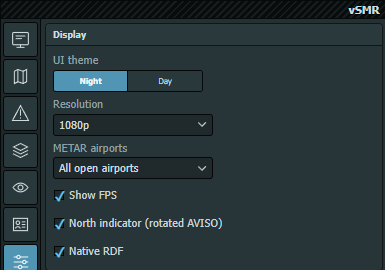
Captured directly in EuroScope on 2026-10-06. Only the Display section is shown to exclude personal file paths; checkbox states are examples, not required values. Any Show FPS control visible in this older screenshot has since been removed.
UI theme — Night/Day changes the interface colors independently from the AVISO Dark/Light/Real palette. It affects the Control Center, Runtime Menu and themed inset presentation.
Resolution is stored with the active profile:
| Preset | Rendering scale |
|---|---|
| 1080p | 100% |
| 2K | 133% |
| 4K | 200% |
It scales AVISO label/line rendering and aircraft icons, trails, tags and their hit areas, including radar insets. It does not resize menus, the Control Center, inset borders/buttons, Weather or Timer. Geographic coordinates and radar zoom are unchanged.
UI theme is a screen/ASR setting; resolution belongs to the shared profile.
METAR airports selects All open airports or One airport at a time. Airports come from open AVISO views, including CoFrance insets. Title-bar arrows change page/station; detail adapts automatically, with no Full/Compact/Mini selector. This grouping choice is saved in the ASR. See Weather.
North indicator (rotated AVISO) shows a compact compass when the actual map projection is not north-up, in main AVISO and insets including CoFrance. It hides when north is up. Drag it to reposition it; positions are saved in the ASR. The main compass remains beneath insets and does not intercept their clicks.
Native RDF enables the TrackAudio-driven map overlay, using the same saved setting as .smr rdf on / .smr rdf off. The RDF list item remains active even when this checkbox is off, including startup with the overlay disabled. This fix is in both main and dev; older packages may still require the overlay enabled for the item.
Preferences belong to the Windows user. Channel selects Stable or Beta eligibility. Download verified updates depends on checking GitHub at startup; automatic runtime activation depends on download being enabled.
User customizations are always preserved is a checked, disabled indicator, not an optional protection switch. Check / repair files requests an application-file check against the channel manifest on the next startup; it does not reset user configuration or custom maps. Contextual actions can queue Retry next startup, clear a skipped release or open validated release notes.
The current per-file updater requires loader 1.3.0 and its matching runtime/helper. Stable and Beta use their respective version.json feeds on the update-feed branch; publishing code or a GitHub release alone does not update that feed. Signing is optional unless explicitly required by the installation. See Installing and Updating.
The Profiles and AVISO GeoJSON path fields are read-only in the hosted Control Center. Computer opens the native picker. GitHub accepts supported credential-free HTTPS file URLs and validates the downloaded document before replacement.
The selected Profiles source and definitions are shared. Reloading or replacing definitions preserves each ASR's active-profile name where possible; a missing profile falls back to Default or the first available profile. AVISO editing applies to the selected airport/source. Verify the displayed paths and airport before replacing data.
EuroScope alias shows the detected alias-file path. It does not enable the removed PDC/CDM reminder workflow.
Use Revert to saved configuration in the rail to reload saved data. Bundled defaults provides recovery to supplied configuration; read the confirmation before replacing custom definitions.
To reset only one part of the configuration, use the section Reset buttons in Display, Alerts or AVISO instead. Their scope and custom-profile fallback are listed in Control Center.
There are no Undo/Redo controls or legacy profile .bak restore action. Keep external backups of custom profiles, maps and ASRs.