Repository navigation
Hide New Tab Until Opened
Keeps the command bar's new tab out of the sidebar and the tab bar until you choose a result. While the bar is open, New Tab (or + in the tab bar) shows as the selected tab, and the tab you were on looks like any other. It's experimental and off by default. It has been tried on Dia 1.58.0 (builds 91060 and 91177), with tabs in the sidebar and with tabs at the top. If something looks wrong, please say so on the issue tracker.
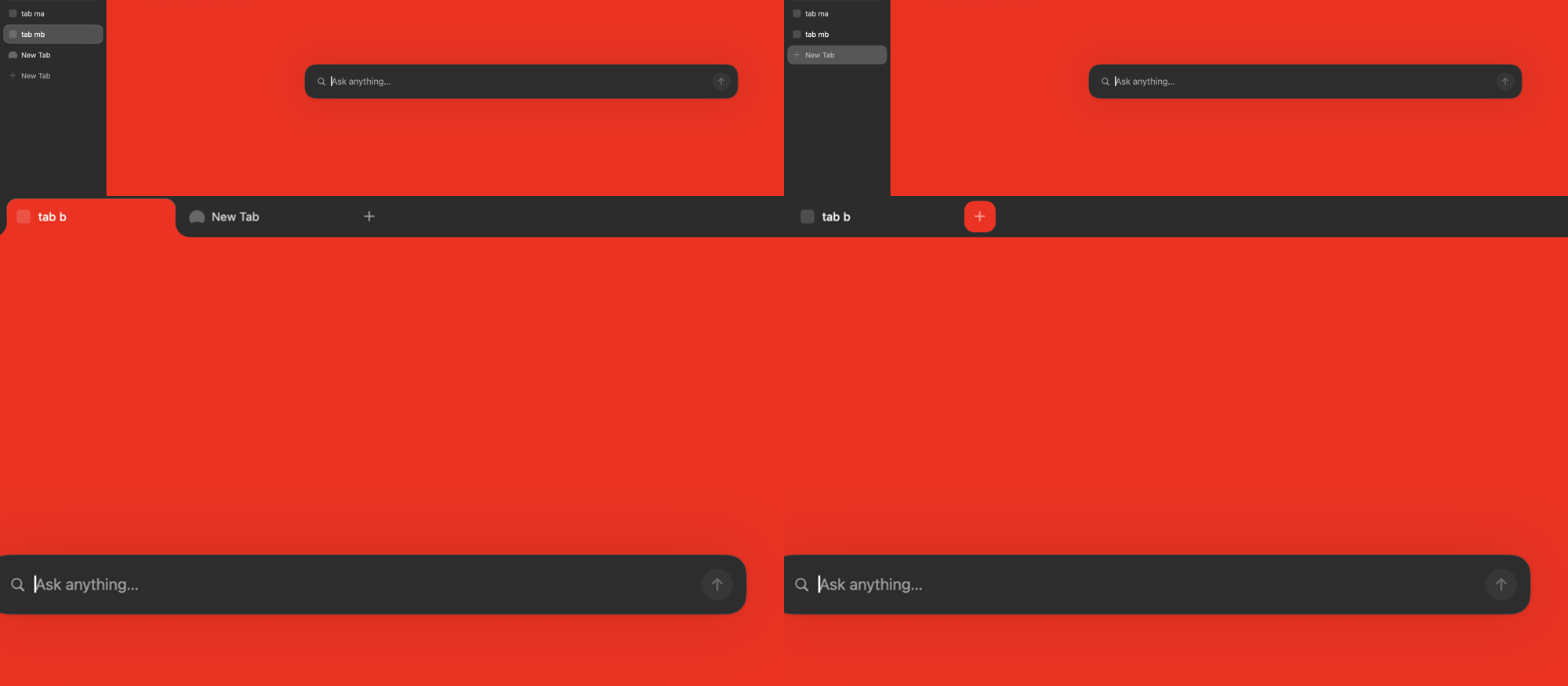
Without it the bar is a real new tab, so it shows in the list, the tabs around it move down, and the tab you were on stays selected behind the bar. With it nothing moves, and the bar looks like what it is: a place to type, not a tab. Leave it off if you like seeing the new tab appear in the list the moment you press the shortcut.
It's off by default and experimental, so Settings hides it until you switch on Show Experimental Tweaks in Dia → Settings → Home, or click Show at the bottom of Patches. Then open Dia → Settings → Patches → Open New Tabs in Command Bar and, under Behavior, switch on Hide New Tab Until Opened. Or run:
diatweaks enable commandBarHideTab- The new tab shows in the sidebar or the tab bar once a result opens in it, about half a second after you choose. Escape closes the bar and the tab never shows.
- New Tab in the sidebar, or + in the tab bar, shows as selected while the bar is open. Click it again to close the bar.
- The sidebar and the tab bar stay in use. Click another tab to close the bar and switch to it. Click the tab you were on to keep the bar open, and double-click it to close the bar.
- Double-click the sidebar's empty space to open the bar, the same as New Tab.
- Close a window's last tab and, with tabs in the sidebar, the window looks empty: no tab in the list, and no toolbar or bookmarks bar. Press the New Tab shortcut or start typing to open the bar over it.
- Typing into another field first, such as a tab group's name, Find, Side Chat or a Peek page, goes to that field. It doesn't open the bar over the empty window.
- Switching between tabs in the sidebar and tabs at the top while the bar is open closes the bar.
- Switching to another space closes the bar, and the bar's unused new tab with it, so it isn't left behind in the space you left. A tab a result is already opening in stays, and so does a space's only tab.
Only the tab the bar makes is ever left out, and only in the window you opened the bar in. Every other tab, in any window, shows as usual. Turn the switch off, or switch off Open New Tabs in Command Bar, and a tab that was left out shows at once. With more than one space, only the sidebar of the space the bar is open in shows New Tab as selected; the next space's sidebar keeps its own look while you swipe to it.
In the sidebar, New Tab gets the same translucent fill a selected tab has, but it comes out as a pale blue card with no shadow, not the white card a selected tab gets. With tabs at the top, + takes the look of a selected tab.
In both layouts: opening the bar with the shortcut; Escape; choosing a result; clicking other tabs, New Tab and + with the bar open; 50 tabs open, with typing in the bar and 50 openings and closings; and closing the window, going full screen, switching layouts, switching the option or its parent off, and quitting with the bar open. With tabs in the sidebar it was also tried with the File menu, the New Tab button and a double-click on the empty space, with dragging the tab you were on, with a window with no tabs, and with a picture-in-picture video playing. On the newer build it was also tried with split view, a private window, the lifted bar from ⌘L, a Return typed within half a second of the New Tab shortcut, a tab left on Dia's own new tab page (Back), and 50 tabs at the top. With the option off, Dia behaves as it does without the tweak.
It has not been tried with dragging in the tab bar while the bar is open, with folders and groups, with resizing the sidebar while the bar is open, with other themes or space colors than the light, translucent look it was tried with, or with another profile. The empty window's hidden toolbar and bookmarks bar have not been seen on screen either, because Hide Toolbar was already hiding them.
- For about half a second after Escape, the tab you were on still looks unselected and New Tab (or +) still looks selected. Then they swap back.
- If you quit Dia with the bar open, the new tab comes back as a normal tab when you open Dia again, with nothing hidden. Close it as you would any other tab.
- The selected New Tab is paler and bluer than a selected tab, as above.
Command bar. Settings greys out this switch until that's on, and diatweaks enable commandBarHideTab offers to turn it on too.
Hide Toolbar, Compact Tab Rows, Open New Tabs Next to Current and Collapse Pinned Tabs: the tab stays out of the list with them on or off.
Why does the tab I'm on look unselected while the bar is open?
The bar stands in for the new tab, so New Tab takes the selected look. Your tab gets its own look back when the bar closes.
Why does the New Tab button look a little different from a selected tab?
Dia draws a selected tab in the sidebar as a translucent white card with a shadow. New Tab is a different kind of row. It gets the same fill, but the card reads a little bluer and has no shadow.
Does it work with tabs at the top?
Yes. The tab bar leaves the new tab out and + shows as selected. A window with no tabs left still shows its blank tab in the tab bar.
Why is the switch unavailable?
The tweak checks, as Dia starts, that Dia still stores a tab's selected look the way it expects, and stays off if not. It comes back in a DiaTweaks update that knows the new layout.
A tab I opened some other way isn't hidden. Is that a bug?
No. Only a tab opened from the New Tab shortcut, menu item, button or +, with the bar over it, is left out. Any other tab shows in the list as usual, and so does a new tab made from a tab that shows Dia's own new tab page: it keeps Dia's page and gets no bar.