Repository navigation
PsApp
Home › All Categories › PsControls › PsApp
The application framework for PsControls. PsApplication handles start-up, the message loop and
tear-down. A PsForm is a window whose messages arrive as callbacks.
The Notepad Tutorial builds a complete program on it.
#import "vendor/PsControls/PsApp"
#import "vendor/PsControls/PsButton"
using PsApp
using PsButton
sub frmMain_OnSize( byval f as PsForm ptr, byval cx as long, byval cy as long )
SetWindowPos( f->Item( 1001 ), null, cx - f->ScaleX( 100 ), cy - f->ScaleY( 44 ), _
f->ScaleX( 88 ), f->ScaleY( 32 ), SWP_NOZORDER or SWP_SHOWWINDOW )
end sub
dim app as PsApplication
app.Init( )
dim f as PsForm ptr = app.NewForm( "Hello", 640, 400 )
dim hOk as HWND = PsButton_Create( f->hWindow, 1001 ) ' themed, with the form's font
PsButton_SetText( hOk, "OK" )
f->OnSize( @frmMain_OnSize )
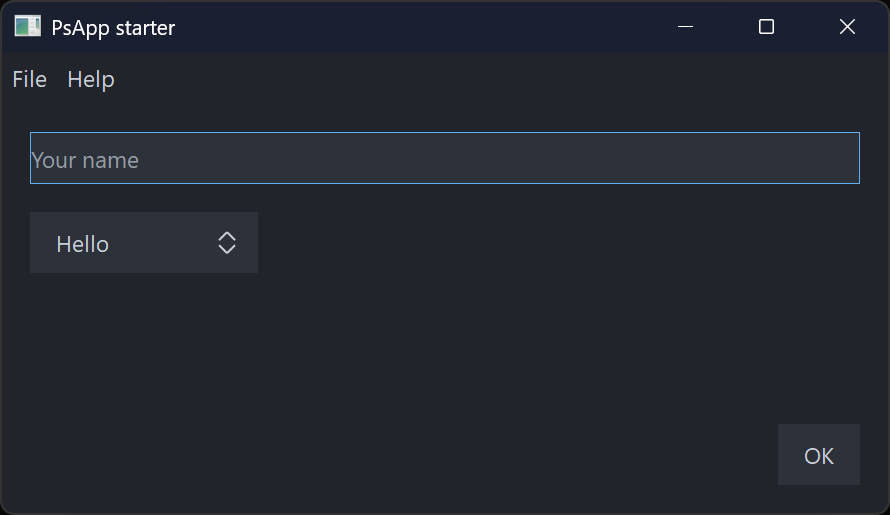
end app.Run( f )examples/PsControls/PsApp is a complete starter to copy. It has a menubar, a text box, a
combobox, a button and a modal About box.
Importing. PsApp re-exports sys/win, sys/win/gui, PsBufferPaint, PsRegistry and
PsTheme, so using gui, using PsBufferPaint and using PsTheme work without importing those
modules yourself. You still
import each control you use.
There is one application per process, and its state is the module's.
| Member | What it does |
|---|---|
Init( ) / Init( byref opts as PSAPP_OPTIONS )
|
Starts COM, sets DPI awareness, starts GDI+, chooses the glyph face and applies the theme ThemeMode asks for. Call it once, before any window exists. Returns FALSE if called a second time or if COM fails. |
NewForm( title, cx, cy [, dwStyle, dwExStyle, hParent] ) as PsForm ptr |
Creates a form, hidden and centred on hParent or the screen. cx/cy are in DIPs. hParent becomes the owner of a top-level form. |
Run( mainForm ) as long |
Shows the main form, pumps messages until it is destroyed (or Quit), destroys any forms still open and undoes Init. Returns the exit code. |
Quit( exitCode = 0 ) |
PostQuitMessage: Run returns exitCode. |
GlyphFace( ) as ustring |
The glyph face Init chose (see below). |
Options( ) as PSAPP_OPTIONS |
The options Init was given. |
AddMessageFilter( p ) / RemoveMessageFilter( p )
|
Your own pre-translate step: function( byval pMsg as MSG ptr ) as boolean. It runs after the controls' filters. Returning TRUE consumes the message. |
RunOnUI( p [, payload] ) as boolean |
Any thread. Queues sub( byval payload as any ptr ) to run on the UI thread, in call order. Returns FALSE when no application is running. |
IsUIThread( ) as boolean |
TRUE on the thread that called Init
|
SetTimer( ms, p [, payload] ) as long |
A timer that needs no form: sub( byval id as long, byval payload as any ptr ). Returns the id, never 0 (0 means it failed). UI thread only. |
KillTimer( id ) |
Stops it; safe to call from the timer's own proc |
SetTheme( t ) / Theme( )
|
Sets the current theme and returns it. Every control whose colours are not pinned is restyled, every form gets the theme's background and title bar, and OnThemeChanged fires. |
SetThemeMode( mode ) / ThemeMode( )
|
PSAPP_THEME_SYSTEM follows the Windows light/dark setting live. LIGHT or DARK fixes the theme. |
PsApp_Instance( ) returns the application Init was called on, or null.
A window belongs to the thread that created it, so a worker (a raw thread, or a std/tasks
goroutine) never touches one. It hands each result back with RunOnUI:
sub Worker( byval nSteps as long ) ' spawn Worker( 100 ) -- another thread
for i as long = 1 to nSteps
' ... the work ...
app.RunOnUI( @Ui_Progress, cast( any ptr, cast( integer, i ) ) )
next
end sub
sub Ui_Progress( byval payload as any ptr ) ' the UI thread
PsProgressBar_SetPos( hBar, cast( long, cast( integer, payload ) ) )
end subHow RunOnUI works.
- It appends to a locked queue and wakes a hidden message-only window. Every message loop on the
thread dispatches that window's messages, including
MessageBox, a modal form and a control's own modal loop, so queued work runs inside those loops too. - It posts at most one wake-up message per batch, so a burst of calls cannot exhaust the thread's post quota.
- It copies the payload pointer, never what it points at. The payload's lifetime is the caller's.
- Work still queued when
Runreturns is dropped.
Polling a channel instead. To drain a std/tasks channel, poll it with TryReceive from a
SetTimer proc; never call Receive on the UI thread.
examples/PsControls/PsAppWorker is the complete example. It is built with -mt, which
std/tasks requires.
PSAPP_OPTIONS
| Field | Default | Meaning |
|---|---|---|
ComMode |
COINIT_APARTMENTTHREADED |
-1 means no COM |
GlyphFontFile |
"" |
A font file to load privately when "Segoe Fluent Icons" is not installed |
DpiMode |
PSAPP_DPI_PERMONITORV2 |
PSAPP_DPI_SYSTEM, or PSAPP_DPI_MANIFEST to keep what the manifest says. A manifest that already declares an awareness wins over either. |
ThemeMode |
PSAPP_THEME_SYSTEM |
PSAPP_THEME_LIGHT, PSAPP_THEME_DARK, or PSAPP_THEME_NONE to leave the controls' built-in colours |
FontUI, FontUISize
|
"Segoe UI", 10
|
The face and point size of the PSFONT_UI* roles |
FontMono |
"Cascadia Mono" |
PSFONT_MONO; Consolas when it is not installed |
The glyph face is the first of these that is available:
- "Segoe Fluent Icons", installed on Windows 11.
-
GlyphFontFile. - "Segoe MDL2 Assets", installed on Windows 10.
For each message, in order:
- the controls' filters (see PsRegistry);
- your own filters;
- the accelerator table of the form that owns the message (
AddAccelerator+CreateAcceleratorTable, both inherited from CWindow); -
IsDialogMessageon that form, which gives Tab navigation; -
TranslateMessage/DispatchMessage.
A popup is not a form, so neither accelerators nor IsDialogMessage ever run against one.
PsForm extends gui.CWindow, so all of CWindow is available on it: ScaleX/ScaleY, CreateFont, AnchorControl, AddControl, AddAccelerator, UserData, hWindow.
Every callback receives the form first. A null proc clears a callback.
| Setter | Callback shape | Notes |
|---|---|---|
OnSize( p ) |
sub( f, cx, cy ) |
Not called when minimised. Show calls it once before the form first appears. |
OnPaint( p ) |
sub( f, byref b as PsPaintBuffer ) |
b is already double-buffered on the form. Without OnPaint, the form paints COLOR_BTNFACE. |
OnCommand( p ) |
function( f, id, code, hCtl ) as boolean |
FALSE passes the message on. |
OnNotify( p ) |
function( f, id, pnm as NMHDR ptr, byref result as LRESULT ) as boolean |
|
OnTimer( p ) |
sub( f, id as UINT_PTR ) |
|
OnKeyDown( p ), OnKeyUp( p )
|
function( f, vk, lParam ) as boolean |
|
OnClose( p ) |
function( f ) as boolean |
FALSE cancels the close. |
OnDestroy( p ) |
sub( f ) |
|
OnActivateApp( p ) |
sub( f, bActive as boolean ) |
|
OnMessage( uMsg, p ) |
function( f, uMsg, wParam, lParam, byref result as LRESULT ) as boolean |
Any message. Setting the same message again replaces its entry. TRUE returns result. |
OnThemeChanged( p ) |
sub( f ) |
After a theme switch, so a form that paints itself can pick up the new roles from app.Theme( )
|
OnDpiChanged( p ) |
sub( f, oldDpi, newDpi ) |
After the form moved to a monitor with another DPI (see below) |
A message goes, in order:
- to the built-ins that always run (see the next table);
- to its typed callback (a
subcallback has handled the message); - to the
OnMessagetable; - to the defaults;
- to
DefWindowProc.
| Message | Built-in behaviour |
|---|---|
WM_ACTIVATEAPP (FALSE) |
Closes every registered dropdown and menu under the form |
WM_DESTROY |
OnDestroy; for the form given to Run, ends the program |
WM_NCDESTROY |
Deletes the form object (OnMessage( WM_NCDESTROY ) still runs first) |
WM_ERASEBKGND |
Returns 1. WM_PAINT fills the background, double-buffered. |
WM_CLOSE |
Asks OnClose, then destroys the form, or ends the modal loop for a modal form |
WM_COMMAND( IDCANCEL ) in a modal form |
Ends the loop with IDCANCEL. This is Esc, through IsDialogMessage. |
Messages sent inside CreateWindowEx (WM_NCCREATE, WM_CREATE, ...) arrive before any callback can be set, so they go to DefWindowProc. Create your controls right after NewForm returns.
| Member | What it does |
|---|---|
Item( id ) as HWND |
GetDlgItem on the form |
Font( role ) as HFONT |
The role's font. It is created at the form's DPI on first use and deleted with the form. |
SetRoleFont( role, face, pt [, weight] ) as HFONT |
Replaces a role's font and deletes the old one, so call it before handing that role's font to controls |
Show( nCmdShow = SW_SHOWNORMAL ) |
Shows a form modelessly. The first call runs OnSize and focuses the first tab stop. |
ShowModal( hOwner = null ) as long |
Disables the owner and pumps until EndModal, Esc or close. Then it re-enables the owner, destroys the form and returns the code. |
EndModal( code ) |
Ends a modal form's loop |
IsModal( ) as boolean |
|
Close( ) |
Sends WM_CLOSE, so OnClose is asked |
FocusFirst( ) |
Focuses the first WS_TABSTOP control |
PsForm.FromHwnd( h ) as PsForm ptr |
The form that owns h: h itself, its parents, or (for a popup) its owners. A control callback receives only the control's HWND; this is how it reaches the form. |
Tag as any ptr |
Yours |
Font roles:
| Role | Font |
|---|---|
PSFONT_UI |
FontUI at FontUISize
|
PSFONT_UI_SMALL |
One point smaller |
PSFONT_UI_BOLD |
Bold |
PSFONT_UI_LARGE |
Two points larger |
PSFONT_GLYPH, PSFONT_GLYPH_LARGE
|
The glyph face, at the size and two points larger |
PSFONT_MONO |
The monospace face |
Under PSAPP_DPI_PERMONITORV2, which is the default and is also declared in the examples'
manifests, each form follows the DPI of the monitor it is on.
When a form moves to a monitor with another DPI (WM_DPICHANGED):
- The form takes the new DPI, so
ScaleX/ScaleYagree with it. - Its role fonts are re-created at the new DPI.
- Every control on the form scales its pixel metrics by new/old (
Ps<X>_Rescale). - Every control is given the form's new
PSFONT_UIandPSFONT_GLYPH. - The window takes the rect Windows suggests, which runs
OnSize. -
OnDpiChangedfires.
A control created on a form whose DPI is not the system DPI is rescaled to the form's DPI as it is created.
Your own fonts. Step 4 replaces any font you gave a control yourself. If you use fonts of
your own, re-create them at the new DPI and set them again in OnDpiChanged. If you keep role
fonts in variables, read f->Font( role ) again there: the old handles are deleted.
-
Controls are created hidden and zero-sized, as in the rest of the family. Position and show them in
OnSize;SWP_SHOWWINDOWdoes both. -
Every form gets a window class of its own (
PsApp.Form:<n>), because CWindow refuses to register a class name twice. -
Fonts are automatic. A control created on a form gets the form's
PSFONT_UIandPSFONT_GLYPHwhen it is created. APs<X>_SetFontcall afterwards replaces them. -
The theme is automatic. Every control is themed as it is created. Calling one of its colour
setters pins its colours (see PsTheme). A form without
OnPaintpaints the theme'sWindowrole.