Repository navigation
Tutorial 08 Rolling against adversaries
For players and the GM.
Tough enemies have the Adversary talent. Each rank upgrades the difficulty of any combat check made against them: one purple difficulty die becomes a red challenge die. The system does this for you when you target the enemy before you roll.
- Target the enemy token: hover over it and press T, or right-click it and click the crosshair on the token HUD.
- Open the roll from your sheet as usual, e.g. click your weapon or skill.
- If the target has Adversary, the dice dialog shows a switch above the pool: Base Pool | Adversary Pool (×N), where N is the number of ranks. Adversary Pool is already selected, and the button says Roll Adversary Pool.
- Roll.
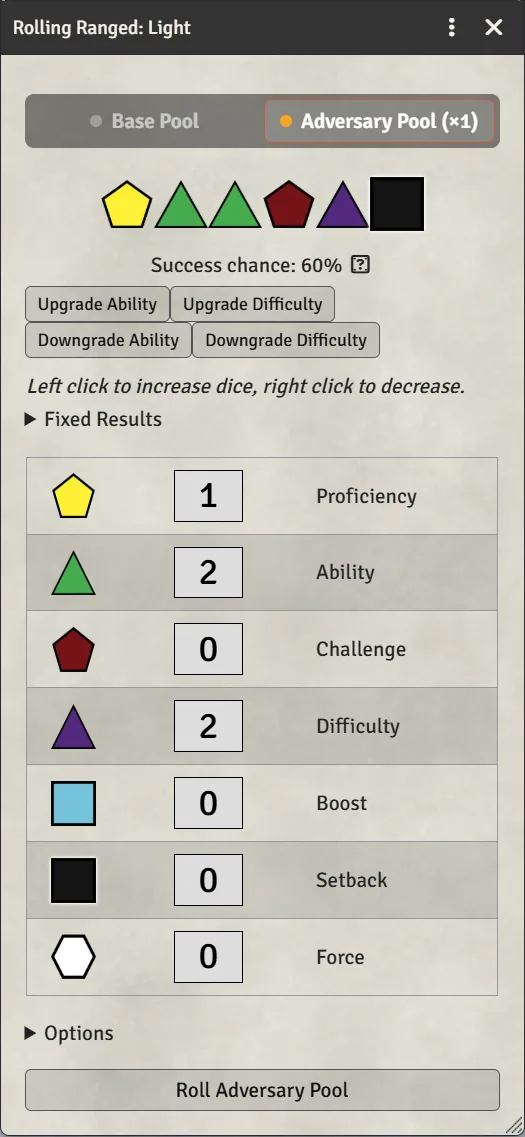
- Target first. The switch only appears when a targeted token has the talent. You can change targets with the dialog open; it recalculates.
- Several targets? The highest Adversary rank among them is used.
- Only difficulty dice get upgraded. If the pool has no purple dice, there's nothing to upgrade.
- Switching is safe. Dice you add or remove by hand stay when you switch between Base and Adversary, so you can compare the two and pick. Chapter 9 covers editing the pool, and the roll after it is posted.
- Vehicles can be adversaries too, e.g. an ace's starfighter. The GM gives a ship the talent by dropping it on the vehicle's sheet: see Setting up Adversary rank on a vehicle.
- Tokens with the talent show their rank as a badge.
Targeting doesn't only check for Adversary. If the target has melee or ranged defence — from cover, a shield, armour or a talent — the system adds that many setback dice to your pool automatically, choosing which defence applies from the skill you're rolling.
- You can see them in the dialog before you roll.
- Right-click the setback row below zero to cancel some of the target's defence, for talents that ignore part of it. The pool shows the negative count so everyone can see what happened.
- Vehicles use defence zones instead: target one and a card beside the dialog picks which zone you're shooting at (chapter 11).
GM settings for this live under Configure Settings → Star Wars FFG → Combat Settings → Configure Combat: Use Defense When Building Pool (on), Enforce Defense Maximum of 4, and Vehicle Defence Zones.
Under Configure Settings → Star Wars FFG → Actor Settings → Configure Actors:
- Enable Adversary Calculation (on): turn off to hide the switch entirely.
- Show Adversary Count (on): the rank badge on tokens.
- Adversary Item Name ("Adversary"): change it if your talent is called something else, for example in a translated compendium.