Repository navigation
Tutorial 12 Apply Damage and Apply Crit
For players and the GM.
When a weapon attack hits, its chat card gets two buttons: Apply Damage and Apply Crit. They take the damage and the critical straight from the roll to the target, so nobody has to do the soak maths by hand.
Only the player who rolled and the GM see the buttons. A miss shows Miss! instead — and a missed roll can still be edited afterwards, see chapter 9.
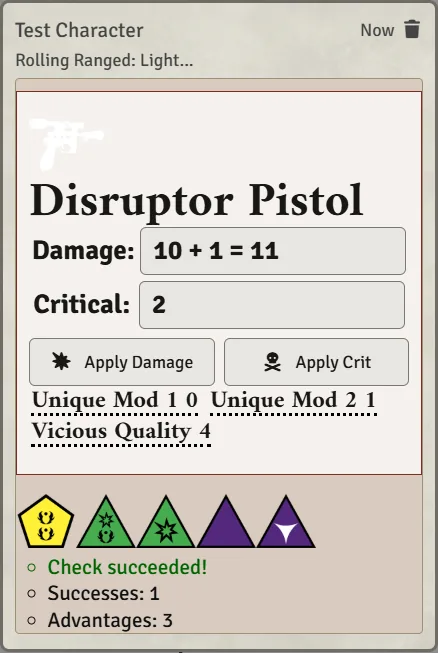
Both buttons act on your target: hover over the enemy and press T. Target before you roll. The dice dialog uses the target too, for Adversary and defence. Only the first target is used.
- Click Apply Damage.
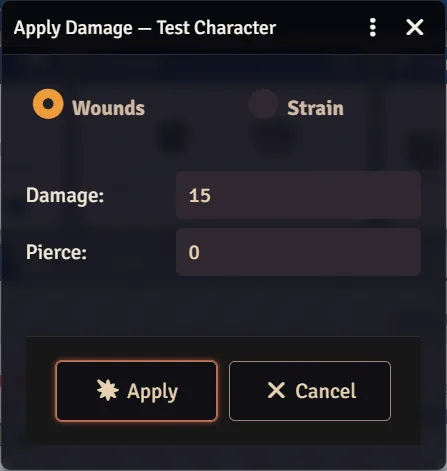
- Check the numbers. Both are filled in and you can change them:
- Damage: the weapon's damage plus the roll's successes.
- Pierce: the weapon's Pierce, plus 10 per rank of Breach. Against a vehicle, which has armour rather than soak, it is 1 per rank of Breach and the weapon's Pierce doesn't count.
- Choose where it goes: wounds or strain for a character or nemesis, hull trauma or system strain for a vehicle. Minions and rivals always take wounds.
- Click Apply.
The target's soak (armour, for a vehicle) is reduced by Pierce, and the rest of the damage is applied.
What people see: everyone gets a short line, "Stormtrooper takes 10 wounds from Blaster Rifle". That number is the damage before soak, so nobody can work the enemy's soak out from it; the sheet gets the smaller number after soak. Only the GM gets the breakdown with both.
- Hitting an enemy you don't own needs a GM online. Your click is passed to the GM's Foundry to apply. With no GM connected you get "No GM is connected…".
- Minion groups take damage into their shared pool, and members drop as it fills.
- Beskar and Cortosis armour stop Pierce and Breach entirely, including from an armour attachment. The GM's breakdown says so.
If the target has Parry and the attack was Melee, Brawl or Lightsaber, the dialog shows Apply Parry. If it has Reflect and the attack was Ranged or Gunnery, it shows Apply Reflect. Click it to have the target use the talent: the hit is reduced before soak, and the target suffers 3 strain in the same step (rivals suffer 3 wounds instead). Minions cannot voluntarily pay this cost and get no talent toggle.
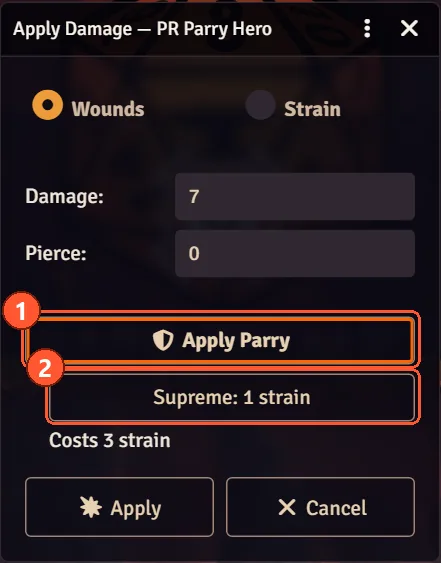
- The dialog never shows the target's ranks or how much is taken off; the GM's breakdown does. Everyone else just sees "… parries." or "… deflects." under the damage line.
- Supreme Parry / Supreme Reflect add a Supreme: 1 strain option, for a target that made no combat check last turn. Unarmed Parry (or reSpecialized's Unarmed Block) adds Unarmed: −1 strain against melee hits. Pick them yourself; the system can't tell which applies.
- The button is greyed out when paying the strain would incapacitate the target, and Apply is greyed out while the cost you picked would. A talent already selected stays selected if strain changes; turn it off yourself if you want to apply the hit without it.
- If Foundry says the client that applies damage runs an older version, ask everyone to reload.
The GM chooses the rules under Configure Settings → Star Wars FFG → Parry & Reflect → Configure Parry & Reflect: Vanilla (2 + ranks) or reSpecialized, and which talent names count for each. The reSpecialized option follows the fan ruleset's v.56: Block and Deflect cost 3 strain and take a flat 4 off the hit, whatever the ranks, and the toggle reads Apply Block or Apply Deflect. Parry and Reflect, from characters built before reSpecialized replaced them, are treated the same way.
The button is greyed out unless the weapon has a Crit rating above 0 and the roll earned a critical: advantages at least equal to that rating, or a Triumph. A weapon with no Crit rating never enables it.
- Click Apply Crit.
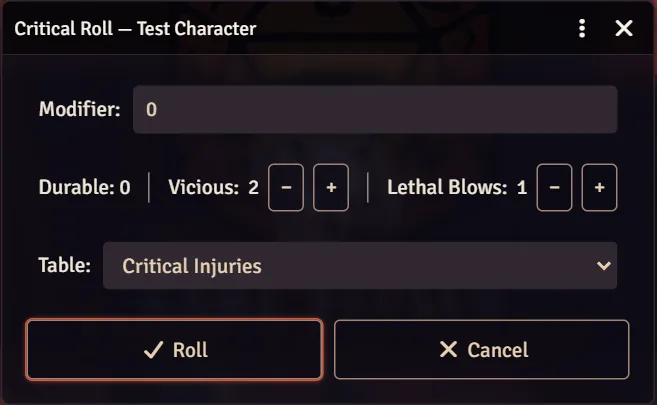
- Check the Critical Roll dialog:
- Modifier: +10 for each crit the target already has. This is filled in for you.
- Durable: the target's Durable talent, subtracted automatically.
- Vicious: the weapon's Vicious rating, +10 per rank. Use − / + to change it.
- Lethal Blows: the attacker's Lethal Blows talent, +10 per rank. Use − / + to change it. Not shown for a vehicle, since the talent only adds to Critical Injuries.
- Table: Critical Injuries for characters and NPCs, Critical Damage for vehicles.
- Click Roll.
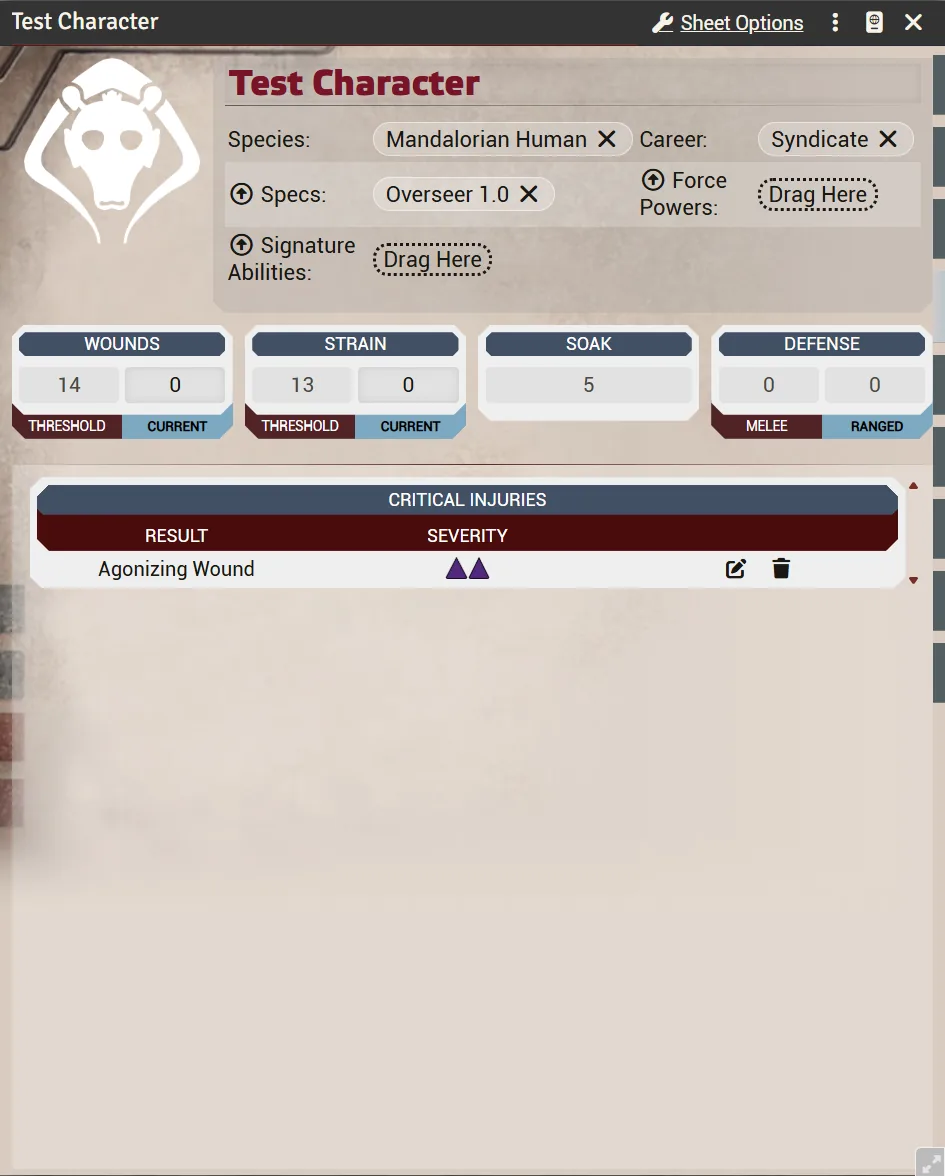
The result is posted to chat, the injury is added to the target's sheet, and its description is shown so everyone knows what it does. Both messages go to the same people who saw the attack, so a whispered or blind attack keeps its crit private.
- You need the tables first. "No critical table found in this world" means the GM hasn't built them yet. See chapter 3.
- A crit on a minion group kills one minion instead of rolling. On a minion vehicle group it destroys one ship.
Weapons can track a magazine, and a weapon at zero refuses to roll with "Not enough ammo!" There are two modes:
- Per weapon (default). Tick Enable Ammo in the weapon's Sheet Options. The card shows a magazine you reload by hand.
- From the Limited Ammo quality. With the world setting Use Limited Ammo Quality on (Configure Settings → Star Wars FFG → Combat Settings → Configure Combat), the weapon's Limited Ammo quality provides the magazine size instead, and the per-weapon tick is disabled with a note saying so.
Each roll of the weapon spends one round. On the Codex sheet the ammo chip is on the expanded weapon card with − / + buttons.
With the FFG Star Wars Enhancements module's special ammo, a loaded special ammo takes the place of this counter: each shot spends from it and its spare magazines, and "Not enough ammo!" appears only when those run out. Choose no special ammo to go back to the weapon's own counter.