Repository navigation
Tutorial 16 More worth knowing
Smaller features and settings the earlier chapters don't need, gathered here so you know they exist. Everything lives under Configure Settings → Star Wars FFG unless stated otherwise.
- Ruleset Settings → Configure Ruleset: Choose Ruleset switches the dice and symbols between Star Wars and Genesys, plus the vehicle range system, the skill theme and whether the Force die appears in the roller.
- Parry & Reflect → Configure Parry & Reflect: the Vanilla or reSpecialized rules for Parry and Reflect in Apply Damage, and which talent names count as them (see chapter 12).
- Localization Settings → Configure Localization: rename Credits, Obligation, Duty, Morality and Conflict to whatever your game calls them, and sort skills by their translated names.
- Skill List Import: import a JSON skill list, which then feeds the skill theme and every new actor. This is the supported way to add or replace skills.
- Adversaries Dataset Importer, next to the OggDude importer in the Compendium sidebar footer, imports an SWA adversary set: a quick NPC library. See chapter 1.
- The d20 button in the chat controls opens an empty dice pool for an ad-hoc roll.
- Drag a weapon or a skill onto the hotbar to make a macro that rolls it.
- Enable Roll Audio and its playlist setting let rolls play a sound.
-
Item modifiers and attachments. Item sheets can add modifiers, install attachments, set ranks and switch individual modifiers on or off; the cog opens a modifier in its own window. Vehicle attachments count against hard points. This is the homebrew layer under chapter 6's Active Effects.
-
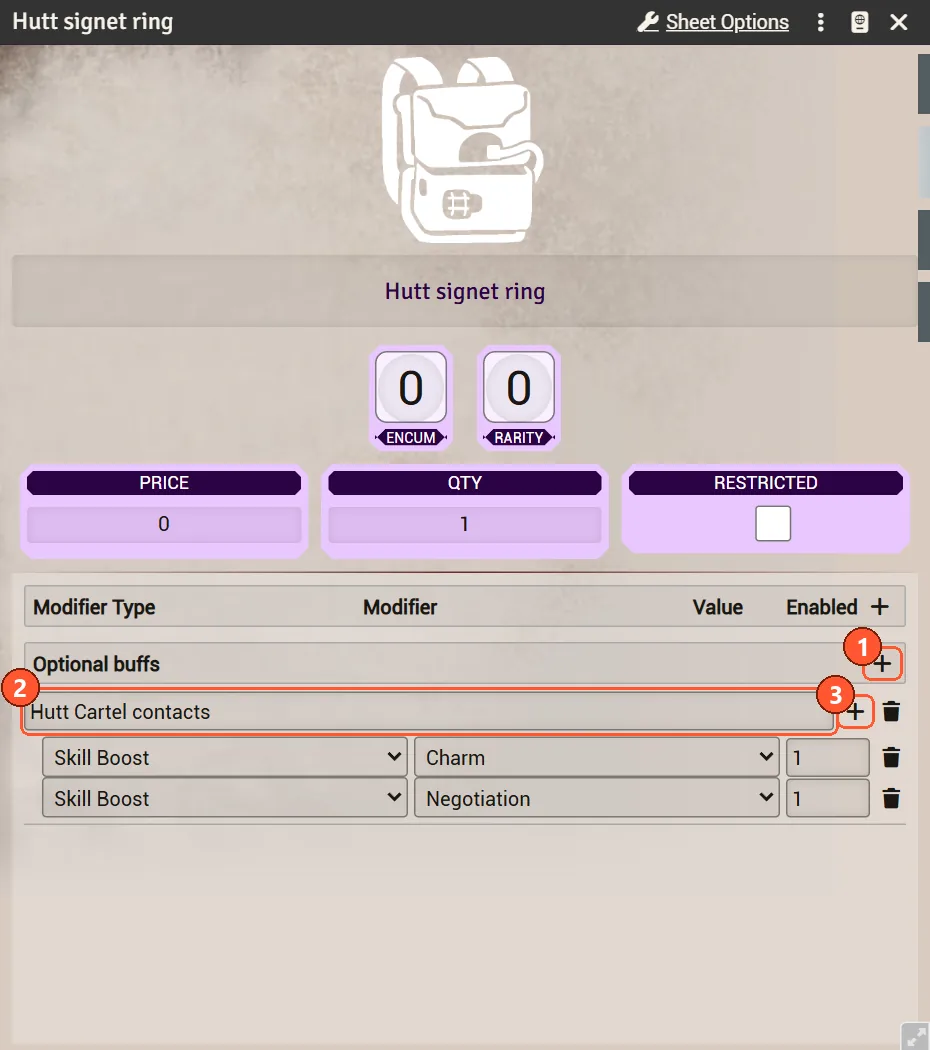
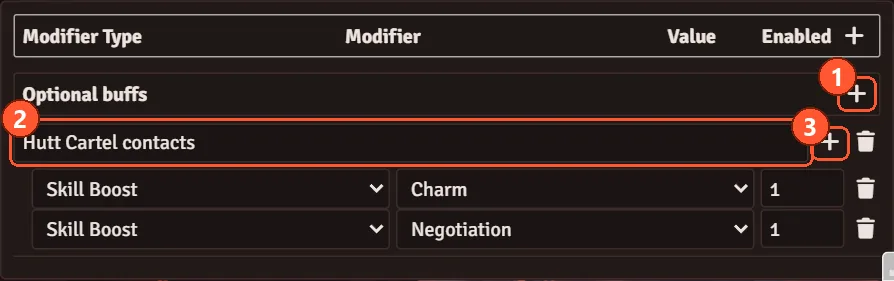
Optional buffs. Weapons, armour, gear, talents and attachments have an Optional buffs block under their Modifiers, on both sheet styles. Click its + (1), name the buff (2), such as "Hutt Cartel contacts", and add rows with the buff's own + (3): the same kinds as modifiers, such as skill boosts and setbacks, extra ranks, added symbols and dice upgrades. A buff does nothing until the player ticks it in the dice dialog (chapter 9).
- Armour offers its buffs only while equipped; weapons and gear while carried; talents always.
- Rows count once per item in a stack and once per talent rank. A weapon's own attack rows count once, on attacks with that weapon.
- A talent dropped into a specialization tree, or an attachment installed on a weapon, keeps the buffs it had at that moment, as it does its modifiers.
-
Roll options (GM). What a talent or quality offers on the dice dialog's roll options card (chapter 9) is written as JSON in a macro, and the item links to that macro. Editing the macro changes every item that links it.
-
Getting started: run
game.ffg.rollOptions.installLibrary()once, as the GM, from a script macro. It creates a macro for each entry in its library, in a Roll options macro folder: the Auto-fire quality and about 210 talents from the core and reSpecialized trees, such as Guns Blazing, Saber Swarm, Master Slicer and Quick Strike. Then it links them into every matching talent and quality on your actors, world items, unlinked tokens and unlocked compendiums, and whispers you a report. Running it again adds what is missing and brings any library macro you never edited up to the library's current text, in place, so its links keep working; it never overwrites a macro you edited (the report names those whose library text changed) or a link you set. Locked compendiums are skipped and named in the report. -
After an update that changed library talents (Rapid Reaction, Get The Drop, On The Lookout and Ready for Anything moved to initiative rolls), run
installLibrary()once more to update those macros. -
What a ticked talent can do: add dice or results (Advantage, Success, Triumph, Threat), add your Force dice (your Force rating less the dice you have committed, once per check), read the Destiny pool (Beginner's Luck), trade Boost dice for results (Assassinate (Improved), Clanker Killer), roll with another characteristic or skill (Blending In, Martial Prowess), or lower the difficulty, taking difficulty dice first and then challenge dice, down to a floor such as Easy. Against The Odds only shows on a Daunting check or harder. An either/or talent (Gatherer, Clanker Killer) has a switch under its row, and the chat card names your pick.
-
"By hand" in a hint means the dialog can't do that part of the talent, such as spending Force points, adding damage or spending a Destiny Point.
-
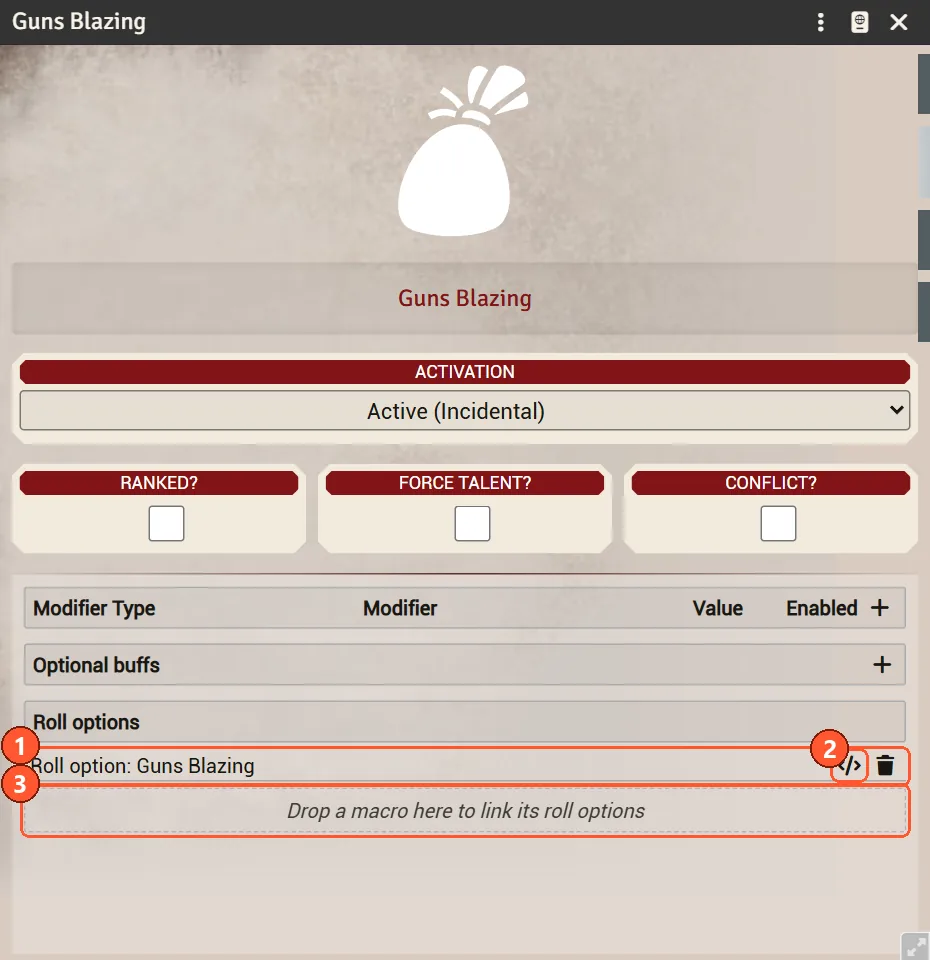
Linking by hand: talent, weapon, armour, gear, attachment and quality sheets have a Roll options list under Optional buffs, shown to the GM only. The windows that edit a quality or attachment on a weapon, and a talent in a specialization tree, have one too. Each row is a linked macro (1): open it to edit its JSON (2), or use the bin to remove the link. Drop a macro from the macro directory or the hotbar onto the list (3) to link it; a macro whose JSON has errors is refused, with the errors listed. Players cannot change the links.
-
Writing the JSON: a macro holds one option or a list of them. Every key is optional:
Key What it does label,hintThe row's name (the item's name if left out) and a short reminder under it, such as "Once per round". offerWhen the row appears: skills(such as["Ranged: Light"]),skillTypes(Combat,General,Knowledge,Social,Magic),attack: truefor attacks only,twoWeapons("same","different"or"any"), which greys the row until Two weapons matches,minDifficulty(such as4for Daunting), which greys it until the check has that many difficulty and challenge dice, andinitiative:truefor initiative rolls only,falseto keep it off them.amountLets the player pick a number from 1 to max: a number,"ranks","forceRating","forceAvailable","destinyLight"or"destinyDark". Leavemaxout for no limit but the strain the character can take.labelnames the box.coststrainandmaneuvers: a number, or"amount"to follow the amount picked. Rivals pay strain as wounds.diceboost,setback,removeSetback,difficulty,upgradeAbility,downgradeAbility,upgradeDifficulty,downgradeDifficulty, the resultssuccess,advantage,triumph,threat,failure,despair,force(Force dice) andremoveBoost(Boost dice traded away, up to those in the pool): a number (negative takes away) or a word:"ranks","amount","forceRating","forceAvailable"(Force rating less committed dice),"destinyLight","destinyDark"(the Destiny pool), with a minus in front to take away ("-ranks").difficultyFloorLowering the difficulty stops at this many dice ( 1is Easy).characteristic,skillRoll with this characteristic (such as "Cunning") or with this skill's ranks instead.choicesAn either/or row: a list of {"id", "label", "dice"}, shown as a switch; the picked one's dice add to the option's.Guns Blazing, for example:
[{"label": "Guns Blazing", "offer": {"skills": ["Ranged: Light"], "twoWeapons": "same"}, "cost": {"strain": 2}, "dice": {"difficulty": -1}}] -
Saving an option macro with errors warns you and lists them; the dice dialog skips that macro until it is fixed.
-
-
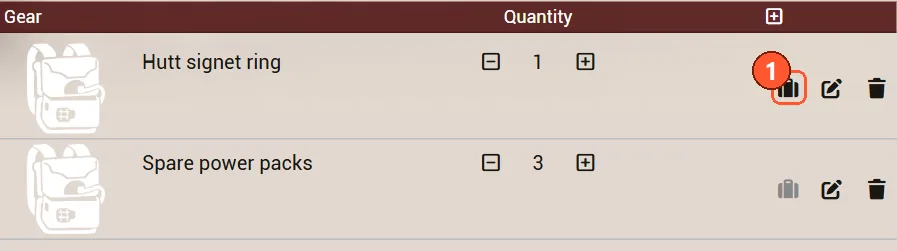
Carried. Weapon, armour and gear rows have a suitcase toggle (1) on both sheet styles. Untick it for things left on the ship or at base: they stop counting toward encumbrance and offer no optional buffs. A greyed suitcase means not carried.
-
Damaged items. An item's damage condition adds setback to rolls with it, and a badly damaged one refuses to roll at all.
-
Sheet Options hold more per-document toggles than the chapters mention: Enable Force Pool, Enable Strain Threshold, Enable Critical Injuries, Enable Auto Soak Calculation and a per-actor healing item name; vehicles add Enable Hyperdrive, Enable Sensors and their defence zone layout; items add Enable Price and Enable Rarity.
- UI Settings → Configure UI: the UI theme, a replacement paused icon, and the six colours for token wound and strain bars. It also holds Dice Simulation Mode and Dice Simulation Count, which drive the "Success chance" figure in the roll dialog (chapter 9).
- Show Minion Count and Show Adversary Count put group size and Adversary ranks on tokens.
- Prepend Adjective to rival tokens gives unlinked rival tokens a random adjective, so three bounty hunters aren't all called the same thing.
-
Dice glyphs in text. Typing
:advantage:,:average:or[AB]in a journal entry or chat message renders the symbol or dice. Handy for writing encounters. - The pop-out editor, the expand button on any description field, is where those glyphs are easiest to insert.
- Tour Management (Foundry's own Game Settings) has two guided tours: Actor Guide and Edit Mode. Both use the Default sheet.
- Homestead actors are a separate actor type with Description, Upgrades and Item Storage tabs, on the Default sheet only.
- Show GM Characters in Group Manager adds GM-owned characters to the party list (chapter 4).
- Enable Old World Compatability helps worlds carried over from much older system versions.
-
Repair commands. If content imported from a pack has broken effects or duplicated talents, a
GM can run these in the browser console (F12), starting with a dry run:
game.starwarsffg.repairModifierEffects({dryRun: true}), plusrepairCareerSkillEffects,repairDuplicateTalentsandreconcileModifierEffects.
Back to the contents.