Repository navigation
Artwork
A theme can show three kinds of picture besides its own: the album art of what plays, pictures from the playing track's folder, and a slideshow of the artist's fanart. The theme says where each goes; this page says where the pictures come from and what the Appearance tab of the Manager sets.
The art the player shows for the track, a file's embedded or folder art, a stream's or a service's own. A theme places it with albumart.pos and albumart.dimension, and may cut it with a mask, frame it with a border, or turn it as a record's label. Nothing to set: it is there whenever the player has it. Whatever plays through the player counts: its own library, a stream, a service, and a player driven from elsewhere, a Lyrion (Squeezebox) server through the Squeezelite plugin, UPnP or AirPlay, where the cover is the one the player's own page shows. A cover is known by its content (JPEG, PNG, GIF or WebP), not by what the server that hands it over calls it (from 0.8.31). Where a player gives one track's cover a new address at every state it pushes, as the Squeezelite plugin does, the cover on show stays until the next one has arrived (from 0.8.34). The pictures fetched to be shown, covers and fanart, are kept to the newest 48, on the player (glass-art in the temp dir), on a remote and in an open Face tab or Anymote page (from 0.8.32); one wanted again is fetched again.
A theme can show up to five pictures from the folder of the playing track: a back cover, a booklet page, a band logo. Name them as the theme's folderlayer.N.files say (back.png, logo.png by default) and put them beside the music. Files and folders only; a stream has no folder. A track in a cue sheet takes the pictures of the sheet's folder. The theme's folderlayer.N.scale says how a picture fills its box: fit (the default, the whole picture in proportion), stretch, or cover (the box filled, the picture's shape kept and the middle cut out). A remote display gets the pictures from the player, through its manager, a moment after the track starts.
A theme with a fanart.pos and fanart.dimension offers a box for pictures of the playing artist; the slideshow runs when the Appearance tab's switch is on. The theme's fanart.scale says how a picture fills the box: fit (the default), stretch or cover, as for a folder picture. Pictures are looked for in this order, and the first source that has any is used:
flowchart TD
    A[Playing artist] --> B{"Personal folder on the player? /data/albumart/personal/artist/<Artist>/"}
    B -- yes --> Z([Show those pictures])
    B -- no --> C{"<Artist>/fanart/ in the library?"}
    C -- yes --> Z
    C -- no --> D{"fanart.tv has pictures? (a key, and a MusicBrainz match)"}
    D -- yes --> Z
    D -- no --> E([Volumio's artist picture, one])
Put a fanart folder inside the artist's folder in your library, next to the album folders, and drop pictures in it:
Music/
  Queen/
    fanart/
      01.jpg
      02.jpg
      03.jpg
    A Night at the Opera/
      01 - Death on Two Legs.flac
    News of the World/
  Pink Floyd/
    fanart/
      01.jpg
    The Dark Side of the Moon/
| Where |
<Artist>/fanart/, at the artist level. Not inside an album. |
| Formats | JPEG, PNG, WebP. |
| Order | By file name; name them 01, 02, 03 to choose the sequence. |
| Priority | These pictures are used instead of fanart.tv's. |
| Scope | Files from the library, a NAS or a USB drive, since the track's folder is needed. Web radio and streaming fall through to fanart.tv and Volumio's picture. |
| Remotes | Work the same; the player finds the pictures and serves them. |
For an artist without a folder in the library (a streamed artist), the personal folder on the player, /data/albumart/personal/artist/<Artist>/, does the same.
With a fanart.tv key the slideshow fetches the artist's backgrounds from fanart.tv, looked up through MusicBrainz, whose first match is taken when its score is 90 or more. Register a project at fanart.tv (Account, API) to get a key of your own and enter it on the Appearance tab; the built in project key is for testing only, and with the key mode on Personal and no key entered this source is skipped.
Pictures found are copied for the display to a folder per artist under /data/plugins/user_interface/glass/fanart-cache/, named by the artist's name in lower case with every run of characters other than a to z and the digits as one -, or by a short code (u- and sixteen hex digits) for a name that has none of those. That folder is not where you edit; put pictures in the source folders above. Changes to your own folders are noticed on the next track, or at the next timed change; pictures from fanart.tv and Volumio are kept for fourteen days. Clear fanart cache on the Appearance tab drops the copies at once (the MusicBrainz lookups are kept).
The Appearance tab also holds the fonts the meters set their text in, one choice per text style: light, regular, bold, italic and the clock digits. Each style is set in one of three kinds of face:
- Built in. The plugin ships a multi-script set, PeppyFont in Light, Regular, Bold and Italic, covering Latin, Cyrillic, Greek, Arabic, Hebrew, Thai, the Indic scripts and Chinese, Japanese and Korean, and a seven-segment face, DSEG7, for the clock. A new install sets every style in it.
-
Uploaded. A font of your own, brought with "Upload a font": a TrueType or OpenType file (
.ttf,.otf), one face per file. Uploaded fonts are kept on the player under/data/INTERNAL/glass/fonts/, survive plugin updates, and are listed on the tab with the styles set in them; Delete removes one, and a style set in it goes back to the built-in face. -
Player fonts. The font files in the directory the meter configuration's
font.pathnames, Volumio's Lato on a player.
Save writes the choices into the meter configuration as font.light, font.regular, font.bold, font.italic and font.digi, and the display starts again with them. For the four text styles a value is builtin, a file name under font.path, or the path of an uploaded font. font.digi, the clock digits, takes the same (a file name under font.path from 0.8.42; before, only the built-in face or an uploaded font). Whatever the face, a character it lacks is taken from the built-in regular face, glyph by glyph, so a Latin artist with a Japanese title is set whole. A theme's own font for a field (the Skin-Creation-Guide has the keys) is used as named, with the same fallback. Remotes bring the built-in set, the player's fonts and the uploaded fonts from their player and set their text the same way.
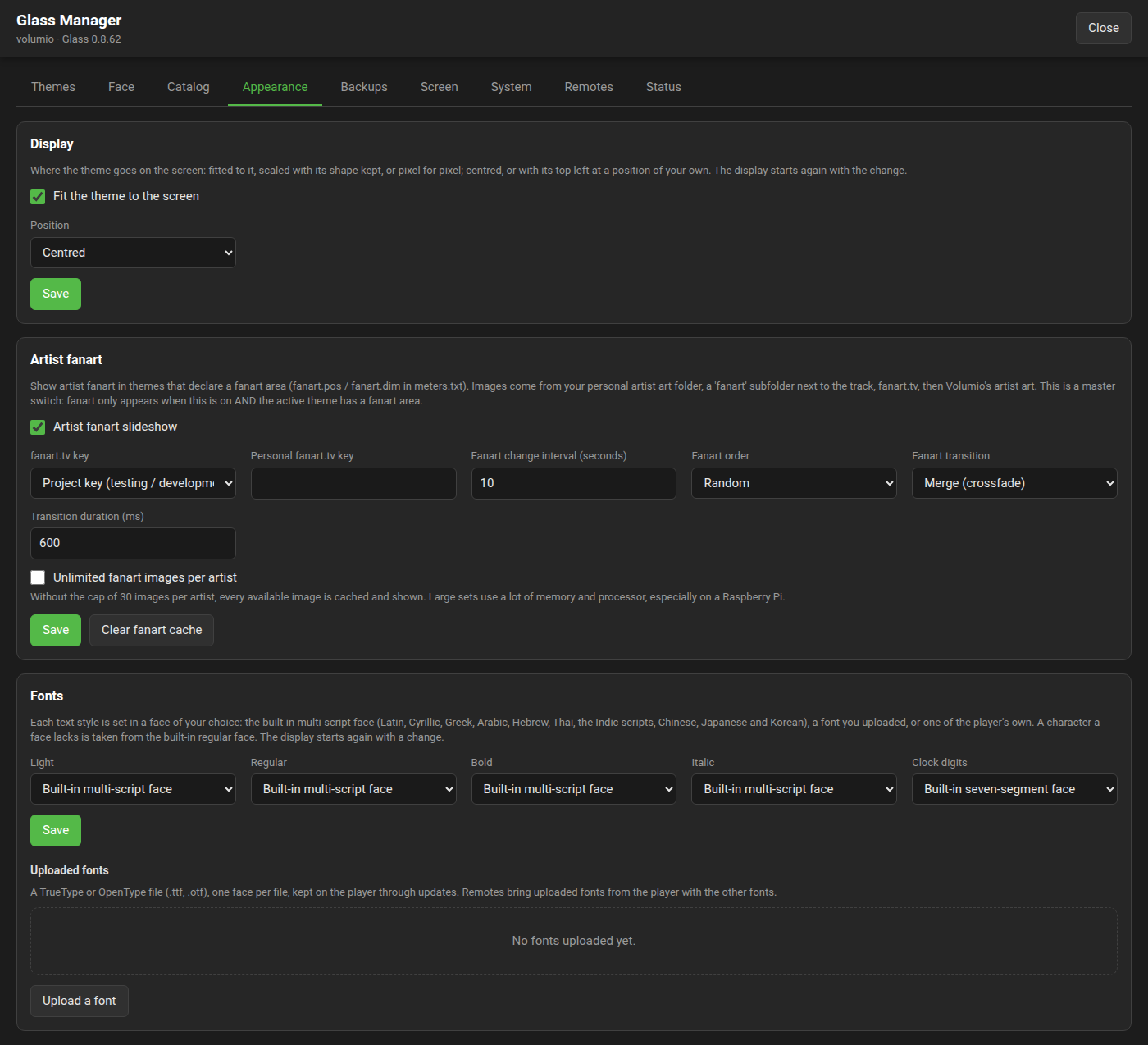
| Setting | Default | Meaning |
|---|---|---|
| Artist fanart slideshow | off | The master switch. Fanart shows only when this is on and the theme on show has a fanart box. |
| fanart.tv key | Personal key | Whose key fanart.tv lookups use: yours, or the project's for testing. |
| Personal fanart.tv key | empty | Your key. |
| Fanart change interval | 0 | Seconds between pictures, 0 to 3600, counted from the last change whatever the player does; a new track moves the picture on as well. 0 changes only with the track. |
| Fanart order | Sequential | File name order, or random. The show carries on when the meter changes while the artist stays (from 0.8.26; before, every change of meter started it again), so meters rotating at random do not restart it. |
| Fanart transition | None | How pictures change: at once, a fade out and in, or a merge of the two. |
| Transition duration | 600 ms | The fade's or merge's length, 50 to 3000 ms. |
| Unlimited fanart images per artist | off | Lifts the cap of thirty pictures per artist. Large sets take memory and processor time, most of all on a Raspberry Pi; leave it off unless you know the sets. Turning it on clears the cache. |
| Clear fanart cache | Drops the cached copies now. |