Repository navigation
Settings
The plugin's settings page, under Settings, Plugins, Installed Plugins, Glass, holds what operates the display. What manages it is in the Manager, which the page opens: themes and Car Dash, the catalog, artwork and fonts, backups, the screen, remotes, the network share, the performance profile, logging, upgrades of Glass and of glass-evo, and the status sheet with its diagnosis.
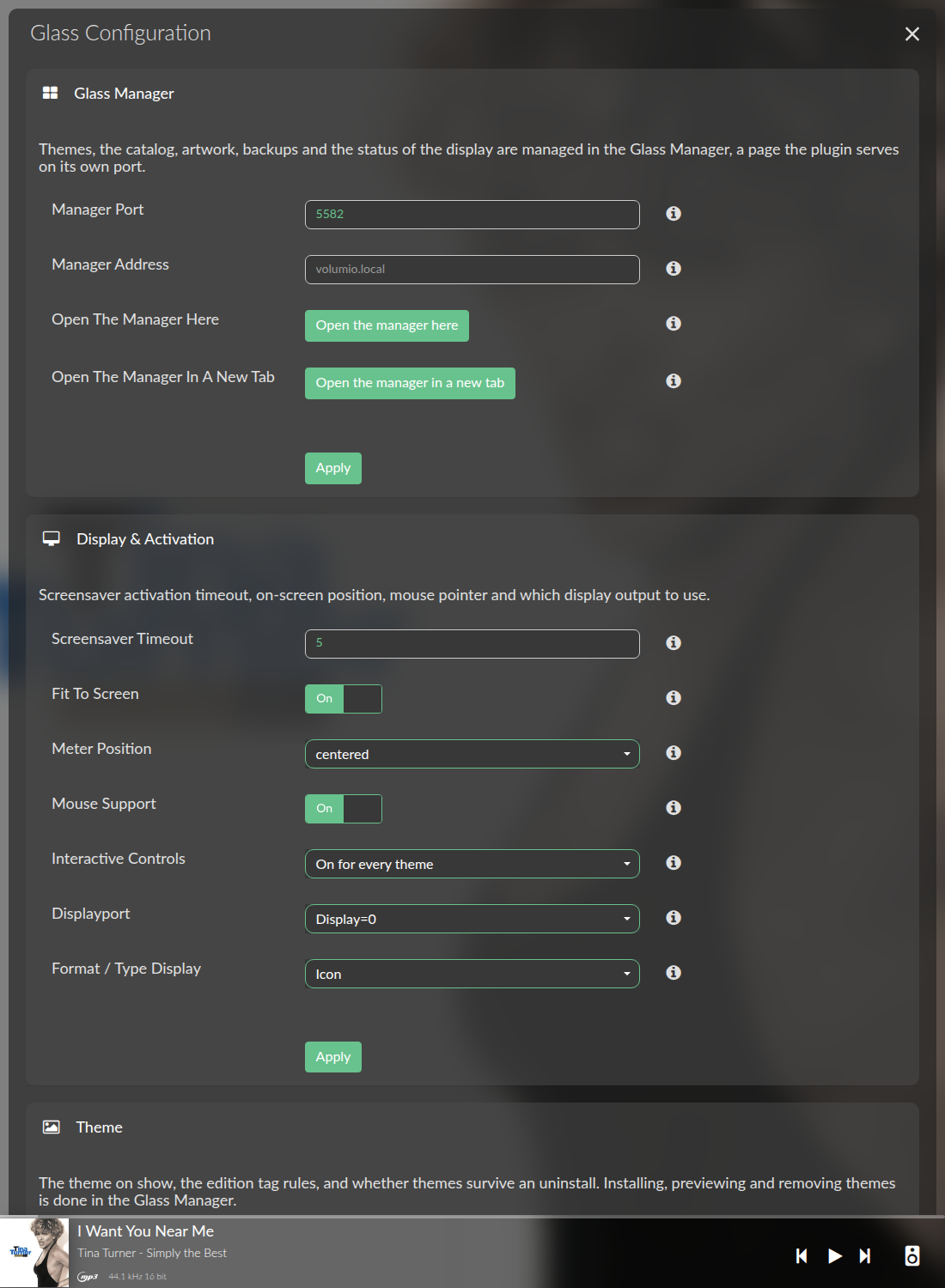
Each section has its own Apply. A change to the display's own settings applies at once: a display that is on the screen starts again with it, and one that is not reads it at its next start. A change to the Manager's port applies at once too.
While PeppyMeter Screensaver is still enabled on the player, the page opens with one section more, "PeppyMeter Screensaver is enabled", and its button Disable PeppyMeter Screensaver and start Glass: the two cannot share the audio path, and Glass stays off until that plugin is.
| Setting | Default | Meaning |
|---|---|---|
| Manager port | 5582 | The port the Manager listens on, 1024 to 65535. A new port is taken at once and the buttons follow; a port something else holds is refused and the old one stays. |
| Manager address | the player's name with .local
|
How browsers reach this player. Enter the player's IP address or a host name on a network where .local names do not resolve. |
| Open the manager here | Opens the manager in this window, inside Volumio's own page, with its way back. This is the button to use on the player's own screen. | |
| Open the manager in a new tab | Opens the manager in a tab of its own. |
| Setting | Default | Meaning |
|---|---|---|
| Screensaver timeout | 60 s | Seconds without a touch before the meters appear while music plays, 0 to 3600. A touch or a click brings Volumio's interface back, and the timeout runs again. Set the Touch Display plugin's own screensaver longer than this, or turn it off, so the two do not fight. |
| Fit to screen | off | The theme scaled to the screen with its shape kept, so any size in the catalogue can show; the bars left over take the background colour. Touches land on the theme's controls as before. |
| Meter position | centered | Where the theme goes, fitted or not: centred, or its top left at Position X and Y, a fitted theme pushed to the top or a corner as much as anywhere else. |
| Position X, Position Y | 0, 0 | The window's top left when the position is manual: X from -3840 to 3840, Y from -2160 to 2160 on this page (the Manager's Appearance tab takes twice that). Either may be negative from 0.8.11, to start a theme left of the screen's corner or above it. |
| Mouse support | on | On a touch screen, a touch dismisses the meters. Off for an HDMI screen without touch, so no pointer shows. |
| Interactive controls | as the theme says | Whether a theme's play, mute, shuffle and repeat indicators, its volume and progress bars and its buttons act when tapped: as the theme says (the meters that ask for it), on for every theme that draws them, or off for a pure screensaver. A tap outside a control still does what the touch settings say. Remote displays and the browser face (Anymote) follow this setting. The Meters-Reference has the theme keys. |
| Displayport | Display=0 | Which X display the window opens on: Display=0 is the player's own screen, Display=1 a second one; a change holds from the display's next start. "No screen of its own: remote displays only" opens no window at all: the tap measures as ever and the player serves remote displays, for a player in a rack. |
| Format / type display | Icon | How a theme's type area shows the format or service: an icon, a text label, or both. A theme may fix its own with playinfo.type.mode. |
| Setting | Default | Meaning |
|---|---|---|
| Active meter folder | the theme on show | The home theme: the one shown when no edition tag rule matches. The Manager's Themes tab sets it too, with previews. The plugin ships with its bundled 800x480 theme on show. |
| Edition tag themes | empty | Rules that pick a theme from a bracketed tag in the album or folder name, so a vinyl rip opens a turntable theme and a tape rip a cassette; 800 characters at most. See below. |
| Do not delete themes | off | On: an uninstall leaves /data/INTERNAL/glass as it is, with the themes, the settings backups, the uploaded fonts and everything else Glass keeps there. Off: the uninstall removes that folder. An install or an upgrade never overwrites a theme that is there, either way. |
Entries are separated by commas or new lines:
Vinyl=1920x1080_name_Vinyl, Tape=1920x1080_name_Tape, SACD=1920x1080_name_Sacd
The left side is the text inside the brackets, matched without regard to case; the right side is a theme folder as the Manager lists it, which must be installed. At the start of playback the album name is read first, then the folder that holds the file; the last [...] group in the name is the tag, and anything after the bracket is ignored.
| Name | Tag |
|---|---|
The Dark Side Of The Moon [Vinyl] |
Vinyl |
Meddle [Tape] 1971 |
Tape |
[1973] The Dark Side Of The Moon [SACD] MCH |
SACD |
the album The Dark Side Of The Moon, in a folder [1973] The Dark Side Of The Moon [Vinyl] 2016
|
Vinyl, from the folder, since the album name has no tag |
Dark Side Vinyl |
none: a word outside brackets does not match |
The Manager's Themes tab has the same two settings, the rules and "Do not delete themes", under "Theme settings".
A match puts that theme on show for the album, as choosing it in the Manager would; the home theme stays what it is, so the next album without a tag comes back to it. A remote display that follows the player follows the change.
| Setting | Default | Meaning |
|---|---|---|
| VU-Meter | Random | Which meter of the theme shows: one by name, Random for all of them in turn, or List for the ones named below. The Manager's Themes tab sets the same with previews. |
| VU-Meters for list | empty | The meters for List, separated by commas; the available names are listed under the field. |
| Random mode | On title change | Whether the next meter comes with the next title or after the interval. Shown while the meter is Random or List. |
| Random interval | 60 s | Seconds between meters, 15 to 1000. |
| Smooth needle | 2 | The needles' inertia, 2 (quick) to 15 (lazy): how many measurements are averaged. |
| Meter sensitivity | 0 dB | -12 to 12 dB. Adds to or takes from the needles' deflection without touching the sound: positive for quiet or ReplayGain-normalised material, negative for hot masters. |
| Setting | Default | Meaning |
|---|---|---|
| Frame rate | 30 | Frames a second, 10 to 60. Needle meters need no more than 30; records, reels and the analyser look smoother at 60. Glass paints only what changed, so a still theme costs little at any rate; the analyser repaints its box every frame, so 30 suits it on a Raspberry Pi 4; 20 suits a Pi 3 with a large spectrum, 15 a Zero 2 W. |
The Manager's System tab sets the frame rate, the rotation quality and the transitions together as a profile; a value changed here by hand makes the profile Custom. The Performance page has the profiles.
| Setting | Default | Meaning |
|---|---|---|
| Rotation quality | Custom | How often turning pictures are redrawn: Low at 4 times a second, Medium at 8, High at 15, or Custom with the values below. A performance profile from the Manager's System tab sets Low, Medium or High; the shipped configuration is Custom at 25. |
| Rotation FPS | 25 | The custom rate, 4 to 30. |
| Vinyl rotation speed | 2.0 | A multiplier on the theme's record speed, 0.1 to 5, with Custom quality. |
| Left spool speed, Right spool speed | 1.0 | Multipliers on the theme's reel speed, with Custom quality. |
| Adaptive spool speeds | on | Reels turn as real ones do: a full reel slowly, an empty one fast, with the progress of the track or the queue. |
| Reel rotation direction | Counter-clockwise | The reels' direction, for themes that do not say. |
| Setting | Default | Meaning |
|---|---|---|
| Scrolling mode | Custom | Where the scrolling speed comes from: the theme's meters.txt (40 when it says nothing), the default of 40, or the three values below. |
| Artist, Title, Album scrolling speed | 10, 8, 8 | Pixels a second, 5 to 200, with Custom mode. |
Scrolling direction and the ticker are the theme's; the Meters-Reference has them.
| Setting | Default | Meaning |
|---|---|---|
| Start/Stop Animation | on | Fade the meters in when they appear and out when they leave. |
| Transition effect | Fade | Fade, or none. |
| Transition duration | 0.5 s | 0.1 to 5 seconds. |
| Transition color | Black | The colour faded through, black or white. |
| Transition opacity | 100 percent | How solid the fade is, 0 to 100. |
The same fade plays between meters when the theme rotates them.
| Setting | Default | Meaning |
|---|---|---|
| Keep display active after pause/stop | 30 s | How long the meters stay after playback pauses or stops, so a track change (which the player reports as stop then play) does not blink the screen, and a short pause does not restart the display. Disabled, 5 s, 15 s, 30 s, 1, 2 or 5 minutes. |
| Time display during persist | Freeze | While paused: keep the track's time as it was, or count down to when the display leaves. |
| Queue progress mode | Single track | Whether reels and the tonearm follow the track or the whole queue. A stream, or an empty queue, follows the track. |
| File | Holds |
|---|---|
/data/configuration/user_interface/glass/config.json |
The settings page's values and the manager's own. |
/data/plugins/user_interface/glass/config/meter.txt |
The display's meter configuration: the theme on show, the meter selection, and the values above that the display reads. |
/data/plugins/user_interface/glass/config/spectrum.txt |
The spectrum configuration: where the spectrum themes live, and under [current] the size, the number of bars a theme of the previous engine's kind draws (20 unless set). |
The three are what a backup holds; the Backups page has how they move between players.