Repository navigation
Spectrum
A theme can show a spectrum analyser beside or instead of its meters. The meter section in meters.txt places the spectrum box; the spectrum's own look, bars, colours and reflection, comes from the spectrum theme of the same name under the spectrum templates tree.
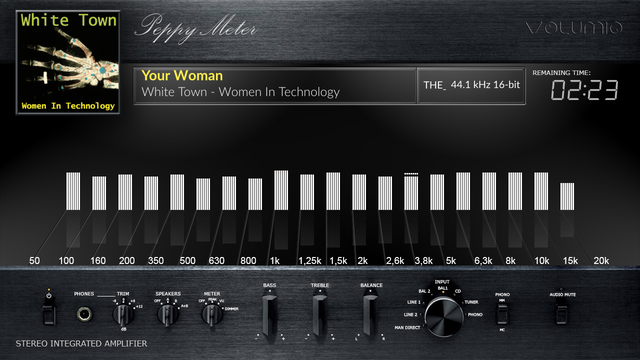
[black-white-spectrum]
config.extend = True
spectrum.visible = True
spectrum.name = black-white
spectrum.size = 400,200| Key | Meaning |
|---|---|
spectrum.visible |
True shows the spectrum, False or absent hides it. The section needs config.extend = True. |
spectrum.name |
The section of the spectrum theme to draw. Required: without it no spectrum is drawn. A comma list, left, right, draws several boxes, one per section named, in that order. |
spectrum.size |
Width and height of the box in pixels, of every box when there are several. Required: without it no spectrum is drawn. |
spectrum.2.size, spectrum.3.size, … |
The size of the second box, the third, and so on, when it differs. |
The box's place on screen is the spectrum section's own spectrum.x and spectrum.y, below; a spectrum.pos in the meter section is not read. Everything the spectrum draws is clipped to its box. A classic layout with a face per channel takes a spectrum per face: two sections, one with channel = left and one with channel = right, each at its own position, named together in spectrum.name. The box sits just above the needles or bars in the drawing order: above the background, the reels, the record, album art, background artwork and the needles; below texts, the tonearm, the indicators, overlay artwork and the foreground picture.
Spectrum themes live beside the meter themes, in a folder of the same name under templates_spectrum; a theme zip from the Catalog carries both when the theme has a spectrum. Each [section] of the spectrum theme's spectrum.txt describes one look:
[black-white]
spectrum.x = 100
spectrum.y = 300
origin.x = 10
origin.y = 190
steps = 25
bar.type = color
bar.color = 220,220,220
bar.width = 12
bar.height = 180
bar.gap = 3
topping.height = 3
topping.step = 2
reflection.type = gradient
reflection.gradient = (60,60,60),(10,10,10)
reflection.gap = 4
bgr.type = color
bgr.color = 0,0,0| Key | Meaning |
|---|---|
spectrum.x, spectrum.y
|
The box's top left on screen. |
channel |
mean (default), left or right (also l, r): the one channel this box draws, whatever its layout says; a section for a box of its own beside another channel's. A section that names left or right asks for a two-channel bank. The previous engine's bars take the mean whatever is said. |
origin.x, origin.y
|
Inside the box, the first bar's left edge and the baseline the bars rise from. Default 0. |
steps |
A bar rises in bar.height / steps pixel steps. Default 1. |
bins, channels, scale, window
|
What the tap measures for this spectrum: the bands (1 to 256, over 20 Hz to 20 kHz), the channels (1 for the two channels' mean, 2 for each; in an analyser section channels = 1 also draws one set of bars, see layout), the scale (log, mel or linear) and the FFT window (2048, 4096, 8192 or 16384 samples; another value is rounded up to the next; with none named the band count picks it, 4096 up to 64 bands, 8192 up to 128, 16384 above). A section that names some of these and no bins is measured at 256 bands; a theme whose sections name none is measured at the bar count rounded up to 32, 64, 128 or 256, on the log scale, two channels. The player measures one bank for the whole spectrum theme: the most bands any section names, two channels when any section asks or none says, the first scale named, the longest window. |
bar.type |
color (one colour), gradient (a vertical gradient), image (bar.filename, a picture stretched to the bar) or image.extended (a picture stretched to the layer). |
bar.color, bar.gradient, bar.filename
|
The bar's colour (r,g,b or r,g,b,a), gradient stops ((r,g,b[,a]) groups separated by commas, the first colour at the bottom) or picture. |
bar.width, bar.height, bar.gap
|
The bar's size (default 1 by 1) and the space between bars (default 0), in pixels. |
topping.height, topping.step
|
A peak marker of that height, falling step pixels a frame after the bar drops. 0 for none. |
reflection.type, reflection.color, reflection.gradient, reflection.filename, reflection.gap
|
A mirrored reflection below the bars, styled like the bars, gap pixels under them. |
bgr.type, bgr.color, bgr.gradient, bgr.filename
|
The box's own background: a colour, a gradient or a picture, centred in the box. |
fgr.filename |
A picture over everything, centred in the box. |
The number of bars is not a theme key: it is size under [current] in the plugin's config/spectrum.txt, 20 unless set, and the bank's bands are regrouped into that many bars on the previous engine's logarithmic frequency scale. The Contracts page has the exact drawing rules, including how a bar picture and a reflection picture are scaled.
A section with style = bars is drawn by the analyser rather than by the bars above: bars drawn straight into the box from a palette, per channel, with peaks that hold and fall, in one of four channel layouts, mirrored and reflected as asked. The keys follow audioMotion-analyzer's controls, name for name where the meaning is the same and with the same defaults but for the level range, so a configuration made for one ports to the other. The section's bgr.* and fgr.filename are still drawn, under the analyser's box, and show through it with bgr.alpha below 1; the old bar keys left in a style section would draw under the analyser too, so a style section carries none.
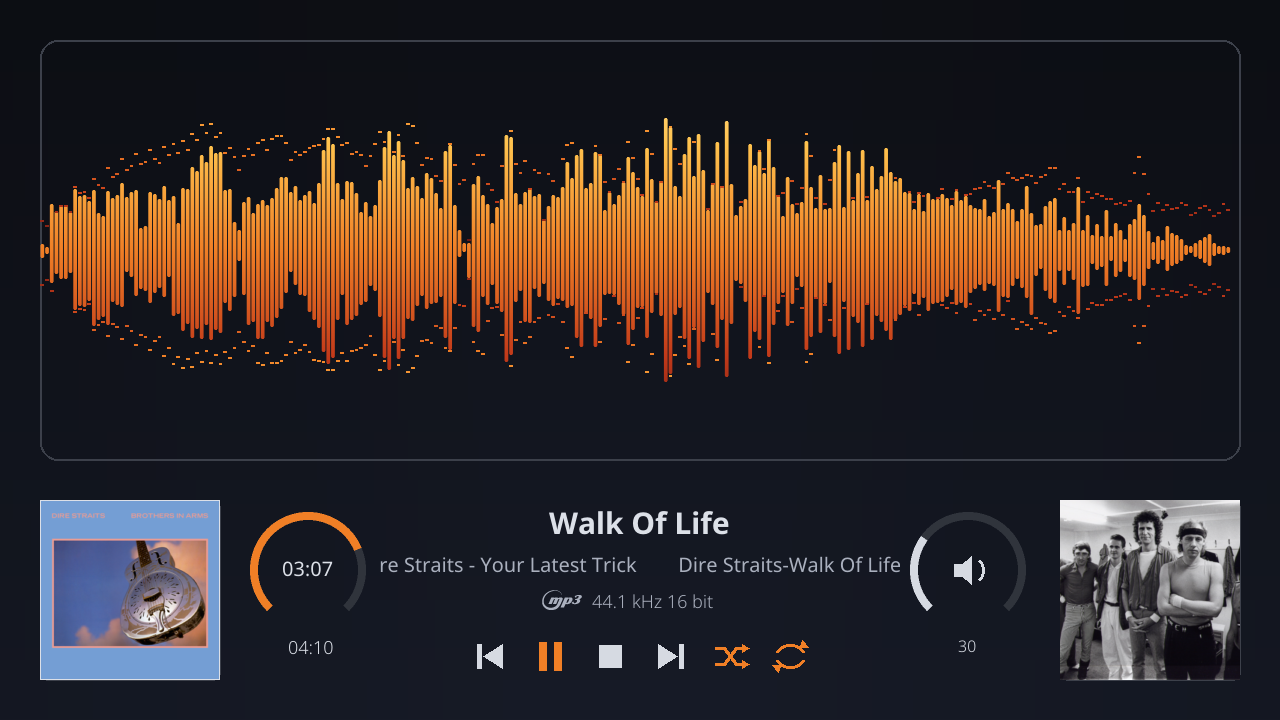
[studio]
style = bars
bins = 128
channels = 2
scale = log
layout = dual-vertical
palette = ember
color.mode = gradient
bar.space = 0.15
bar.round = True
peaks = True
peaks.hold = 500
gravity = 3.8
reflex = 0.25
reflex.alpha = 0.2| Key | Default | Meaning |
|---|---|---|
style |
bars: the analyser's bars. graph (also area, line): the band levels joined into a line across the box, the area under it filled at fill.alpha in the palette and the line drawn line.width pixels thick (0, the default, draws the fill alone); color.mode = index colours by the place across the box. dots: a disc per band at its level, dot.size pixels across (0, the default, seven tenths of a band's width), the peaks as smaller discs. waterfall (also spectrogram): a spectrogram, each frame's levels written as a row of colour at the base of the box (the palette by level in gradient and level modes, the band's colour at the level's opacity in index) and moved away waterfall.speed rows a frame (1) towards the far edge, or the other way with waterfall.reverse; the box keeps as many frames as it has rows. Absent, or any other value: the engine's bars from the keys above. |
|
dot.hold |
False |
In the dots style, the dot sits at the band's held peak and falls with it (peaks.hold, gravity), a constellation of peaks; no separate peak mark is drawn. |
range |
20, 22000 |
The bands drawn, in hertz, a crop of the bank, which itself stops at 20 kHz. |
level.range |
-60, 0 |
The decibels of an empty bar and of a full one. A band of the bank reads hotter than a browser's single bin, a full-scale sine reading 0 dB in its band, so the default is not audioMotion's -85, -25; a configuration ported from it wants its range raised by about 25 dB. |
level.scale |
log |
linear draws the amplitude itself, raised to one over level.boost (default 1) to lift quiet bands. |
weighting |
none |
A, B, C, D or 468 (also itu468, itu-r 468): a weighting curve applied to each band by its centre frequency. off is none. |
smoothing |
0.5 |
How much of the last frame's bar stays each frame: 0 follows every reading, 1 never moves. |
peaks, peaks.hold, gravity, peaks.fade
|
True, 500, 3.8, off
|
A mark at each bar's peak, held for peaks.hold milliseconds, then falling at gravity thousands of pixels a second squared, or fading out over peaks.fade milliseconds instead (on or true is 750; off, false or 0 none). |
peaks.line |
False |
In the graph style, the peaks joined into a line of their own instead of a mark per band. |
bar.space |
0.1 |
The gap between bars: below 1 a share of a bar's pitch, else pixels. |
bar.round |
False |
Rounded tops. |
bar.outline, line.width, fill.alpha
|
False, 0, 1
|
Bars as outlines of line.width pixels (rounded to whole pixels, at least 1), filled inside at fill.alpha. fill.alpha also dims plain and LED bars. |
led, led.max, led.space, led.true
|
False, 0, 0.25, 0.3, False
|
Bars as columns of LEDs: led.max cells per bar (0 fits as many square cells as the bar's width allows), the vertical gap the first led.space value as a share of a cell (at most 0.9), the horizontal inset the second as a share of the bar below 1, else pixels; with led.true each LED is in the colour of its own height, as a column of lamps. |
lumi |
False |
Every bar full height, its opacity the level; no peaks, and fill.alpha does not apply. |
alpha |
False |
Each bar's opacity its level. |
mirror |
0 |
1 draws the bands on the left half and their mirror image on the right, the treble meeting in the middle; -1 the other way round, the bass meeting. |
layout |
single |
single draws the two channels' mean, band by band. dual-vertical draws the left channel on the top half rising and the right on the bottom half hanging from the middle. dual-horizontal draws the left channel on the left half and the right on the right. dual-combined draws both over each other, the right channel at half opacity. vertical, horizontal and combined are read as the same. A section that asks for a one-channel bank (channels = 1) draws as single whatever is asked, and a section that names a channel draws that one channel, likewise. What plays never changes the layout: a recording alike on both channels shows the same on both sides (before 0.8.15 it drew as single). |
palette |
classic |
A shipped palette by name: classic, orangered, prism, rainbow, steelblue, aurora, ember, ice, violet, mono; or the theme's own stops separated by commas, each #rrggbb, #rrggbbaa or (r,g,b[,a]), with @pos for its place along the bar (0 the base, 1 the top; evenly spaced without) and /level for the bar level from which it takes over in color.mode = level. |
palette.left, palette.right
|
the palette | A palette per channel in a dual layout. |
palette.split |
False |
In dual-vertical, unless the section draws one channel (channels = 1, or a channel named), the palette runs over both halves: the top channel shows its upper colours, the hanging one its lower. |
palette.dir |
v |
h runs the palette across the bands instead of along a bar. |
color.mode |
gradient |
gradient paints the palette along each bar; index (also bar-index) gives each bar one colour by its place across the bands; level (also bar-level) gives each bar one colour by its level. |
reflex, reflex.alpha, reflex.bright, reflex.fit
|
0, 0.15, 1, True
|
The bottom reflex share of the box (up to 0.99) shows the bars upside down at reflex.alpha, their colours multiplied by reflex.bright (up to 4), squeezed to fit the share (reflex.fit) or cut. |
bgr.alpha |
0.7 |
How solid the box's black background is under the bars, letting the theme show through below 1. |
radial |
False |
The bands round a circle in the middle of the box instead of along a baseline: each band a sector, clockwise from the top, its bar growing out from the base circle to the rim. dual-vertical puts the left channel outside the base circle and the right inside it, growing inward; dual-horizontal gives the left channel the left half of the circle and the right the right half, both from the top; dual-combined lays the two over each other. mirror runs the bands over half the turn and back (1 and -1 alike, but in dual-horizontal). The palettes run along the bars, out from the base; color.mode, peaks, bar.space and alpha apply; led, lumi, bar.outline, bar.round and reflex do not. Radial draws bars whatever style says; sparkle, bar.glow, bar.fade and echo do not apply. |
radial.invert |
False |
The bars grow in from the rim towards the centre, radius saying how close to it they may reach. Not in dual-vertical. |
radius |
0.3 |
The base circle, as a share of the box's radius (the smaller of half its width and half its height). |
spin |
0 |
Revolutions a minute the radial picture turns at, clockwise for positive values (spin.speed is read too). |
scale.x, note.labels
|
False, False
|
A strip under the bars with the frequencies labelled (20, 50, 100 … 20k, those inside the bands drawn), a tick above each; with note.labels the notes C1 to C8 instead. One set per run of bands: each half of a mirror, each channel's side. Not in the radial look. |
scale.y |
False |
Decibel labels at the left of each bars area, every 10 dB of level.range (20 when the range spans 90 or more), with a faint line across at each. Not with level.scale = linear, lumi or the radial look. |
scale.size, scale.color
|
11, 180,180,180
|
The labels' size in pixels and colour, set in the theme's regular font. |
onset |
off |
What an onset does, a band group rising after quiet as the bank hears it: flash brightens that group's bars towards onset.color and fades them back; pulse grows every bar by up to three tenths and settles it back; ring sends a line from the base to the top of the box, a ring out from the base circle in the radial look, fading as it goes. Glass's own, not audioMotion's. |
onset.decay, onset.strength
|
150, 0.6
|
How long an onset's effect lasts, in milliseconds, and how strong it is, 0 to 1. |
onset.groups, onset.color
|
all, 255,255,255
|
Which groups fire it, a list of sub (also sub-bass, subbass), bass, mid, high, and the colour of a flash or a ring. |
trail |
0 |
The share of the last frame kept under this one, up to 0.98: a fading wake behind whatever moves, in every style but the waterfall. |
bar.glow |
0 |
A soft halo behind each bar, wider than the bar by this share of a band's pitch at a quarter of the bar's opacity; True is 1.2. |
bar.fade |
False |
Each bar dim at its base and bright at its tip, in three steps; a LED column lamp by lamp. |
sparkle |
False |
Specks above bars louder than half way, thrown some frames in the tip's colour, twinkling. |
blend |
normal |
add makes the box's own drawing add its colour to what is under it within the box instead of covering it, so overlapping channels (layout = dual-combined), a trail's wake or a glow's halo bloom and saturate; the box still sits on the theme as its alpha says. |
line.width.max |
0 |
In the graph style, the line this thick at a full level, thinning to line.width at nothing: a ribbon. |
line.glow |
0 |
In the graph style, a soft band this many pixels wide around the line. |
echo |
0 |
A ghost of the levels that follows them by this share a frame (True is 0.05), drawn as a thin line in the palette's top colour: on bars a mark per band, on a graph a line of its own. |
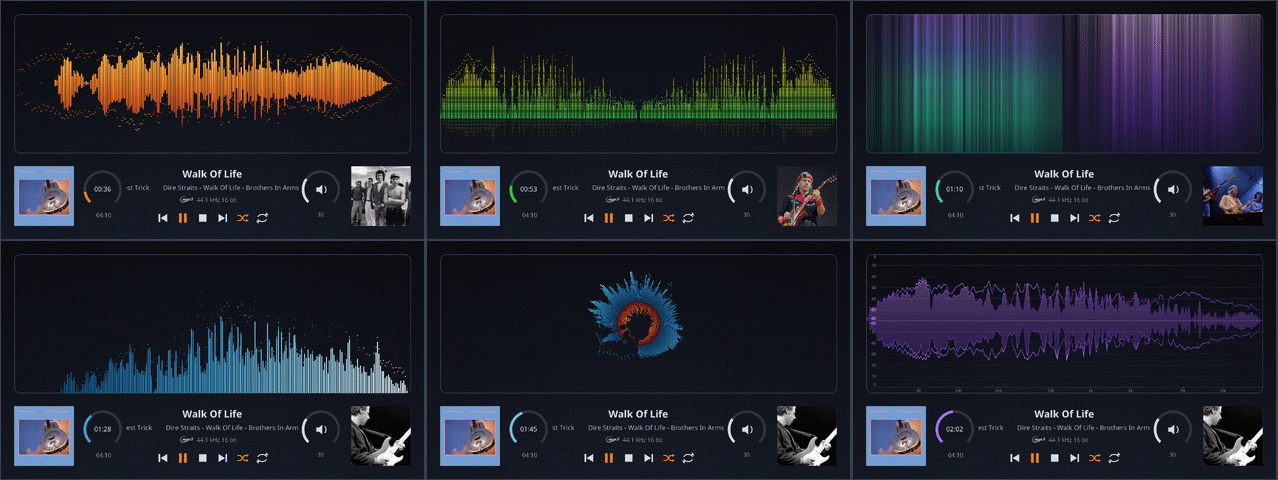
The Catalog offers two reference themes for authors. 1280x720_glass_looks is the vocabulary: one meter per look, over twenty of them from the plainest bars through the graph, dots, waterfall and radial styles, the scales, a palette of the theme's own, colouring by level and the onsets, each spectrum section a few lines under a comment that names the keys it shows. Put it on show, flip through the rotation or the Manager's previews to the look wanted, and copy its section. 1280x720_glass_analyser is the dashboard: seven meters, six of those looks and a pair of boxes, one per channel, over a strip with the cover, the progress as an arc with the times, the title and the tickers, the type icon with the sample rate, the volume as an arc with the mute button inside and the number under it, the fanart covering its square, and the six transport buttons; a finished theme to adapt.

The bank behind the analyser is the theme's, measured once for all its sections from what they name (bins, channels, scale, window above); a style section that names none of them is drawn from the bank the other sections brought about. The peaks are the analyser's own, timed on the display, as the previous engine's toppings are.
The tap measures every stream on its way to the sound card: every 1024 samples it takes a Hann-windowed FFT of the last 2048 to 16384 samples, as the theme on show demands, and projects it onto the bank's bands, up to 256 per channel over 20 Hz to 20 kHz on a log, mel or linear scale, a full-scale sine reading full in its band, with a peak hold per band that falls by half every quarter second. The analyser draws each channel of that bank on its own scale: decibels between level.range, or the amplitude itself, weighted by weighting, smoothed by smoothing. The previous engine's bars take the two channels' mean, regrouped onto the old logarithmic mapping, smoothed against the last frame and squeezed with a logarithm so that a full scale tone reaches the top and quiet passages still move; a theme of that kind cannot change the scale, only how the bars look.
The analyser repaints its whole box every frame, so it costs by area, frame rate and how many bars there are; a see-through box (bgr.alpha below 1) blends every pixel where a solid one writes them. The Performance page has the measured cost of each look of the reference theme on a Raspberry Pi 5, from half a core to a whole one at 1280x720 and 60 frames a second. The analyser is recommended from a Raspberry Pi 4 class board up; it is not blocked on smaller boards, where the governor lowers the frame rate to what the board keeps, but a Pi 3 or a Zero 2 W is not recommended for it. To make it lighter: 30 frames a second, fewer bins, plain bars, bgr.alpha = 1.
The previous engine's bars repaint only when they move, so a spectrum of sixty bars at 30 frames a second stays comfortable on a Raspberry Pi 4; on a Pi 3 or a Zero 2 W, keep the box small or the frame rate at 20.
- Meters-Reference for every key of a meter section.
- Themes for how a theme is put together and tested.