Repository navigation
Themes
A theme is a folder of pictures and one meters.txt that says how Glass draws them: needles or bars over a background, album art, texts, times, indicators, a record and tonearm or a pair of reels, and a spectrum. Glass reads the theme format PeppyMeter Screensaver read, so every theme made for it runs as it is, and themes from the Catalog install with one press. To make one, start with the Skin-Creation-Guide.
| Tree | What it holds |
|---|---|
/data/INTERNAL/glass/templates/<theme>/ |
The meter themes: meters.txt and the pictures. |
/data/INTERNAL/glass/templates_spectrum/<theme>/ |
The spectrum themes: spectrum.txt and the pictures, under the same folder name as the meter theme they belong to. |
Both trees survive an uninstall when "Do not delete themes" is on (the Themes tab of the Manager), and a reinstall never overwrites a theme that is there.
1280x720_MyDeck/
  meters.txt            the meters, one [section] each
  background.png        the meter background
  foreground.png        drawn above everything, for glass and bezels
  needle.png            the needle picture
  vinyl.png             a record, for a turntable
  tonearm.png           the arm
  reel_left.png         reels, for a cassette
  reel_right.png
  fonts/                fonts the theme brings for its time fields
  format-icons/         the theme's own format icons
  face.txt              a look for glass-evo's face while this theme is on show
The folder's name starts with the screen size the theme is drawn for, 1280x720_, 800x480_, 1920x1080_, then a name. The Manager lists themes by that size, and the Catalog filters on it.
| Picture | What Glass expects |
|---|---|
Background (bgr.filename) |
The meter's face, opaque where the meters are. Its size is the meter's size. |
Foreground (fgr.filename) |
Transparent where the meters show through; drawn last. |
Needle (indicator.filename) |
Transparent around the needle, drawn upright; Glass turns it to start.angle at silence and on to the level. |
Record (vinyl.filename) |
Transparent around the disc; the picture's centre is put on vinyl.center. |
Tonearm (tonearm.filename) |
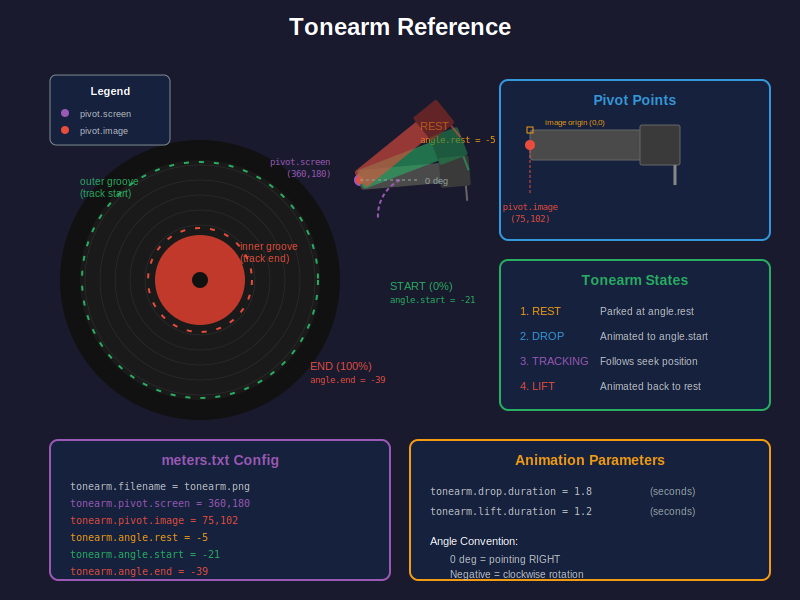
Transparent around the arm, drawn as it lies at 0 degrees; the pivot is tonearm.pivot.image. |
Reels (reel.<side>.filename) |
Transparent around the reel; the picture's centre, its hub, is put on reel.<side>.center. |
Screen (screen.bgr) |
A full screen picture behind a meter smaller than the screen. |
PNG with alpha for anything transparent. JPEG does for an opaque background. Pictures are read once per meter and kept; a large background costs memory, not time.
The origin is the top left corner; x grows to the right, y downwards. Angles are in degrees, positive counter clockwise, negative clockwise. For needles 0 is the needle as drawn, upright, so a needle sweeping from start.angle = 45 to stop.angle = -45 swings from upper left to upper right. For the tonearm, the knob and the arc 0 points right.
From the back to the front:
- The screen picture and the meter background.
- Reels, then the record, then album art.
- Artwork with
zorder = background: folder layers, then fanart. - The needles or bars, then the spectrum.
- Texts and times.
- The tonearm.
- Indicators and buttons, then the format's type area.
- Artwork with
zorder = overlay: folder layers, then fanart. - The foreground picture.
Glass repaints only the boxes whose content changed, so a large still background costs nothing per frame; what moves is what is paid for.
| Kind | What it has | What moves |
|---|---|---|
| Meter | Needles or bars, texts, art | The needles or bars, the texts as they scroll. |
| Spectrum | A spectrum box, with or without meters | The bars and their reflection; with style = bars in the spectrum theme, the analyser: bars per channel from a palette, peaks, mirrors, reflections, LEDs, outlines. The Spectrum page has it. |
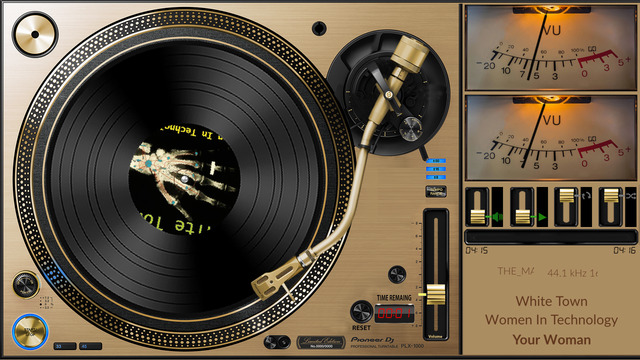
| Turntable | A record (vinyl.filename and vinyl.center), a tonearm (tonearm.filename, tonearm.pivot.screen and tonearm.pivot.image), or turning art (albumart.rotation = True with a speed above 0) |
The record and its label, the arm as the track plays. |
| Cassette |
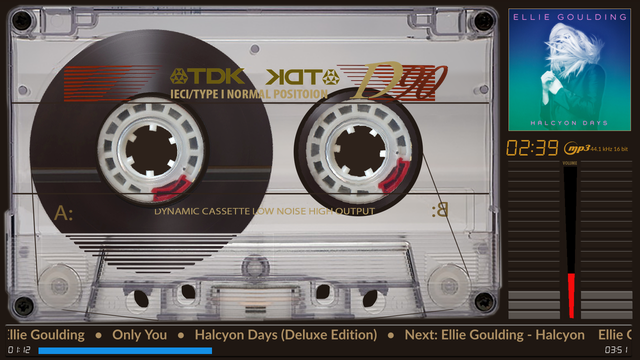
reel.<side>.filename with reel.<side>.center, in a section without a vinyl.center or a tonearm |
The two reels, faster and slower as the tape moves when spools are adaptive. |
| Dashboard |
interactive = True, or button.<name>.* keys, in any of the kinds above |
Its indicators and buttons act when tapped; the Meters-Reference has the controls. |
A theme that only means to show still album art leaves albumart.rotation out: with True the art is cut round where no mask shapes it, and it turns when albumart.rotation.speed is above 0.
The Skin-Creation-Guide takes a theme from an empty folder to the screen: the pictures and how to draw them, coordinates and angles, and a meter, a turntable and a cassette theme step by step, with indicators, texts, a spectrum and artwork added.
From 0.9.14 the Manager reads every file a theme's text calls for and looks for each where the display looks. The pictures of every kind count: bgr.filename, fgr.filename, indicator.filename, bar.filename, reflection.filename, screen.bgr, albumart.mask, vinyl.filename, reel.<side>.filename, tonearm.filename, button.<name>.image, <name>.head.image, <name>.knob.image, <name>.slider.tip, <name>.slider.track, <name>.icon and <name>.marker.<n>.image, each looked for in the theme folder; and every <field>.font, looked for at its own path, in the theme folder, then under the display's font path. A record's, a reel's or the tonearm's list of pictures (vinyl.filename = disc.png,vinyl_disc.png) names the track's own pictures first and the theme's file last, and only the last is looked for.
A theme card on the Themes tab carries a red count of the files the theme names and does not have. Details lists every file with a sticker: found; missing in red, the theme names it and it is not there, so the display draws without it and the theme has a hole; optional in grey, not there, and the display has a fallback it documents, a field's own font falling back to its style's font and a knob's picture to the arc; elsewhere, a path outside the theme that is there. Missing files come first, and each row names the meters whose lines name the file, three by name and the rest counted, so the line is found in a theme of fifty meters. From 0.9.16 the files that are there are listed only with Show every file on, a switch this browser remembers; what is missing, optional or elsewhere always shows, and a whole theme is one line. The Status tab's sheet carries the same for the theme on show, and Find a problem names its missing files as a cause and its optional ones as a note. A remote display says the same of the theme it shows on its Assets panel, see Remotes.
glass reviews a theme from the command line on the player, or on any machine with the theme in a Glass home:
glass --list                                     the installed themes and their meters
glass --headless --snapshot out --theme 1280x720_MyDeck --settle 2
                                                  a PNG of every meter of the theme, after two seconds
glass --dev --theme 1280x720_MyDeck --meter "My VU Meter"
                                                  the meter in a movable window at its exact size, the player's configuration untouched
The Manager's previews are made the same way. The Tests page has the rest of the review workflow.
A theme made for one screen is cut to another with the display's own binary on any machine, the player included; the Tailor page has the whole of it, the Manager's buttons and pictures of the outcome. The command:
glass --tailor 1280x720 --theme /data/INTERNAL/glass/templates/3840x2160_amber --out /tmp/cut
The copy lands under /tmp/cut/templates/1280x720_amber with its spectrum twin under /tmp/cut/templates_spectrum/1280x720_amber when the theme has one; the size in front of the name is replaced, a name without one gets it. --theme also takes the name of an installed theme. Every position, size, length and font size in the two text files is scaled, every picture resampled, and the theme keeps its shape, centred on the new screen with the display's background around it when the shapes differ; --stretch fits the screen's shape instead. Comments, the order of the keys and any key the cutter does not know are kept as they are, and the unknown ones are named on the way out, as is a picture the text names but the folder does not hold. --from WIDTHxHEIGHT gives the theme's size, and is needed only where the folder's name does not start with it and meters.txt has no screen.width and screen.height; --spectrum FOLDER names a twin that does not sit beside the theme.
The cutter's table classifies each key the parser reads, and a test holds the parser to it: a new key fails the build until it is classified.
The same binary packages a theme for the collection:
glass --package --theme 1280x720_amber --out /tmp/pkg --settle 3
The display shows every meter of the theme headless for the settle seconds, with the player's state and levels as they are, and tiles the pictures into one preview.png the theme's own width, up to three across and nine in all; /tmp/pkg/1280x720_amber.zip then holds the theme, its spectrum twin and the preview in the layout the Catalog takes. --tailor and --package together cut first and package the cut, so a theme made for one screen goes to the collection at another in one step. A creator shrinks a 4K theme to check it on a smaller screen, or lifts a small one to a larger, and then works on the differences: the scaled pictures are a starting point, and a needle or a scale drawn for the original size may want redrawing at the new one.
Package on the theme's card in the Manager, or glass --package above, makes the zip the collection takes: the theme, its spectrum twin when it has one, and a preview. Open a pull request on glass_templates with it; the catalog index is generated from the repository and every Glass player sees the theme on its Catalog tab. The repository's contributing guide has the layout it expects.
Two themes by the clock, on the Manager's Themes tab: a day theme from one time and a night theme from another, in the player's time zone as Volumio's settings have it. The player puts the right theme on show at those times and after every start, from its own clock, so nothing outside the plugin runs; the theme it chooses is the one the tab shows as on show, with the meter rotation set for that theme, and a remote that follows the player follows the switch. Either time may lie past midnight for the other, so a day that starts at 22:00 and a night that starts at 04:00 is a day that wraps midnight. The tab says which period it is and when the next switch comes. Off, the theme on show stays as chosen.
The switch can follow the sun instead of the two times. The player reckons sunrise and sunset itself, from the place of its time zone as Volumio's settings have it (the system's zone table gives every zone a reference point, London for Europe/London), or from a latitude and longitude typed on the tab for the minute, or where the zone's place lies far away; a car within its zone needs none. Minutes after sunset and before sunrise are added on top, so a dashboard goes dark a little after the sun is down. Nothing is fetched from the network. On a day without a sunrise or a sunset, in the far north or south, the two times apply; the tab shows today's sunrise and sunset beside the next switch. It serves a screen in a car, and a dark theme for the evening in a room just as well; a Raspberry Pi in a car has the time once it has been online, or from a real time clock: the Pi 5 and the CM5 have one and need only a battery for it, earlier models a small module.
The Manager draws a preview of every meter with the display itself, so a theme needs no preview picture for the Themes tab. A preview.png in the folder is still worth adding: the Catalog index uses it as the thumbnail of a contributed theme.
The third value of a text position, playinfo.title.pos = 830,205,bold, picks the style: light, regular, bold or italic. Each style has its size in the theme (font.size.light, font.size.regular, font.size.bold, font.size.italic) and the digital font its own (font.size.digi). The font files come from the display's configuration and serve every theme, chosen per style on the Manager's Appearance tab (built in, uploaded, or the player's own; the Artwork page has the fonts); a theme brings its own font for a time field with time.<field>.font, and from 0.8.70 for a text field with playinfo.<field>.font and its size with playinfo.<field>.fontsize (playinfo.title.font = fonts/MyTitle.ttf; title, artist, album, sample rate, ticker and the next track's three). Italic is a true italic face for Latin, Cyrillic and Greek, upright for scripts without one.
A theme may bring its own icons for formats and services under format-icons/ in its folder: flac.png, wav.png, tidal.svg. A track of a cue sheet, for which the player names no type, takes cue.png (from 0.8.56).
From 0.8.66 the icon is looked for under the most telling name first and the plainest last. A radio station is reported with its signal after its name, five dots of which the filled ones count (FM ◦◦●●● is 3 of 5), and in mono with one channel or the word in its type (FM MONO ◦◦●●●), in stereo with the word (FM STEREO ◦◦●●●, from 0.8.69): the names tried are fm_mono_3, fm_mono, fm_3, fm, then the type's own name, and the first found is drawn; for stereo, fm_stereo_3, fm_stereo, fm_3, fm. The plugin brings fm_0 to fm_5 and dab_0 to dab_5 (the signal as bars beside the letters), fm_mono_0 to fm_mono_5 and fm_stereo_0 to fm_stereo_5 (the word under the letters), fm_mono and fm_stereo. A theme may bring some of these and not others: fm_mono.svg alone shows at every level. Any type the player reports with one channel is looked for under its _mono name first, and shows its plain icon where there is none. A PNG is drawn as it is; an SVG is tinted with playinfo.type.color. Anything the theme does not bring comes from the plugin's own icons and Volumio's.
Where glass-evo holds the screen, its face draws a bar of controls, a clock and a date over the theme, in the look chosen on the Manager's Screen tab. A theme may bring a look of its own for them: a face.txt in its folder, written as a face theme is (the glass-evo wiki's Face themes page has every key). While the theme is on show its keys lie over the chosen look, and what the user adjusted in the Manager lies over both. The file is optional; it travels with the folder to remotes and to the browser views, and a theme cut to another size or packaged keeps it. It is drawn from glass-evo 0.1.26; Glass's own display has no face and passes it over.
Besides album art, a theme can show pictures from the playing track's folder (a back cover, a logo) in up to five boxes, and an artist fanart slideshow in another box, each behind the meters or above them. The Meters-Reference has the keys; the Artwork page has where the pictures come from.
Glass repaints only the boxes that change, so a large still background is free after the first frame. What is paid for each frame is what moves: needles, a spectrum's bars, a turning record or reel, scrolling text, a fanart fade. A theme for a Raspberry Pi 3 or a Zero 2 W keeps the spectrum small and leaves the analyser to a Pi 4 class board or better, and uses a screen sized picture set rather than a larger one scaled down. Pictures are kept in memory at their drawn size; a 1920x1080 background costs eight megabytes.
| What you see | What to look at |
|---|---|
| A picture missing | The theme's Details on the Themes tab list every file the theme names, the missing ones in red and first; then the file name's case, and that the file sits in the theme folder. |
| A record or reel turning about the wrong point |
vinyl.center and reel.<side>.center are screen coordinates, not points inside the picture. |
| The needle pointing the wrong way |
start.angle and stop.angle, and how the needle is drawn in its picture. |
| The arm off the record |
tonearm.pivot.image against the picture, then the three angles. |
| Text never scrolling | The text fits its box: playinfo.<field>.maxwidth, else playinfo.maxwidth, else 60 percent of the screen when centred or the width to 20 pixels short of the screen's right edge. |
| Album art turning or cut round in a theme meant to be still |
albumart.rotation = True. |