Repository navigation
Performance
Glass was built to be cheap on the player: it paints only the boxes that change, keeps every picture decoded once, maps fonts from disk, and measures the audio on a thread of its own inside the sound path. This page has the numbers, how they were taken, what to turn when a player is short of processor time, and, for developers, how the frame is made and how it scales across cores.
A Raspberry Pi 5 with a 1280x720 DSI screen, Volumio 4 with the 32 bit userland, music playing from internal storage throughout. Eight meters drawn at random from a pool of 41 heavy ones, turntables and tape decks: one each from Pioneer PLX-500, custom_turnplate and g5_444_rotate, three from g5_710_Turntables, two from g5_711_Tape_Recorder. Each ran ten seconds at a fixed frame rate; after four seconds its processor share (of one of the four cores), resident memory, the board's power rails and the achieved rate were read. PeppyMeter Screensaver, the Python engine Glass replaces, ran the same eight meters through its own launcher at its 30 frames a second.
| Frames a second | Processor, one core | Achieved | Frame, ms | Memory, MB | Power, W |
|---|---|---|---|---|---|
| 10 | 13 percent | 9.5 | 16.0 | 113 | 3.48 |
| 15 | 20 percent | 15.0 | 13.0 | 116 | 3.47 |
| 30 | 38 percent | 29.9 | 12.7 | 122 | 4.00 |
| 45 | 47 percent | 44.7 | 10.3 | 126 | 4.24 |
| 60 | 56 percent | 59.6 | 9.3 | 126 | 4.39 |
Power is the board's rails with the display and fan on them; the idle board read 3.37 W. A frame takes less time at higher rates because the caches of turned needles and text are hit more often and the cores stay clocked up.
| Meter | Glass | Python | Glass memory | Python memory |
|---|---|---|---|---|
| Pioneer PLX-500, turntable | 41 percent | 78 percent | 137 MB | 1028 MB |
| VTEBT record player | 30 percent | 48 percent | 104 MB | 941 MB |
| Streamer CD, turning disc | 28 percent | 76 percent | 115 MB | 671 MB |
| Pioneer Gold turntable | 38 percent | 76 percent | 135 MB | 900 MB |
| Thorens turntable | 45 percent | 84 percent | 142 MB | 1092 MB |
| Denon DP400 turntable | 38 percent | 74 percent | 134 MB | 1046 MB |
| Akai 77 tape recorder | 42 percent | 52 percent | 106 MB | 1067 MB |
| Revox B77 tape recorder | 44 percent | 70 percent | 104 MB | 1492 MB |
| Average | 38 percent | 70 percent | 122 MB | 1030 MB |
xychart-beta
    title "Processor share of one core at 30 frames a second: Glass as bars, the Python engine as the line"
    x-axis ["PLX-500", "VTEBT", "Streamer CD", "Pioneer Gold", "Thorens", "Denon DP400", "Akai 77", "Revox B77"]
    y-axis "percent" 0 --> 100
    bar [41, 30, 28, 38, 45, 38, 42, 44]
    line [78, 48, 76, 76, 84, 74, 52, 70]
The bars are Glass, the line is the Python engine on the same meters. On power the two engines read 4.00 W against 4.49 W, a difference near the reading's noise; the processor share and the memory are the differences that matter, and on a Raspberry Pi 3 or a Zero 2 W they decide whether a theme runs at all.
The chart was measured on Glass 0.4.24, the release that introduced painting by row bands. The releases after it took the same meters lower: the table below is two releases on, 0.4.26 against 0.4.27, which paints only the boxes that change, so its first column already stands below the chart's bars for the same meters. Measured on the same board at 30 frames a second:
| Meter | 0.4.26 | 0.4.27 | Painted per frame | Boxes | Raster, ms | Upload, ms |
|---|---|---|---|---|---|---|
| Thorens turntable | 37 percent | 30 percent | 45 percent of the screen | 3.3 | 8.2 | 1.2 |
| Streamer CD | 25 percent | 18 percent | 27 percent | 3.0 | 5.1 | 0.9 |
| A needle meter (black-white) | 10 percent | 3.5 percent | 5 percent | 2.0 | 0.8 | 0.4 |
| Revox B77 tape recorder | 45 percent | 41 percent | 71 percent | 6.2 | 11.8 | 1.6 |
| Pioneer PLX-500 | 40 percent | 29 percent | 42 percent | 3.2 | 8.7 | 1.0 |
| Thorens at 60 frames a second | 52 percent | 49 percent | 45 percent | 1.6 | 7.0 | 1.0 |
A needle meter costs a few percent of one core. The reels' 71 percent is inherent where every frame is drawn: every pixel of a turning reel changes with it. These figures were taken so. From 0.8.57 the rotation quality sets how often a turning picture is drawn anew (Low 4, Medium 8, High 15 times a second, or the custom number), and between two of those moments it stands and is not painted, which is the lever for a small board. A spectrum of sixty bars of the previous engine's kind adds about a fifth of a core; the analyser's looks are measured under The analyser below.
flowchart LR
    R[(Ring)] -->|poll| I[Input: levels, spectrum, state]
    I -->|step, pure| S[Scene: every element as geometry]
    S -->|plan| O[Ops: read-only draw steps with keys and boxes]
    O -->|diff against last frame| D[Damage: the boxes whose keys changed]
    D -->|paint, in strips, across threads| F[Frame over the composed base]
    F -->|upload the boxes| W[Window texture]
| Stage | What it does | Share of a frame |
|---|---|---|
| Poll | Reads the ring and the channel. | under 1 percent |
| Step | The scene: needle angles, text offsets, what turned. Pure, replayed in tests without a display. | 1 to 2 percent |
| Plan | Turns pictures that changed angle into the cache, sets type, lists the ops. | a few percent |
| Paint | Copies the base into the damaged boxes and runs the ops that meet them. | 80 to 90 percent |
| Upload | Sends the boxes to the window's streaming texture and presents. | 10 to 15 percent |
Three things keep the paint small:
- Only what changed. Every op has a key (a hash of its fields, pictures by identity) and a box. The damage is the boxes of the ops whose keys differ from last frame's, merged when a union costs no more than its parts, at most eight boxes. A box whose key is unchanged is neither painted nor uploaded. Painting inside the boxes is exact by construction: the same read-only ops run over the same base, and a test asserts byte equality against whole repaints across thirty frames of needles, turning art, scrolling text, a fade, a text change and a picture swap.
- Composed once. The screen picture, the background and the still parts of the face are composed once per meter into a base the frame is painted over. The base is not kept per frame; it is copied into the damaged boxes only.
- Turning pictures by row spans. A record, a reel, a knob or a needle is turned by the row spans of its opaque pixels with a nearest fixed point step, so a round reel in a square picture is read as a disc and its box is its real reach, not its diagonal. Small turned pictures are cached by angle; the cache holds 16 MB and lets go of angles not shown for ten seconds, so a tonearm's drop trail does not stay.
GLASS_PROFILE in the display's environment prints, every sixty frames, the rate achieved, the painter count, the share of the screen painted and in how many boxes, the time in poll, step, raster (its two parts, prep and paint) and show, and the memory moving; the memory kept for the meter is printed once at the start. The Logging page has it.
The canvas is cut into strips of sixteen rows; each strip carries its pieces of the damaged boxes, and the strips are pulled from a shared queue by the painter threads, so a heavy strip does not hold the others. Only painting runs across threads: polling, stepping and planning are one thread's work, and the upload is the window's.
The painter count adapts. The display starts with one painter and judges painting only: a frame whose painting takes more than 0.8 of the period is an overrun; more than 5 percent overruns in a one second window adds a painter, up to one per core and at most eight; a painter is given back after five seconds when the measured cost with one fewer is under half the period. The first three seconds after a start and one after a change are not judged, since a start turns fresh pictures for over a second. --threads N fixes the count.
Measured on the Pi 5 with the Thorens turntable and the Streamer CD, processor share of one core and the paint's wall time:
| Meter | Painters | Frames a second | Processor | Paint, ms |
|---|---|---|---|---|
| Thorens | 1 | 30 | 38.5 percent | 11.0 |
| Thorens | 4 | 30 | 50.0 percent | 4.0 |
| Thorens | 1 | 60 | 53.5 percent | 7.6 |
| Thorens | 4 | 60 | 97.5 percent | 3.9 |
| Streamer CD | 1 | 30 | 26.5 percent | 6.3 |
| Streamer CD | 4 | 30 | 37.3 percent | 2.9 |
| Thorens | as needed | 30 | 37.3 percent | 10.8, one painter |
| Thorens | as needed | 60 | 52 percent | 7.3, one painter |
| Revox B77, clock held at 1.5 GHz | as needed | 60 | 12.3 then 6.6, a second painter after four seconds |
Four painters cut the paint's wall time 1.9 to 2.6 times and cost 30 to 45 percent more processor seconds: the memory bandwidth is shared, each thread copies its strips of the base, and threads are woken per frame. So on a Pi 5 the adaptive count stays at one, where every theme in the pool keeps 30 frames a second, and steps up only when painting stops fitting the period, as it did with the clock held down. A theme with two reels scales best, 1.86 times on two painters, because its damage is two boxes of equal weight. On a Pi 3 or a Zero 2 W the same policy reaches for the other cores from the start with a turntable theme, which is the point of it: the light half of the pool fits one core at 15 frames a second at 1280x720, the heavy turntables and tape decks land at 8 to 13 on one core and need the others, and everything fits at 800x480.
Two notes for anyone measuring. The ondemand governor lowers the clock when a core idles, so a frame's wall time at 30 frames a second is longer than at 60 on the same meter (11.0 against 7.8 ms for the Thorens), and the processor share is inflated at low clocks; pin scaling_governor and scaling_max_freq before comparing rates. And the figures here are from the 32 bit userland; the 64 bit builds run the same code and have not been measured on the bench.
| Thread | In | What it does |
|---|---|---|
| The frame loop | glass |
Polls, steps, plans, uploads, sleeps the rest of the period. |
| Painters | glass |
One to one per core, painting strips. |
| Picture decoding | glass |
Album art, folder pictures and fanart are decoded and scaled off the frame loop, and handed over when ready, so a new track does not stall a frame. |
| Picture fetching | glass |
The album art, the artist's fanart set and, on a remote, the pictures of the track's folder are each asked for on a thread that ends with its answer. |
| The settings page | glass --remote |
Serves the page and its API; a change lands as a counter the frame loop compares once a frame. |
| Measuring |
glasstap, inside the source's own process |
Takes the peaks and RMS of every period of audio, runs the spectrum bank's FFT every 1024 samples over a window of 4096 to 16384 samples as the theme on show demands, and writes the ring; the audio thread only copies. The audio process as a whole, decoder and tap, reads 1.7 percent of a core with a legacy theme's window and 4.5 percent with a 256 band analyser's, on the Pi 5 at 44.1 kHz stereo. |
| The frames daemon | glass-serve |
One loop: reads the ring, merges hops, sends to subscribers, sleeps a few milliseconds. For browser pages, one thread that accepts them and one for each page connected. |
The channel has no thread: its socket does not block, and the frame loop reads what has arrived once a frame.
| What | Size |
|---|---|
| The composed base of a 1280x720 meter | 3.7 MB |
| The frame being painted | 3.7 MB |
| The face's front picture, kept as opaque spans only | 2 to 4 MB |
| A turntable theme's pictures, decoded | 30 to 60 MB |
| The turned picture cache | at most 16 MB, angles not shown for ten seconds let go |
| The plugin's fonts | mapped from disk, resident by the pages touched, shared between styles and processes |
| Shared libraries, SDL2 and its GL driver | about 47 MB, shared with the system |
A heavy theme sits at 85 to 140 MB resident on a 32 bit system, a light one nearer 90 MB. The Thorens turntable went from 125 to 87 MB resident, and its private memory from 72 to 33 MB, when the fonts were mapped instead of read (the plugin's italic face alone is 16.7 MB), the turned cache was given its budget and the front picture kept only its opaque spans. The Python engine sat at 700 to 1500 MB for the same themes, most of it a prepared frame per degree of rotation.
Three ways the same player can have its screen, measured alike on two players: the kiosk alone, its browser showing Volumio's playback page; the kiosk with Glass as a screensaver over it; and glass-evo in the kiosk's place (see Screen). The same theme and meter on both (the looks reference theme, its waterfall meter across the whole screen, sixty frames a second, the most the display is asked for), the same queue of tracks from its first, shuffle off. Each state settled for most of a minute, then one minute of steady play, one minute with "next" every ten seconds, and forty seconds paused; every process sampled each second. The Raspberry Pi 5 has a DSI panel the display turns by 270 degrees when it draws on the screen itself; the x86 player is a virtual machine with no graphics acceleration, where glass-evo keeps an X server of its own.
Memory in use while playing, as free gives it:
| Player | The kiosk alone | The kiosk, Glass over it | glass-evo |
|---|---|---|---|
| Raspberry Pi 5 | 931 MB | 981 MB | 674 MB |
| x86, virtual machine | 939 MB | 1011 MB | 746 MB |
Where it goes, as each process's proportional share:
| Process | Pi 5, kiosk and Glass | Pi 5, glass-evo | x86, kiosk and Glass | x86, glass-evo |
|---|---|---|---|---|
| The browser (every process of it) | 434 MB | none | 463 MB | none |
| The X server | 46 MB | none | 38 MB | 46 MB |
| The window manager | 8 MB | none | 9 MB | 11 MB |
| The display (Glass, or glass-evo) | 46 MB | 68 MB | 84 MB | 105 MB |
| The player's backend (node) | 193 MB | 190 MB | 221 MB | 227 MB |
| mpd | 45 MB | 57 MB | 45 MB | 46 MB |
Processor, as a percentage of one core: what draws the screen, the whole player in brackets, and the player's busiest second after the comma.
| Player and state | Steady play | "Next" every ten seconds | Paused |
|---|---|---|---|
| Pi 5, the kiosk alone | browser 41.1 (42.9), 49 | browser 35.3 (38.3), 84 | browser 34.8 (38.2), 48 |
| Pi 5, the kiosk, Glass over it | Glass 46.4, X 2.5, browser 0.5 (59.0), 67 | Glass 45.8, X 2.6, browser 2.1 (64.6), 103 | browser 36.6, Glass 3.3 on its way off the screen (41.5), 64 |
| Pi 5, glass-evo | glass-evo 36.8 (47.9), 72 | glass-evo 45.9 (58.8), 101 | glass-evo 23.8 (28.7), 44 |
| x86, the kiosk alone | browser 6.3, X 0.4 (8.3), 32 | browser 10.7, X 0.7 (12.9), 28 | browser 6.8, X 0.5 (8.5), 14 |
| x86, the kiosk, Glass over it | Glass 27.8, X 8.1, browser 0.2 (37.5), 48 | Glass 27.3, X 8.0, browser 1.9 (37.4), 47 | browser 6.8, Glass 2.1 on its way off the screen (12.8), 40 |
| x86, glass-evo | glass-evo 27.5, X 8.1 (37.0), 46 | glass-evo 26.9, X 7.2 (35.9), 54 | glass-evo 15.9, X 2.4 (20.6), 38 |
What the numbers say:
- The saving is memory, and it is the browser. With glass-evo in the kiosk's place the player has about 260 MB less in use on the Raspberry Pi and about 190 MB less on x86 than with the kiosk alone, and some 310 and 265 MB less than with the kiosk and Glass together. On the Pi the X server goes too; on x86 it stays, a small part of the whole.
- On the Pi the same theme now costs less on the screen itself than under the kiosk's X server: 36.8 percent of a core against Glass's 46.4 with the X server's 2.5, at sixty frames a second. On x86, where both draw through X, the two are the same within a point.
- A player standing still is where the browser costs most for what it shows. Paused, Volumio's playback page takes 35 percent of a core on the Pi; glass-evo with its clock and its bar takes 24, drawn fifteen times a second and sent to the screen only when something changes. On the virtual machine, which draws everything in software, the picture is the other way round: the browser's 7 against glass-evo's 16 with the X server's 2.
- A change of track costs glass-evo nine points over steady play on the Pi, the cover's colours and the bar's glass made anew for each track, and nothing on x86. The busiest second is about the same with either on the Pi, a hundred percent of one core.
- A meter across the whole screen sixty times a second is not free. Playing, the kiosk's page alone costs about what glass-evo costs on the Pi and far less on x86; what glass-evo gives for it is the meters as the player's interface, in a quarter of a gigabyte less. At thirty frames a second the display costs markedly less; Glass at five frame rates above has the shape of it.
One run of each state on each player, on 2026-10-02 with Glass 0.8.2 and glass-evo 0.1.11; the benchmark above averages many. The x86 figures are a virtual machine's and say more about memory than about what real graphics hardware does. Before Glass 0.8.2 and glass-evo 0.1.11 the face cost more than this: the display made a new copy of the picture for it on every frame, a standing clock was drawn and sent sixty times a second, and the moment between two tracks was taken for the player standing still.
The tap sits in the ALSA chain of every source and passes the stream through byte for byte; the measurement runs on a thread of its own and costs about 2 percent of a core at 44.1 kHz stereo with the 4096 sample window a legacy theme asks for, near 5 percent with the 16384 window of a fine analyser, a little more for high rates and DSD. The window follows the theme on show: a coarse spectrum keeps the small window, so a player pays for the fine bank only while a theme draws it. The sound is not touched: the pass-through is proven bit exact for every format in the project's own workflow before a release. The ring under /dev/shm is written by the source's process and read by the display and the daemon without a lock: a header with the sequence and the time of the last hop, and slots the reader checks for a write in progress.
The analyser repaints its whole box every frame, so its cost is the box's area times the frame rate, and what covers the area decides how much work each pixel is. Measured on the Pi 5 at 1280x720 and 60 frames a second, each meter of the reference theme 1280x720_glass_analyser on show alone with a lively track, the display's share of one core over ten seconds:
| Meter | Bank | Look | Processor |
|---|---|---|---|
| studio | 128 bands, two channels | rounded bars, the channels top and bottom, a split palette | 32 percent |
| wire | 96 bands, two channels | outlined bars, both channels over each other, faint fill | 45 percent |
| lamps | 64 bands, two channels | LED columns, mirrored, with a reflection | 48 percent |
| glow | 256 bands, two channels | luminance bars side by side, the box see-through | 71 percent |
| pair | 64 bands, two channels | two boxes of rounded bars, 590x420 each, one channel in each | 26 percent |
Every bar is drawn as rectangles, a rounded or outlined one too but for the few rows its corners and end lines touch, so the looks cost by how much of the box they cover: luminance bars cover all of it, and a see-through box (bgr.alpha below 1) blends every pixel against the theme where a solid one writes them. Each figure includes the strip below the box, the same in every row. Several boxes cost as their areas add: the pair's two boxes together cover less than one wide box, and the looks theme's pair, two 590x600 boxes, takes 49 percent. (At 0.7.50 the studio and wire meters took 64 and 100 percent, drawn row by row.)
The analyser is recommended from a Raspberry Pi 4 class board up; it is not blocked on smaller boards, where the governor lowers the frame rate to what the board keeps, but a Pi 3 or a Zero 2 W is not recommended for it. At 30 frames a second every figure above halves.
A remote costs the player nothing to draw: the daemon reads the ring and sends one datagram per hop, at most sixty a second, of 46 bytes and two more for every band of every channel: about a kilobyte for the largest bank, 256 bands of two channels, and half that for 128. That is at most half a megabit a second per remote. The remote draws with the same code and the same cost as the player would.
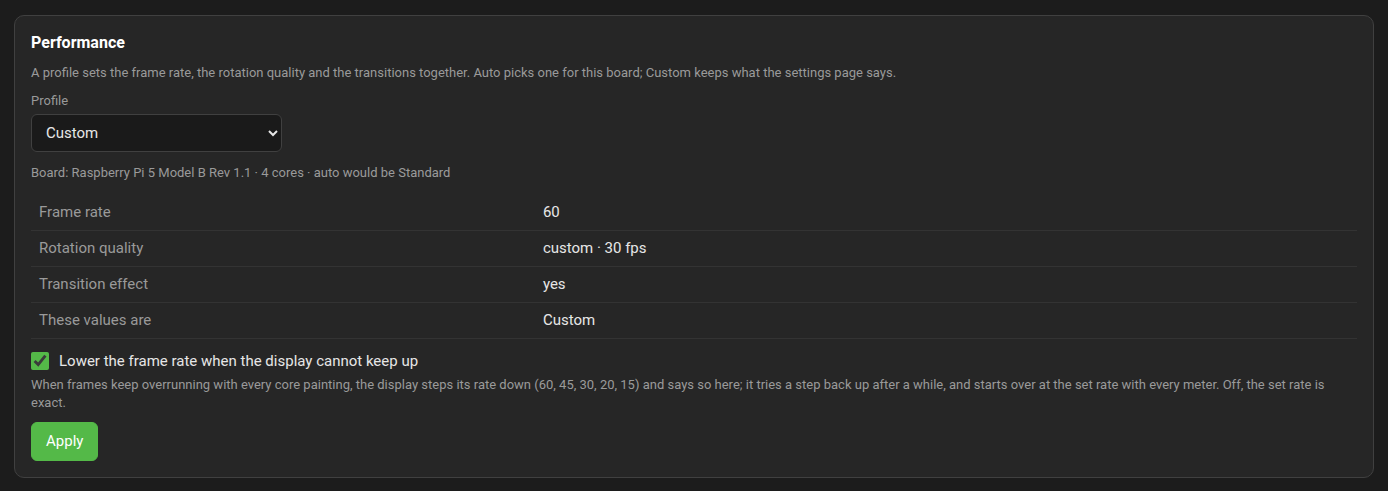
The Manager's System tab has a Performance panel: a profile sets the frame rate, the rotation quality and the transitions together, with one press.
| Profile | Frame rate | Rotation quality written | Transitions | Auto picks it for |
|---|---|---|---|---|
| Full | 60 | High, rotation.fps 15 |
on | nothing by itself; a choice for a Raspberry Pi 5, a Compute Module 5 or a PC |
| Standard | 30 | Medium, rotation.fps 8 |
on | Raspberry Pi 5 and 4, Compute Modules 4 and 5, a PC, any other board with four cores |
| Light | 20 | Low, rotation.fps 4 |
on | Raspberry Pi 3 and Compute Module 3; any other board with fewer than four cores |
| Minimal | 15 | Low, rotation.fps 4 |
off | Raspberry Pi Zero 2 W and older boards; a Raspberry Pi 3 with a theme taller than 720 pixels |
A profile writes frame.rate, rotation.quality with rotation.fps, and transition.type with start.animation into [current] of the meter configuration. The display parses the rotation quality's redraw rate and does not use it: a record or a reel turns at every frame.
Auto reads the board from the device tree and the processor count, takes the theme's height from screen.height (720 when the key is absent), applies the row, and says which board it saw and which row it chose. Custom is what the settings page says: a frame rate, rotation or transition changed there by hand makes the profile Custom, and the panel shows which profile the values are, if any. The rows for the Raspberry Pi 3 and the Zero 2 W are estimates from the Pi 5 figures until one is on the bench.
A profile sets what the display aims for; the governor makes sure a theme the player cannot keep up with still runs smoothly. The display judges its frames in two second windows: when more than a quarter of them run a quarter or more past their period while every painter is at work, the rate steps down the ladder 60, 45, 30, 20, 15, and the display says so in the journal ("governor: 20 fps, the theme is heavy for this player") and tells the plugin, so the Status tab and the Performance panel show "lowered to" beside the set rate and a remote's page shows the rate it draws at. After two minutes at the lower rate one step up is tried; if the theme proves too heavy again the next try waits twice as long, up to half an hour. Every meter starts over at the set rate. The first three seconds after a start, and after each step, are not judged: a start turns fresh pictures, and a step changes the period the frames are measured against.
The Status tab's Display row, while the governor holds the rate at 30 frames a second:
Display showing · DISPLAY=:0 · opens after 60 s · lowered to 30 fps
The switch on the Performance panel, "Lower the frame rate when the display cannot keep up", is on by default and is kept as frame.rate.governor in [current] of the meter configuration, on unless it says False; off, the set rate is exact, and so is a rate asked for on the command line with --fps. GLASS_BENCH_DELAY_MS in the display's environment adds that many milliseconds to every frame's painting, so the painters grow to their most and the governor steps down, which is how both are watched at work on a machine that would never overrun. The display must have a window, since a headless run paints nothing and so has nothing to judge:
GLASS_BENCH_DELAY_MS=30 GLASS_LOG=info glass --remote --devWith 30 milliseconds added, a remote set to 60 frames a second says "governor: 45 fps" once the painters have grown to their most and "governor: 30 fps" five seconds after that, and holds there; GLASS_PROFILE beside it shows the paint stage carrying the added time and the frames a second settling at the lowered rate.
On a screen that is the display's own (no kiosk, or glass-evo holding it) the display draws 15 frames a second from three seconds after the player last played or the screen was last touched, never faster than the rate in force, and is back at its full rate with the next note or touch. Under a kiosk and on a remote the display does not slow down for a player standing still.
What reaches the window follows what changed. The theme alone is sent by the boxes that changed, none when nothing did. With a face over the theme the whole picture is sent, and where the same face stands over the same picture, drawn the same as on the frame before, the window is given nothing.
| When | Turn |
|---|---|
| A Raspberry Pi 3 or 4 with a turntable or tape theme | The frame rate to 20 or 25 on the Settings page. |
| A large spectrum on any Pi below the 5 | The frame rate to 20, or the spectrum's size in the theme. |
| The analyser on a Pi 4 or below | The frame rate to 30; fewer bins; plain bars rather than rounded or outlined ones; bgr.alpha = 1. |
| A Raspberry Pi Zero 2 W | Light themes at 15 frames a second; an 800x480 theme rather than a 1280x720 one. |
| Records and reels look stepped | A higher frame rate: a record or a reel turns at every frame. |
| A theme fine at 30 but the fan runs | 25 frames a second. |
| Fanart with fades on a small player | A longer change interval, or no transition. |
| Measuring a change |
GLASS_PROFILE=1, the governor pinned, ten seconds per meter, the same eight meters. |
The frame rate is the biggest lever: the processor share of a theme is close to proportional to it between 15 and 60.
The Face tab and Anymote draw with the display's pipeline compiled for the browser, so the browser pays the theme's cost and the player pays almost nothing: the frames daemon writes each datagram to one more socket, and the manager passes it on. Measured on a desktop, a 1280x720 reel theme costs 1.6 to 1.7 ms a frame in Firefox and in node, canvas blit included, against a budget of 33 ms at 30 frames a second; the page paces itself by the player's frame rate setting, so a lower rate there costs a phone less too. A phone is unmeasured; at three to five times slower than a desktop core it stays inside the budget. The first visit fetches the theme, the icons and the fonts, about 60 MB with the built-in set, and keeps them in the browser by checksum.