Repository navigation
Catalog
The Catalog tab of the Manager installs themes from the community collection, glass_templates. The collection publishes an index of every theme zip it holds, with its size, its kind, a thumbnail and a checksum; the Manager reads that index, shows what is installed and what is new, and installs, updates or replaces a theme without the command line.
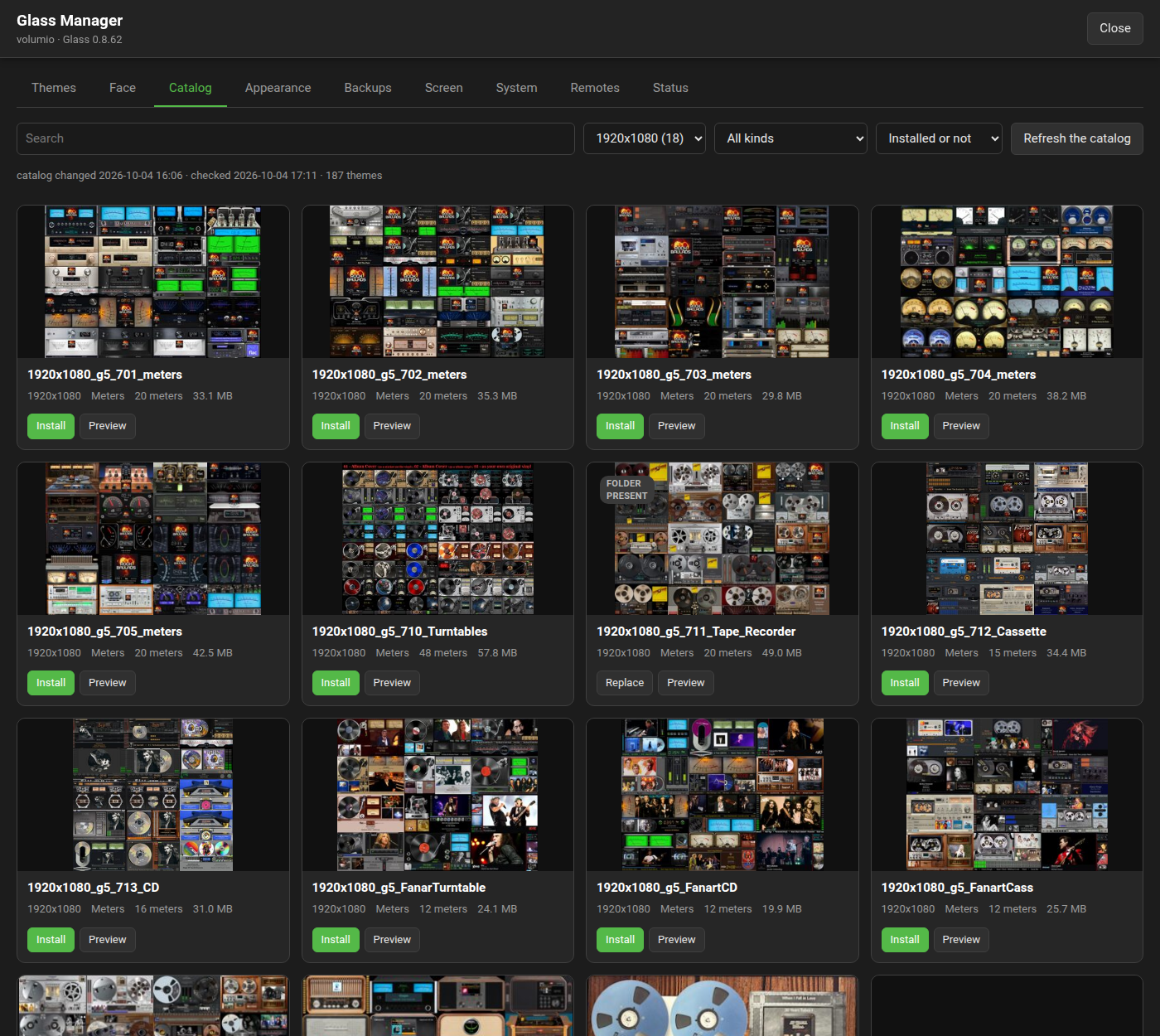
| Control | What it does |
|---|---|
| Search | Filters by the theme's name and the names of its meters. |
| Size | The screen size the theme is drawn for. The list starts at the size last chosen in this browser, else at the size of the theme on show. |
| Kind | Meter, spectrum, or both (a meter theme with its spectrum twin). |
| State | "Installed or not" (everything), "Not installed", "Installed" (which includes a folder that is there without a record of an install) or "Update available". |
| Refresh the catalog | Reads the index again. The tab reads it on its own when the one kept is older than ten minutes, and an install whose zip no longer matches the index reads it again before trying once more. |
The line under the filters says when the catalog last changed, when it was last checked, how many themes it holds, and the reason when it could not be fetched.
Each entry shows its thumbnail, its name, its size, its kind, how many meters it holds and the size of its zip. Preview opens the collection's picture of it. A badge says how the entry stands on this player:
| Badge | Meaning | The button |
|---|---|---|
| none | Not installed. | Install, at one press. |
| Installed | Installed from the catalog, and the zip in the index is the one installed. | Install again |
| Update available | Installed from the catalog, and the index now has another zip. | Update |
| Folder present | A folder of that name is there and was not installed from the catalog: copied to the player by hand, taken over from PeppyMeter Screensaver, or uploaded as a zip. | Replace |
Install again, Update and Replace ask first and name the folders they replace. The Manager-API calls the four states absent, installed, update and present.
An install downloads the zip, checks its size and checksum against the index while it arrives, opens it, checks that the folders it holds are the ones the index names, unpacks each into the meter or the spectrum tree through a staging directory that replaces the folder in one step, records the checksum, and draws the theme's previews. The job is followed on the tab while it downloads, checks and unpacks; a failure says why: a checksum that does not match, a zip that is not a theme, a download that did not complete. A download whose connection breaks is made again after 2, 4 and 8 seconds before it counts as failed (from 0.8.13). A zip that changed in the collection since the index was read is downloaded again against the index read afresh. A zip may be 512 MB at most.
Installs run one at a time. An installed theme is put on show from the Themes tab.
When the collection publishes another zip of a theme that is installed, the entry shows "Update available"; Update installs it over the old one.
The state is read from the record of the install, never from the theme's files. Edits made by hand to an installed theme are therefore not seen: it stays "Installed", and Install again or an update overwrites them.
The Themes tab takes a zip from the browser, in any of the layouts the catalog accepts: one theme folder, the files at the zip's root, a templates/ prefix, several folders in one zip, or a meter theme with its spectrum twin. The folder's name is the theme's; when the files sit at the root, the zip's own name is used. A theme uploaded over one that came from the catalog shows "Folder present" from then on.
A theme goes into the collection by pull request on glass_templates, following the repository's contributing guide. The short way to its zip is the Themes tab's Package button, which writes the zip in the collection's layout with its preview: one folder named after the theme, with preview.png at its top, the theme under templates/<name>/ and its spectrum twin, when it has one, under templates_spectrum/<name>/. A zip made by hand may hold the theme's files beside preview.png instead.
The preview shows the theme with a track on; a theme with several meters shows them side by side in one picture (Package tiles the first nine), as the reference themes 1280x720_glass_analyser and 1280x720_glass_looks do. The Spectrum page says what those two are for. The repository's workflow extracts that preview, writes the entry's README and the index, and makes the thumbnail, and every Glass player sees the new entry on its next look at the catalog. The Themes page has what a theme is made of, and the Tailor page the Package button.
| Path | What it is |
|---|---|
/data/INTERNAL/glass/catalog/index.json |
The index as last read, with the tag the server gave it. |
/data/INTERNAL/glass/catalog/installed.json |
What was installed from the catalog, by name and checksum. |
/data/INTERNAL/glass/catalog/thumbs/ |
Thumbnails as they were looked at. |
/data/INTERNAL/glass/catalog/downloads/ |
Zips and staging folders while a theme installs, uploads, is cut to another size or packaged; a packaged theme's zip stays for its Download link. |