Repository navigation
Files
Settings → Files shows everything you've made, by kind, with its size and where it's used. Export, copy, move or delete any of it, and import any Pack Rat file.
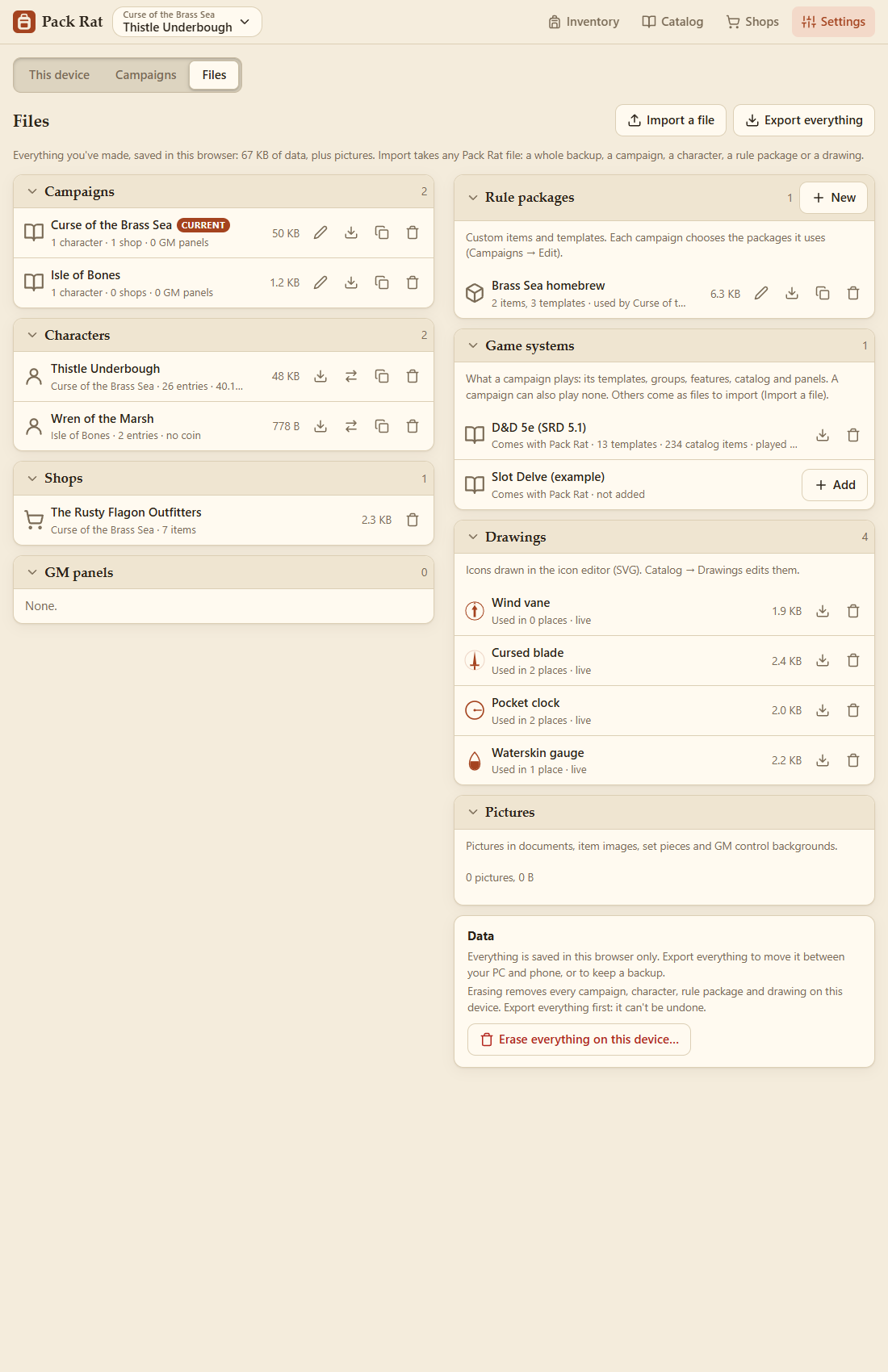
| Kind | What it is | Actions |
|---|---|---|
| Campaigns | Your games (see Campaigns). | Edit, export, copy, delete. |
| Characters | Every character, in every campaign. | Export, move to another campaign, copy, delete. |
| Game systems | What a campaign plays: its templates, groups, features, states, money, catalog and panels. D&D 5e (SRD 5.1) comes with Pack Rat, and so does Slot Delve, a small example system (not added unless you add it). Others are files to import. | Export, remove (once no campaign plays it); Add one that comes with Pack Rat. |
| Rule packages | Custom items and templates, shared by the campaigns that use them. | Rename, export, copy, delete, and New. |
| Drawings | Icons drawn in the icon editor, kept as SVG (see Drawn Icons). | Export, delete. |
| Shops | Each campaign's shops. | Delete. |
| GM panels | Each campaign's control panels (see GM Controls). | Delete. |
| Pictures | Pictures in documents, item images, set pieces and control backgrounds. | Clear unused pictures. |
Characters playing in a party can't be moved to another campaign while they're in it. New campaigns are made in Campaigns.
The Data card at the end says where everything is saved (this browser, or the app's data on the PC or phone), and has Erase everything on this device… on its own: every campaign, character, rule package and drawing. Export everything first: it can't be undone.
Import a file takes any Pack Rat file and works out what it is:
- a whole backup (Export everything) restores everything, with Undo;
- a campaign, a character, a rule package or a drawing is added to what you have;
- a game system is added (or updated, if you have it already); choose it for a campaign in the campaign's Edit;
- a backup from before campaigns becomes a campaign of its own, named after the file.
Exports carry the pictures they use, so a character's maps and card faces come along.
The size at the top is your data, not counting pictures. On the Windows app it's kept in %APPDATA%\PackRat\my-data; see Settings and Backups for the others.
A game system is what a campaign plays. Remove one you don't use. One that comes with Pack Rat stays listed as not added, with Add to bring it back. Importing a campaign that plays D&D 5e adds 5e back if you'd removed it.
Slot Delve is a made-up example, deliberately unlike D&D 5e: inventory slots instead of pounds, the silver standard, armor points instead of Armor Class, and a Referee instead of a GM. Add it and choose it for a campaign to see how different a system can be.

To make your own, see Writing a Game System.