Repository navigation
Item States and Rules
An item in an inventory can be in states: attuned, identified, cursed. Each state can change what the item is (a layer), and items can have rules: things that happen by themselves.
The states come with the campaign's game system, and a campaign can add its own. D&D 5e has four:
| State | Who switches it | |
|---|---|---|
| Attuned | The player (a checkbox in the item's details) | Only items that need attunement. A limit per character: 3, unless the GM changes it (Attunement slots on the character's card in the GM tab). Going over warns. |
| Identified | The GM | |
| Cursed | The GM | |
| Two-handed | The player | Only versatile weapons. Its damage in the Combat panel is the two-handed one, and it takes both hands (see Your Inventory). |
The campaign's own states: Settings → Campaigns, the campaign's Item states lists the game system's (they can't be removed) and its own. Add a state: its name (Broken, Lit, Wet…), who switches it (the player, or only the GM; rules can switch any), which items can have it (those with a feature), and a limit per character if you like. They work like the system's: layers, rules, the GM's overrides, s: in a search. In a party, everyone's device gets the GM's.

The GM can set any state of any item to On, Off or the player's choice: the wand button on an item in GM → Players, or States (GM) in an item's details on a GM device. On and Off hold whatever the player does. See Running the Game.
An item can have a layer for each state: what changes while it's in that state. A plain silver ring could become a Ring of Protection (+1 AC, worth 3,500 gp) once identified, and weigh as much as an anvil once cursed.
- A layer can change any field (name, description, cost, weight, an AC bonus…), turn features on (Charges, while attuned), and lock other states: while it's on, only the GM can change them.
- Everything uses the item as it is now: its name, weight and your load, what it's worth and sells for, and the panels (its AC bonus counts once it's identified).
- Its details show the layers that aren't on below, faded: Needs: Attuned for the states you switch, so you can see what you could unlock. What the GM's states would bring (identified, cursed) isn't shown to players, since it would give the item away. The GM sees those too, marked only the GM sees this.
- A change takes effect at once, even with the item's details open: attune to a cursed ring and the curse takes hold (and locks Attuned) before you can untick it.

When editing an item, the tabs across the top are Basic, one per state it has, and Rules. + Add a state… adds one.
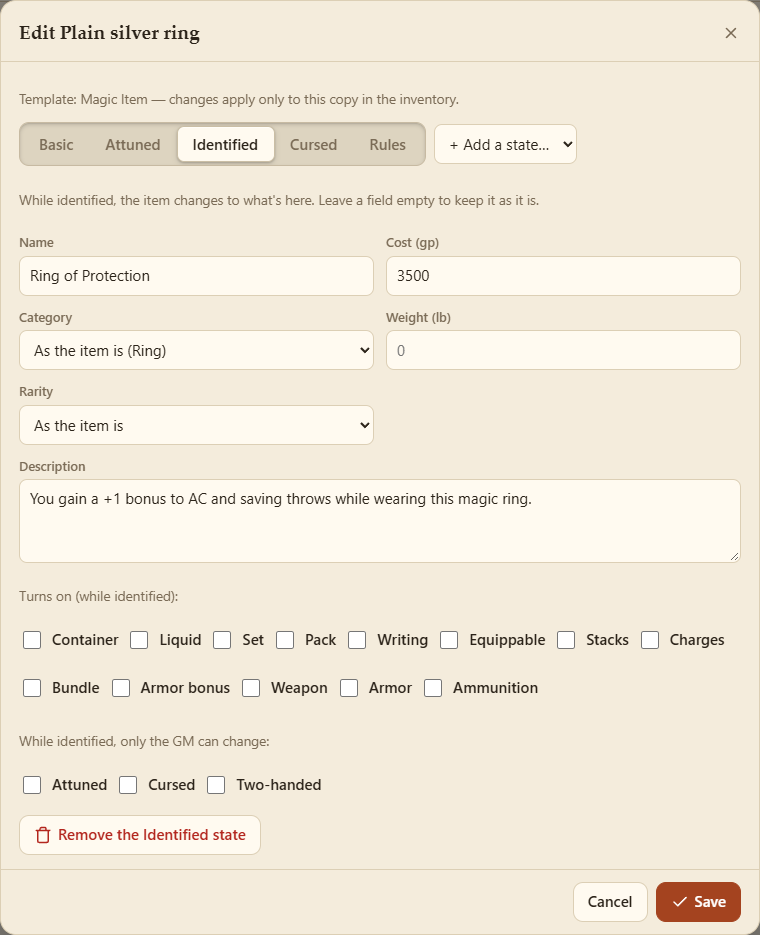
On a state's tab, each field shows the item's own value greyed out. Leave it empty to keep it, or type what it becomes. Below are the features it turns on, the states only the GM can change while it's on, and Remove the … state.
Templates have a States list: the states their items start with a tab for.
A rule says when something happens, then what the item does: turn a state on or off, change its charges or a value, or tell the player. Rules used to be called triggers; older ones keep working, and read the same.
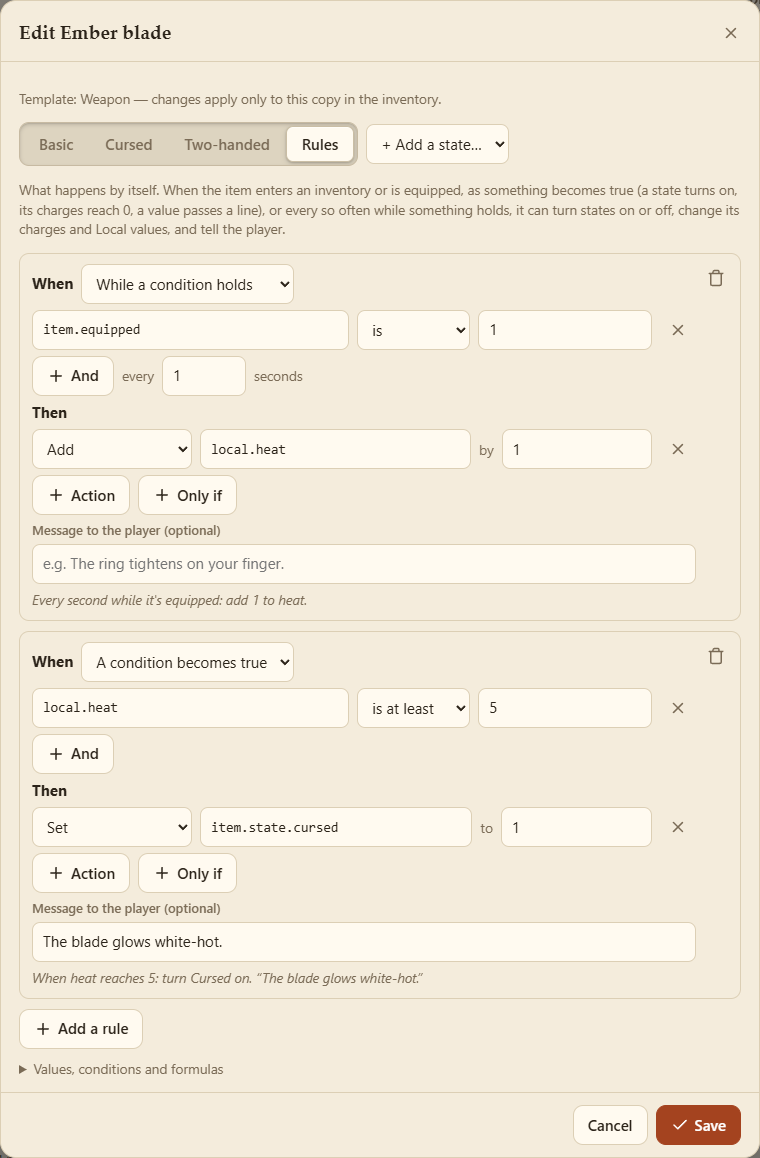
- A condition becomes true: once, as it does. Its charges reach 0, a state turns on, a value passes a line. It fires again only if the condition stops being true and then becomes true again.
- While a condition holds: every so many seconds (1 to start with), for as long as it's true. Every second while it's equipped, add 1 to its heat.
- It enters the inventory (added, bought, given, traded, or taken from treasure), it's equipped, it's unequipped.
It doesn't matter what made the change: you, the GM (a state, a panel's dial), a trade, another rule, or a value changing over time.
A condition is a value, compared with something: Charges is 0, heat is at least 5.
-
The value is typed in, with suggestions as you type:
-
item.charges,item.state.cursed(1 on, 0 off),item.equipped,item.qty,item.weight,item.worth,item.fill; - the character's:
char.count.attuned(items attuned),char.limit.attuned,char.carried; - values:
local.heat(the item's own Local value, else its character's),char.local.luck(the character's),global.doom(the GM's Global value). See GM Controls.
-
- Compared: is, isn't, is under, is at most, is over, is at least, is between.
- With: a number, on or off, one of the value's choices by name, or a formula (below).
- + And adds another: all of them must hold.
- + Only if adds conditions checked only at the moment it fires: when Attuned turns on, only if Identified is off.
-
Set: a state on or off, its charges, or a Local value (
local.glowtolocal.heat / 10). - Add: to its charges or a Local value (a negative number takes away).
- Change over time: start a Local value rising or falling, so much a second, to where it stops (see GM Controls).
- Message: shown to the player.
Rules can't set Global values: those are the GM's.
Under each rule it says what it does in words, as you edit: When Charges reaches 0: turn Cursed on.
Wherever a number goes, a formula can: local.heat / 10, item.charges * 2 + 1, clamp(local.heat - 3, 0, 5). They use numbers, values, + - * / %, ^ (power), brackets, and min, max, clamp, abs, round, floor, ceil and sqrt.
Rules run on the device of the character who has the item: after every change, and every second or so for while rules. A chain of state changes stops after 10 steps, and a rule that keeps firing over and over (two rules undoing each other) is held back, with a message. Items from before rules don't fire for what they already were.
Templates have Rules too: the rules their items start with.
Players can switch their own states from an item's details, or from the item menu (press and hold it: Attuned: turn on).
The GM can switch rules off for a whole campaign (Settings → Campaigns, on the campaign's card: Rules, values and controls): rules don't run, and don't catch up when switched back on. States and layers still work.
| How | |
|---|---|
| Attuning | You tick Attuned: its layer comes on. |
| Identifying | The GM switches Identified on when you've done what it takes: its name, description and powers appear. |
| A cursed stone that doubles in weight | When it enters the inventory: turn Cursed on. Its Cursed layer sets its weight. |
| A cursed ring disguised as a magic one | When Attuned turns on: turn Cursed on. Its Cursed layer locks Attuned: you can't end the attunement, only the GM can (by switching Cursed off). |
| A wand that crumbles | When Charges reaches 0: turn Cursed on, say "The wand crumbles to dust." |
| A blade that heats up |
Every second while it's equipped: add 1 to heat. And when heat reaches 5: turn Cursed on, with a Cursed layer named Ember blade (white-hot). Its drawn icon can glow with local_heat. |
| A lantern that burns its oil | Its interactive drawing sets local_lit with a tap. When lit becomes 1: change oil at −1 an hour, until 0. When lit is 1 and oil reaches 0: set lit to 0, say "The lantern goes out." A drawing can also switch a state itself (Pack Rat's Switch a state action). |
| A charm the GM's dial curses |
When Global doom reaches 3: turn Cursed on. The GM turns doom up on a panel, and every such charm curses at once. |
D&D 5e's Cursed Item example template is set up like the ring: Catalog → Templates → Add to my templates.