Repository navigation
Trading
In a party, players can swap items and coins.
Press Trade on a player's card in the Party tab, or Trade in an item's details (that item is picked already).
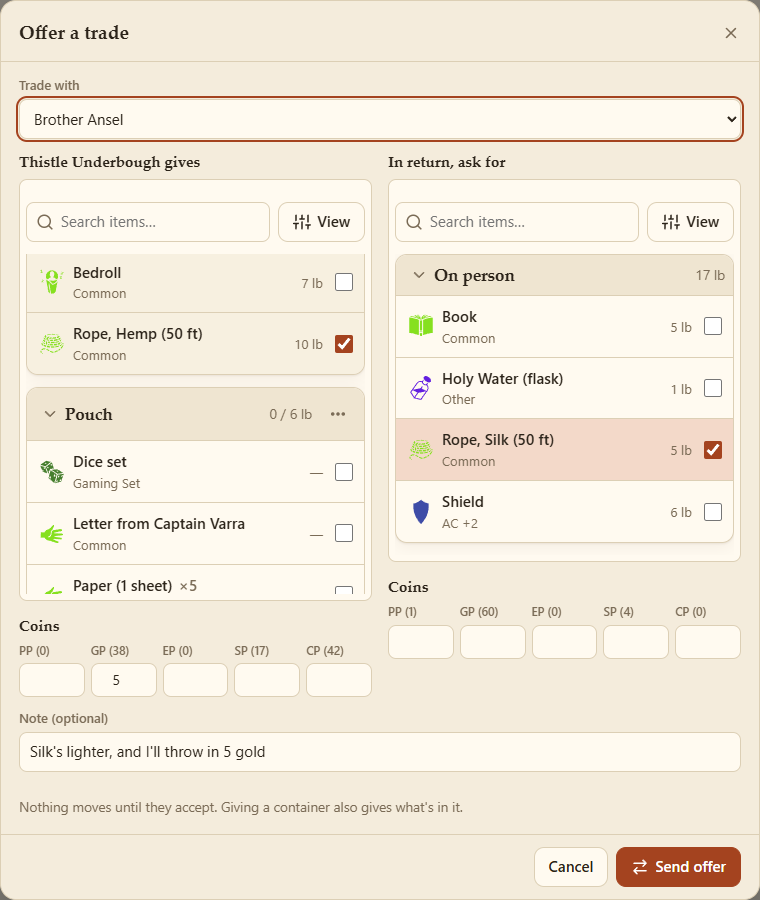
- Pick who you're trading with.
- On the left, tick what you give; on the right, what you'd like back. Each side lists items like an inventory, with its own search, sort and filters; picked items stay listed while you search. For a stack, choose how many.
- Add coins to either side.
- Add a note if you like, and Send offer.
Giving a container gives what's in it and strapped to it too (its contents are ticked with it). A deck of cards goes with its cards. An item's own Local values go with it (a lantern's oil, an abacus's count).
Show… in an item's menu (or Show in its details) shows it to players you choose, or the GM. It pops up for them: its details, its notes, what's in it, with Seen. Nothing changes hands, and it goes once everyone's seen it. (What it could become, its layers, isn't sent.)
In a party, Remove is Discard: the item goes to the GM, into a Discarded hoard on their Treasure tab, ready to give out again (see Treasure). What was in a container stays with you. If no GM is connected, it waits at the host.
The other player sees the offer straight away, on the Party tab (the tab shows a count).

Accept swaps everything at once, after checking both of you still have it all. Decline turns it down. Whoever made the offer can Cancel it until then, and both players see how it ended.