Admin Architecture
Taranis is developed to support the prevention component of the CERT-process: collecting information about vulnerabilities and threats, analyzing the collected news items, and writing and publishing advisories judging the discovered security issues. These functions are described as the phases of the CERT-process. In addition to the core functionality, several additional tools are provided. Among these is the possibility to maintain a Constituent administration, user information, and manage collectable sources. This chapter introduces the basic concepts of Taranis and its architecture.
NOTE: Taranis was developed with the CERT-process in mind. That is why the Taranis documentation often refers to this process in general and to IT-vulnerabilities and threats. This does not mean Taranis isn’t useful in other processes or businesses.
NCSC-NL collects, and enriches information by following a five phase process. Through these phases, relevant items are transformed from raw input into products of the security team, each for its specific target audience.
The five phases summarized:
- Collect: Collect news items from external sources.
- Assess: Determine the relevance of news items and discard when irrelevant.
- Analyze: Analyze relevant news items and determine the appropriate publication(s) that are to be created on the subject.
- Write: Write the product(s) (like advisories and alert e-mails) and apply the standard quality assurance cycle.
- Publish: Send out the product(s) to the relevant target audience.
Based on the experience NCSC-NL had in executing the five phase workflow, a number of design principles were formulated at the start of the Taranis project. These principles may help you understand why some things in Taranis are the way they are. The more important design principles are outlined below:
It must be possible to see what happened with a certain event or news item from the moment it was published on the web. Taranis must store information to be able to answer questions like:
- Did a member of the CERT staff analyze the event?
- If so, who created the analysis?
- What were the findings?
- Did we write a product about this event?
- If so, what kind of product?
- If not, why not?
- How long did it take us from the event occurring until the publication was sent out?
There are some important initiatives in the security world that are very helpful to Taranis. Reported vulnerabilities are directly marked with Common Vulnerabilities and Exposures (CVE) IDs. The software list is based on the Common Platform Enumeration (CPE) list. Both lists are actively maintained and developed by MITRE. The CVE list is sponsored by the National Cyber Security Division of the U.S. Department of Homeland Security. Taranis implements mechanisms to keep both lists and the mapping between them up to date.
The security world is constantly changing. Therefore, Taranis supports mechanisms to easily add new features without the need to change the whole application.
In the past, NCSC-NL used different tools for each of the five phases of the workflow, resulting in a lot of copy-and-paste work and errors. It was very important that Taranis had a single interface, supporting all of the different phases.
Taranis must be able to support different input- and output mechanisms. Taranis started with support for HTTP(S)-based sources. From version 2.0.2 onwards, Taranis also supports IMAP(S) and POP3(S) based sources. On the output side Taranis currently only supports e-mails. Other output mechanisms such as SMS and CMS (websites) can be integrated manually.
Of course, as a CERT, we put strong emphasis on creating a secure (web) application. We tried to prevent the introduction of vulnerabilities in the code: we have performed penetration tests on the application and we also incorporated an extensive authentication and authorization framework that enables the implementation of different user roles.
Combining the five phase workflow and the design principles has resulted in the architecture depicted below.
Figure: Taranis architecture
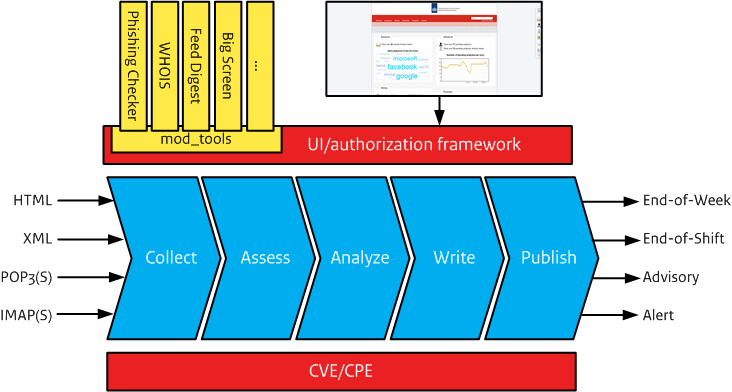
The basis of the architecture is formed by the different steps of the workflow (collect-assess-analyze-write-publish). The process is started by different kinds of input as HTML and POP3 and ends with different products as part of the publish phase.
On top of the different steps in the workflow, you can see the User Interface (UI) and authorization framework. The idea behind this is that all of the steps are supported through the same interface and the same uniform authorization framework.
The UI contains a plug-in called ‘mod_tools’. Mod_tools is the Taranis extension mechanism through which Taranis supports new functionalities. A tool added to mod_tools can make use of all the standard Taranis features, including authorization and user interface. This way it is quite easy to fully integrate new features in a safe and fast manner.
Let’s walk through an example of how Taranis is able to support the vulnerability management process of a security team. Let’s assume a security team monitors vulnerabilities in product XYZ because an organisation in the constituency of the security team uses this product and that a new vulnerability in this product has been found.
First, the “collect” phase is used to scan the sources for new information. Taranis scans both web and e-mail sources for new messages. An automated process recognizes any changes in websites, mailboxes, and RSS feeds, collects the changes and stores them in a database. Different sources that the security team monitors, probably will report about the vulnerability in XYZ. These reports are stored in the database. If configured, the Collector (the Taranis component responsible for collecting news items), automatically extracts relevant identifiers from the reports for easy correlation of items. When, for example, the vulnerability is assigned CVE-2016-9999, different reports about the vulnerability will incorporate this same ID. Because Taranis records these identifiers, it is very easy to correlate news items about the same vulnerability from different sources.
Software companies report about vulnerabilities (e.g. the company behind XYZ), other sources might be vulnerability research companies (e.g. VUPEN and Secunia), blogs and mailing lists (e.g. Bugtraq).
The collected information is displayed in the Taranis interface, enabling the team to “assess” whether the collected news items are interesting and relevant for any of her target audiences. The duty officer of the security team sees all the collected news items about the vulnerability in XYZ (along with numerous other news items) and decides for each whether it is relevant for it’s constituency.
All the relevant items about the vulnerability in XYZ are transferred to the “analyze” phase and grouped into one analysis. This phase allows the analyst to further investigate the issue. The collected items give the duty officer a clear picture of the vulnerability, the impact, and the solution. The duty officer documents all his findings in the analysis for future reference. All findings are time stamped by the application.
Suppose the vulnerability is deemed relevant for the constituency of the security team, therefore the analysis is transferred to the “write” phase. This phase is where the advisories and warning mails are written, reviewed, and checked. Publication Quality Assurance is a mandatory part of the process.
During the transfer from analysis to publication, all relevant information contained in the analysis (links, identifiers, hard- and software) are automatically saved to a newly created publication. The duty officer writes an advisory based on his findings in the analysis and, after he is satisfied with the advisory, he marks the advisory as ‘Ready for Review’. A colleague of the duty officer then checks the advisory for possible mistakes and completeness. If this colleague is satisfied with the content, the advisory is marked ‘Approved’. To enforce a ‘four-eyes’-principle the author of the advisory cannot mark his own publications as ‘Approved’.
Now the advisory is ‘Approved’, the “publish” phase helps this written advisory to be published to the various channels (i.e. websites and e-mail). A team member publishes the advisory to the relevant contacts after which Taranis records the recipients of each of the products. It updates the analysis to reflect the publication. Taranis automatically matches Constituents with the products selected in the advisory; this way, only Constituents that have marked the software as ‘in use’, will receive the advisory.
Taranis is implemented as a Perl web application. The figure below gives an overview of the technical components used by Taranis.
Figure: Components used by Taranis

