Admin CLI
The Collect phase is implemented Taranis offers a lot of configuration options, both through the web interface as through files on the file system. This chapter describes the options contained in the files.
The Taranis XML configuration files can be found in the ~/var directory of your taranis user. As a Taranis administrator you should become familiar with at least a few of those configuration files, especially these files that cannot be alterd through the Taranis web interface.
Different configuration files along with a short description of their purpose and whether or not you should edit these files by hand:
- ~/etc/taranis.conf.xml
- The main Taranis configuration file. It contains core settings, like database connection details and e-mail settings. It also list the exact location of the other config files.
- ~/var/dashboard.layout.xml
- Influences the working of the Taranis dashboard. Controls e.g. the item categories shown in the tag cloud.
- ~/var/website/entitlements.xml
- Controls the authorizations that roles have on the different Taranis components and options.
- ~/var/dashboard/tagcloud_blacklist.xml
- Words not to be included in the tagcloud on the dashboard
- ~/var/collector/identifiers.xml
- To be able to automatically extract unique identifiers from items, this file contains regular expressions for well-known identifiers. Add your own definitions for missing identifiers. Edited through the Taranis web interface.
- ~/var/publications/templates.xml
- Defines the templates that are used by Taranis to create default products.
- ~/var/website/path.shortcuts.html
- Contains shortcuts so that users can create bookmarks to often used parts of the Taranis web interface.
- ~/var/stats/external.xml
- Defines external statistics to be downloaded to the Taranis server. These statistics will show up in the Taranis web interface once downloaded.
- ~/var/collector/strips.xml
- Sometimes using regular expressions for identifiers on items can result in undesired identifiers. By using strips you can strip off parts of a webpage before looking for identifiers. Edited through the Taranis web interface.
- ~/var/tools/external.xml
- Defines the tools plugged into Taranis. Edited through the Taranis web interface.
The main Taranis configuration file is ~/etc/taranis.conf.xml: this is the file that should edited by every Taranis administrator.
The table below lists the parameters in the main configuration file. Not all of these settings are meant to be edited by system administrators. The more important settings, which you should review when configuring Taranis for the first time, are marked with #.
Parameters in the main Taranis configuration file:
- access_token_default_expiry
- Number of minutes after which an accesstoken should expire. If left blank it will default to 60 minutes. This token is used by the REST interface which Taranis offers.
- advisory_id_length
#
- Number of digits to use for the advisory number. By default this is 4, which results in an ID like ‘NCSC-2016-1234’. Changing this setting to e.g. ‘5’ will result in something like ‘NCSC-2016-12345’.
- advisory_prefix
#
- Prefix added to every advisory ID. By default this NCSC but it can be changed to anything you like. If you change it to e.g. MyOrganization, the next advisory you write will receive ID MyOrganization-2016-0001.
- advisory_xml_template
- Path to the template used for XML advisories. Only change this value if you will be using a non-standard XML template in combination with the ‘Write Advisory’ functionality of Taranis.
- advisory_xsd
- Reference to the XML Schema Definition (XSD) used to create XML versions of advisories.
- analyze_published_status
- Statuses that are considered ‘end statuses’ by Taranis. These settings are used by Taranis for statistical purposes. The string specified here should be a subset of the statuses specified in analyze_status_options.
- analyze_status_options
- Subset of analyse statuses which will be offered to the user by the web-interface. Available options are: pending, done, eow, eow done, skipped, waiting and joined.
- back-end_tools
- Directory where back-end-tools are placed. Used by the Collector to run additional tools.
- banner_html
- Snippet of HTML that is displayed on top of the Taranis web interface. Use this to change the “branding” of Taranis.
- collector_alerter_to_address
#
- E-mail address for sending collector alerts.
- collector_secret
- Secret used by a collector to communicate with Taranis. This secret is generated upon Collector definition in the Taranis web interface.
- collector_threads
#
- Number of parallel processes used by the Collector.
- cookie_jar
- File from which the Collector retrieves cookie-information for access to protected resources.
- customstats_imagepath
- Location of the directory to temporarily store dynamically generated statistics.
- dbdriver
- Driver that is to be used for database access. Currently we only support PostgreSQL so this field always contains ‘Pg’.
- dbhost
- Host on which the Taranis PostgreSQL-database is running (by default this is on the same machine as Taranis).
- dbi
- The database scheme that is used, always ‘dbi’.
- dbname
- The name of your Taranis PostgreSQL-database.
- dbpasswd
- Password for the Taranis database user (see dbuser).
- dbport
- Port on which PostgreSQL is listening (default 5432).
- dbsslmode
- SSL mode for database connection. Options are disable, allow, prefer and require. Please see PostgreSQL documentation on ‘SSL Support’.
- dbuser
- Username for the Taranis database user, defaults to ‘rss’.
- entitlements
- Specifies the file that contains all entitlement information.
- glue_word
- The word(s) to insert before the last element in a list, when an array of values gets serialized in a publication. By default 'and'. By default, ('a', 'b') becomes "a and b".
- identifiersconfig
- Location of the file on the file system that is used to specify identifiers, such as CVE-IDs. This file is edited when doing web-based configuration.
- logdirectory
- Specifies the directory where the Collector will store log-information about sources visited.
- maillist
#
- Contains a semicolon separated list of all the e-mail addresses that users should be able to send email to. This list is used when users click the envelope icon next to a news item. The email addresses are separated by a semi-colon and a space. Example:
one@myorganization.com; two@myorganization.com
- mail_from_address
#
- ‘From’ e-mail address that is used by several back-end scripts, like back-end-tools and collector alerter.
- mimeparser_outputdir
- Path to be used to temporarily store MIME-related files.
- no_proxy
- URLs and IP addresses of websites that should not be accessed through the web proxy. The URLs and IP addresses are separated by a comma (,). Change this option if you use a proxy (proxy = yes) in combination with internal sources that should not be visited through the proxy. Examples: localhost, intranet.myorganization.com
- organisation
#
- Name of your organisation, used in different products.
- pgp_signing_advisory
#
- Indicates whether or not Taranis requires a PGP signature for publishing advisories.
- pgp_signing_endofday
#
- Indicates whether or not Taranis requires a PGP signature for publishing an End-of-Day, End-of-Day-Public and End-of Day-White report.
- pgp_signing_endofshift
#
- Indicates whether or not Taranis requires a PGP signature for publishing an End-of-Shift report.
- pgp_signing_endofweek
#
- Indicates whether or not Taranis requires a PGP signature for publishing an End-of-Week report.
- phishdownkeysfile
- The Phishing Checker configuration file. This file contains phrases which usually indicate that the phishing site is down.
- phishfrom
#
- ‘From’ e-mail address to be used by the Phishing Checker in case it sends updates about phishing websites.
- phishto
#
- E-mail addresses where the Phishing Checker will send notifications to.
- phishreferencemandatory
#
- Set the reference setting of the phishing tool to mandatory. ON for mandatory, OFF for optional.
- phishreferencepattern
#
- Regular expression pattern rule for the reference setting of the phishing tool.
- proxy
- Defines whether or not to use a proxy server for HTTP and HTTPS-based connections. Possible values: yes / no
- proxy_host
- http://URL:Portnumber of proxy server for HTTP-based connections. You should only specify a value if you set proxy to ‘yes’. Possible value: http://<IPaddress>:<Portnumber>
- publication_eod_orange
#
- Specifies the time from which Taranis shows the orange indicator as a reminder for sending out the daily End-of-Day report. Based on 24h standard (e.g. 1400 for 2pm).
- publication_eod_red
#
- Specifies the time from which Taranis shows the red indicator as a reminder for sending out the daily End-of-Day report. Based on 24h standard (e.g. 1600 for 4pm).
- publication_templates
- File that contains the available publication templates. This file is edited when the templates are configured through the web interface. publish_advisory_from_address Specifies the ‘from’ email address when sending advisories.
- publish_advisory_from_name
#
- Specifies the ‘from’ name when sending advisories.
- publish_advisory_to
#
- Specifies the ‘to’ email address when sending advisories without an XML-attachment. This can be a non-existent address as ‘real’ receivers of the advisory are placed in the ‘bcc’-section of the emails.
- publish_eod_from
#
- Specifies the ‘from’ email address when sending End-of-Day publications.
- publish_eod_to
#
- Specifies the ‘to’ email address where to send the End-of-Day to (this can only be one address!).
- publish_eos_from
#
- Specifies the ‘from’ email address when sending End-of-Shifts.
- publish_eos_to
#
- Specifies the ‘to’ email address where to send the End-of-Shift to (this can only be one address!).
- publish_eow_from
#
- Specifies the ‘from’ email address when sending End-of-Weeks.
- publish_eow_to
#
- Specifies the ‘to’ email address when sending End-of-Weeks. This can be a non-existent address as ‘real’ receivers of the advisory are placed in the ‘bcc’-section of the e-mails.
- publish_LL_advisory
#
- Define whether or not you want to block advisories with low probability and low damage. Set this to ‘no’ to block L/L advisories and to ‘yes’ if you want to send out these types of advisories. Possible values: yes / no
- publish_testing_to
#
- Specifies the ‘to’ email address when sending Advisories, End-of-Weeks and other publication when running in test mode (testmode = on).
- publish_xml_advisory_to
- Specifies the ‘to’ email address when sending advisories with an XML-attachment. This can be a non-existent address as ‘real’ receivers of the advisory are placed in the ‘bcc’-section of the emails.
- rt_ticket_url
- Defines the URL to your ticketing system. When you add a phishing website to the phishing checker and specify a ticket number, Taranis will use the URL defined here to create a clickable link to the ticket in your ticketing system.
- screenshot_module
- Specifies the module to be used to create screenshots of websites. By default, screenshots are made with PhantomJS.
- scriptroot
- Path component of a Taranis website URI, which refers to the directory containing scripts
- session_expire
- Defines after which period of time, the session of the web user must expire. By default this is 30 minutes (‘30m’).
- session_secure_cookie
- Specifies if the Taranis session cookie should be labeled ‘secure’. Set to ‘yes’ if you use SSL/TLS for the connection to the Taranis WebUI, and otherwise to ‘no’.
- shifts
#
- Sets the start, end, orange, and red time of shifts which are used for the Report and End-Of-Shift functionality. The
<shifts>container element consists of a<shift>container element for each shift. The<shift>container consists of the<start>,<end>,<orange>and<red>elements. All 4 elements expect times in 24 hour 4 digit format e.g: 2200 for 10 PM.
- shortcutsconfig
- Specifies the file in which URL-shortcuts are configured.
- smtppass
- Specifies the password for logging in to the SMTP-server. Leave empty if no authentication is required.
- smtpport
- Specifies the port number on which to connect to the SMTP-server (this is most probably 25).
- smtpserver
- IP address of the SMTP server to be used by Taranis. If blank, emails use local delivery.
- smtpuser
- Specifies the username for logging in to the SMTP-server. Leave empty if no authentication is required.
- sso
- Allow Single Sign-On integration with Microsoft AD.
- statsconfig
- File that contains the configuration of all the stats.
- stripsconfig
- File that contains the configuration of the strips used to parse the content collected from the sources. This file can be modified through the web-interface.
- syslog
- Specifies whether Taranis database errors should be sent to syslog. Possible values: on / off
- syslog_facility
#
- Specifies the syslog facility.
- syslog_pid
#
- Specifies if the process ID must be logged.
- syslog_priority
- Specifies what kind of events must be logged to syslog. Possible values: debug, info, notice, warning (warn), error (err), crit, alert, emerg (panic).
- tagcloud_blacklist
- The file that contains words that should not show up in the tag cloud on the dashboard.
- testmode
#
- Run Taranis in ‘test mode’. This influences the e-mail addresses used for sending out advisories and other products. Possible values: on / off
- timeout
- Timeout to be used by different actions performed by the Collector.
- toolsconfig
- File that contains the configuration of the tools that are ‘plugged into’ Taranis. This file is modified by the web-based configuration of the add-on tools.
- twitter_consumer_key, twitter_consumer_secret, twitter_access_token, twitter_access_token_secret
#
- Settings used to access Twitter information based on OAuth. You can generate the consumer and access information from https://dev.twitter.com
- useragent_string
- The user-agent string used by Taranis when visiting web-based resources.
- webroot
- Directory of the Taranis web root.
The dashboard.xml file contains attributes for the creation of the dashboard screen that is visible upon login and the minified dashboard on the right side of the screen.
We advise you to leave most of the attributes of this file as they are. Only the two <categories> sections of this file are meant to be edited. The first categories section is for the numberOfUnreadItems data processor. The number of unread items in Taranis is shown both on the dashboard screen and the minified version of the dashboard.
Figure: Number of unread items
You can control which categories are included in the count of unread items. When you have multiple teams working on Taranis, it can be that the number of unread items is only relevant for the team that runs the operational process and less for the team that uses Taranis for less operational activities (e.g. monitoring new whitepapers and reports). Therefore, Taranis allows you to only include the categories that you think are relevant. Every category you want to be included in the count must be added between <category> tags.
It is not possible to create different dashboard views for different users or roles. This can be confusing for users when they see there are still unread items in Taranis but they don’t see any of them because their role is not allowed to look into the categories involved.
The second categories section is for the assessTagCloud data processor. This is the process that creates the tag cloud that is visible on the dashboard screen.
Figure: Dashboard tag cloud
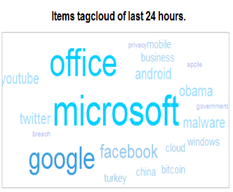
You can control the tags that are included in the tag cloud by specifying the news categories that should be included in the tag cloud. Specifying these categories works in the same way as specifying the categories for the unread items.
Taranis handles all requests from clients through a single URL. This makes it impossible for users to bookmark specific pages of Taranis. In order to give users the possibility to use bookmarks, Taranis supports the use of shortcuts. An example shortcut is shown below:
<anon>
  <shortcut>assess/news</shortcut>
  <modname>assess</modname>
  <scriptname>assess</scriptname>
  <action>displayAssess</action>
  <parameters>category=4</parameters>
  <menuitem>assess</menuitem>
</anon>
Administrators can add their own shortcuts based on the desires of their users. Let’s go through an example to illustrate how this works. Let’s assume users want to bookmark the WHOIS tool. This is not possible by default, so the administrator decides to add a bookmark. First, the administrator needs to find out where the WHOIS script is located at: ~taranis/scripts/mod_tools/whois/whois.pl
The module name is mod_tools and the scriptname is whois.pl. The string mod_ is stripped from the module name and .pl is stripped from the script name so that the resulting attributes are:
<modname>tools</modname>
<scriptname>whois</scriptname>
Next you need to look into the script (whois.pl) and decide which function you want to call. In this case “displayWhois” is the sub that you most certainly are interested in:
<action>displayWhois</action>Your definition is now almost ready to be used, but there is a catch here. As you can see from the filepath, the whois.pl script is not placed in the mod_tools directory but under the whois subdirectory in the mod_tools directory. Because Taranis does not allow for subdirectories in the <scriptname> attribute, this is solved by adding an extra parameter for tools:
<parameters>tool=whois</parameters>To make sure that the right menu item is highlighted in the Taranis top menu you must define that the focus should be on the “Tools” section:
<menuitem>tools</menuitem>Finally, you must decide the keyword through which users can reach this shortcut, e.g. “whoistool”:
<shortcut>whoistool</shortcut>After adding this configuration to the configuration file in the same way as the “assess” example shown in this paragraph, users will be able to access your shortcut through the following URL:
http(s)://$yourserver/taranis/goto/whoistool/
Externally stored statistics can be any random image file available on the internet. The external paths are defined in stats.xml. You can use this feature to download statistics from remote websites about viruses, malware, botnets, port activity, etc.
View the downloaded statistics by choosing “Statistics” from the main menu and then selecting one of the statistics categories.
Editing the list of externally stored statistics is not (yet) possible through the Taranis web interface. If you want to edit this list, you must do so by editing the XML-file.
This XML-file contains a list of all statistics to be downloaded. Each statistic is defined in <stat> container. To add new statistics, add a new container to the configuration file, and supply the information required.
Per statistic, you have to specify the following information:
- description
- Description of the statistic, to be displayed above the image.
- link
- A link to the page where this image will be downloaded from. Users will be redirected to this link if they click on the image in the Taranis web interface.
- image
- The URI of the image-file to be downloaded.
- mtbc
- Mean Time Between Checks. Just as with regular sources, this parameter defines how often a fresh version of the image file must be downloaded. MTBC is defined in minutes. If you want an image file to be downloaded every hour you must specify a MTBC of 60.
- source
- Name of the source. This name must match an icon file in
source_icons.
- category
- The category for the statistic.
