Admin Collector
The Collect phase is implemented by the Taranis Collector which is located in the collector folder of the Taranis installation. The Collector —responsible for visiting all the sources and storing news items in the database is automatically started through a cron job but you can also start it manually from the command line. This chapter describes the different options the Collector has and the process that is followed upon collection.
From Taranis version 3.3 the Collector is no longer bound to the server, on which the rest of your Taranis installation runs. You can configure multiple Collector instances on remote systems. This allows you e.g. to collect information from different networks with distinct trust levels.
Figure: Using multiple Collector instances
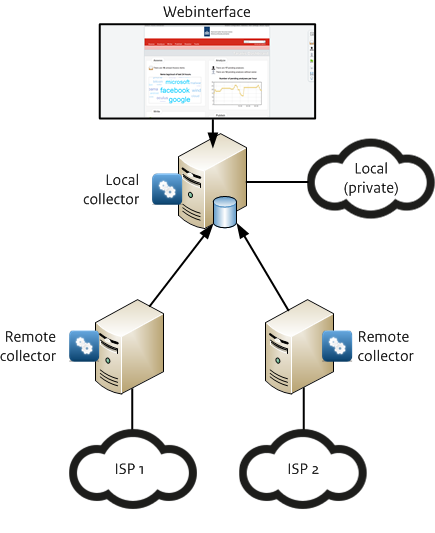
Above figure shows one central Taranis server that hosts the Taranis web interface and also runs one Collector instance to gather information from the local network. Next to this Collector instance there are also two remote Collector instances that gather information from external sources through internet connection 1 (ISP 1) and internet connection 2 (ISP 2).
Every time the Collector runs, it will check for new items published by the source, based on title, description and referral like.
When a newspaper corrects a typo of a news item in the title after an hour, Taranis will treat this change as a new item.
The collector runs (by default) every 20 minutes. It is triggered via cron (for user taranis), where you can change the scan frequency.
Via cron, the script ~taranis/var/cron.cycle gets run, which starts a bunch of maintenance steps as well. Each step has its own log-file. When a step is not re-entrant, it will set a lock: you can always safely start them by hand as well without the need to stop cron.
Clustering means that related items are sorted together. Whether or not specific items will be clustered depends on many different variables:
- Is clustering for the source of the items enabled?
- Is there a cluster word pattern set for this specific category of items?
- Does this cluster definition support the language of the specific source (Dutch or English)?
- Can this item be clustered with other items based on timeframe and threshold?
Taranis collects external statistics and Taranis specific statistics. External statistics are image files that are downloaded from the external websites. The external statistics downloaded are configured through the ~/var/stats/external.xml file. See the chapter on the configuration of Taranis for more info. By default, Taranis includes some sample statistics from SWITCH.
Taranis specific statistics are statistics on items and sources in the database. These are updated on each cycle.
To start the Collector manually, run the following command:
tara$ taranis collector scan-sources--help switch to get an overview of the available switches:
  Taranis version 3.4.1
  Usage:
    taranis [--help]
    taranis <COMMAND> [--help] <SUB-COMMAND>? [OPTIONS]

      COMMAND=     SUB-COMMAND=
    ~ apache       start|stop|restart
    ~ cluster      news-items
    ~ collector    alerter|scan-sources|download-stats|send-digests|make-stats
    ~ cpe          dictionary
    ~ cve          related-cpes|descriptions
    ~ dashboard    make-pages
    ~ db           archive|close-opened
    ~ dossiers     send-reminders
    ~ git          init|release
    ~ install
    ~ phish        check-down|cleanup-images
    ~ photo        cleanup-issues|import|export
    ~ publications autosend-eos
    ~ rest         cleanup-tokens
    ~ restart
    ~ specint      send-reminders
    ~ start
    ~ stop
~ tools run-backendsThe only switch that might need some more explanation is the --debug switch, witch is used for troubleshooting purposes. For example, when source (‘SourceA’) is experiencing problems, you can tell the Collector to exclusively check this source and present detailed findings:
$ taranis collector scan-sources --debug SourceAWith this switch, the Collector will ignore all other sources configured. The Collector will show a lot of debugging information as shown below:
processing PHP http://www.php.net/news.rss
$VAR1 = {
category => 'security-vuln',
clustering_enabled => 0,
collector_id => 2,
contains_advisory => 0,
enabled => 1,
fullurl => 'http://www.php.net/news.rss',
language => 'en',
mtbc => 60,
mtbc_random_delay_max => 0,
parser => 'xml',
sourcename => 'PHP',
use_keyword_matching => 0,
[...]
};
request http://www.php.net/news.rss
200 OK
Encoding: UTF-8
title: PHP 7.1.10 Release Announcement
description: The PHP development team announces the immediate [...]
Vx5UKkFNoRKALFsdCH2jpw Exists in table item
title: PHP 7.2.0 Release Candidate 3 Released
[...]
With debugging enabled, the Collector shows information about the parser used for the specific source as well as an overview of all the news items collected.
The Collector supports the use of a cookie jar to automatically insert cookie information when checking a source. This is useful when you want to add a source that requires authentication based on a cookie. Cookie information is kept in: ~/var/collector/cookie_jar.txt
When you add a new source, let’s say www.thissiterequirescookies.com, you first add this source through the Taranis web interface (Configuration -> Taranis Sources). After that, you add the cookie to the cookie jar. Below is an example of a cookie for this website:
Set-Cookie3: myid=123abc; path='/';
domain=.thissiterequirescookies.com; version=0
If you configure a rule like this, the Collector will send this cookie with every request to .thissiterequirescookies.com. When you add multiple lines with different cookies for the same domain, all of these cookies will be used in the request to the source. Of course you can specify a different “domain”-value on every line in the same file so that you can add cookies for all of your sources.
Every line in the cookie jar is constructed as follows:
Set-Cookie3: $name=$value; $extra_option=$extra_value;
[...]
A cookie line always starts with the text “Set-Cookie3:”. Then, the name of the cookie and the value of the cookie are specified followed by a semicolon. After the semicolon you can add extra option/value pairs of cookie properties.
Cookie properties:
- domain: The domain name for which this cookie is valid.
- expires: Expiration date and time for the cookie (forever if empty).
- path_spec: True/false value indicating whether or not this cookie is valid for all the URLs in the domain or just the specific URL path.
- path: The path for which the cookie is valid (for example “/”).
- port: The port number for which the cookie is valid.
- property: Description
- secure: True/false value indicating that the cookie should only be used over secure connections (https).
- version: The cookie-spec version number (0).
If you experience problems with the Collector, the best thing to do is to start it manually and see what happens. If you experience problems with specific sources, you should use the debugging options.
The Collector will log any problems with sources to the Taranis database. You can check the Collector-log through the Taranis web interface (Configuration -> Collector Error Logging).
Figure: Collector errors
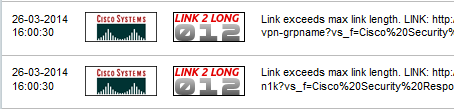
Every error reported by the Collector has an error type. In the above example, the Collector ran into a C012-error which means that this source results in items with hyperlinks that are too long. Most of the error codes are closely linked to standard HTTP error codes.
Collector error codes:
- C000 Unknown error
- C001 Time-out
- C010 IMAP/POP3 connection error
- C011 MIME-parsing error
- C012 Hyperlink for a given news item exceeds maximum length
- C013 No title or link for news item after parsing (invalid item)
- C014 Error during writing CVE / identifier
- C015 Advisory import error
- C016 Collector notification regarding Advisory imports
- C017 Software/hardware problem during advisory import
- C018 Imported advisory has references to original publisher
- C019 Screenshot failure
- C099 Found no news item after parsing the source (possible parser error)
- C301 Redirect
- C400 Webserver reports ‘bad request’
- C401 Webserver requires authentication
- C403 Access to this source is forbidden by the webserver
- C404 Source was not found on the server
- C500 Webserver reports ‘Internal server error’
- C503 Service unavailable
