Admin Configure Users
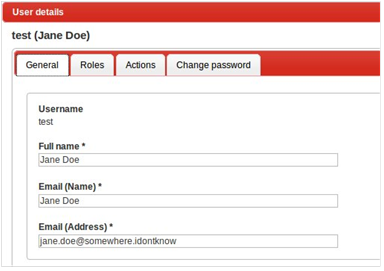
After installation of Taranis only the ‘admin’ user is defined. To add a new user or edit the properties of an existing user, open the users’ details window. It will show some basic properties of the user. You can specify the full name, email address. and email name of this user.
The “Role” tab allows the administrator to specify which roles the users will have.
Figure: User configuration
By default only the role ‘Taranis Administrator’ is available, which allows full access to the configuration. You may link multiple roles to a single user; to do this, the access rights the user will receive are cumulative (the rights of all the roles combined).
The “Change password” tab allows the administrator to change the current password of the users. The “Actions” tab gives you an overview of the last actions by this user.
Taranis supports a granular authorization framework in which users can get access to the different features of Taranis. This authorization framework makes use of “roles”, “entitlements”, and “particularizations”. An entitlement defines the authorization a user can have on a very specific component of Taranis, e.g. authorizations to access the “Assess”-part of Taranis.
A role is used to group a list of entitlements and to specify the exact rights on this entitlement. Possible rights on an entitlement are “Read” (R), “Write” (W) and “Execute (X). When a user has for example only Read-access to items he or she can read the items collected but cannot change the status of these items.
| admin_generic | Defines access to generic administration features |
| analysis | Analyses |
| configuration_generic | Item categories, collector logs, ID patterns |
| configuration_parser | Parser definitions |
| configuration_strips | <currently not in use> |
| Constituent_groups | Constituent groups, soft-/hardware linked to Constituent groups |
| Constituent_individuals | Constituent individuals, Constituent roles |
| cve | CVE Descriptions |
| damage_description | Damage descriptions |
| entitlements | <currently not in use> |
| dossiers | The dossier functionality |
| generic | Basic access (required for every user) |
| item_analysis | Items from assessment to analyze, bulk analysis, multiple analyses |
| items | Items |
| membership | <currently not in use> |
| photo_import | Photo management features under Configuration |
| publication | Publications, soft-/hardware list, publishing, calling lists |
| publication_template | Publication templates |
| publication_type | <currently not in use> |
| report | Report functionality |
| rest_level_1-4 | Access to the REST API |
| role_right | Roles, role rights |
| roles | Roles, role rights |
| soft_hard_usage | <currently not in use> |
| software_hardware | Soft-/hardware types, soft-/hardware list |
| sources_errors | <currently not in use> |
| sources_items | Sources, strips |
| sources_stats | Statistics |
| tools | Tools |
| user_action | User actions |
| user_role | User roles, users |
| users | Users |
The ‘Rights’ tab for a role shows all the entitlements along with three checkboxes (R, W, X) and sometimes a particularization.
Figure: Role rights
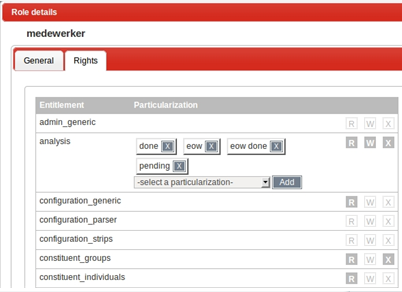
Some entitlements support a particularization. These particularizations enable the administrator to further limit the access of the user to certain subsets of the entitlement. The example shows that the role has read-, write- and execute-access to analyses, but only for analyses with the statuses ‘Done’, ‘Eow’, ‘Eow Done’ and ‘Pending’. This means that the user does not have access to analyses with another status than those.
