Repository navigation
Encryption and Keys
The key material under a database's Security folder — the database master key, certificates, asymmetric and symmetric keys, and the Always Encrypted key stores — plus server-level cryptographic providers and the endpoint that needs a certificate.
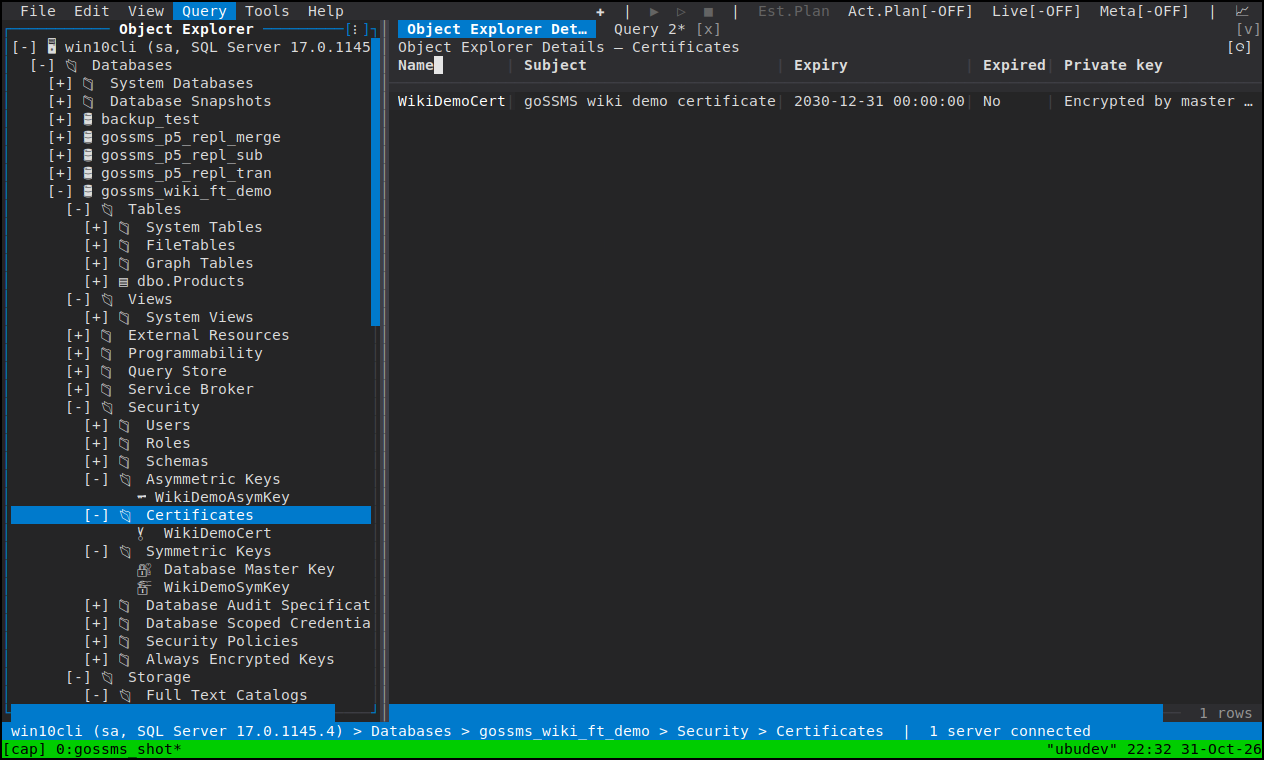
Under Database ▸ Security:
- Asymmetric Keys, Certificates, Symmetric Keys
- Database Master Key — the first child of Symmetric Keys, and shown only where it exists and the login has a right on it (it is one read, not one guess)
- Always Encrypted Keys ▸ Column Master Keys, Column Encryption Keys
Under Server ▸ Security: Cryptographic Providers (the registered EKM providers) and the certificates and asymmetric keys the instance holds.
Properties has General, read-only, and Encryption: the encryptions by the service master key and by password, added and dropped from there. Every write needs CONTROL on the database.
Its context menu carries Back Up Master Key and Regenerate Master Key. Both name the key's password when the service master key does not encrypt it, and both files are written by the SQL Server service account on the server's filesystem.
A dialog that needs one will create one. A certificate or asymmetric key
whose private key opens without a password is protected by the database master
key, and SQL Server refuses to create such a key in a database that has none
(Msg 15581). So New Certificate, New Asymmetric Key and New Database Mirroring
Endpoint ask for the master key's password and create it first when the database
has none. New Symmetric Key does not: a symmetric key is encrypted by a
certificate's or asymmetric key's public half or a password, and none of those
needs a master key.
New Certificate generates one (WITH SUBJECT). The import forms — FROM FILE, EXECUTABLE FILE, ASSEMBLY, WITH PRIVATE KEY (FILE = …) — all read
the server's own filesystem, which goSSMS cannot browse, so they are left to a
query window. New Asymmetric Key is the same shape, with algorithm and key
length in place of the subject. The private key is protected by the database
master key or by a password.
Certificate Properties and Asymmetric Key Properties carry General (with
the Owner row), the private key's protection, and Signatures: the modules
this object signs, with Add and Remove. ADD SIGNATURE needs CONTROL on the key
and the right on the module being signed, and the page asks before offering it.
Three actions are shared by the key families that have a private key:
-
Back Up Certificate —
BACKUP CERTIFICATEto a file on the server, with the private key to a second file when one is named. The public certificate backs up for anyone who can see it (db_securityadminincluded); the private key needs CONTROL on it. Both files are written by the SQL Server service account, which must be able to write the directory, and they come out readable by that account alone — so nothing in goSSMS can delete them afterwards either: that needs an administrator on the host. - Remove Private Key — a tree action on the two families that have one, withheld without a private key to remove; irreversible, needs the effective ALTER on the object.
-
Owner — the row their General page edits, because
ALTER AUTHORIZATIONdrops every explicit permission on the object, which is why the page states it. Taking ownership yourself needs CONTROL or TAKE OWNERSHIP; handing it to someone else also needs IMPERSONATE on them. A certificate or asymmetric key cannot be owned by a role; a symmetric key can.
New Symmetric Key encrypts the new key by any of a certificate, an asymmetric
key or a password — at least one. Encryption by another symmetric key is not
offered, because that key has to be opened first, and the decryptor prompt that
belongs to it is a different thing. An instance with an EKM provider registered
also offers FROM PROVIDER, which takes no encryption and no key material.
New Column Master Key and New Column Encryption Key are database-scoped
creates. A column master key stores only a key store provider name and a
path into that provider's store — the key itself never lives in SQL Server —
and the provider field is free text, because a custom provider name is legal and
only the client driver resolves it. The providers SQL Server ships with are
MSSQL_CERTIFICATE_STORE, AZURE_KEY_VAULT, MSSQL_CSP_PROVIDER,
MSSQL_CNG_STORE and MSSQL_JAVA_KEYSTORE, and the dialog lists them beside the
field.
One honest limit: a portable, no-CGO build cannot reach a Windows certificate
store or Key Vault, so goSSMS cannot compute an enclave-quoted column master
key signature itself. For an enclave-enabled key you paste the signature SSMS or
the SqlColumnMasterKey cmdlets produced; everything else about the key — the
store, the path, the algorithm — is created here, and column encryption keys that
wrap under a column master key are created normally.
New Database Mirroring Endpoint… sits on the Always On node because it is the prerequisite New Availability Group needs: the port, the authentication and encryption the endpoint accepts, and the certificate its endpoint key uses — which is where the master key precondition above turns up again when the database has none.
Endpoint Properties (General and Type Properties) is read-only on purpose. An
endpoint's only in-place writes are ALTER ENDPOINT … STATE and
DROP ENDPOINT, which are immediate commands in the context menu rather than an
Apply, and rewriting a payload's authentication or encryption means rewriting the
endpoint every replica connects through. What it cannot write it shows, and
Script as ▸ CREATE is how a
copy of one becomes a change.
The server-level Cryptographic Providers folder lists what is registered, with state and description. goSSMS browses providers; registering or configuring an EKM provider is a SQL statement, and Script as ▸ CREATE on what it can read is where the T-SQL starts.