Repository navigation
Service Broker
Under each database: all seven Service Broker families — message types, contracts, queues, services, routes, remote service bindings and conversation priorities.
The folder appears whether or not the broker is enabled on the database, because every one of these objects can be created, listed and dropped either way.

Expand one to list its objects, or select the folder to see them side by side in the Details pane — for queues, that means status, retention, activation procedure, reader count and the number of messages waiting. A disabled queue says so in the tree, so the state is visible without opening anything.
Script as ▸ CREATE is offered for all seven families.
Queues and routes are the two families you can edit, because their settings are the
ones that change while an application runs: a queue taken out of service, an activation
procedure stopped, a reader count raised under load, or a route repointed at a new
address. Everything the page changes is an ALTER QUEUE or ALTER ROUTE clause, and
Script Changes shows you exactly which before you apply it.
Queue Properties covers whether the queue is enabled, retention, poison message
handling, and activation: procedure (with its schema), whether activation is enabled,
max queue readers, and ACTIVATION EXECUTE AS — where SELF does not survive a round
trip, because the server resolves it at ALTER time and the queue reads back as the
user it resolved to, so the page says which of OWNER, SELF or a named user you are
writing.
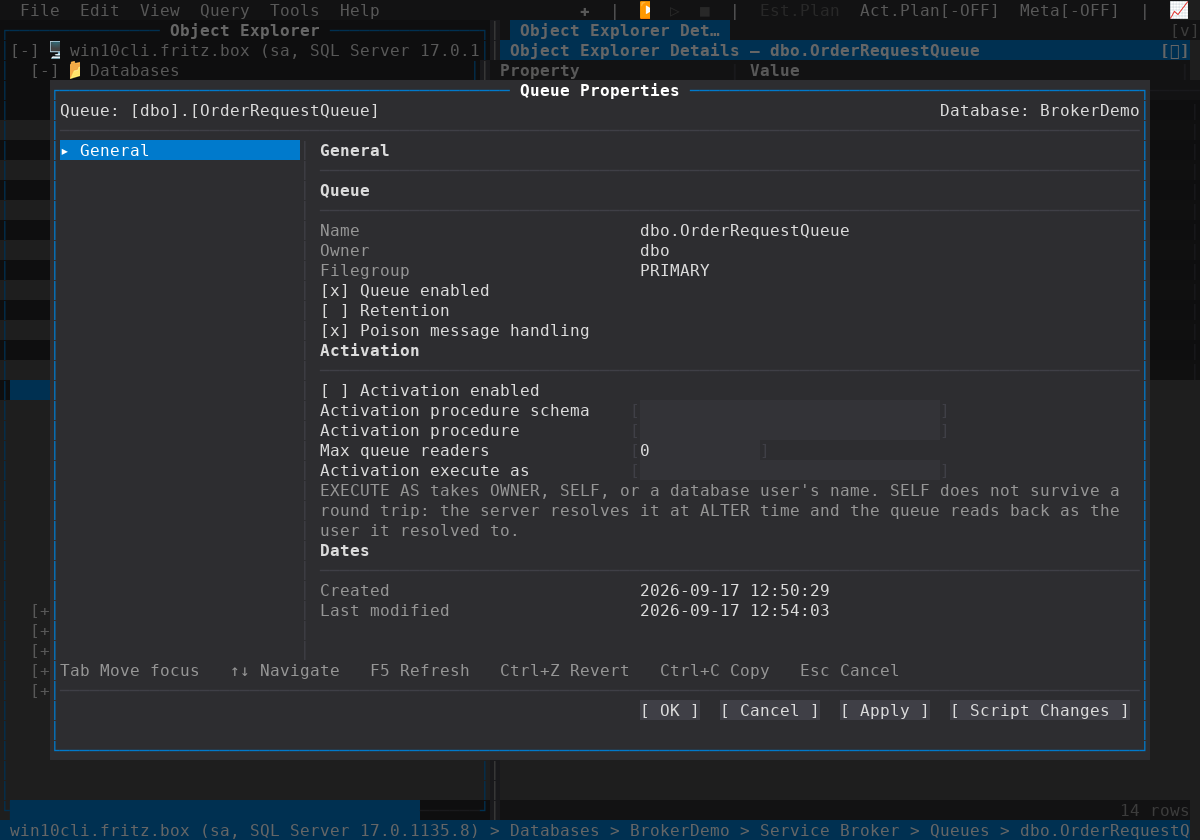
There is deliberately no Enable/Disable item in the tree for a queue: a queue's status is one row on its own Properties page, rather than the same switch living in two places.
Route Properties covers the destination: the remote service name, the broker
instance, the address (ADDRESS takes a TCP address, LOCAL, or TRANSPORT), the
mirror address, the lifetime and the security bindings — with the fact that makes a
difference when you edit one: ALTER ROUTE can change a setting but never clear
one, the server refusing an empty value and NULL not parsing, so a route that must
lose its broker instance, mirror address or lifetime is dropped and created again. And
the remote service name is matched byte for byte by the broker, even on a
server with a case-insensitive collation.
The other five families are read-only. What they define — a message type's validation, a contract's messages and who may send each, a service's binding to a contract, a remote binding's certificate, a broker priority's level and the three criteria it matches (contract, local service, remote service; 1 is lowest, 10 highest, and a conversation matching nothing runs at 5) — is part of the application's own schema rather than a setting, and changing one mid-flight changes the meaning of conversations already under way.
There is no New dialog for a Service Broker object, here or in SSMS: the way to create one is Script as ▸ CREATE, edited in a query window and run from there. Delete is offered where the object type can be dropped, with a confirmation that names it, and every drop can be scripted instead of run — which matters, because a message type or contract in use by a queue or service is refused by the server.
- Object Explorer
- Scripting — Script Changes and Script as ▸ CREATE
- Encryption and keys — the certificates a route authenticates with