Repository navigation
Query Editor
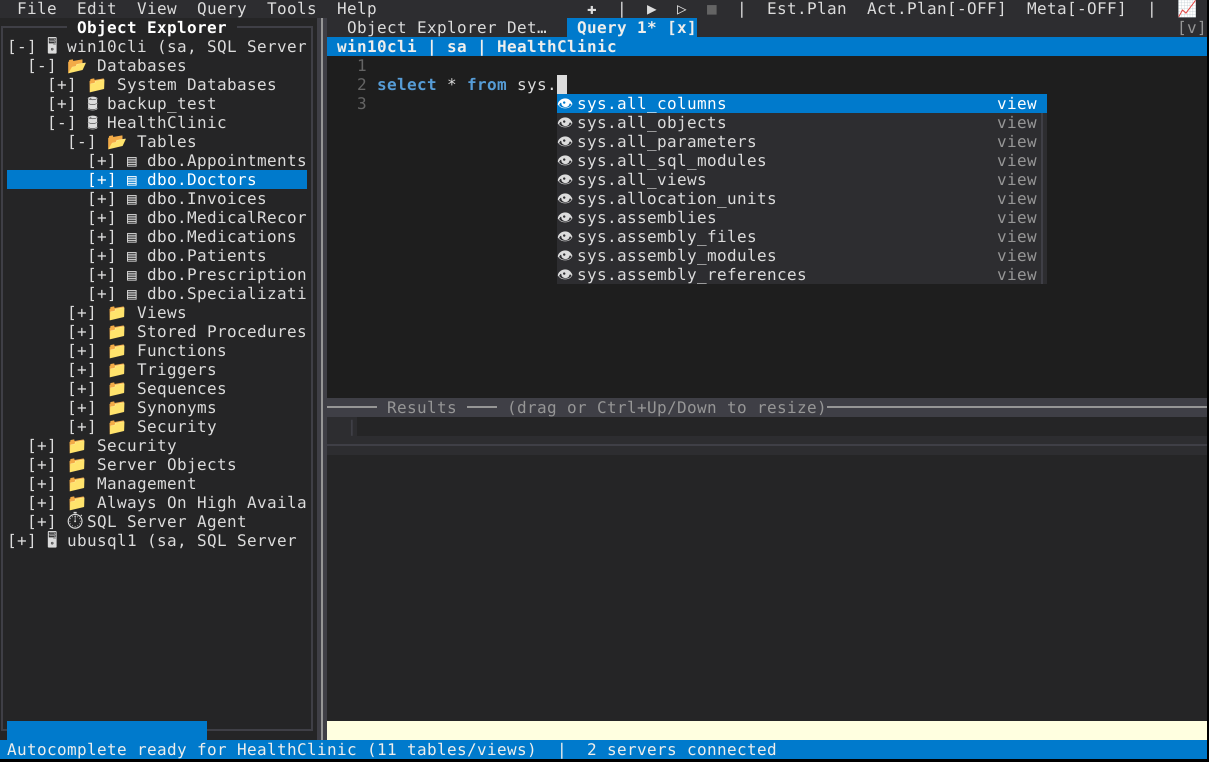
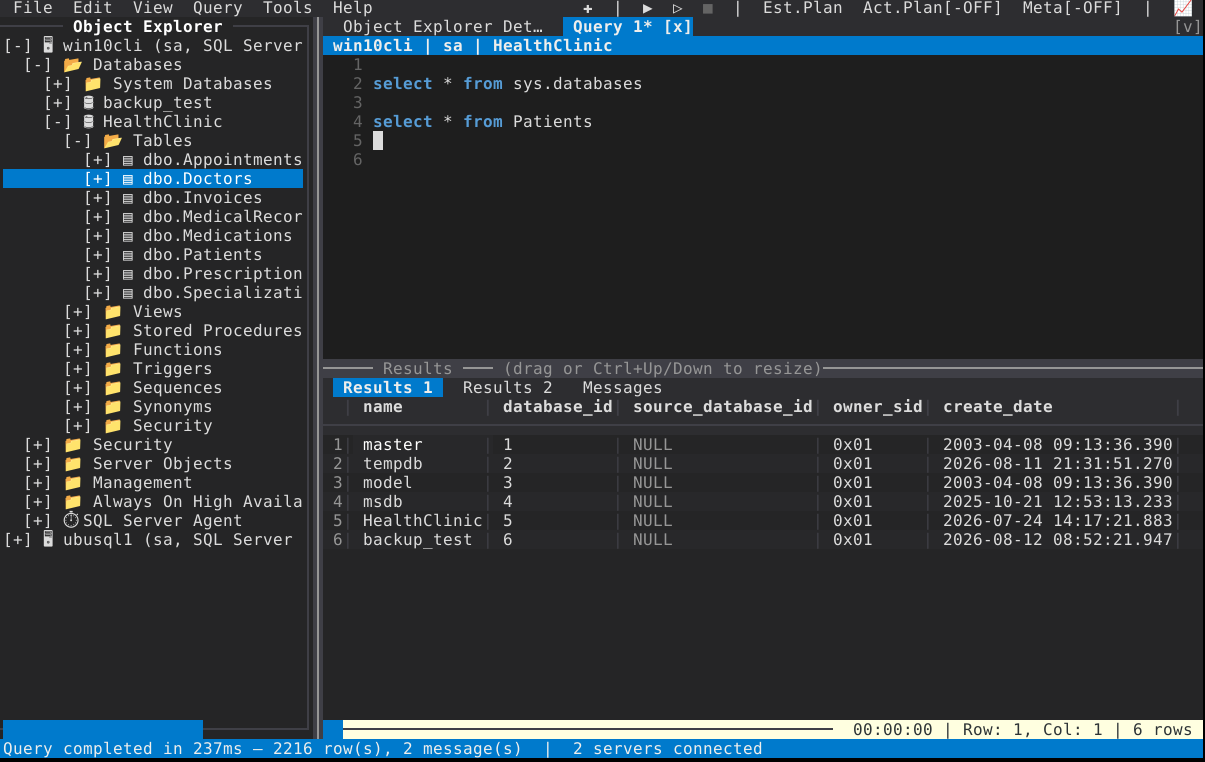
Ctrl+N opens a query panel — a SQL editor over a results area, one connected session each. Object Explorer is where the databases, tables and scripts come from; this is where they run.
| F5 | Execute. Runs only the selection, if there is one — the reason a highlighted SELECT in a big script does what you meant |
| Ctrl+Enter | Execute at cursor (Query ▸ Execute at Cursor) — the statement under the caret, no selection needed |
| Query ▸ Cancel Executing Query | Cancel from the menu; enabled while the panel is executing |
| Query ▸ Reconnect | Reopen the panel's session after a drop, without going back through the connect dialog |
| Ctrl+PgUp / Ctrl+PgDn | Previous / next result tab — a multi-statement batch produces one per result set, plus the Messages tab |
| Ctrl+O / Ctrl+S | Open a .sql file into a panel; save. Save As… is in the File menu |
The status line under the results reads … | Row: 4, Col: 1 | 1 rows, with the elapsed time
in front once the run has finished.
The whole Query menu is real menu items: New Query, Execute, Execute at Cursor, Cancel Executing Query, Reconnect, Refresh IntelliSense Cache, Estimated Execution Plan, Compare Showplan…, and the three result destinations.
Query ▸ Results To Grid, Results To Text, Results To File — SSMS's three destinations, with goSSMS's own behaviour behind the third:
Results To File asks for a path before the run starts, and cancelling that prompt
runs nothing and keeps the panel's previous results. What is written is CSV, streamed:
each row goes to disk as it arrives, so an export never holds more than one row in memory,
result sets are separated by a blank line with a header row each, a SQL NULL is an empty
field, an empty string is "", and the string 'NULL' is NULL — PostgreSQL's
COPY CSV convention, which is what most importers expect. (One limit is the format's: a row
of a single NULL column is written "" too, because a truly empty line is the set separator.)
The mode in force is a panel property, so a panel can be left pointed at a file and the next F5 will ask for a path — that is the mode, not a bug in the run.
Tools ▸ Options ▸ Max fetch rows caps how many rows a panel keeps of each result
set, in all three destinations — grid, text and file. 0, the default, is unlimited.
Reaching the cap cancels the rest of the script, later GO batches included: a
script that has already returned more than you asked for is not left running to return
more. Nothing about it is silent:
- the status line under the results reads
MORE ROWS NOT FETCHED - MAX FETCH ROWS IS N; - Messages names each result set that was cut ("only the first N rows were fetched") and says the remaining statements and batches did not run.
A run reads the cap when it starts, so changing it in Options affects the next F5, not one in flight.
| Up/Down | Move the row cursor |
| Left / Right | Pan columns |
| PgUp / PgDn | A page of rows |
| Home / End | First / last row |
| Enter / Space |
Show Value on the selected cell: the value on its own, at width — the 4,000-character nvarchar(max) that is the point of SSMS's Ctrl+Query trick |
| Ctrl+PgUp/PgDn | Switch result set |
| Wheel | Scroll down, and sideways with the horizontal wheel — with Shift+Wheel as the alias for terminals that report no horizontal wheel |
| Click | Select the row (or the cell) |
| Ctrl+click | Add or remove one row from a marked set; any cursor move drops it |
| Shift+click / Alt+click | Extend the selection from the anchor — Alt for terminals that hold Shift back for their own text selection |
| Right-click | Copy, Copy All, Copy All with Headers, Show Value, plus whatever the panel adds under the divider — Sort Ascending / Sort Descending among them |
| Ctrl+Space | The same menu, from the keyboard |
| Click a column header | Sort the result set by that column; click again to reverse (▲ / ▼ in the header) |
A header click — or Sort Ascending / Sort Descending from the cell menu — orders the result set on screen by that column. Each result tab keeps its own sort, and a new run starts unsorted.
The comparison follows the column's declared type: numbers by value (decimal and
money exactly, digit for digit), datetimeoffset by the instant it names, and text
case-insensitively by character code — not the column's collation, so é sorts after
z rather than beside e. NULL sorts last in either direction, unlike ORDER BY.
The order is display only: the result keeps the order the server returned it in, which is what Results To Text and a re-run show. When the order matters downstream, put it in the query.
Errors arrive in the server's own rendering — Msg 208, Level 16, State 1, Line 4 — and
Enter or double-click on an error line goes to that line in the editor.
Click the status bar at any time for the message history of the session.
The editor is the same control every text surface in goSSMS uses — a property-sheet field, a filter box, and this.
| Ctrl+Z / Ctrl+Y | Undo / redo — one undo per editing action, including the whole line an Enter inserted with its auto-indent |
| Ctrl+Space | Clipboard menu (Cut/Copy/Paste) at the cursor where no completion is installed; Ctrl+C/X/V when there is one |
| Arrows, Home / End, PgUp / PgDn | Cursor movement, with the goal column preserved on vertical moves |
| Ctrl+←/→ | Word movement, across a word that keeps its underscores and digits |
| Ctrl+Backspace / Ctrl+Delete | Delete a word left / right |
| Shift+Arrow | Extend the selection; Shift+Home/End to the edges |
| Alt+Shift+Arrow |
Rectangular block selection; Alt+drag with the mouse; a block stays armed while you type, so a column of text can be edited in one pass |
| Ctrl+A | Select all |
| Tab / Backtab | Indent / outdent — Shift+Tab and Backtab both, because terminals disagree about which they send |
| Enter | New line, carrying the previous line's indentation. Auto-indent lives in the key handler, never in the insert path, so a multi-line paste arrives as pasted instead of re-indented into a staircase |
| Ctrl+D / Ctrl+L | Duplicate line / delete line |
| Ctrl+Shift+Up / Ctrl+Shift+Down | Move line up / down |
| Ctrl+/ | Comment / uncomment (both the modern and the legacy terminal encoding of that chord are accepted) |
| Ctrl+Shift+U / Ctrl+U | Uppercase / lowercase the selection |
| Ctrl+F, F3 / Shift+F3 | Find, next, previous; Replace… is in the Edit menu |
| Alt+Z | Word wrap on/off — display only, the text is untouched |
Selecting a word with a double-click, or a line with a triple-, is standard; so is dragging with the mouse. A double-click counts at the same speed everywhere in the app, at the interval DataGrid uses, so an editor and a grid do not disagree about what "double" means.
(as you type)   Suggests schemas/tables/views/columns, including sys. — opens once a
                word starts (a letter or '['); space, '.' or digits never open it
Ctrl+Space      Open or force suggestions. Completes a started word that has exactly one
                match; with nothing typed, always shows the list
(filtering)     Matches anywhere in a name, names starting with it first. A list of only
                mid-name matches opens unselected, because the top row is then not
                necessarily the one you meant: Down to pick
Tab / Enter     Accept the selected suggestion
Up/Down         Move; PgUp/PgDn page the list
Esc             Dismiss — and it stays dismissed for that word until you move on
Ctrl+R          Refresh the cached table/column list for this database
Completion is SQL-aware, not a word list: it resolves the identifier at the caret — including its dots — and answers for the clause it is in.
-
A FROM scope is understood. An alias, a derived table and a CTE each resolve to a
column list:
o.afterFROM dbo.Orders ocompletes the table's columns, and a CTE completes the columns its own body selects. Where the name cannot be resolved — an unresolvable name, a cycle, a shape the parser dropped — the answer is no columns and the list closes, because a plausible-looking wrong column list is the one failure this feature cannot afford. -
Cross-database names work.
OtherDb.dbo.andOtherDb..resolve the database part against the server's database directory, then read that database's catalogue. -
Linked-server four-part names work:
LS.,LS.Sales.,LS.Sales.dbo.,LS.Sales.dbo.Orders., andFROM LS.Sales.dbo.Orders ogiveso.its columns remotely. -
Catalogues load lazily and once each: a database's catalogue, the
sysschema's, the server's database directory, the linked-server list, a linked server's databases, a remote database's catalogue. Typing.is not a metadata query per keypress.
The cache belongs to the connected session rather than to the panel, and Query ▸ Refresh
IntelliSense Cache (Ctrl+R) reloads it after a CREATE TABLE you just ran.
Tools ▸ Options has an on/off switch for the whole feature.
Alt+Shift+F (or Alt+F, or Edit ▸ Format Document) pretty-prints the text in the document's own language — SQL, XML or JSON — over the selection's lines, or the whole buffer with nothing selected. One Ctrl+Z undoes it, because a reformat that eats an afternoon of work should never have been a two-way decision.
Small documents are formatted on the UI goroutine; above 256 KB the work moves off it, with a
Formatting… flash, because a 5 MB script cost 1.7 seconds of every key and redraw at the
old, synchronous call site. The panel's plan is not affected — a formatter that disagreed with
the parser about a statement boundary would only ever be an argument about who is right.
Any panic writes the text of every panel with unsaved changes to goSSMS's recovered-file
directory before the process ends, one file per panel, and says where it put them; resuming
the event loop after a panic is refused, because mid-mutation state is worse than a clean exit
with the text saved. The same save runs on SIGHUP and SIGTERM — closing a terminal
window, a dropped SSH session, a kill — which otherwise end the process by default.
Ctrl+C is deliberately not a quit anywhere near the editor: on the splash it quits, on the connect dialog it cancels the attempt, and while a form is open it types nothing. During a running query, cancel is a menu item rather than a signal.
- Keys and mouse
- Execution plans
- Object Explorer — what you can drag into an editor
- Scripting
- Database tasks — Background Tasks, for the statements that run for minutes