Repository navigation
Security
Principals and permissions: server logins and roles, database users and roles, the permissions grids, credentials, auditing and row-level security policies. Key material — master keys, certificates, symmetric and asymmetric keys, Always Encrypted column keys — is on Encryption and keys.
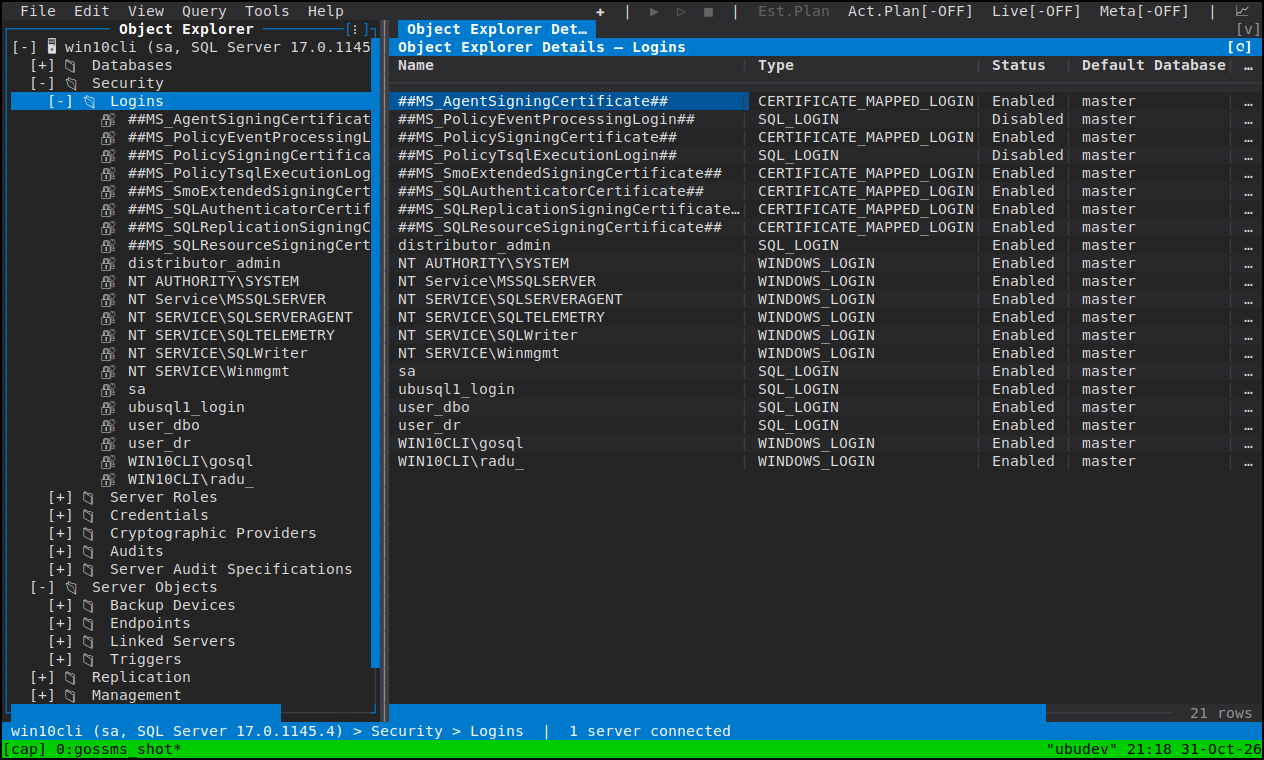
- Server ▸ Security: Logins, Server Roles, Credentials, Cryptographic Providers, Audits, Server Audit Specifications.
- Database ▸ Security: Users, Roles, Schemas, Database Audit Specifications, Security Policies, Credentials and Database Scoped Credentials, plus the key families.
Principals SQL Server creates for itself are handled per what the server
refuses: no Delete and no Rename where both are refused (dbo, guest, sys,
INFORMATION_SCHEMA, the fixed roles, public), and their identity fields draw
read-only. sa keeps Rename because renaming it is a supported hardening step,
and the db_* role schemas stay droppable because they really can be dropped.
Login Properties pages: General, Server Roles, User Mapping, Securables and Effective Permissions.
- Renaming a login is supported, and every other page follows the new name — the rename is the last write of an Apply, and a reload afterwards re-fetches under it.
-
Password policy and unlock ride in the same statement as the password
change: uncheck "Enforce password policy", tick Unlock login, set an
expiry, and it all goes as one
ALTER LOGIN. Unlock login and User must change password only take effect together with a new password — the page says so, because SQL Server'sALTER LOGINacceptsMUST_CHANGEandUNLOCKonly alongsidePASSWORD =. Combinations the server would refuse (a policy change on a login created withCHECK_POLICY = OFF, for instance) are refused in the dialog, before you press Apply. - Securables is the server-scoped GRANT/DENY editor over the permissions a login can be given on the server, listing the securables it can be granted on. Effective Permissions is a read-only listing by design: resolving it means impersonating the principal, which is what the server's own Effective tab does.
New Login offers SQL and Windows logins and the Microsoft Entra forms, with the database-user mapping and role membership set on later pages that run in order.
Fixed server roles carry a rating of what membership actually confers; a
user-defined role's rating is derived from the permissions granted to it, so
"who holds the keys" is answerable without reading sys.server_permissions by
hand.
Server Role Properties covers Members and the same server-scoped Securables
editor. Two of the database-role pages are deliberately absent: a server role
cannot own a schema (schemas are database-scoped) and server-level principals do
not support extended properties at all. There is no Effective Permissions tab
either — SQL Server refuses to impersonate a role (Msg 15406), so the page's
only possible content would be that error.
Database User Properties pages: General, Owned Schemas, Membership,
Securables, Extended Properties and Effective Permissions (read-only, for the
same reason as a login's). For the fixed system users — dbo, guest, sys,
INFORMATION_SCHEMA, which reject ALTER USER entirely — General is read-only
while the rest stay editable.
New User offers every user type SSMS offers, including the Microsoft Entra
forms on an Azure engine edition, and applies three pages in order: General
creates the user, then Owned Schemas and Membership address the user that now
exists. public is never offered as a role to assign: membership is implicit and
ALTER ROLE public ADD MEMBER is a syntax error.
Membership is shown with what each fixed database role means — the SSMS descriptions — so the tickboxes are not a guess.
Database Role Properties: General, Members, Owned Schemas, Owned Roles,
Securables and Extended Properties, all editable except a built-in role's name
and owner. As with a server role there is no Effective Permissions tab, because
SQL Server cannot impersonate a role (Msg 15517). Application roles are a
separate principal type and are not covered.
A Schema page covers its owner and its contents; moving an object to another schema is on the object, in the tree.
Both scopes use one editor: a list of securables to grant on, and a grid of principal / permission / state with GRANT and DENY written as you set them — server scope for logins and server roles, database scope for users and database roles. A DENY on an object, column or schema is asked about before anything is offered, and it wins over a GRANT held at a higher scope.
Where the login could not read a grant, the row says so rather than rendering an empty grid.
Objects owned by a principal can be handed over from the owner transfer page: one row per owned object with the new owner picked beside it, dirty exactly where you changed it.
Credential Properties is one page, as SSMS's own credential dialog is. A
credential has no rename — there is no ALTER CREDENTIAL … WITH NAME and no
sp_rename class for one — so the name is static. Database Scoped Credential
has its own node, New dialog and page.
Audits (server) and Server Audit Specifications / Database Audit Specifications each have a New dialog and a Properties sheet. A specification page lists the actions groups it collects, and its state — enabled or disabled — is written as part of Apply rather than being a separate trip to the server.
A Security Policy (a filter or block predicate over a table) is browsed, not edited: its Properties are read-only because the only thing changeable in place is the policy's state, and that is the context menu's Enable / Disable. Everything else about a policy means dropping and recreating it, which Script as ▸ CREATE hands you as T-SQL.
Script Database Security on a database node generates its roles, users, schemas, role memberships and permissions as one unexecuted script — see Scripting.
- Encryption and keys
- Object Explorer — why an action is greyed
- Connecting — what rights goSSMS needs and never adds