Repository navigation
Full Text Search
The three catalogue families under a database's Storage folder — Full Text Catalogs, Full Text Stoplists, Search Property Lists — and the full-text index that hangs off a table.
Where the full-text feature is not installed on the instance, the three folders show a single "not installed" row in their place instead of an empty folder, so you are not left guessing whether the objects are missing or the component is.

A catalog's Properties… has General and Maintenance.
-
General — the name, the owner (shown, not changed), and AS DEFAULT. Making a
catalog default is a database-wide statement, so it needs
ALTER ANY FULLTEXT CATALOG: holdingALTERon the catalog alone is not enough, and the page says so rather than letting the server refuse it. -
Maintenance — Reorganize (SSMS's Optimize) and Rebuild, with the accent
sensitivity a rebuild can change. Both need
ALTERon the catalog.
New Full-Text Catalog… creates one; New Full-Text Stoplist… and New Search
Property List… each offer Copy from database and a list picker, which is
CREATE … FROM [database].[name] — a list that already exists somewhere else being a
better starting point than twenty stop words typed by hand. The picker reads another
database's lists once, on first choice, and a list you paged past while choosing is
cancelled rather than left loading.
A stoplist is the noise list: its Properties page lists the current stoplist's
words and adds or removes them (ADD/DROP, needing ALTER on the stoplist). A
search property list carries the weights and property sets a ranked search uses:
its Properties page lists and adds or removes the properties it carries, on the same
right.
Neither takes effect silently: these pages warn that an index picks up a change at its next full population — and that changing a stoplist or property list on an index starts a full population of it — so the population, not the edit, is the moment your queries change.
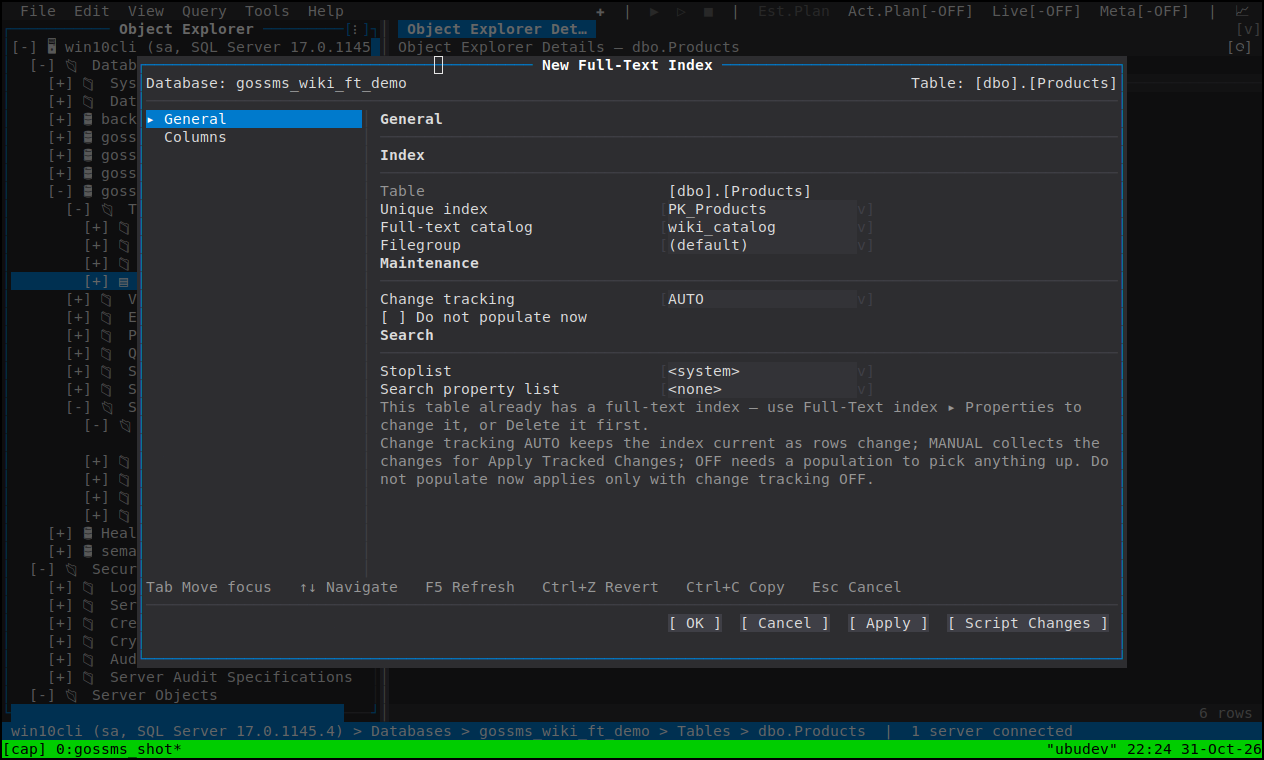
Under the table's own sub-objects, and driven from the table's Full-Text index cascade:
| Define Full-Text Index… | SSMS's wizard as one dialog of two pages |
| Enable / Disable Full-Text Index | The index's state |
| Start Full Population / Start Incremental Population / Stop Population | The populations |
| Track Changes / Apply Tracked Changes | Change tracking and its catch-up |
| Delete | The index |
Define Full-Text Index asks for the unique key index, the catalog, the filegroup, the change-tracking option, the stoplist and the property list on General, then the indexed Columns on the second page — the same column editor the index's own Properties page uses, with type, language and statistical semantics per column.
Two rights gate it, and they are different rights: ALTER on the table (which is
what the menu item is gated on, like the rest of the cascade) and REFERENCES on the
catalog and on any user stoplist or property list you name — ALTER ANY FULLTEXT CATALOG and ALTER on the database both read 0 for REFERENCES, so being allowed to
open the dialog is not being allowed to use the catalog you picked. Those are asked
about once you choose them, before Apply.
The tree does not know whether a table has a full-text index, and SQL Server answers
several of these statements with an informational message and no error — STOP POPULATION under AUTO or MANUAL change tracking ("Stop crawl request is ignored"),
START FULL POPULATION while one is already running ("is ignored because a population
is currently active"). A client that only looked for errors would report success for a
statement that did nothing, so goSSMS reads the index's state first and says what it is
about to do — or why there is nothing to do.
A population runs as a background task, so its progress and its end are in Tools ▸ Background Tasks rather than in a modal dialog you must sit through — see Database tasks.
Every full-text family has a Details-pane grid: catalogs with their paths, state and is-default flag; stoplists and property lists with their counts; indexed tables with their population state. That is the view that answers "which tables are not population-current" without opening each table.
- Object Explorer
- Scripting — the index's CREATE script
- Database tasks — Background Tasks