Quick start
Your first automatic train in five steps. After that, have a look at Stations and roles and Networks.
- Factorio 2.1 and the mod flib. Space Age is not required, but supported.
- The research “Unified Train Logistics”. It comes after “Automated rail transportation” and “Circuit network” and unlocks the UTL train stop and the UTL station combinator.
- At least one train, a chest with goods and a chest to deliver into.
Note
The upgrades “UTL: Loading control” (wagon filters, job output) and “UTL: Network links I–III” are not needed to get started. With the map setting “UTL features need research” = off, everything is available right away, see Settings.

Place a UTL train stop on a track where trains can wait. Open it and pick the role Depot in the UTL panel to the left of the train stop window. The name does not matter, for example “Depot”.
- Give the train a schedule with only the depot stop. The wait condition does not matter, for example “inactivity 5 s”.
- The train is in automatic mode and empty. A train with cargo is sent to a cleanup first (see Fuel, cleanup and depots).
- As soon as the train stops at the depot, it counts as free and waits for jobs.
Tip
More trains? Just put more trains with the same schedule (only “Depot”) into the depot. Several depot tracks may share a name – but each one needs the Depot role.
UTL does not overwrite your schedule. Provider and requester are inserted later as temporary stops and vanish again after departure.
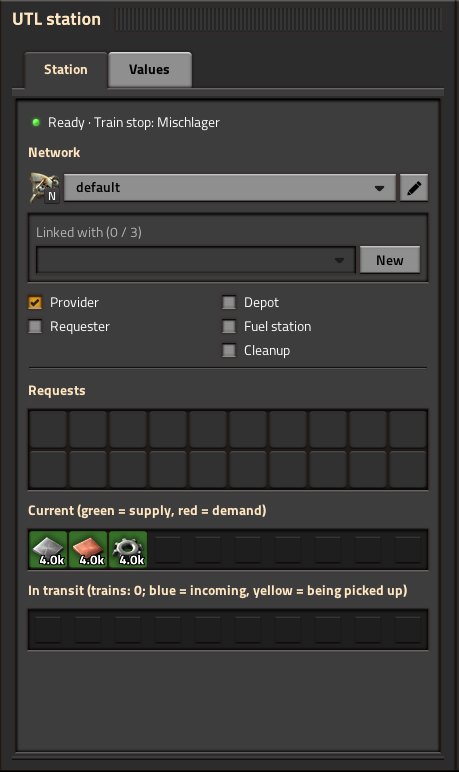
- Place a UTL train stop and tick the role Provider.
- Connect a chest with the goods to the stop with a red or green wire.
- Add inserters from the chest to the wagon – they load the train when it is there.
Whatever lies in the chest is offered as soon as the amount reaches the provide threshold (default 1000, adjustable in the “Values” tab).
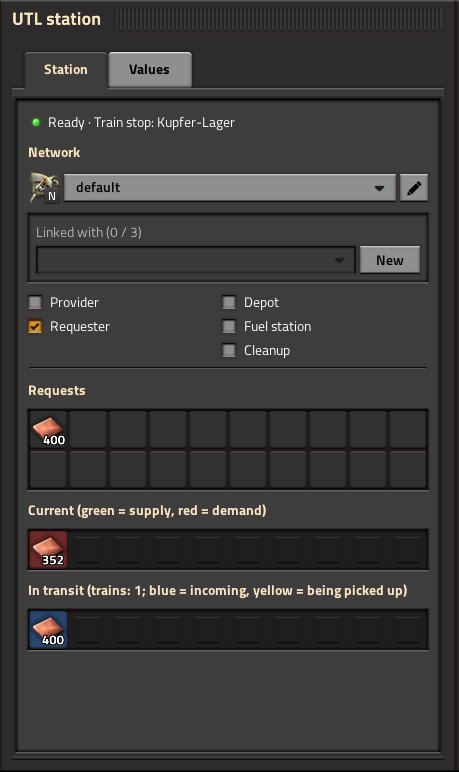
- Place a UTL train stop and tick the role Requester.
- In the window under Requests, click a slot, pick the good and enter the amount, for example 8000 iron plates.
- Wire the target chest to the stop so UTL can see what is already there.
- Add inserters from the wagon to the chest – they unload the train.
Important
The amount is a target stock, not an order: only what is missing is delivered. More on this under Stations and roles.
As soon as the requester is short enough (the request threshold, default 1000), a free train sets off: from the depot to the provider, loads, brings the goods to the requester, unloads and goes back to the depot – or straight on to the next job.
In the station window, the section “Current” shows what the station provides (green) or needs (red), and “In transit” what is on its way. The UTL Manager (Ctrl + Shift + U) gives you the overview of everything.
- Copy settings: Shift + right-click a configured station, Shift + left-click another one. Blueprints and Ctrl + C / Ctrl + V keep the UTL settings as well.
- Reuse existing stations: use the UTL station combinator instead of the UTL train stop, see Stations and roles.
- Fuel and leftovers: add a fuel station and a cleanup, see Fuel, cleanup and depots.
- Separate systems: give networks names, see Networks.
- Try it without building: the ready-made scenarios and the in-game tips & tricks.
Important
Testing status. UTL runs through an automated self test and a headless load test with 384 trains; updates are checked with a save from the previous version. In real games it has so far been played on small networks. Keep a backup before adding it to a long-running base, and please report problems in the discussion.