Stations and roles
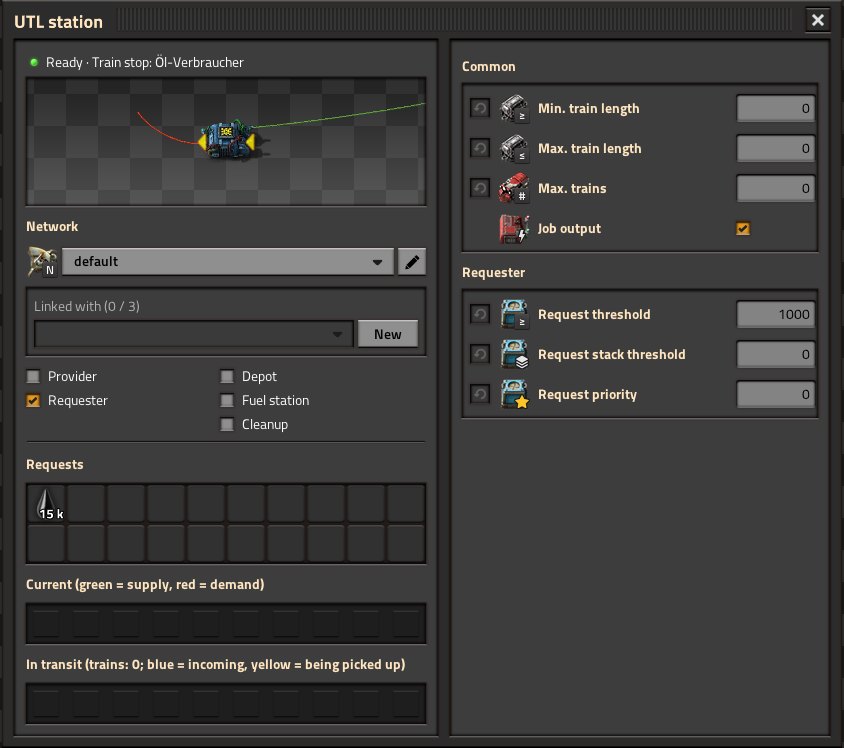
UTL has two building blocks that do the same thing. Which one you use is a matter of taste.
 UTL train stop |
 UTL station combinator |
|
|---|---|---|
| Setup | replaces the normal train stop; can be built directly over an existing one | stands next to a normal train stop |
| Wires | chests and tanks to the stop | chests and tanks to the input, the output (red or green) to the stop |
| Window | UTL panel to the left of the train stop window, tabs “Station” and “Values” | own window |
| Power | no | no |
The combinator is handy for existing stations: place it next to the stop, wire its output to the stop, chests to the input – done. As long as the output is not connected to a stop, its window says “No train stop: wire the output to a normal train stop”.
Every station has exactly one kind: station (provider and/or requester), depot, fuel station, cleanup or storage.
| Role | Meaning |
|---|---|
| Provider | Goods with a positive value on the input are offered and picked up. |
| Requester | Goods with a negative value on the input or from the request slots are delivered. |
| Provider + requester | Buffer: both at the same station. |
| Depot | Free trains wait here for jobs. |
| Fuel station | Trains low on fuel come here; inserters fill the locomotives. |
| Cleanup | Trains with leftover cargo are emptied here. |
| Storage | Takes in and gives out: minimum and maximum stock per good – see Storage. |
Depot, fuel station and cleanup exclude each other and provider/requester. The three special roles are explained under Fuel, cleanup and depots.
UTL reads all signals on the input (for the UTL train stop: on the stop itself) and subtracts the request slots. For every good this gives a net amount:
- positive and at least the provide threshold → offer (only with the provider role),
- negative and at least the request threshold → demand (only with the requester role).
So instead of the request slots you can also create negative signals yourself, for example with a constant combinator or your own circuit.
The Requests section has 20 slots. Left-click picks the good or edits the amount (in items or in stacks), right-click clears the slot. It works like a constant combinator with negative values on the input – just without wires.
The amount is the stock you want to have. Only what is missing is delivered:
Important
demand = target − in stock − already in transit
Example: target 8000, 1536 in the chests → 6464 are missing. If one train holds 8000, one train goes and brings everything. If you want several trains at the same time, set a higher target (for example 32000). A train is only sent once the demand reaches the request threshold.
Tip
“Already in transit” prevents several trains from being sent for the same demand: UTL counts what a train is currently bringing.
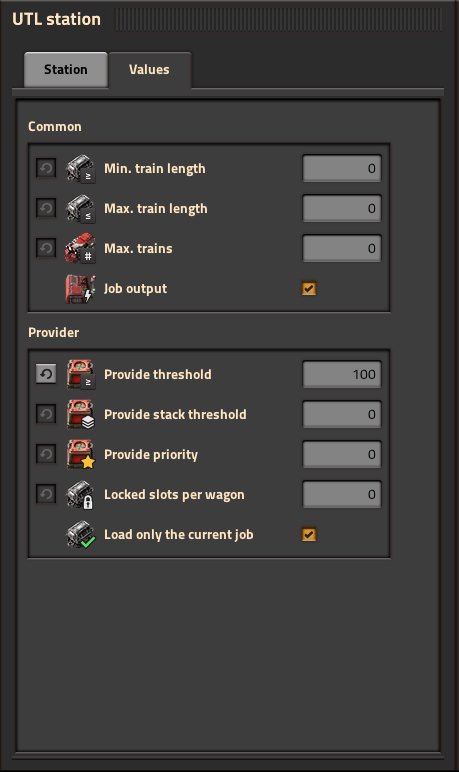
Which values appear depends on the role. The grey ⟲ button resets a value to its default.
| Value | Effect | |
|---|---|---|
 
|
Min./max. train length | Only trains with this many carriages (locomotives included). 0 = any. Applies to provider, requester, fuel station, cleanup and depot. |
 |
Max. trains | At most this many trains here or on their way at once – at providers, requesters, storages, fuel stations, cleanups and depots. 0 = unlimited (depot: one train). The stop's train limit (vanilla) applies as well; use either one or both. |
 |
Job output | The small output next to the stop on/off (see job output). |
 |
Provide threshold | A good is only offered from this amount. |
 |
Provide stack threshold | Threshold in stacks (items only). Applies when it is higher than the provide threshold. 0 = off. |
 |
Provide priority | Providers with higher priority are used first. |
 |
Locked slots per wagon | This many slots per cargo wagon stay empty when loading. |
 |
Load only the current job | Wagon filters during a delivery (see mixed providers). |
 |
Request threshold | A train is only sent from this demand. |
 |
Request stack threshold | As above, in stacks. |
 |
Request priority | Requesters with higher priority are served first. |
 |
Depot priority | reserved for later versions |
The default thresholds for new stations come from the map settings (1000). The icons are the same as in the station window.
Tip
Math in number fields: every number field can calculate, for example 4000*2, 8000/4,
(1+2)*3, 2^3 or 1e3. Enter applies the result.
- Only full trains: a wagon holds 40 stacks. Set the request stack threshold to 40, and a train is only sent once at least one wagon can be filled.
- Don't offer small amounts: provide threshold 500 – with only 200 plates in the chest, the good does not show up as an offer at all.
- Important requester first: request priority 10 for research, 0 for everything else.
- Shift + right-click a configured station and Shift + left-click another one copies all UTL settings – stop ↔ stop, combinator ↔ combinator, as with assemblers.
- Blueprints and Ctrl + C / Ctrl + V keep the UTL settings, including role, network and requests.
- Header: state of the station (“Ready”, “No task”, or a hint about what is missing).
- Network: name of the home network and the linked networks, see Networks.
- Role and the values of that role.
- Current: what the station provides (green) and needs (red) right now.
- In transit: what is coming by train (blue) and what is reserved for trains, i.e. about to be picked up (yellow), plus the number of trains.