Networks
 Networks
Every station has one network name (field “Network” at the top of the station window). Empty
means default. Two stations only work together when the name is exactly the same – there are
no numbers and no bitmask, just names. The number of networks is not limited.
This applies to all roles:
| Role | Effect of the network |
|---|---|
| Provider | is only offered to requesters with the same name |
| Requester | is only served by providers with the same name |
| Depot | hands its trains only to that network |
| Fuel station | a train only refuels in its own network |
| Cleanup | a train is only emptied in its own network |
If you just want one big network, leave the field empty everywhere.
Picking a network: the drop-down lists every network that already exists on the map. The pencil button renames the home network or lets you type a new name (Enter applies).
| Station | Network |
|---|---|
| Iron mine, iron smelter, depot “Ore depot” | Ore |
| Plate storage, plate consumers, depot “Plate depot” | Plates |
Ore trains never take a plate job and vice versa. Each system then needs its own depot, fuel station and cleanup – unless you link the networks.
Note
Needs research: “UTL: Network links I”, II and III allow 1, 2 and 3 partners per network. With the map setting “UTL features need research” = off, 3 partners are possible right away.
Linked networks help each other: trains, depots, fuel stations and cleanups of one also serve the other. A link is a star:
- One network is the center, the networks linked to it are its partners.
- Center and partner help each other in both directions.
- Partners do not help each other. They only share the center.
- A network belongs to at most one star: a partner cannot get partners of its own and cannot also be linked to a second center. This avoids chains where half the map ends up as one network by accident.
- Links count per surface and per team. Networks on Nauvis and on Vulcanus are linked separately, even if they have the same name.
(needs “Network links III”)
| Network | Role | helps / gets help from |
|---|---|---|
Iron |
center |
Copper, Coal, Stone
|
Copper |
partner |
Iron only |
Coal |
partner |
Iron only |
Stone |
partner |
Iron only |
A free train from the iron depot takes copper, coal and stone jobs. A copper train may take an iron job – but a copper train never takes a coal job.
Put a depot into its own network Reserve and link Ore and Plates to it (Reserve is the
center). The reserve trains serve both systems, while ore and plate stations still ignore each other.
A small network Copper gets no depot of its own but becomes a partner of Iron. The iron trains
then run all copper jobs as well. The fuel station and cleanup of Iron apply to these trains too.
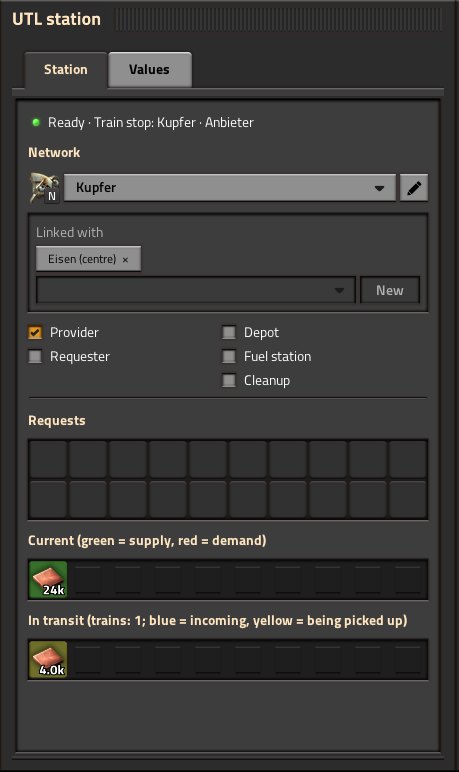
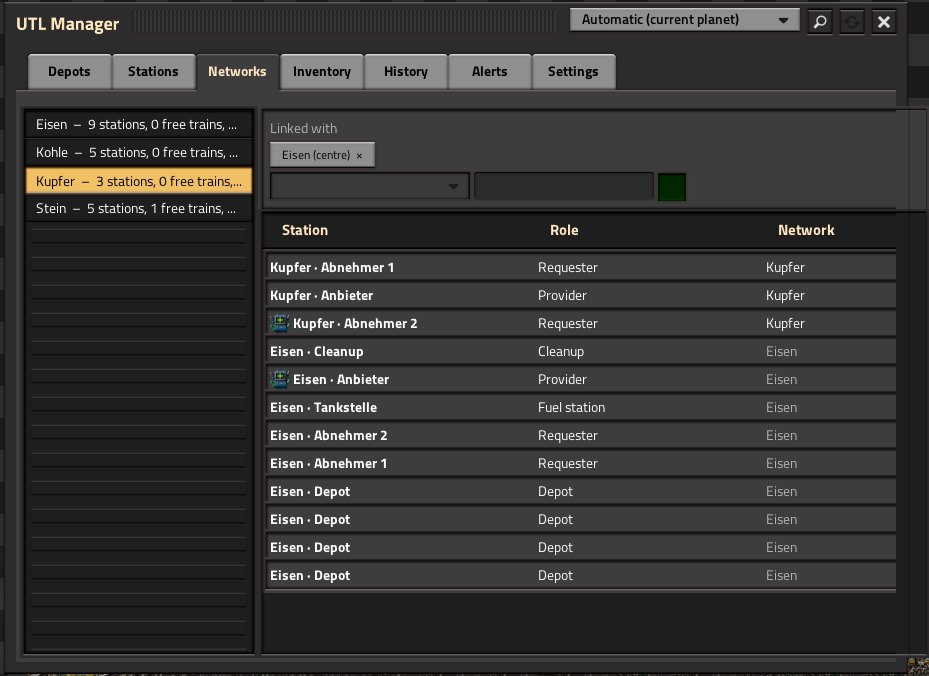
Both ways do the same. A link always applies to the whole network on that surface, not just to the one station.
-
Station window: the box “Linked with” below the home network.
- Pick a network from the list (it only shows networks that are still free) or create a new one with “New” and link it right away.
- Every partner appears as a button below; a click removes the link.
- If your own network is a partner itself, the button shows its center (“… (centre) ×”), and a click leaves the star.
- UTL Manager, “Networks” tab: pick a network on the left; above the station list you add and remove partners the same way.
The counter shows how many partners are used and allowed, for example Linked with (2 / 3). When the
limit is reached, the tooltip names the research that allows more.
The UTL Manager shows the network in brackets behind the station name when it is not default;
links appear as [Iron ↔ Copper, Coal] for a center and [Copper → Iron] for a partner.
| Message | Meaning |
|---|---|
| “This network is a partner of “…” – partners cannot have partners of their own.” | Leave the star first, then the network can become a center. |
| “This network is already a partner of another network and cannot have partners of its own.” | As above. |
| ““…” is already linked with another network.” | The network you want already belongs to a star. |
| ““…” already has partners of its own and cannot become a partner.” | A center cannot become a partner itself. |
| “Research does not allow more partners yet.” | Research the next “UTL: Network links” tier. |
| “A network cannot be linked with itself.” | – |
| “No free network – create one with “New”.” | All other networks already belong to stars. |
Warning
A typo or a different capital letter is a different network. The safest way is to pick the network from the list instead of typing it.
- Depot in the wrong network → alert “network “…”: … requests have been waiting for a free train for over … minutes”, although trains are waiting.
- Fuel station in the wrong network → low trains are not sent (see Fuel, cleanup and depots).
-
Typo or capital letter → a different network:
Oreandoredo not work together. - Trying to link two stars → not possible; a network belongs to at most one star.