Repository navigation
Home
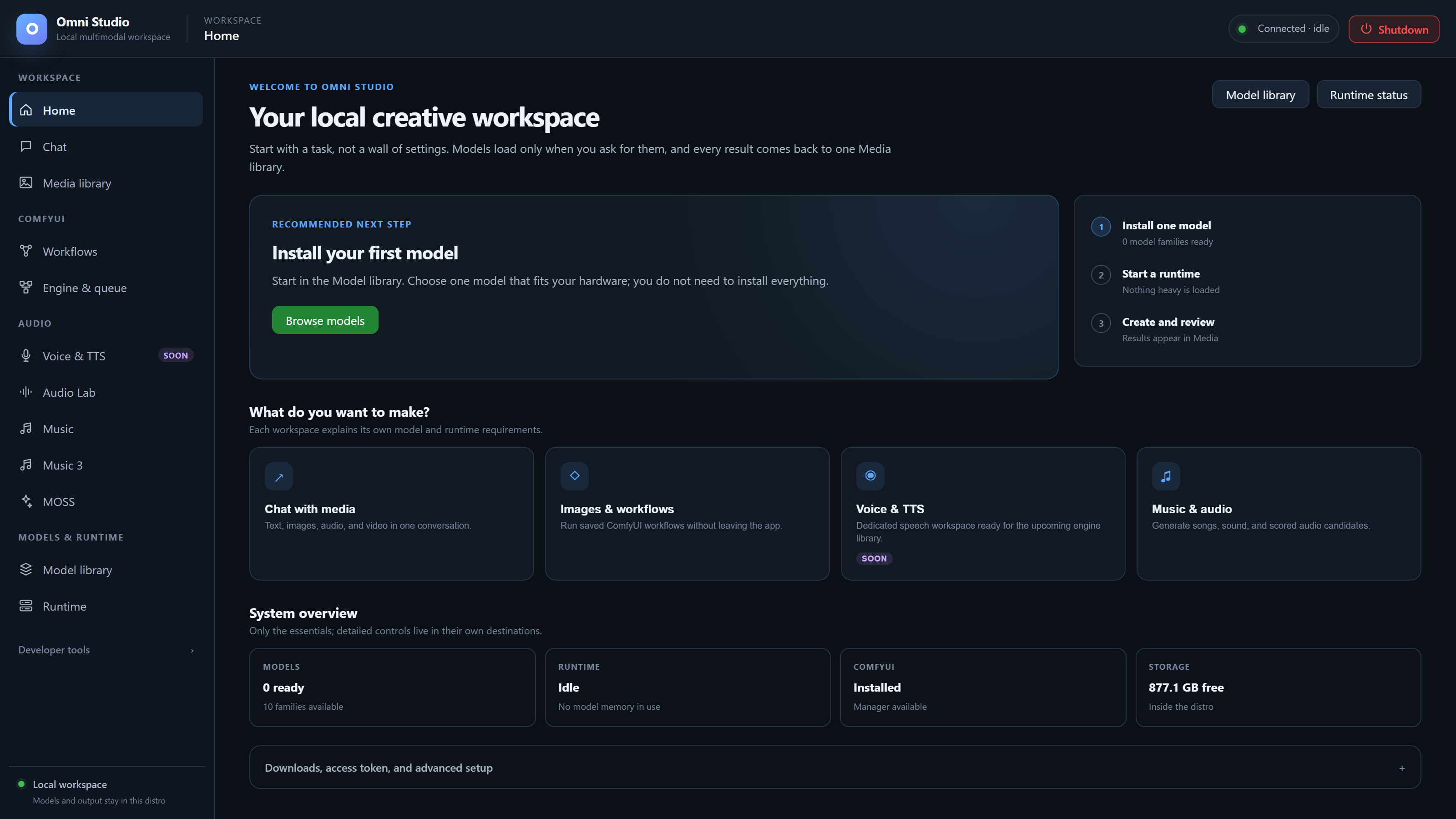
This folder is the operator usage manual for Omni Studio. Read it when you want to run the app as a person sitting at a Windows PC: launch it, install a model, generate media, inspect results, and shut it down cleanly.
Omni Studio is a Linux distro packaged as a Windows application for Windows
users. You double-click Omni_Studio.exe like any other Windows program. Under
the hood the launcher starts a dedicated WSL2 distro named linbox-Omni_Studio
and shows the Linux workspace in a WebView2 window. You do not install Ubuntu by
hand, you do not manage Docker, and you do not need to learn Linux first. You
do need the Windows-side requirements in
What Omni Studio is and the launch steps in
Launch and first run.
Important
Install WSL2 on Windows before launching the distro. Enable hardware virtualization and install the WebView2 Runtime. CPU-capable workloads can run without an NVIDIA GPU; CUDA workloads need a compatible NVIDIA GPU and Windows driver. Python is included. The host requirements page also covers CPU/GPU selection and disk space.
This manual is written as how-to prose. Each page walks through the actual
buttons, fields, and consequences of using that part of the app. It is not a
route catalog. The in-repo docs/ folder remains the API contract for agents
and programmers.
The screenshot gallery provides real captures of every main destination, a repository hero, and narrow-window navigation. Screenshots are also embedded in the matching pages below.
- Start with identity and launch if you have never opened the app.
- Use Home to decide the next destination, then follow that destination's page.
- Use Feature compatibility to select model inputs, engine dependencies and GPU capacity for your task.
- Use the CLI and GPU-placement pages when you leave the graphical workspace or when a workflow asks you to choose GPUs.
| Page | What it teaches |
|---|---|
| What Omni Studio is | Linux-distro-for-Windows identity, Windows 10/11, WSL2, WebView2, NVIDIA GPU, disk headroom, and what stays inside the distro |
| Launch and first run | Keep the app folder together, double-click Omni_Studio.exe, first-boot setup, connecting badge, navigation, and the Shutdown button |
| Page | What it teaches |
|---|---|
| Home | Recommended next step, HuggingFace token, default downloads, LoRA search, and install jobs |
| Chat | Sessions, spawn-a-worker, attachments, sampling knobs, abort, and which models actually consume image/audio/video |
| Media library | Browse, filter, pin, tag, collections, lightbox, ZIP export, delete, and media retrieval |
| Page | What it teaches |
|---|---|
| Model library | Install, variants, ComfyUI template catalog, Audio Lab / ACE assets, and deletion |
| Runtime | Devices, spawn/unload workers, Comfy from Runtime, API keys, and OpenAI-compatible /v1
|
| Page | What it teaches |
|---|---|
| Workflows | Import, verify, GPU placement (single / auto / manual), analyze-before-run, queue, and valid: false as a hard stop |
| Engine & queue | Start options, GPU pool, queue, interrupt, unload models, custom nodes, and assets |
| Page | What it teaches |
|---|---|
| Voice & TTS | The Soon surface and the current speech-generation limitation |
| Audio Lab | Stable Audio load, generate, ranked candidates, A2A, inpaint, VAE lab, CLAP score |
| Music | ACE-Step install, load, generate, transform, LoRAs, and specialized-adapter requirements |
| Music 3 | MiniMax Music 3 official Diffusers install, CPU offload, lyrics + caption generation |
| MOSS | MOSS-SoundEffect, the MOSS-TTS controls, and the current TTS decoder failure |
| Page | What it teaches |
|---|---|
| Testing | One-shot Omni inference with optional media; Audio Lab and ACE-Step load controls |
| Logs | Live log stream, auto-scroll, clear, and what the colors mean |
| Shutdown | The top-bar Shutdown button versus gateway restart and exact-worker cleanup |
| Page | What it teaches |
|---|---|
| Command-line interface |
omni-cli.bat on Windows and omni-cli inside the distro |
| GPU placement |
single / auto / manual, stable GPU UUIDs, analyze-before-run, valid: false
|
| Jobs, tokens, composition, and media retrieval | HuggingFace token, install jobs, polling jobs, compose long audio, fetch files |
| Feature compatibility | Model input types, speech-runtime compatibility, specialized adapters and GPU capacity |
Omni Studio has three kinds of heavy runtime, and they do not share a single "Load model" button:
- Standalone Omni workers — Chat models such as Qwen and MiniCPM. Spawn them from Runtime, Chat, or Testing. Unload by killing the exact worker.
- ComfyUI instances — Image and video graphs. Start the engine from Engine & queue, then run a graph from Workflows. Starting Comfy does not load a checkpoint.
- Audio engines — Audio Lab, Music (ACE-Step), Music 3, and MOSS each have their own load/unload controls. Do not assume a Chat worker can sing, and do not assume ACE-Step can chat.
Nothing heavy starts until you ask. Home can look "ready" while every GPU is idle. That is intentional.
Models, workflows, and generated files live inside the distro, not next to
Omni_Studio.exe on NTFS. Treat the Windows folder as the launcher. Treat
linbox-Omni_Studio as the studio.
- Do this means an operator step in the shipped UI or CLI.
- Then is the next observable result you should see.
- Do not is a real failure mode in this build, not a style preference.
- Unavailable means a task requires an implementation or compatible dependency beyond the installed configuration. Reserved destinations carry the Soon badge.
If a page and a live dialog disagree, trust the live dialog: device lists, installed variants, and free VRAM change between boots. Re-read devices before you spawn or queue.