Repository navigation
Chat
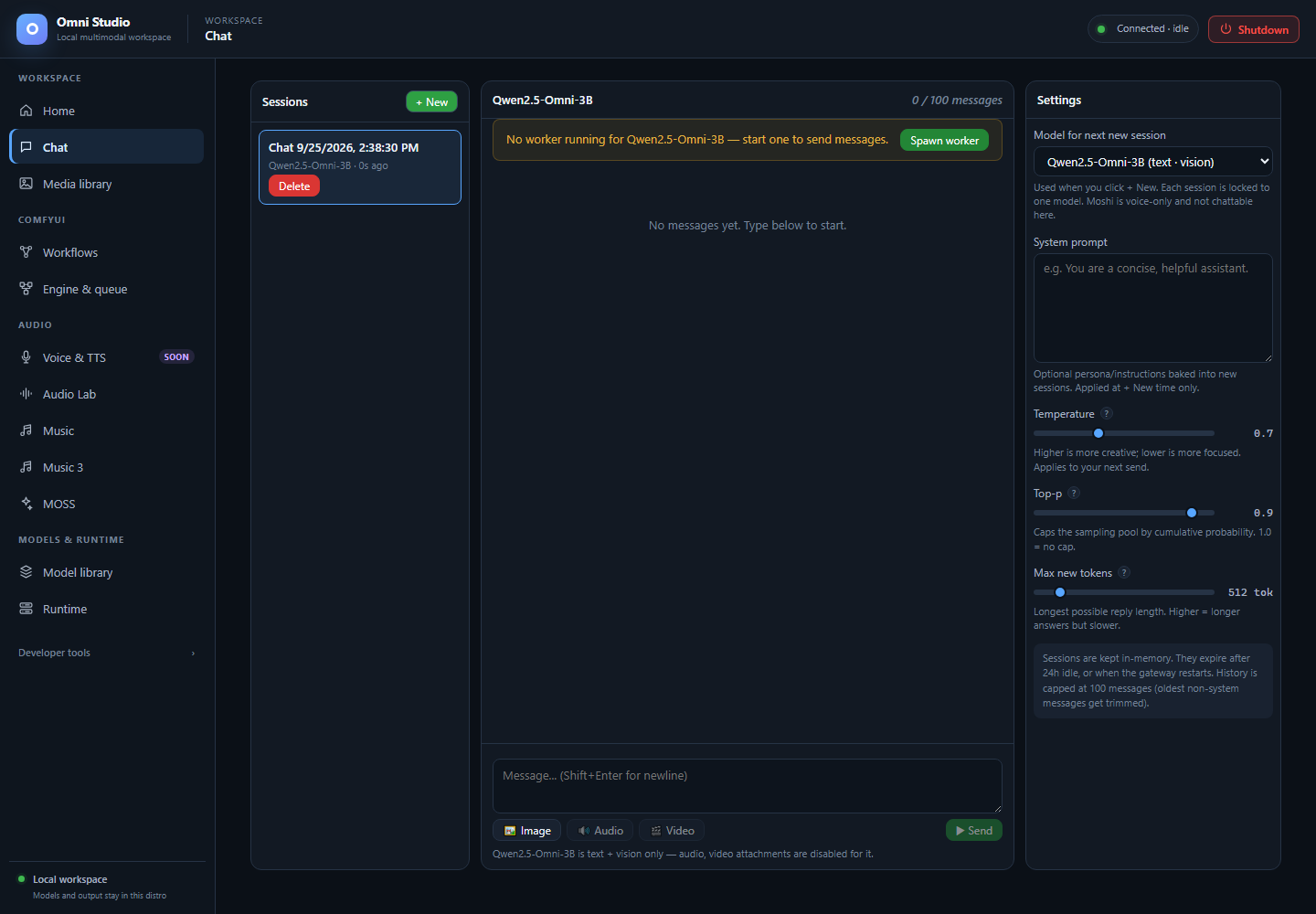
A new empty Qwen session. No worker is running; unsupported audio/video attachments are disabled. Captured September 25, 2026.
Chat is the conversational workspace. It is a three-pane session UI over persisted (in-memory) conversations: Sessions on the left, the thread in the center, Settings on the right. It talks to a running Omni model worker. If no worker is ready for the session's model, Send stays disabled until you spawn one.
Open it from Workspace → Chat, from Home's Chat card, or from #chat.
Chat is not Music, not Audio Lab, and not ComfyUI. A song model cannot appear here. Moshi is intentionally hidden because the session API cannot carry full-duplex audio.
- Install a chat-capable family on Model library.
- Prefer a variant that fits the GPU. Verified starting points:
- Qwen2.5-Omni 3B text on a 12 GB card (it will fill the card)
- Qwen2.5-Omni 7B GPTQ-int4 text/image on a 24 GB card
- MiniCPM-o 2.6 text/image/audio understanding on a 24 GB card
- Read Feature compatibility for the same family. Typed attachment buttons are not a capability guarantee.
- Leave Music 3 / ACE-Step / a full Comfy graph unloaded if VRAM is tight.
Do this:
- On the right, choose Model for next new session. The label includes a
short capability hint such as
text · vision · audio. - Optionally type a System prompt. It is baked in at creation time only. Changing the box later does not rewrite an open session.
- Click + New.
Then: a row appears in Sessions, the thread opens, and the compose box is ready. The session is locked to that model. You cannot switch models inside an existing thread; create another session.
If no models are available, the UI tells you to install one first. Audio Lab, ACE-Step, MOSS-TTS, MOSS-SFX, and Moshi are not in this picker.
Each row shows a title (or Model · N msg), the model display name, and
relative activity (3m ago). Click a row to open it. Delete asks for
confirmation and drops that history.
Sessions live in gateway memory. They expire after 24 hours idle, they die when the gateway restarts, and history is capped at 100 messages (oldest non-system messages are trimmed). This is not a cloud transcript and not a file on disk.
If the session's model has no ready worker, a warning banner appears above the thread: "No worker running for … — start one to send messages." Spawn worker calls the same default spawn path as Runtime.
Do this: click Spawn worker and wait. Cold loads can take a minute, and MiniCPM-o on a busy host has taken several minutes. The banner changes to "Starting worker…" while that runs. Send stays disabled.
Then: the banner clears, Send enables, and Runtime will show a ready worker for that family.
If spawn fails, read the toast, check Runtime for VRAM, and analyze placement as in GPU placement. Chat's one-click spawn does not let you pick a UUID pool; use Runtime when you need an explicit device, variant, LoRA, or precision.
Do not click Spawn repeatedly. One load is already expensive.
Type in the box. Enter sends. Shift+Enter inserts a newline. IME composition (CJK candidate Enter) does not send.
Send streams the reply into the thread. Tokens appear as they arrive. A ■ Abort button appears during a stream; it cancels the job on the worker.
If streaming fails, Chat falls back to the non-streaming session message route. Either way, the completed assistant turn is stored on the session.
Three buttons sit under the textarea: Image, Audio, Video. They open a file picker for that media type. A chip appears above the box with the filename and an ✕ to remove it. Attachments apply to the next send only.
Binary files are capped at about 14 MB so the base64 payload stays under the gateway limit. Larger files fail with a toast before they are sent.
Buttons whose modality the active model cannot accept are disabled, with an inline hint such as "MiniCPM-o is text + vision + audio only — video attachment is disabled for it." Disabled buttons do nothing on click.
Honest wiring (do not skip this):
| Family | What Chat can actually use today |
|---|---|
| Qwen2.5-Omni 3B/7B | Text verified. Image verified on the 7B GPTQ and 3B (use a 24 GB card for image). Audio and video input return 501 — not wired. Native speech output is not registered. |
| MiniCPM-o 2.6 | Text, image, and audio understanding verified. Video is rejected. Native TTS is blocked in the decoder. Send one input modality per request; image-plus-audio together is rejected. Raw audio is decoded to mono 16 kHz and limited to 60 seconds. |
| Qwen3-Omni / Nemotron 30B | Capacity hard-stop on typical 24+12 GB hosts. Audio/video 501 even if a future variant fits. |
| AnyGPT | Worker is text-only. Cold load has failed to become ready inside the bridge window. Do not treat it as a Chat target. |
| Moshi | Hidden from Chat. No usable batch or full-duplex stream path. |
If you attach audio to Qwen, the server will not silently ignore it. You get an error. That is better than a fake success.
These knobs apply to the next send (except model and system prompt, which apply to the next new session):
- Temperature (0–2) — higher is more varied
- Top-p (0–1) — nucleus sampling cap; 1.0 is no cap
- Max new tokens (32–4096) — upper bound on the reply length
Values persist in local browser storage on this Windows profile.
If a reply is still streaming, selecting another session asks for confirmation and aborts the in-flight job. Pending attachments are cleared so they cannot leak into the other thread.
Assistant or user images render inline. Clicking an image opens it in a new WebView/browser view. Durable files still belong in Media library; Chat attachments are session payload, not a substitute for the output library.
If you want Cursor, a Python OpenAI() client, or another tool to talk to the
same worker, use Runtime's API access card and
Command-line interface. Chat itself is the GUI for humans.
Loopback clients use http://127.0.0.1:9200/v1. Do not print the Omni API
token into logs.
- Runtime — pick device/variant/LoRA before spawn
- Model library — install the family first
- Feature compatibility — Moshi, Qwen audio/video, MiniCPM TTS
- Testing — single-shot prompt without sessions