Repository navigation
Runtime
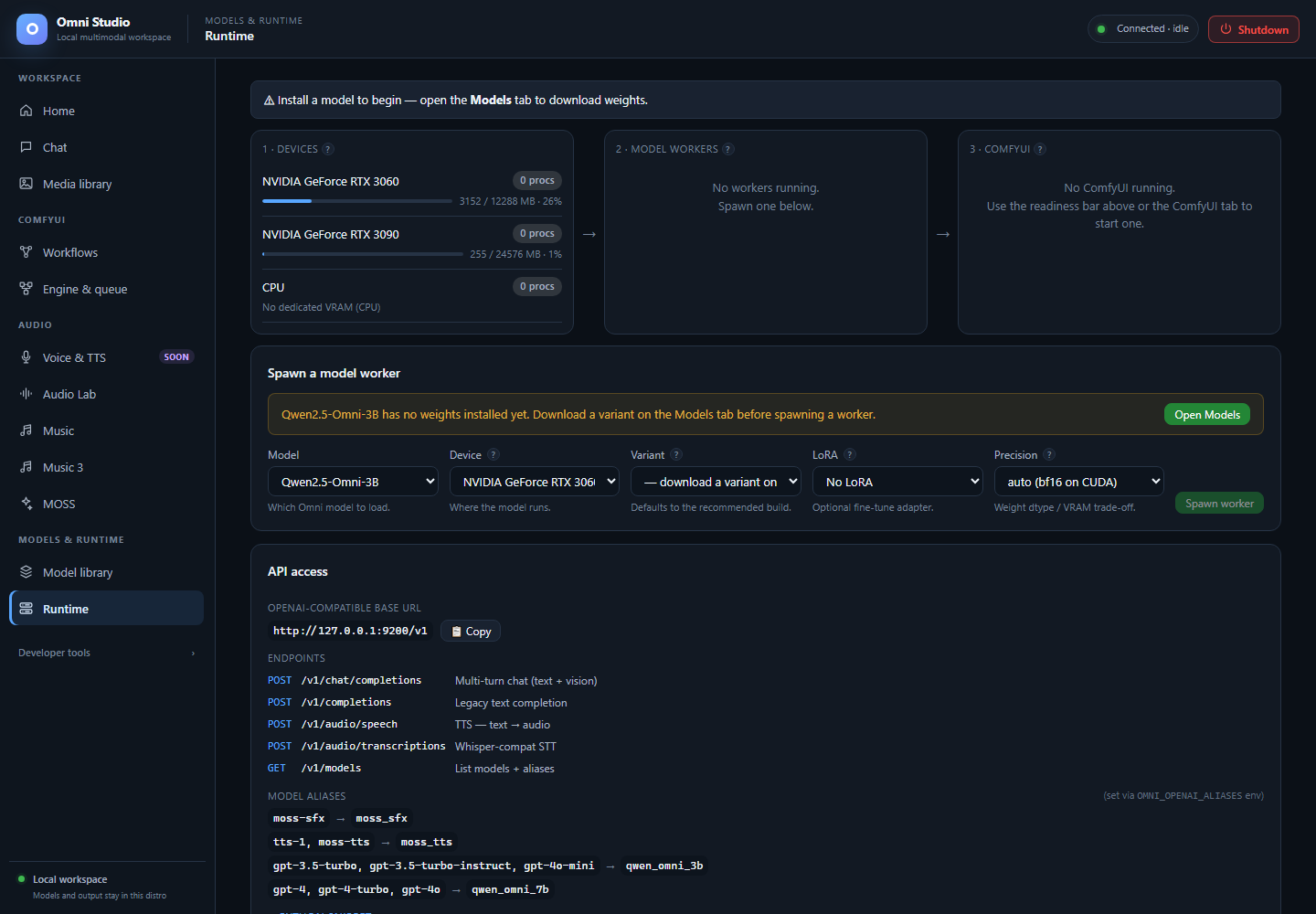
Device memory, idle worker state and the Windows-facing API address. Memory use includes activity outside Omni. Captured September 25, 2026.
Runtime is the control room for devices, standalone model workers, and a compact view of ComfyUI instances. It is also where you create OpenAI-compatible API keys. Audio engines (ACE-Step, Audio Lab, Music 3, MOSS) can appear as workers here, but their load/generate UI stays on their own tabs.
Open Models & runtime → Runtime. The page title is Runtime.
The top line summarizes Chat and Image/Video:
-
Chat: ready if at least one non-audio Omni worker is
ready - Chat: no worker otherwise, with Start <model> when a family is installed
- Image/Video: ready if a Comfy instance is ready
- Image/Video: start ComfyUI with a one-click start (auto device, normal VRAM)
If nothing is installed, the bar tells you to open Models. It will not spawn air.
One-click Start uses sensible defaults. For GPU pools, precision, or LoRAs, use the forms on this page and on Engine & queue instead.
Each GPU (and CPU) is a row:
- marketing name (hover for raw id such as
cuda:0) - process count (workers + Comfy instances on that device)
- a VRAM bar: used / total MB
This list is the live GET /api/devices picture: current cuda:N indices,
free VRAM, and compute PIDs. Indices can change between boots. Saved
placement policies use stable NVIDIA GPU UUIDs, not remembered cuda:1.
See GPU placement.
If a card is full of "foreign" compute PIDs (another Windows app, another WSL process), placement will warn. Close those apps or pick the other GPU.
Refresh happens on a poll; you can also use system refresh from the CLI.
Workers are grouped by family. Each line shows status, variant, precision, optional LoRA, and VRAM. Hover for worker id and port.
Actions:
- Logs — last lines from that worker
- Kill — stop that exact worker and release its model
- Kill all workers — every managed worker. Confirm. Running inference is lost. Do not use this to unload one ACE-Step model; kill the one id.
Statuses move through starting → ready → busy → dead. A worker that times out during ACE/Audio Lab inference is retired, not returned to ready with poisoned CUDA state. Spawn again if you still need it.
MOSS, Audio Lab, and ACE-Step workers may show up here after their tabs load them. Killing them here is valid cleanup. Generating still happens on the audio tabs.
The form under the pipeline:
- Model — family, including audio families. Friendly names, raw ids as values.
- Device — current GPU/CPU from the device list. Pick free VRAM.
- Variant — only installed variants. If the list says to download on Models, do that first.
- LoRA — only for LoRA-compatible families, and only adapters that have an adapter file. Choose No LoRA when unsure.
-
Precision —
auto (bf16 on CUDA), fp16, bf16, fp32. Moshi disables this dropdown because dtype is baked into the variant name. - Spawn worker
If the family has no weights, a banner points to Model library and Spawn is disabled. ACE-Step extra banners appear when the shared v1.5 core or an LM is missing; those installs happen on the Music tab. Spawning ACE from Runtime only starts the process; generation still loads components from Music.
Do this for a Chat model:
- Install base + one variant.
- Pick the 24 GB GPU for 7B-class models.
- Leave LoRA empty.
- Precision auto.
- Spawn, wait for ready (toasts say this can take a minute).
- Open Chat and send.
If spawn fails with a placement error, stop. Run analyze-before-run as in
GPU placement. valid: false is a hard stop. Do
not retry the same oversized 30B variant on the same cards.
GPTQ Qwen variants must stay on single GPU placement; auto sharding is blocked for that loader. Runtime's simple spawn is single-device, which is the safe default.
Each instance shows status, device, VRAM mode, used VRAM, and a port. When status is ready, Open :PORT launches the native ComfyUI front-end in a new window (still on this machine). Logs and Stop affect that instance. Stop all ComfyUI asks for confirmation.
Starting Comfy from here uses auto device + normal VRAM. For GPU pool, preview method, and low-VRAM flags, use Engine & queue. Starting the engine does not load a checkpoint.
The API access card is how external tools on Windows talk to the same gateway.
-
OpenAI-compatible base URL — copy
http://127.0.0.1:9200/v1(the displayed host follows the live session; 9200 is the Windows bridge). - Endpoints listed:
/v1/chat/completions,/v1/completions,/v1/audio/speech,/v1/audio/transcriptions,/v1/models. -
Model aliases map names like
gpt-4oonto native ids when configured. - A Python snippet is under a disclosure.
Auth: default loopback-token mode accepts the per-instance session
token. A newly created API key does not authenticate in that mode. Start the
gateway with OMNI_AUTH_MODE=bearer to accept registered bearer keys; the
local session token continues to work for the UI.
- Click + New key.
- Enter a label (
my-python-app). - Enter scopes:
admin,read,generate,manage(comma-separated). - Copy the secret from the modal now. It is not shown again.
- In bearer mode, use
Authorization: Bearer <key>against/v1.
Revoke immediately invalidates that key. The list never prints secrets, only ids, labels, scopes, and last-used time.
Never paste the Omni loopback token or a bearer key into a screenshot, a git repo, or this manual's examples. The UI already warns you.
/v1/audio/speech is not a substitute for the Soon Voice & TTS page. Only
registered local TTS models answer it; Qwen native talker is not registered,
and MiniCPM TTS is blocked.
When you are done with Chat:
- Kill the exact worker (not Kill all, unless you mean it).
- Confirm Devices VRAM dropped.
- Only then load ACE-Step, Music 3, or a large Comfy graph.
Crossing families without an unload is the usual OOM.
Full app teardown is Shutdown, not Kill all.
- Chat
- Engine & queue
- GPU placement
-
Command-line interface —
omni-cli workers spawn|kill|list