Repository navigation
Music ACE Step
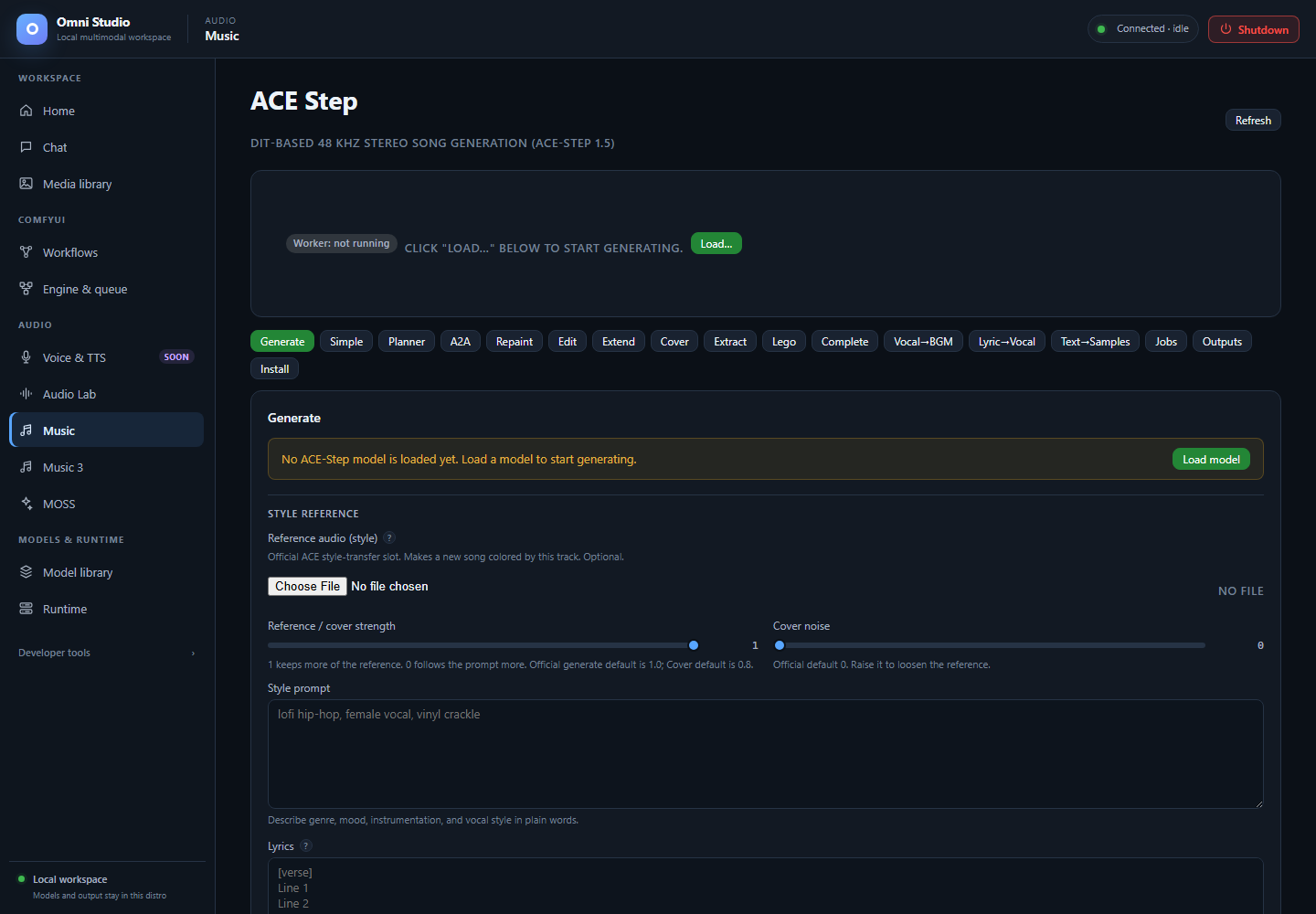
ACE-Step task controls in their unloaded state. Visible transformations have separate model requirements. Captured September 25, 2026.
Music is ACE-Step 1.5: DiT-based 48 kHz stereo song generation. The sidebar label is Music; the page heading says ACE Step. It is not MiniMax Music 3 and not Audio Lab.
Open Audio → Music.
Sub-tabs across the top: Generate, Simple, Planner, A2A, Repaint, Edit, Extend, Cover, Extract, Lego, Complete, Vocal→BGM, Lyric→Vocal, Text→Samples, Jobs, Outputs, Install.
Lyric→Vocal and Text→Samples are blocked unless upstream assets exist. They are documented last so you do not plan a session around them.
The top card is the worker:
- Worker: not running — click Load…
- Worker: ready plus badges for model, LM, optional VAE swap, attached LoRAs
- CLAP via audio_lab green if Audio Lab has CLAP loaded (ranked generate will score); orange if unavailable (ranked still generates, unranked)
- Change… / Unload all
If runtime dependencies are missing, repair the app venv/setup before any load. If a native model is installed but the shared v1.5 core is missing, use Install shared core. New native installs include the core; old partial installs may not.
Generation forms stay disabled until a base model is loaded. Loading the worker process from Runtime is not enough.
Install DiT models, LMs, VAE swaps, LoRA packs, and custom HF repos here
(or from Model library / omni-cli ace-step install-*).
Practical stacks:
| Goal | Model | LM | Notes |
|---|---|---|---|
| Fast general songs |
ace-1.5 / 2B turbo |
ace-lm-0.6b |
Verified through 120 s; turbo defaults ~8 steps, CFG 1.0, shift 3.0 |
| Higher quality on two GPUs | ace-xl-sft |
ace-lm-4b on the other GPU |
4B LM needs the second card cleared |
| XL turbo |
ace-xl-turbo + 1.7B LM |
~19 GB VRAM in tests; cold page-in can take many minutes | |
| Base-only extract/lego/complete |
ace-base / ace-xl-base
|
defaults ~50 steps, CFG 4.0 |
LoRA packs with verified attach/detach: raspy, acoustic, Chinese New Year, lofi, raga. Start multiplier 0.4–0.5 (safe band about 0.2–0.7). The legacy Chinese Rap package is installed-incompatible (not PEFT) and blocked.
Installs are background jobs. Poll them. Delete is immediate; unload first.
The load modal/form asks for:
- model variant (required for generation)
- LM variant (required for lyric/caption paths that need the 5 Hz LM)
- VAE default or swap
- device and optional lm_device (ACE can put DiT on the primary GPU and the LM on an auxiliary GPU — component split, not HF layer sharding)
- bf16 (default), optional CPU offload, optional int8 on XL, optional torch.compile (slow first run)
Only send components you want to change. A model hot-swap frees the previous weights first. Do not enable CPU offload on a GPU that already fits.
After load, confirm the live card. Then generate with autospawn conceptually
false: the model is already resident.
Main song form.
Do this:
- Prompt — style, genre, vocal character, mix notes.
-
Lyrics — optional. Use
[Verse],[Chorus],[Bridge]tags. Omit lyrics and sayinstrumental, no vocalsfor beds. - Negative prompt — on v1.5 this is the LM negative prompt.
- Duration — 1 to 600 seconds documented. Long tracks should still be composed from sections; listen for continuity.
-
Steps / CFG / scheduler (
euler,heun,dpmpp) / shift (1.0–5.0; turbo 3.0, SFT/base 1.0). - Optional BPM (30–300), keyscale (
D minor), time signature (4for 4/4), seed, guidance interval. - Generate or ranked N=1–16.
The call is synchronous. The returned job_id is an output folder, not
a background job to poll. Play the WAV from the result, Jobs, Outputs, or
Media library (Omni source).
infer_method: ode is the official default (use for SFT). sde is known
to garble SFT. Leave Adaptive Dual Guidance off unless you know you want it.
n candidates, optional CLAP score prompt. Without Audio Lab CLAP, results
are unranked. With CLAP, pick the best_ file and still listen; CLAP is not a
mix engineer.
-
Simple — style query → caption/lyrics/BPM/key then generate in one
operator action (
create-samplethen generate). -
Planner — LM planning helpers (
format-sample,understand). Use when you want the 5 Hz LM to rewrite metadata; turn thinking off on Generate if you want to skip CoT rewrite even with an LM loaded.
Language list on the tab is large (en, zh, ja, …). It labels lyric language for the LM; it is not a guarantee of native pronunciation quality.
These modes take init audio (upload or a library URL such as an ACE output or a MOSS WAV in the Omni library):
| Mode | What it does | Extra fields |
|---|---|---|
| A2A | Restyle / denoise toward the prompt |
init_noise_level 0–1 |
| Repaint | Replace a time range |
mask_start_s, mask_end_s inside duration |
| Edit | Lyrics-only or remix |
only_lyrics or remix; optional source prompt/lyrics |
| Extend | Prepend or append new audio |
prepend/append, extend duration. On SFT this pads silence and repaints the new region |
| Cover | Re-style a song | describe the target in the prompt |
| Vocal→BGM | Voice or vocal stem → accompaniment | optional accompaniment prompt. MOSS TTS output URLs are valid sources |
Completion and extension are generative, not lossless splices. In current base-model tests the retained portion changed. If you must keep existing audio bit-stable, use composition on library files instead (see Jobs, tokens, composition, and media retrieval).
Analyze (API / advanced) returns BPM, key, loudness. It does not prove the track is musically coherent.
Load ace-base or ace-xl-base first:
-
Extract —
track_namefrom the list (woodwinds, brass, fx, synth, strings, percussion, keyboard, guitar, bass, drums, backing_vocals, vocals) - Lego — rebuild from tracks
-
Complete —
track_names
These are not a DAW. They need the base model, not turbo-only.
Load the base model. Attach an installed pack with the exact
adapter_file when the pack has several files (required to choose among a
declared pack). Detach by name. Status shows recommended multiplier
ranges; do not guess filenames inside a repo.
- Jobs — persisted ACE output jobs, open/delete/zip
- Outputs — files for a job id
Delete removes the folder. ZIP is the Windows-friendly retrieval path along with Media library export.
These sub-tabs exist because the ACE-Step product defines the modes.
- Official Lyric2Vocal and Text2Samples weights are unreleased.
- The registry refuses false installs.
- Specialized endpoints are not usable with official weights.
- Do not follow third-party "just download this LoRA" advice unless Omni's
status page shows the adapter as installed and
enables_modefor that tab. Until then the mode is blocked.
Use Generate with lyrics for sung songs, Vocal→BGM for accompaniment from a voice, and Audio Lab / MOSS-SFX for one-shot samples.
Unload all on the live card, or unload model / lm / vae separately.
Then kill the exact ACE worker on Runtime if you need the GPU for Comfy.
Do not leave XL + 4B LM resident "for later" while you start Music 3.
- Audio Lab — CLAP ranking and short beds
- Music 3 — different engine, lyrics required
- MOSS — speech source for Vocal→BGM
- Feature compatibility