Repository navigation
Testing
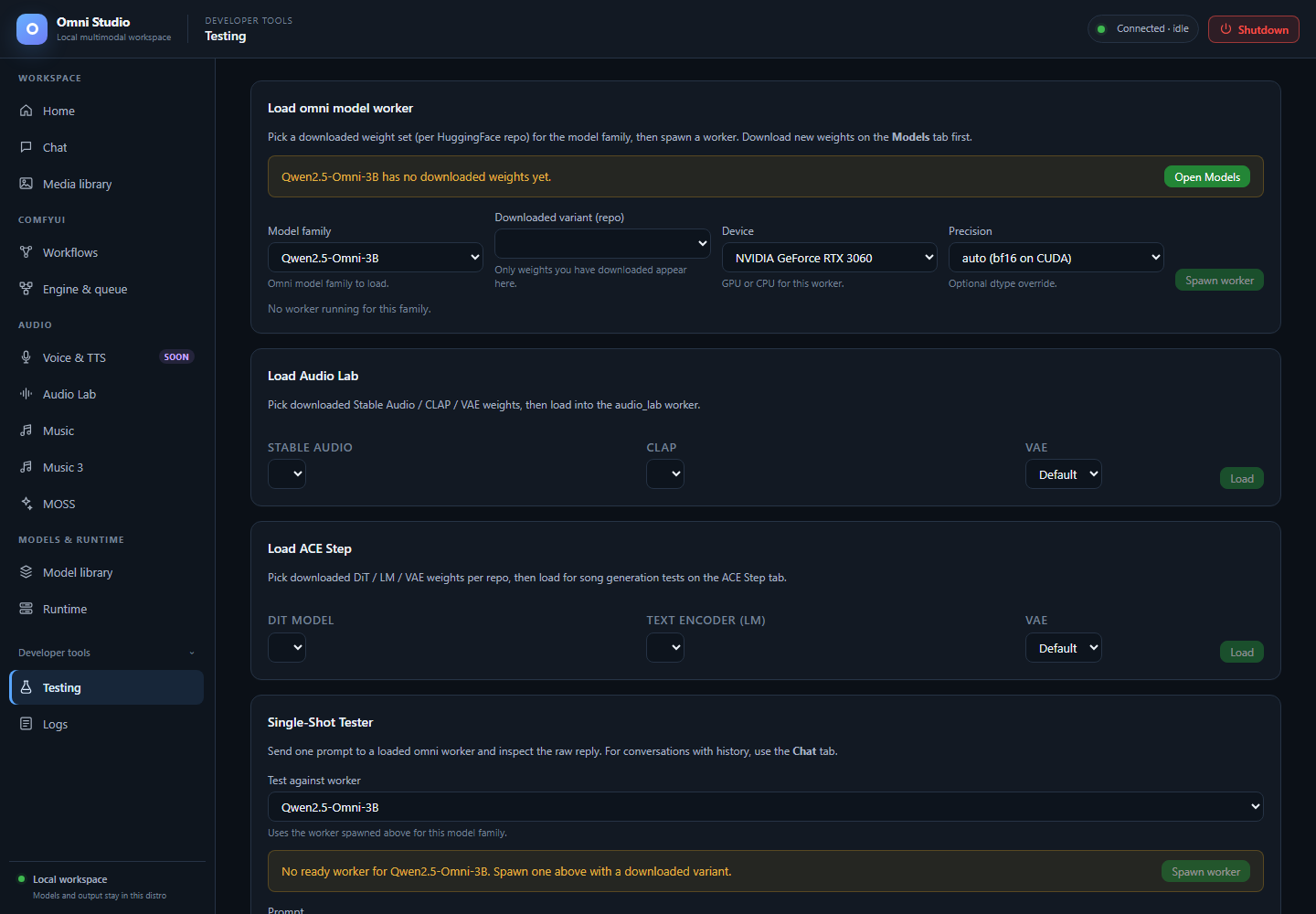
Developer controls for selecting installed variants and workers. Loading and inference were not performed for this capture. Captured September 25, 2026.
Testing is a developer tool: load downloaded weights, then send a one-shot prompt and inspect the raw reply. It is not a replacement for Chat sessions, not a music DAW, and not a Comfy queue.
Open the sidebar Developer tools disclosure, then Testing.
Use it when you want to know "does this variant actually answer?" without creating a 100-message session. For multi-turn work, use Chat.
The first card is Load omni model worker.
- Model family — chat-capable ids. Moshi, Audio Lab, ACE-Step, MOSS-TTS, and MOSS-SFX are hidden here on purpose. Moshi has no batch path.
- Downloaded variant (repo) — only variants you already downloaded. Empty list means go to Model library.
- Device
- Precision — auto / fp16 / bf16 / fp32
- Spawn worker
Banners appear when the family has no weights or no variants. Open Models jumps to Model library.
If a worker already exists for that family, the card shows its status and variant so you do not spawn a duplicate by accident. Kill extras on Runtime.
Once a worker is ready, the prompt box, temperature, top-p, and max tokens
send a single /api/chat/{model} style request (non-session). The raw text
lands in the response pane. This is for contract checks (QWEN3B_TEXT_OK
style), not for roleplay.
Testing also has Image, Audio, and Video file inputs below the prompt. It sends those files with the one-shot request, subject to the chosen worker's actual modality support. Responses are not streamed. Qwen audio/video and Moshi duplex remain unavailable here.
If the response is an error JSON, read it. 501 on audio/video is the honest Qwen/MiniCPM video behavior, not a broken button.
Lower cards let you pick installed Audio Lab SA/CLAP/VAE or ACE-Step DiT/LM/VAE (including custom: names) and load them the same way the audio tabs do. Generate on the Audio Lab or Music tab after loading; Testing has no Audio Lab or ACE-Step generation form.
Prefer the real Audio Lab / Music tabs for anything you want to keep. Those tabs have progress, jobs, LoRAs, and ranked output. Testing is a smoke path.
Still obey:
- cheap state reads before load
- explicit device
- unload + delete the exact worker after the test if residency is not wanted
- ACE and Audio Lab inference is synchronous; do not poll generic jobs
- It will not create Chat sessions or persist 24h history
- It will not queue Comfy workflows
- It will not enable Voice & TTS
- It will not make Moshi batch-infer (hidden)
- It will not bypass
valid: falseon an oversized spawn
- Chat
- Runtime
- Logs — if spawn hangs, watch the stream
- Feature compatibility