Repository navigation
Kit Mixer
The Advanced tab of Kit Mixer lets you mix each piece of a kit by hand (jersey, numbers, name color) instead of applying a whole ready-made set. It builds on the per-team kit source described below.
Just want to apply a downloaded kit pack in one click? Use the Simple tab instead, see Kit Sets & hotkeys. For a quick comparison of both tabs, see the Kits overview.
Kit Mixer looks for source kits under FSW/Kits/<name>/, where <name> is either the team's raw numeric ID or a friendly folder name mapped to that ID via settings.ini [kitsid] (the same mechanism used for chants' [chantsid], edited from the asset settings editor):
FSW/Kits/<name>/
  sceneassets/kit/kit_<team_id>_<kittype>_<tourn_id>.rx3
  sceneassets/kitnumbers/specifickitnumbers_<team_id>_<jerseyOrShorts>_<tourn_id>_<kittype>.rx3
  ui/imgAssets/kits/j<kittype>_<team_id>_0.dds
  fifarna/lua/assignments/teams/<any-name>.lua        (optional)
kittype is 0 = home, 1 = away, 2 = keeper, 3 = third; tourn_id is normally 0 (the tournament-agnostic slot the engine falls back to).
Notes:
- At least one
.rx3undersceneassets/kit/is required before Kit Mixer can mix that team + kit type — it's used as the template whose non-mixed parts (e.g. the badge decal) are kept. - If
FSW/Kits/has nothing for a team, Kit Mixer falls back to whatever is already live underdata/sceneassets/kit/— which is exactly what the Assets Extractor can populate, so running its "Extract Selected → Kit Textures" once is a quick way to get a valid template for every team without needing a community kit pack first. - Any
.luadropped underfifarna/lua/assignments/teams/doesn't need to reference the same team ID — Kit Mixer only scans it forassignKitDetails(...)calls to offer as ready-made jersey-name-color swatches, regardless of which team the file was originally written for.
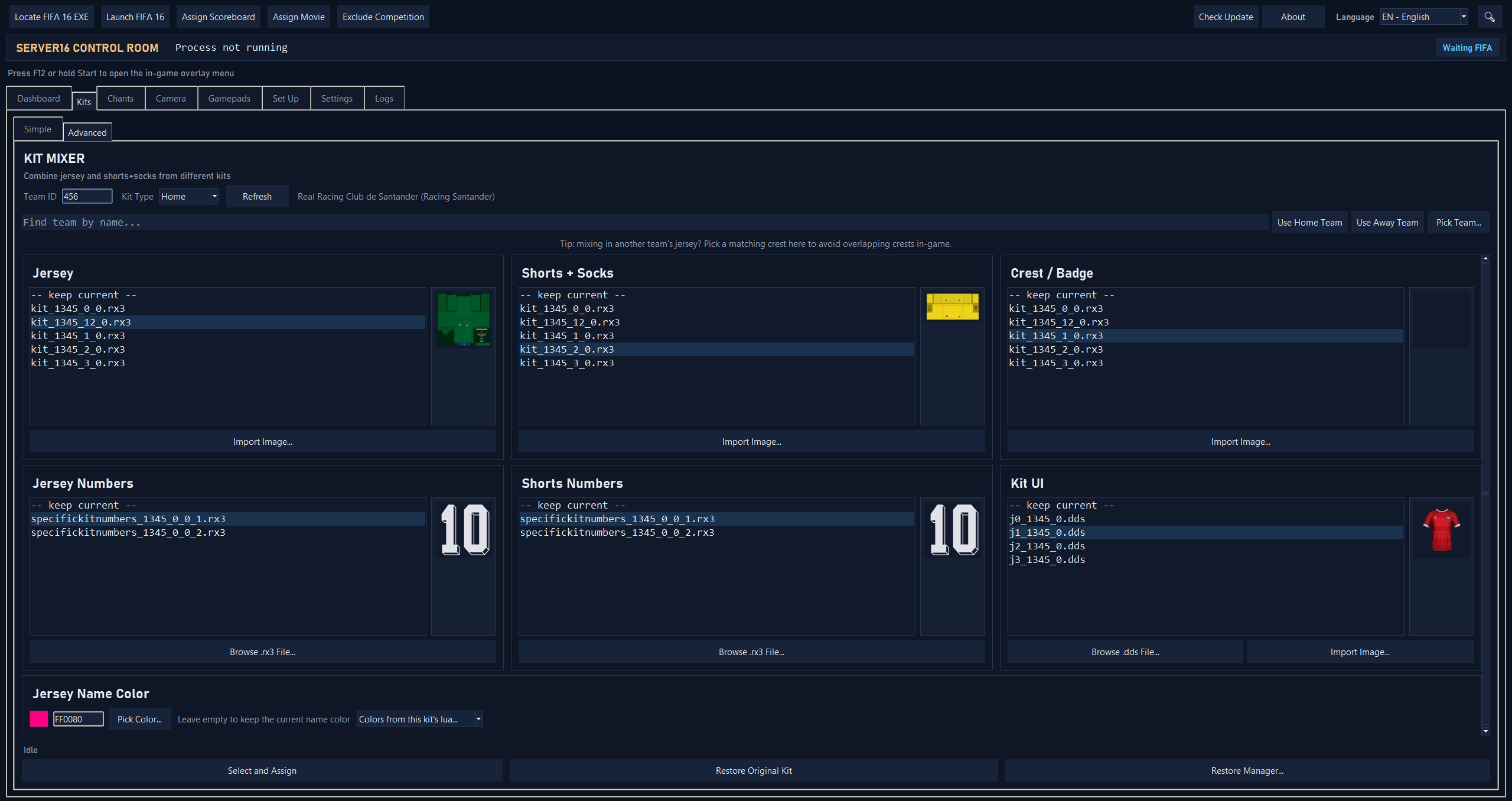
- Kits overview: Simple vs. Advanced at a glance
-
Kit Sets & hotkeys: the Simple tab,
packs/layout and the in-game F7–F11 hotkeys - Assets Extractor: populate template kit textures for every team