Repository navigation
ImageEN
Hand comics (manga, western comics, black-and-white or color, horizontal or vertical text) or text-bearing images (including fully transparent, translucent solid-color, or transparent-edge overlays) directly to AGENT. It runs the entire pipeline—layout scanning, OCR, automatic lettering removal, batch translation, bubble-fitted typesetting, and full-page visual QA—in one workflow.
| Item | Scope & Defaults |
|---|---|
| Supported Formats | Static raster images: .png, .jpg, .jpeg, .webp, .bmp, .avif, and single-frame .gif (animated images and vector graphics are not supported) |
| Transparency & Fidelity | Preserves original format and alpha transparency (GIF uses binary transparency); untouched pages pass through byte-for-byte |
| Default Deliverables |
{project name}_Translated (translated images) + {project name}_Translated_Bilingual (full-resolution side-by-side original/translated images), preserving relative folder structure |
💡 Drag standalone images or comic folders straight in; for images inside a game folder, use the corresponding native game engine workflow instead of splitting them out manually
- Bubble-Fitted Typesetting & Side-by-Side Comparison: Automatically handles connected bubble splits, font-size hierarchy, and clean lettering removal even on full-color pages
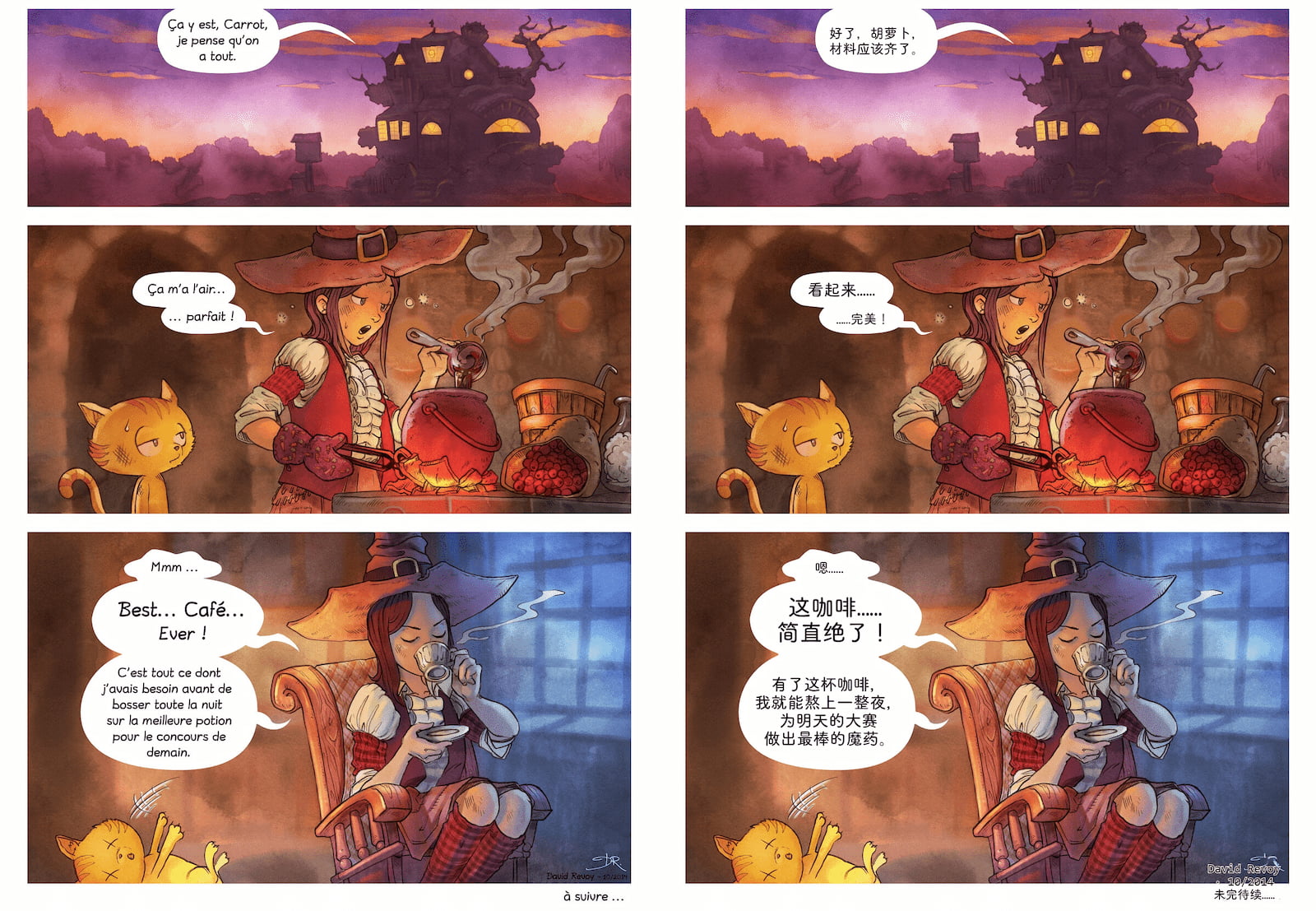
Image and comic tasks rely heavily on the Main model's visual inspection ability during full-page QA to catch residual original text, cramped bubbles, or layout overflow:
- Complete [Model Management] setup and assign a strong vision model such as
Geminias yourMain model - For large batches where you want lower text-translation cost, assign a dedicated
Translation modelunderSubmodelsin theAGENTcomposer
Either workflow works—the first is fastest:
-
Drag in directly (Recommended): On the
AGENTpage with no project open, drag your image files or comic folder straight into the input box → confirmSource language/Target languageand.lgsave location → press Enter on the pre-filled workflow draft -
Empty project first: Click
Create projectinAGENTwithout selecting files, then drag your images or folder into the input box and describe what you want (e.g.,Translate these comic pages)
- On the first image task,
AGENTinstalls local dependencies and downloads roughly300 MBof OCR and inpainting models (reused automatically across future projects) - GPU acceleration is enabled by default; if the GPU is unavailable, the task falls back to CPU automatically (processing will take noticeably longer)
Scanning, translation, and visual checks run automatically without manual box selection:
-
Scan & erase: Detects text regions and bubbles across the whole batch, removes original lettering, and packs the
.imageasset - Batch translation: Translates extracted text with your glossary and context
-
Typeset & batched QA: Reviews full-page side-by-side renders in 10-page batches; when
AGENTspots connected bubbles crammed into one side, residual text on complex screentones/color art, or text overflow, it splits bubbles, runs contour inpainting, or tunes font sizes and line breaks automatically
💡 Which text is translated by default?
- Framed text (inside bubbles): Translated by default
- Unframed text (background text, SFX, decorative lettering, margin ads): Kept untouched by default; enabled only for dialogue/narration, key chapter titles/plot clues, or when you explicitly ask to translate transparent UI/overlay graphics
The pre-filled draft exports automatically after QA passes. After any later adjustments, click Instructions → Export translations (or tell AGENT Help me export translations):
-
{project name}_Translated: Clean translated images -
{project name}_Translated_Bilingual: Full-resolution side-by-side original/translated images for quick review
No need to redo the whole batch for local issues—just tell AGENT the page number and spot (or send a screenshot), then export again:
| Issue | What to Tell AGENT |
|---|---|
| Background narration, SFX, or transparent UI text stayed untranslated | Please also translate the background narration and SFX on page 3 |
| Margin ads or decorative art got erased by mistake | Keep the margin text in the bottom-right of page 5 untouched |
| Connected bubble text crammed into one side | The double bubble in the top-right of page 8 is crammed on one side—split and re-typeset it |
| Leftover strokes on complex color art or screentones | There is leftover original text in the middle bubble on page 12—run contour inpainting on it |
| Font size feels off or line breaks look awkward | Make the font slightly smaller in the bottom-left bubble on page 4 and refine the line breaks |
- Vertical text & punctuation: Both horizontal and vertical typesetting are handled automatically, including vertical exclamation/question mark combinations—just write natural translations
-
Manual line tweaks: You can also edit individual lines on [Proofreading], then return to
AGENTand export again to re-render the affected images